You are not logged in.
- Topics: Active | Unanswered
#26 2022-10-27 14:00:22
- seth
- Member

- From: Won't reply 2 private help req
- Registered: 2012-09-03
- Posts: 77,200
Re: Screen flashing along the edges in some websites or parts of videos
Disabling the audio channel didn't help?
Offline
#27 2022-10-27 14:15:33
- pepper
- Member

- Registered: 2017-12-09
- Posts: 135
Re: Screen flashing along the edges in some websites or parts of videos
It seems the problem was redshift https://archlinux.org/packages/communit … /redshift/ I'll try to not use it for today. I really forgot about this software. Do you know an alternative? I'm using XFCE so it's not a d.e. feature
Last edited by pepper (2022-10-27 14:16:34)
Offline
#28 2022-10-27 14:19:31
- d.ALT
- Member

- Registered: 2019-05-10
- Posts: 959
Re: Screen flashing along the edges in some websites or parts of videos
Hey seth, wouldn't be worth also try downgrading linux and nvidia? Maybe something around end of September (linux-5.19.12.arch1-1 and nvidia-515.76-3)?
<49,17,III,I> Fama di loro il mondo esser non lassa;
<50,17,III,I> misericordia e giustizia li sdegna:
<51,17,III,I> non ragioniam di lor, ma guarda e passa.
Offline
#29 2022-10-27 14:24:23
- seth
- Member
- From: Won't reply 2 private help req
- Registered: 2012-09-03
- Posts: 77,200
Re: Screen flashing along the edges in some websites or parts of videos
He's tried the LTS kernel already.
https://bbs.archlinux.org/viewtopic.php … 8#p2064248
https://bbs.archlinux.org/viewtopic.php … 2#p2064342
@pepper, so was this daytime dependent?
Can you enforce the issue w/ certain gamma ramps?
I'd expect it to reveal an issue rather than causing it, though - do you get similar behavior w/ adjusting the gamma ramps in nvidia-settings (or w/ eg. xcalib or xgamma)?
Does nvidia's "digital vibrance" setting cause this as well?
Offline
#30 2022-10-27 14:40:23
- pepper
- Member
- Registered: 2017-12-09
- Posts: 135
Re: Screen flashing along the edges in some websites or parts of videos
@pepper, so was this daytime dependent?
Absolutely not, I'm sure, it depends on the content of the screen
Can you enforce the issue w/ certain gamma ramps?
I suppose not, because the gamma changes during the day between temperature 5000 to 6000 and the problems occurs in any moment of the day, it depends on the content of the screen. There is no time (morning, night, afternoon, all times) in which facebook doesn't produce flashes
I'd expect it to reveal an issue rather than causing it, though - do you get similar behavior w/ adjusting the gamma ramps in nvidia-settings (or w/ eg. xcalib or xgamma)?
Could you provide an example of test?
Does nvidia's "digital vibrance" setting cause this as well?
I can't find this setting in nvidia-settings
Last edited by pepper (2022-10-27 14:41:42)
Offline
#31 2022-10-27 15:00:35
- seth
- Member
- From: Won't reply 2 private help req
- Registered: 2012-09-03
- Posts: 77,200
Re: Screen flashing along the edges in some websites or parts of videos
Innvidia-settings, look at
GPU 0 / DP-2 / Controls and GPU 0 / DP-2 / Color Correction
Not sure how redshift would cause this, esp. if the gamma adjustment isn't relevant.
What's your reshift config/invocation command?
Offline
#32 2022-10-27 15:08:27
- pepper
- Member
- Registered: 2017-12-09
- Posts: 135
Re: Screen flashing along the edges in some websites or parts of videos
redshift enabled: https://i.postimg.cc/T1XYFkg5/image.png
redshift disabled: https://i.postimg.cc/xT6n3jxz/image.png
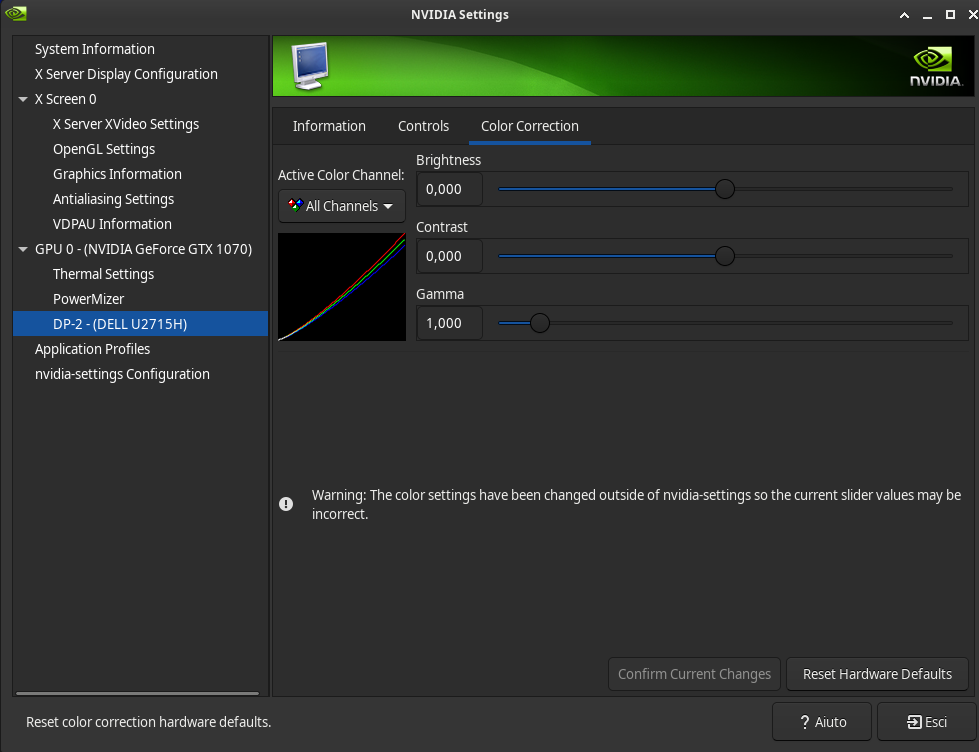
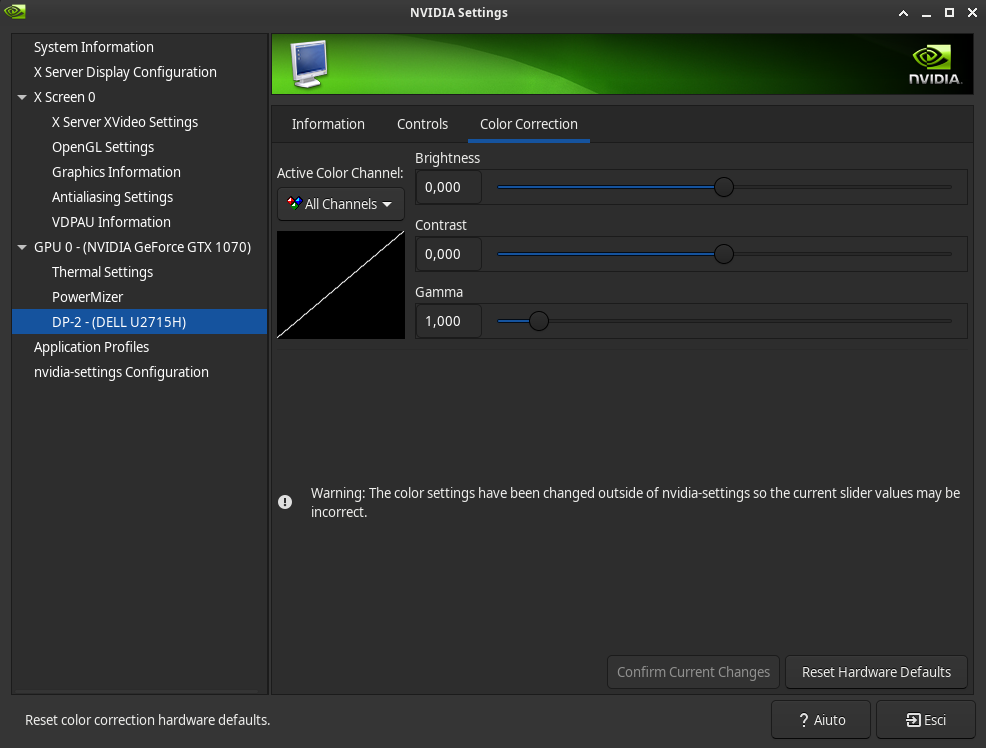
In all cases I have Brightness=0, Contrast=0, Gamma=1
I run redshift at startup by just running redshift, nothing more, and this is my redshift default configuration:
; Global settings for redshift
[redshift]
; Set the day and night screen temperatures
temp-day=5700
temp-night=3500

; Disable the smooth fade between temperatures when Redshift starts and stops.
; 0 will cause an immediate change between screen temperatures.
; 1 will gradually apply the new screen temperature over a couple of seconds.
fade=1

; Solar elevation thresholds.
; By default, Redshift will use the current elevation of the sun to determine
; whether it is daytime, night or in transition (dawn/dusk). When the sun is
; above the degrees specified with elevation-high it is considered daytime and
; below elevation-low it is considered night.
;elevation-high=3
;elevation-low=-6

; Custom dawn/dusk intervals.
; Instead of using the solar elevation, the time intervals of dawn and dusk
; can be specified manually. The times must be specified as HH:MM in 24-hour
; format.
;dawn-time=6:00-7:45
;dusk-time=18:35-20:15

; Set the screen brightness. Default is 1.0.
;brightness=0.9
; It is also possible to use different settings for day and night
; since version 1.8.
;brightness-day=0.7
;brightness-night=0.4
; Set the screen gamma (for all colors, or each color channel
; individually)
gamma=0.8
;gamma=0.8:0.7:0.8
; This can also be set individually for day and night since
; version 1.10.
;gamma-day=0.8:0.7:0.8
;gamma-night=0.6

; Set the location-provider: 'geoclue2', 'manual'
; type 'redshift -l list' to see possible values.
; The location provider settings are in a different section.
location-provider=manual

; Set the adjustment-method: 'randr', 'vidmode'
; type 'redshift -m list' to see all possible values.
; 'randr' is the preferred method, 'vidmode' is an older API.
; but works in some cases when 'randr' does not.
; The adjustment method settings are in a different section.
adjustment-method=randr

; Configuration of the location-provider:
; type 'redshift -l PROVIDER:help' to see the settings.
; ex: 'redshift -l manual:help'
; Keep in mind that longitudes west of Greenwich (e.g. the Americas)
; are negative numbers.
[manual]
lat= ---censored LOL---
lon= ---censored LOL---

; Configuration of the adjustment-method
; type 'redshift -m METHOD:help' to see the settings.
; ex: 'redshift -m randr:help'
; In this example, randr is configured to adjust only screen 0.
; Note that the numbering starts from 0, so this is actually the first screen.
; If this option is not specified, Redshift will try to adjust _all_ screens.
[randr]
screen=0
Last edited by pepper (2022-10-27 15:15:29)
Offline
#33 2022-10-27 15:23:57
- seth
- Member
- From: Won't reply 2 private help req
- Registered: 2012-09-03
- Posts: 77,200
Re: Screen flashing along the edges in some websites or parts of videos
The idea was to change the gamma values in nvidia-settings *instead* of using redshift and see whether that triggers similar issues.
You've a fixed gamma correction in the redshift config, so you're always manipulating the gamma ramps (slightly darker…)
xcalib -a -gc 1.25might achieve the same,
xcalib -cwill clear the gamma ramps (don't run this next to redshift and nb. that "xcalib -a" adjusts the existing gamma ramps, so running it multiple times will eventually turn your monitor black ;-)
Offline
#34 2022-10-27 15:36:02
- pepper
- Member
- Registered: 2017-12-09
- Posts: 135
Re: Screen flashing along the edges in some websites or parts of videos
yes, the problem seems to be redshift, when I use xcalib there isn't any flashing
Last edited by pepper (2022-10-27 15:44:42)
Offline
#35 2022-10-27 19:23:48
- seth
- Member
- From: Won't reply 2 private help req
- Registered: 2012-09-03
- Posts: 77,200
Re: Screen flashing along the edges in some websites or parts of videos
Do you get the same behavior for either of
pkill redshift # no daemon interference - we don't expect any changes here ;)
redshift -P -O 6500 -g 0.8 # gamma correction but on 6500K, "-P" resets the gamma ramps before the change
redshift -P -O 5700 -g 0.8 # gamma correction on your daytime temperatureOffline
#36 2022-10-28 08:05:19
- pepper
- Member
- Registered: 2017-12-09
- Posts: 135
Re: Screen flashing along the edges in some websites or parts of videos
Do you get the same behavior for either of
pkill redshift # no daemon interference - we don't expect any changes here ;)
redshift -P -O 6500 -g 0.8 # gamma correction but on 6500K, "-P" resets the gamma ramps before the change
redshift -P -O 5700 -g 0.8 # gamma correction on your daytime temperature
with the 6500 command I get no flashing (apparently.. I tested only with facebook GUI, but today I use this comand for all the day)
with the 4700 command there is flashing
Is it normal that after executing these two commands (not the pkill obv) there isn't a redshift process running?
Last edited by pepper (2022-10-28 08:05:51)
Offline
#37 2022-10-28 08:11:52
- seth
- Member
- From: Won't reply 2 private help req
- Registered: 2012-09-03
- Posts: 77,200
Re: Screen flashing along the edges in some websites or parts of videos
Yes, that's what "-O" does.
So it's ultimately down to the gamma, but red bias (you're never goint above 5700K) seems to be relevant.
Try
redshift -P -O 5700 # so only the temperature w/o the global gamma adjustmentOffline
#38 2022-10-28 08:50:30
- pepper
- Member
- Registered: 2017-12-09
- Posts: 135
Re: Screen flashing along the edges in some websites or parts of videos
Yes, that's what "-O" does.
So it's ultimately down to the gamma, but red bias (you're never goint above 5700K) seems to be relevant.
Tryredshift -P -O 5700 # so only the temperature w/o the global gamma adjustment
it produces flashing again
EDIT: I can confirm after hours of tests that redshift -P -O 6500 -g 0.8 doesn't produce flashing
Last edited by pepper (2022-10-28 12:06:27)
Offline
#39 2022-10-28 14:28:08
- seth
- Member
- From: Won't reply 2 private help req
- Registered: 2012-09-03
- Posts: 77,200
Re: Screen flashing along the edges in some websites or parts of videos
What happens when you just tint your display very red
xcalib -a -red 0.5 10 100
# to reset the gamma ramps and get a normal colored display
xcalib -cOffline
#40 2022-10-28 17:30:35
- pepper
- Member
- Registered: 2017-12-09
- Posts: 135
Re: Screen flashing along the edges in some websites or parts of videos
What happens when you just tint your display very red
xcalib -a -red 0.5 10 100
# to reset the gamma ramps and get a normal colored display
xcalib -c
there isn't flashing, in my limited "visual" experience it seems a problem related to shadows or dark/transparent areas
Last edited by pepper (2022-10-28 17:32:36)
Offline
#41 2022-10-28 18:48:35
- seth
- Member
- From: Won't reply 2 private help req
- Registered: 2012-09-03
- Posts: 77,200
Re: Screen flashing along the edges in some websites or parts of videos
So it's really about very specific colors…
I tested debian
Can you reproduce the problem w/ debian and redshift?
(To ballpark whether it's more a problem w/ the hardware or the driver, I don't suspect redshift specifically to be the cause here)
Offline
#42 2022-11-01 13:13:20
- pepper
- Member
- Registered: 2017-12-09
- Posts: 135
Re: Screen flashing along the edges in some websites or parts of videos
I don't have debian installed anymore.
I used xcalib -a -gc 1.25 for these 4-5 days (and no redshift running anymore) because I can get dark screen color (similar to redshift) and it seems it never produces flashing.
Today I found a video that in a specific timestamp using MPV (with the screen setted to xcalib -a -gc 1.25 and NO redshift running) produces flashing, so I tested Ubuntu 22.04 XFCE Live ISO (that has kernel 5.15) using the same command xcalib -a -gc 1.25 , the same video, the same timestamp and the same software MPV, but the flashing problem never occurs. I also tried redshift in the same ubuntu live environment and the flashing never occurs.
I can't understand where the problem is, it's not redshift itself, for sure. Maybe it's something related with kernel and nvidia drivers. It's not my screen because using the same exact color setting command in another distro like ubuntu, the flashing never occurs.
Last edited by pepper (2022-11-01 13:22:04)
Offline
#43 2022-11-01 13:21:10
- seth
- Member
- From: Won't reply 2 private help req
- Registered: 2012-09-03
- Posts: 77,200
Re: Screen flashing along the edges in some websites or parts of videos
The unbuntu live system likely runs on nouveau (and maybe even wayland?) - does xcalib at least cause a discernable gamma change there?
Does "xcalib -a -gc 1.25" currently reliably trigger the falshing on your arch installation?
Offline
#44 2022-11-01 13:30:19
- pepper
- Member
- Registered: 2017-12-09
- Posts: 135
Re: Screen flashing along the edges in some websites or parts of videos
The unbuntu live system likely runs on nouveau (and maybe even wayland?) - does xcalib at least cause a discernable gamma change there?
Yes there is a gamma change using that command, but at this point I don't know if it's the same change.. mm could you suggest me another test with a live iso (that doesn't force me to install a distro) where I can reproduce the same gamma change?
Does "xcalib -a -gc 1.25" currently reliably trigger the falshing on your arch installation?
yes, there is a specific timestamp in a specific video that produces a slight flashing, but I found it by chance, that command it seems never produce flashing except that video, it's the first case I found in days of tests/usage (>12h/day of varied usage).
Last edited by pepper (2022-11-01 13:30:34)
Offline
#45 2022-11-01 13:53:47
- pepper
- Member
- Registered: 2017-12-09
- Posts: 135
Re: Screen flashing along the edges in some websites or parts of videos
the specific timestamp is not reliable.. the only reliable test it seems to be the facebook web graphical interface when I use redshift
Last edited by pepper (2022-11-01 13:56:32)
Offline
#46 2022-11-01 14:00:20
- seth
- Member
- From: Won't reply 2 private help req
- Registered: 2012-09-03
- Posts: 77,200
Re: Screen flashing along the edges in some websites or parts of videos
xcalib will always do the same, the significant difference would be nvidia/nouveau.
You could try the latter (blacklist nvidia and un-blacklist nouveau, it's in /usr/lib/modprobe.d/nvidia-utils.conf - you may have to rebuild the initramfs, and make sure your xorg config doesn't explicitly reference the nvidia driver)
The problem would then be that we still don't know whether the bug is in the nvidia driver or due to a very specific color signal 
Offline