You are not logged in.
- Topics: Active | Unanswered
#301 2008-09-16 06:07:51
- yettenet
- Member
- Registered: 2007-05-17
- Posts: 129
Re: September 2008 Screenshots

dwm, yayz! \o/
Last edited by yettenet (2008-09-16 12:59:31)
Offline
#302 2008-09-16 10:29:19
- Rasi
- Member

- From: Germany
- Registered: 2007-08-14
- Posts: 1,914
- Website
Re: September 2008 Screenshots
Why not post one too...
Last edited by Rasi (2008-09-16 10:29:41)
He hoped and prayed that there wasn't an afterlife. Then he realized there was a contradiction involved here and merely hoped that there wasn't an afterlife.
Douglas Adams
Offline
#303 2008-09-16 10:51:44
- dmz
- Member

- From: Sweden
- Registered: 2008-08-27
- Posts: 881
- Website
Re: September 2008 Screenshots

Offline
#304 2008-09-16 11:02:32
- moljac024
- Member

- From: Serbia
- Registered: 2008-01-29
- Posts: 2,676
Re: September 2008 Screenshots
How did you get that terminal down there ? Border-less xterm ?
The day Microsoft makes a product that doesn't suck, is the day they make a vacuum cleaner.
--------------------------------------------------------------------------------------------------------------
But if they tell you that I've lost my mind, maybe it's not gone just a little hard to find...
Offline
#305 2008-09-16 11:08:52
- dmz
- Member
- From: Sweden
- Registered: 2008-08-27
- Posts: 881
- Website
Re: September 2008 Screenshots
How did you get that terminal down there ? Border-less xterm ?
Yep, borderless urxvt.
Offline
#306 2008-09-16 11:44:51
- finferflu
- Forum Fellow

- From: Manchester, UK
- Registered: 2007-06-21
- Posts: 1,899
- Website
Re: September 2008 Screenshots
Why not post one too...
Where did you get that wallpaper? 
Have you Syued today?
Free music for free people! | Earthlings
"Perfection is achieved, not when there is nothing more to add, but when there is nothing left to take away." -- A. de Saint-Exupery
Offline
#307 2008-09-16 12:26:27
- hBd
- Member

- From: Romania - Cluj Napoca
- Registered: 2008-06-08
- Posts: 241
- Website
Re: September 2008 Screenshots
my new desk! clean & dirty

Offline
#308 2008-09-16 12:29:22
- zodmaner
- Member
- Registered: 2007-07-11
- Posts: 653
Re: September 2008 Screenshots
Beautiful theme! Great work there.
Offline
#309 2008-09-16 13:29:04
- dmz
- Member
- From: Sweden
- Registered: 2008-08-27
- Posts: 881
- Website
Re: September 2008 Screenshots
Beautiful theme! Great work there.
Thank you very much. 
Offline
#310 2008-09-16 14:30:03
- bobdob
- Member
- Registered: 2008-06-13
- Posts: 138
Re: September 2008 Screenshots
Awesome 2
Offline
#311 2008-09-16 14:59:36
- keks
- Member
- Registered: 2007-07-11
- Posts: 45
Re: September 2008 Screenshots
http://tn3-1.deviantart.com/fs36/300W/f … yetike.png
dwm, yayz! \o/
may it's possbile to see your Xdefaults?
Offline
#312 2008-09-16 15:21:18
- yettenet
- Member
- Registered: 2007-05-17
- Posts: 129
Re: September 2008 Screenshots
yettenet wrote:http://tn3-1.deviantart.com/fs36/300W/f … yetike.png
dwm, yayz! \o/
may it's possbile to see your Xdefaults?
Sure thing!
Xft*dpi:         96
xft*antialias:   false
#Xft*lcdfilter:   lcdfilterlegacy
Xft*hinting:     true
Xft*hintstyle:   hintfull

Xcursor.theme:   Obsidian

URxvt.cursorColor: 4
URxvt.pointerColor: 4

#*background:    #000000
#*foreground:    #aaaa88
#!black
#*color0:        #000000
#*color8:        #555544
#!red
#*color1:        #aa3322
#*color9:        #bb3322
#!green
#*color2:        #5b762f
#*color10:       #89b83f
#!brown/yellow
#*color3:        #c4a000
#*coror11:       #fce94f
#!blue
#*color4:        #2288cc
#*color12:       #008fcf
#!magenta
#*color5:        #ce5c00
#*color13:       #f57900
#!cyan
#*color6:        #558888
#*color14:       #71bebe
#!white
#*color7:        #aaaa88
#*color15:       #ddddaa

*background:    #000000
*foreground:    #bbbb99
*color0:        #000000
*color8:        #555544
*color1:        #AE4747
*color9:        #EE6363
*color2:        #6b862f
*color10:       #89b83f
*color3:        #BAA520
*color11:       #FFC135
*color4:        #5485a4
*color12:       #729fcf
#*color5:        #75507b
*color5:        #85608b
*color13:       #ad7fa8
*color6:        #5f9ea0
*color14:       #a1cdcd
*color7:        #bbbb99
*color15:       #eeeebb


URxvt*font:        -*clean-*-*-*-*-12-*-*-*-*-*-iso8859-*
URxvt*boldFont:    -*clean-*-*-*-*-12-*-*-*-*-*-iso8859-*


URxvt.perl-ext-common:        default,matcher
#URxvt.perl-ext-common:        default,tabbed,matcher

URxvt*cutchars:     `"()'*<>[]{|}

URxvt*matcher.button:       1
URxvt.tabbed.tabbar-fg:     2
URxvt.tabbed.tabbar-bg:     0
URxvt.tabbed.tab-fg:        4
URxvt.tabbed.tab-bg:        0

URxvt.remote-selection.store:       rsh ruth 'cat >/tmp/distributed-selection'
URxvt.remote-selection.fetch:       rsh ruth 'cat /tmp/distributed-selection'


URxvt*geometry:     90x24

URxvt*internalBorder:      0
URxvt*externalBorder:      0
URxvt*borderLess:          True

URxvt*dynamicColors:       True
#URxvt*depth:        32
#URxvt*fading:              30
URxvt*loginShell:          True
URxvt*scrollBar:           False
URxvt*saveLines:           1000
URxvt*urlLauncher:         /usr/bin/firefox
#URxvt*locale:             green

urxvt*tintColor:           black
urxvt*shading:             20
urxvt*inheritPixmap:       True

#XTerm*utf8:                1
XTerm*eightBitInput:       True
XTerm*metaSendsEscape:     True

xterm*scrollTtyKeypress:   True
xterm*scrollTtyOutput:     False
Offline
#313 2008-09-16 15:50:00
- arialis111
- Member

- Registered: 2006-12-12
- Posts: 63
Re: September 2008 Screenshots
My Xfce4:

Offline
#314 2008-09-16 16:02:23
- froli
- Member

- From: Germany
- Registered: 2008-06-17
- Posts: 455
Re: September 2008 Screenshots
Probably the best Xfce destop I've seen, but why are you using gnome-panel?
And where can I find your icon set?
archlinux on Macbook Pro 10,1
Offline
#315 2008-09-16 16:24:51
- arialis111
- Member
- Registered: 2006-12-12
- Posts: 63
Re: September 2008 Screenshots
arialis111 wrote:Probably the best Xfce destop I've seen, but why are you using gnome-panel?
And where can I find your icon set?
Thank you. That's xfce4-panel, not gnome.
Icons: http://gnome-look.org/content/show.php/ … tent=88575
Offline
#316 2008-09-16 16:40:27
- froli
- Member
- From: Germany
- Registered: 2008-06-17
- Posts: 455
Re: September 2008 Screenshots
froli wrote:arialis111 wrote:Probably the best Xfce destop I've seen, but why are you using gnome-panel?
And where can I find your icon set?
Thank you. That's xfce4-panel, not gnome.
Icons: http://gnome-look.org/content/show.php/ … tent=88575
Ok I tought it was gnome-panel because of the gnome logo at the left of the panel.
Thanks for the link.
archlinux on Macbook Pro 10,1
Offline
#317 2008-09-16 16:59:40
- arialis111
- Member
- Registered: 2006-12-12
- Posts: 63
Re: September 2008 Screenshots
Yeah, gnome logo. Right. I'm too lazy to change it 
You're welcome.
Offline
#318 2008-09-16 17:06:22
- dmz
- Member
- From: Sweden
- Registered: 2008-08-27
- Posts: 881
- Website
Re: September 2008 Screenshots
zodmaner wrote:Beautiful theme! Great work there.
Thank you very much.
I've made a try to make a GTK-theme to go with the Woodstock openbox theme. I want it small and simple, and this is my first attempt ever creating a GTK-theme, so well I guess it could be better. Anyways:

Offline
#319 2008-09-16 18:19:54
- tonyisnt
- Member
- Registered: 2008-03-18
- Posts: 158
Re: September 2008 Screenshots
Cluttered...
Clean...
I think I'm going to make a serious stab at using Openbox soon. That is, using it for more than an hour. Now that I've figured out I can get it setup to mimick the window-managment keybinds I have set in Gnome (minimize, maximize, swtich desktops, etc.) I think I might be able to stay happy with it.
Offline
#320 2008-09-16 23:33:40
- Varreon
- Member
- Registered: 2008-07-03
- Posts: 95
Re: September 2008 Screenshots
Heh, sweet. I love your background. Btw, are you using a netbook or something? Your screen size seems awfully small.
Actually, thats part of what lead me into arch. My dell notebook was defective, and they refuse to repair it. Right now I'm running Arch off a really old hp I had sitting around in my basement.
And Tonyisnt, thats an awesome todo list.
Offline
#321 2008-09-16 23:40:37
- kernel_script
- Member

- Registered: 2008-08-30
- Posts: 44
Re: September 2008 Screenshots
@dmz
Cool theme dude! Thank you very much for share it and your efforts!
I'm a dA member too, +devwatching you now
My Blog - http://openmindlifestyle.wordpress.com/
Offline
#322 2008-09-17 00:38:55
- l33tunderground
- Banned

- Registered: 2007-05-09
- Posts: 103
Re: September 2008 Screenshots
Hey, everyone. I thought I'd give something new a try.
I've been studying some world literature lately, and I've read a philosophical translation of the Daodejing, and I am currently reading The Bhagavad Gita. A constant theme in both of these texts that I'm experimenting with is the idea of emotional equilibrium and the concept that all things in excess must be eventually corrected to maintain inner peace. So, as I struggled to decide what I wanted my desktop to look like, I decided to bring some of this equilibrium to the computer world. The result is a Ruby script (most definitely not optimized; I'm just starting to learn Ruby) that generates a sort of random hex code for a color. It's only sort of random because it's based on your answers to a few questions about your current feelings. I looked up some of the significances and meanings of colors and associated them with some feelings. Based on your answers to the questions, it adds a random amount of the color that represents the OPPOSITE of how you feel to the final color. This way, equilibrium is preserved by changing your background to counteract how you feel.
Here's the script:
#! /usr/bin/env ruby
# Copyright 2008 Winslow Dalpe under the MIT License

def adjustColor(answer, qnumber)
    if answer == "y"
        if qnumber <= 2
            @bluenum = rand(@bluemax)
            @bluetotal = @bluetotal + @bluenum
            @bluemax = @bluemax - @bluenum
        elsif qnumber <= 4
            @rednum = rand(@redmax)
            @redtotal = @redtotal + @rednum
            @redmax = @redmax - @rednum
        else
            @greennum = rand(@greenmax)
            @greentotal = @greentotal + @greennum
            @greenmax = @greenmax - @greennum
        end
    else
        if qnumber <= 2
            @rednum = rand(@redmax)
            @redtotal = @redtotal + @rednum
            @redmax = @redmax - @rednum
        elsif qnumber <= 4
            @greennum = rand(@greenmax)
            @greentotal = @greentotal + @greennum
            @greenmax = @greenmax - @greennum
        else
            @bluenum = rand(@bluemax)
            @bluetotal = @bluetotal + @bluenum
            @bluemax = @bluemax - @bluenum
        end
    end
end

def changeToHex(red, green, blue)
    red1 = red / 16; red2 = red % 16
    green1 = green / 16; green2 = green % 16
    blue1 = blue / 16; blue2 = blue % 16
    redhex = convert(red1, red2)
    greenhex = convert(green1, green2)
    bluehex = convert(blue1, blue2)
    return "#" + redhex + greenhex + bluehex
end

def convert(c1, c2)
    case c1
    when 0..9 then
    when 10 then c1 = "A"
    when 11 then c1 = "B"
    when 12 then c1 = "C"
    when 13 then c1 = "D"
    when 14 then c1 = "E"
    when 15 then c1 = "F"
    end
    case c2
    when 0..9 then
    when 10 then c2 = "A"
    when 11 then c2 = "B"
    when 12 then c2 = "C"
    when 13 then c2 = "D"
    when 14 then c2 = "E"
    when 15 then c2 = "F"
    end

    return c1.to_s + c2.to_s
end

@redmax = 255
@redtotal = 0
@greenmax = 255
@greentotal = 0
@bluemax = 255
@bluetotal = 0

@questions = ["Do you feel powerful? ", "Do you feel loving? ", "Do you feel enthusiastic? ", "Do you feel safe? ", "Do you feel harmonious? ", "Do you feel wise? ", "Do you feel confident? "]

puts "Please answer y or n for the following:"
@questions.each do |q|
    i = @questions.index(q)
    print q
    answer = gets
    adjustColor(answer.slice(0..answer.length-2), i)
end


color = changeToHex(@redtotal, @greentotal, @bluetotal)
puts color
colorfile = File.new(".colors.txt", "w+")
colorfile.write(color)
colorfile.close
It's open source, so please feel free to optimize, correct, and alter this. Please though! Let me know what you changed so I can include your (hopefully) better changes to my script.
NOTE: If you're using Openbox, adding the line
xsetroot -solid `cut -f 1 /directory/where/you/put/the/script/.colors.txt`to your autostart.sh will set the background to the color on the running of
startxEdit: I relicensed this under the MIT License. I like it better
Last edited by l33tunderground (2008-09-19 01:44:26)
Offline
#323 2008-09-17 04:22:20
- dmz
- Member
- From: Sweden
- Registered: 2008-08-27
- Posts: 881
- Website
Re: September 2008 Screenshots
@dmz
Cool theme dude! Thank you very much for share it and your efforts!
I'm a dA member too, +devwatching you now
Oh, thanks a lot man.
Offline
#324 2008-09-17 04:24:24
- feminaexlux
- Member

- From: /home/lani
- Registered: 2008-08-28
- Posts: 29
- Website
Re: September 2008 Screenshots
Whoo
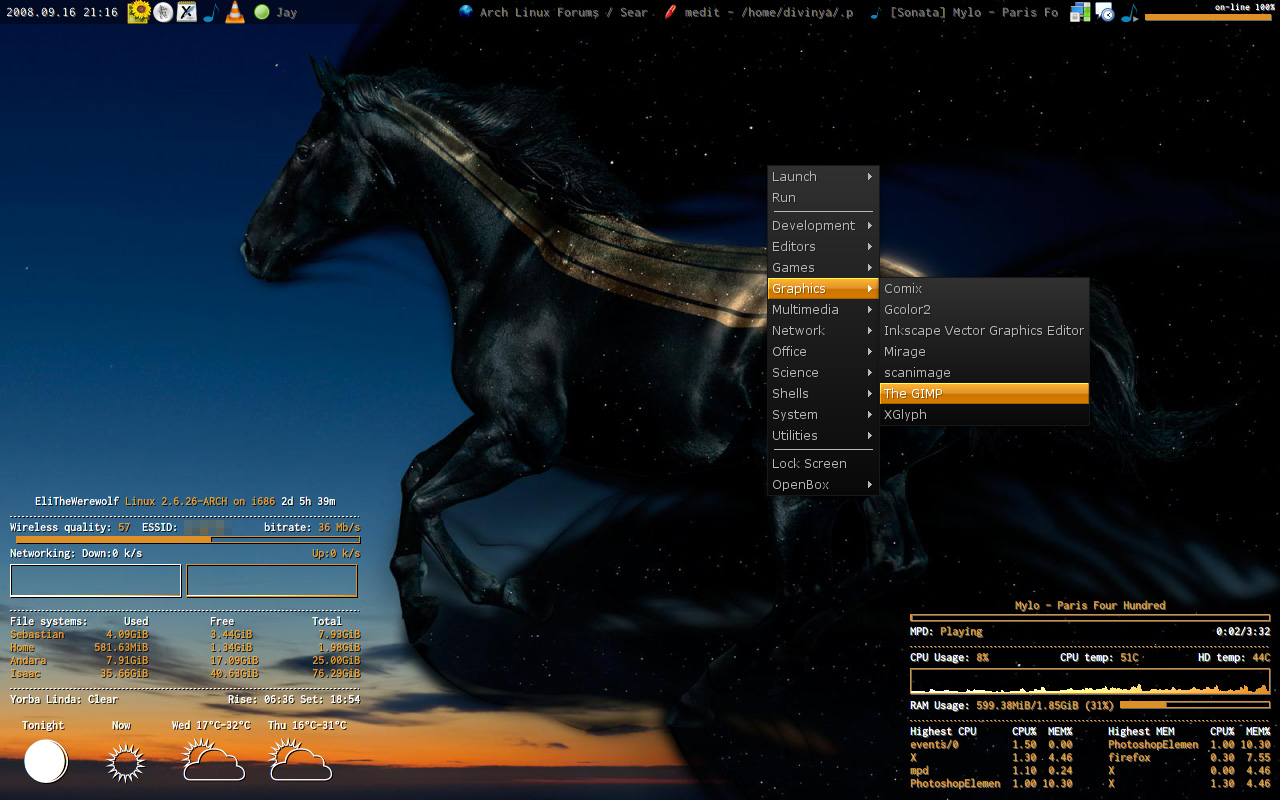
Let's see: Openbox with barely modified Onyx-Citrus. Pypanel.
Love, love is a verb. Love is a doing word.
Offline
#325 2008-09-17 04:25:11
- kernel_script
- Member
- Registered: 2008-08-30
- Posts: 44
Re: September 2008 Screenshots
kernel_script wrote:@dmz
Cool theme dude! Thank you very much for share it and your efforts!
I'm a dA member too, +devwatching you nowOh, thanks a lot man.
You're welcome
My Blog - http://openmindlifestyle.wordpress.com/
Offline