You are not logged in.
- Topics: Active | Unanswered
#1 2011-03-25 20:38:19
- s1n1st3r
- Member

- From: Rio de Janeiro, Brazil
- Registered: 2011-03-15
- Posts: 19
is there any Chemistry plug-in/add-on to LibreOffice? [Solved]
hi guys, recently i've updated my system and took Libreoffice, replacing OpenOffice. As a Chemistry/Biology professor I need to write my exams, tests, etc. The problem is: how can i write chemical formulas in a better way than handle the subscripts manually? Is there some add-on or way to configure LibreOffice to make it easier?
Thanks
Last edited by s1n1st3r (2011-03-26 11:21:19)
Offline
#2 2011-03-25 20:47:16
- metre
- Member

- Registered: 2011-03-13
- Posts: 130
Re: is there any Chemistry plug-in/add-on to LibreOffice? [Solved]
hi guys, recently i've updated my system and took Libreoffice, replacing OpenOffice. As a Chemistry/Biology professor I need to write my exams, tests, etc. The problem is: how can i write chemical formulas in a better way than handle the subscripts manually? Is there some add-on or way to configure LibreOffice to make it easier?
Thanks
I used it, it works very well indeed and supports multiple file formats during exporting
http://www.archlinux.org/packages/extra/i686/chemtool/
Offline
#3 2011-03-25 20:58:34
- linux-ka
- Member

- From: ADL
- Registered: 2010-05-07
- Posts: 232
Re: is there any Chemistry plug-in/add-on to LibreOffice? [Solved]
I am used to work with LaTeX. Aside a nice layout you won't have any problems with formula. Just dip into it.
Offline
#4 2011-03-26 00:12:16
- thisoldman
- Member

- From: Pittsburgh
- Registered: 2009-04-25
- Posts: 1,172
Re: is there any Chemistry plug-in/add-on to LibreOffice? [Solved]
There's the OpenOffice 'Typography Toolbar', http://extensions.services.openoffice.o … oject/typo that works with 'ttf-linux-libertine-g' from the AUR. It gives you a toolbar for subscripts and superscripts with Graphite-enabled fonts. It's not much better than manually formatting super and subscripts.
I wish there was something similar to Chemformatter that I use in MSOffice.
Offline
#5 2011-03-26 00:12:31
- s1n1st3r
- Member
- From: Rio de Janeiro, Brazil
- Registered: 2011-03-15
- Posts: 19
Re: is there any Chemistry plug-in/add-on to LibreOffice? [Solved]
I used it, it works very well indeed and supports multiple file formats during exporting
http://www.archlinux.org/packages/extra/i686/chemtool/
i'm seeking something to help me out writing formulas, just like C6H12O6 (glucose). Am i supposed to make all subscritps manually?
Offline
#6 2011-03-26 00:14:13
- s1n1st3r
- Member
- From: Rio de Janeiro, Brazil
- Registered: 2011-03-15
- Posts: 19
Re: is there any Chemistry plug-in/add-on to LibreOffice? [Solved]
I am used to work with LaTeX. Aside a nice layout you won't have any problems with formula. Just dip into it.
i didn't got it. What is LaTeX ? Some text editor?
Offline
#7 2011-03-26 00:17:07
- s1n1st3r
- Member
- From: Rio de Janeiro, Brazil
- Registered: 2011-03-15
- Posts: 19
Re: is there any Chemistry plug-in/add-on to LibreOffice? [Solved]
There's the OpenOffice 'Typography Toolbar', http://extensions.services.openoffice.o … oject/typo that works with 'ttf-linux-libertine-g' from the AUR. It gives you a toolbar for subscripts and superscripts with Graphite-enabled fonts. It's not much better than manually formatting super and subscripts.
I wish there was something similar to Chemformatter that I use in MSOffice.
agreed.
By the way, i already put superscripts and subscripts at my LibreOffice toolbar. It helps a little, but i wish i could get something more dynamic.
Offline
#8 2011-03-26 00:17:36
- metre
- Member
- Registered: 2011-03-13
- Posts: 130
Re: is there any Chemistry plug-in/add-on to LibreOffice? [Solved]
sinister, me too: I didn't get it 
can you show us some images from the web so we can understand better what you need?
Offline
#9 2011-03-26 00:21:52
- s1n1st3r
- Member
- From: Rio de Janeiro, Brazil
- Registered: 2011-03-15
- Posts: 19
Re: is there any Chemistry plug-in/add-on to LibreOffice? [Solved]
sinister, me too: I didn't get it
can you show us some images from the web so we can understand better what you need?
course i can.
here: http://4.bp.blogspot.com/_lC6u9R9yK2M/S … ica_31.jpg
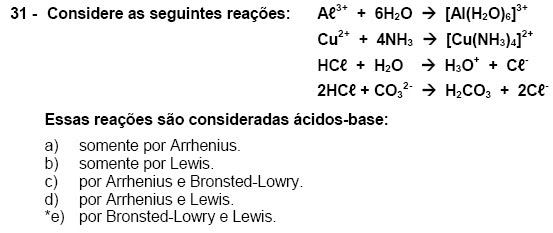
i need to write that kind of formulas
Last edited by s1n1st3r (2011-03-26 00:32:15)
Offline
#10 2011-03-26 00:37:53
- thisoldman
- Member
- From: Pittsburgh
- Registered: 2009-04-25
- Posts: 1,172
Re: is there any Chemistry plug-in/add-on to LibreOffice? [Solved]
I never really looked for it before, but I think I found it. 'SuperbChemistry' adds a macro that will format the whole document: http://extensions.services.openoffice.o … ject/schem.
I haven't fully tested it but it works on the instances I've attempted.
Last edited by thisoldman (2011-03-26 00:38:08)
Offline
#11 2011-03-26 01:43:52
- s1n1st3r
- Member
- From: Rio de Janeiro, Brazil
- Registered: 2011-03-15
- Posts: 19
Re: is there any Chemistry plug-in/add-on to LibreOffice? [Solved]
I never really looked for it before, but I think I found it. 'SuperbChemistry' adds a macro that will format the whole document: http://extensions.services.openoffice.o … ject/schem.
I haven't fully tested it but it works on the instances I've attempted.
once i have it saved here, what should i do ? Do i extract it to some place else?
ps : thx : )
ps²: ok, i read how to make it through openoffice. I tried to make the same steps using LibreOffice and didn't have same results.
ps³: it seems that the superbchemistry is exactly what i'm looking for, but when i came to update my system 2 days ago, I've replaced my openoffice for libreoffice. Trying to install the add-on with libreoffice is useless. Now i'm traying to figure out how to get back openoffice instead of keep libreoffice, but can't find openoffice by pacman.
I'm trying:
# pacman -S openoffice-pt-BR
then, arch sends me a sort of error message telling me that is not possible resolve the deps. (openoffice-base).
Last edited by s1n1st3r (2011-03-26 02:13:32)
Offline
#12 2011-03-26 02:33:52
- thisoldman
- Member
- From: Pittsburgh
- Registered: 2009-04-25
- Posts: 1,172
Re: is there any Chemistry plug-in/add-on to LibreOffice? [Solved]
I'm using Libreoffice, too. Save the SuperbChemistry extension. I'm sorry I don't have this translated.
From the menu bar: 'Tools >> Extension Manager >> Add'.
This opens a file dialogue. Navigate and select the SuperbChemistry extension. then exit the dialogues.
Type your text, for example, "Mg(OH)2 and SO2."
From the menu bar: Tools >> Macros >> Run Macro.
Find 'SuperbChemistry', expand it, select 'Main' and finally select 'Format Document'.
Click Run.
This works for me.
Last edited by thisoldman (2011-03-26 02:39:56)
Offline
#13 2011-03-26 11:16:02
- s1n1st3r
- Member
- From: Rio de Janeiro, Brazil
- Registered: 2011-03-15
- Posts: 19
Re: is there any Chemistry plug-in/add-on to LibreOffice? [Solved]
I'm using Libreoffice, too. Save the SuperbChemistry extension. I'm sorry I don't have this translated.
From the menu bar: 'Tools >> Extension Manager >> Add'.
This opens a file dialogue. Navigate and select the SuperbChemistry extension. then exit the dialogues.Type your text, for example, "Mg(OH)2 and SO2."
From the menu bar: Tools >> Macros >> Run Macro.
Find 'SuperbChemistry', expand it, select 'Main' and finally select 'Format Document'.
Click Run.This works for me.
thisoldman, it works fine for me also. Thx for all support you guys gave me. My homeworks will get more easy now. : D
Once more, Thx
Offline
#14 2011-04-17 12:18:06
- youarefunny
- Member
- From: Toronto, Canada
- Registered: 2010-11-13
- Posts: 42
Re: is there any Chemistry plug-in/add-on to LibreOffice? [Solved]
You can also use OOo math.
libreoffice -mathYou can insert a math formula into a document by Insert>Object>OLE Object...
Offline
#15 2011-06-08 08:19:27
- ratzfatz
- Member
- From: KL, Germany
- Registered: 2011-06-03
- Posts: 30
Re: is there any Chemistry plug-in/add-on to LibreOffice? [Solved]
Hello,
i'm afraid of reading about using OOo, or stuff like that for writing chemical formulas. The only useful tool for this is LaTeX of course - of course for writing chemical structures - and of course for any other kind of text. Everything you dare to dream about to write, LaTeX can! You can even deal with more complicated and interesting structures with LaTeX.
My first package (based on PSTricks) I used for chemical structures was this one:
XyMTeX
You get very fancy structures with this, but the Syntax isn't really simple.
A newer package (less than one year old, i think) based on TikZ is this one:
chemfig
Very simple code an you can easily write structures like chlorophyll.
For the examples here in topic you only need the package chmst-pdf
\documentclass[a4paper,10pt]{scrartcl}

\usepackage[utf8x]{inputenc}
  \usepackage{chemfig,chmst-pdf}

\begin{document}
  \chemform{H2SO4}
\end{document}
If you never heared of LaTeX before you should read some introducing lectures before (you'll find a lot of that in your language in the web), and than check out the packages I postet on top after that. LaTeX needs some time to learn, but after it you will never work with OOo again. The difference between LaTeX and OOo is like the difference between Linux and Windows 7 
regards Michael
The common language in modern science is broken english
Offline
#16 2011-06-08 09:21:03
- panosk
- Member

- From: Athens, Greece
- Registered: 2008-10-29
- Posts: 241
Re: is there any Chemistry plug-in/add-on to LibreOffice? [Solved]
I totally agree with ratzfatz. If you intent to write often complex documents with chemistry and math notation, LaTeX is the tool you need. Even when you gain some skill on it, your documents will probably take longer to construct but the end result will be a piece of art that you will be proud of, trust me :-).
Offline
#17 2011-06-08 14:03:25
- FreeTheBee
- Member
- Registered: 2011-01-02
- Posts: 125
Re: is there any Chemistry plug-in/add-on to LibreOffice? [Solved]
Another LaTeX answer and not Libreoffice. For writing formulas in text I use the mhchem package. For structural formulas you can also use ppchTeX.
As a chemist I also recommend having a look at LaTeX. For a general intro you could have a look at the not so short introduction to LaTeX
Offline