You are not logged in.
- Topics: Active | Unanswered
Pages: 1
#1 2012-01-16 18:09:55
- Superiorem
- Member
- From: Southeastern Michigan
- Registered: 2011-12-05
- Posts: 16
Broadcom BCM4311 Wifi Issues
Greetings.
I have gone through multiple installs in order to fix this. Also, please keep in mind I am new to Arch.
I recently installed Arch (2011.08.19 Core Dual) on my laptop. I can provide laptop specs as necessary. It is a 2006 Dell Inspiron e1405.
# uname -a
Linux Arch 3.0-ARCH #1 SMP PREEMPT Wed Aug 17 20:24:07 UTC 2011 i686 Intel(R) Core(TM) Duo CPU T2350 @ 1.86GHz GenuineIntel GNU/Linux
I am having issues with WiFi. My card is Broadcom BCM4311.
# lspci | grep Network
0c:00.0 Network controller: Broadcom Corporation BCM4311 802.11b/g WLAN (rev 01)
I installed Arch using the Core disk. Both base and base-devel were selected. Among the automatically selected packages packages, I selected
b43-fwcutter
sudo
wireless_tools
netcfg
possibly others, but I do not remember, nor do I think they are causing issues
Following a combination of directions from:
https://wiki.archlinux.org/index.php/Broadcom_wireless
http://wireless.kernel.org/en/users/Dri … stallation
https://wiki.archlinux.org/index.php/De … eless_1390
I began to prepare packages. As I did not have an internet connection, I downloaded the driver on another computer and placed it on a USB Drive (b43-fwcutter was installed using the core disk). I then installed the driver (I am pretty sure) by mounting the USB drive, and following
tar xjf broadcom-wl-5.10.56.27.3_mipsel.tar.bz2
    sudo b43-fwcutter -w "$FIRMWARE_INSTALL_DIR" broadcom-wl-5.10.56.27.3/driver/wl_apsta/wl_prebuilt.o
I believe my Wifi card turns on at boot, as the little green light denoting Wifi turns on. Furthermore, upon boot, I can see the "Starting Network [BUSY]" message (although that takes a good 10 seconds)
From what I understand, to connect to a network, you need to:
# iwlistlo and eth0 display "no wireless extensions" but wlan0 shows that it is connect to ESSID:"*******". (asterisks shown in place of actual ESSID for privacy) There is other information below it. I can post a picture if needed, because I am NOT typing it out!
# iwlist wlan0 scanningScan completes and displays information.
# iwconfig wlan0 essid "*******"There is the home Wifi network, which is protected with WPA (I believe...It is certainly not WEP)
From what I understand, additional entries need to be made in CLI to connect to WPA network.
For now, I can tether to my phone (unlimited data, and actually sometimes faster than my home WiFi, so not a big deal)
Just for the sake of simplicity, I will connect to my phone, which is broadcasting a network with no protection.
# iwconfig wlan0 essid "*******"After pressing enter, it just drops to the next line.
Then, input
# dhcpcd wlan0Output:
dhcpcd[838]: version 5.2.12 starting
dhcpcd[838]: wlan0: waiting for carrier
dhcpcd[838]: timed out
I'm lost after that. I'm positive I am doing something wrong.
I have poked around Google, as well as the Wiki and the forums.
Please note that because I have no internet connection to this Arch box, I have not run pacman -Syu. All packages installed are in the original versions shipped with the (2011.08.19-core-dual) iso.
Please help!
Much appreciated,
[::AP::]
Last edited by Superiorem (2012-01-16 18:33:08)
Laptop (Main): Lenovo Y470 - Windows 7 Home & Xubuntu 13.04 - i5-2410M @ 2.30 GHz - 4GB RAM - 500 GB HDD @ 7200 RPM - 14inch 1336x768 laptop screen - 23inch 1920x1080 Samsung Monitor
Laptop (other): Dell Inspiron e1405 - Windows XP & Arch - Core Duo T350 @ 1.86 GHz - 1 GB RAM - 80 GB HDD @ 5400 RPM - 14inch 1280x800 laptop screen - 22inch 1920x1080 Samsung Monitor
Offline
#2 2012-01-16 18:17:28
- piratebill
- Member

- From: Sol System
- Registered: 2011-10-20
- Posts: 140
Re: Broadcom BCM4311 Wifi Issues
Did you try to black list either b43 or b43legacy?
Offline
#3 2012-01-16 18:27:07
- Superiorem
- Member
- From: Southeastern Michigan
- Registered: 2011-12-05
- Posts: 16
Re: Broadcom BCM4311 Wifi Issues
Do you mean like this?
https://wiki.archlinux.org/index.php/Ke … acklisting
Or something like
# rmmod b43?
Thanks for the speedy response.
[::AP::]
Laptop (Main): Lenovo Y470 - Windows 7 Home & Xubuntu 13.04 - i5-2410M @ 2.30 GHz - 4GB RAM - 500 GB HDD @ 7200 RPM - 14inch 1336x768 laptop screen - 23inch 1920x1080 Samsung Monitor
Laptop (other): Dell Inspiron e1405 - Windows XP & Arch - Core Duo T350 @ 1.86 GHz - 1 GB RAM - 80 GB HDD @ 5400 RPM - 14inch 1280x800 laptop screen - 22inch 1920x1080 Samsung Monitor
Offline
#4 2012-01-16 18:54:49
- Gusar
- Member
- Registered: 2009-08-25
- Posts: 3,607
Re: Broadcom BCM4311 Wifi Issues
No need to blacklist anything, you're on the right track. Except for one thing: If the network is WPA protected, you need to use wpa_supplicant, connecting with iwconfig won't work. The easiest way: create a netcfg profile. Look into /etc/network.d/examples, should be easy to create a profile based on those.
Offline
#5 2012-01-16 19:36:57
- Superiorem
- Member
- From: Southeastern Michigan
- Registered: 2011-12-05
- Posts: 16
Re: Broadcom BCM4311 Wifi Issues
No need to blacklist anything, you're on the right track. Except for one thing: If the network is WPA protected, you need to use wpa_supplicant, connecting with iwconfig won't work. The easiest way: create a netcfg profile. Look into /etc/network.d/examples, should be easy to create a profile based on those.
Ok, I will try that next.
First I wish to just connect to the Wifi broadcasting from my phone.
Then I will move on to connecting to my home Wifi, which is WPA protected.
Laptop (Main): Lenovo Y470 - Windows 7 Home & Xubuntu 13.04 - i5-2410M @ 2.30 GHz - 4GB RAM - 500 GB HDD @ 7200 RPM - 14inch 1336x768 laptop screen - 23inch 1920x1080 Samsung Monitor
Laptop (other): Dell Inspiron e1405 - Windows XP & Arch - Core Duo T350 @ 1.86 GHz - 1 GB RAM - 80 GB HDD @ 5400 RPM - 14inch 1280x800 laptop screen - 22inch 1920x1080 Samsung Monitor
Offline
#6 2012-01-16 19:37:33
- stefanwilkens
- Member
- From: Enschede, the Netherlands
- Registered: 2008-12-10
- Posts: 624
Re: Broadcom BCM4311 Wifi Issues
It's valuable to work your way through the wpa_supplicant documentation, but you might want to have a look at a network manager to deal with the authentication configuration for you. A very simple one is wicd, it comes with a very simple terminal configuration client: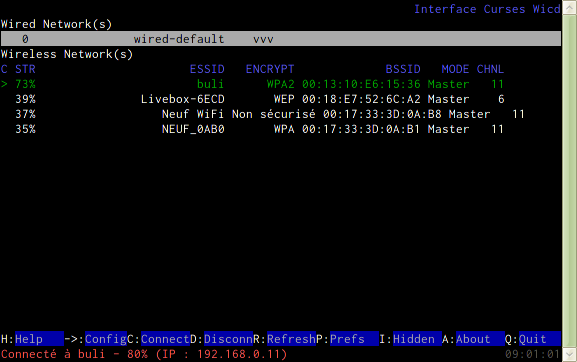
Alternative graphical front-ends for wicd are available, the wikipage is fairly complete:
https://wiki.archlinux.org/index.php/Wicd
Arch i686 on Phenom X4 | GTX760
Offline
#7 2012-01-16 19:56:12
- Superiorem
- Member
- From: Southeastern Michigan
- Registered: 2011-12-05
- Posts: 16
Re: Broadcom BCM4311 Wifi Issues
No need to blacklist anything, you're on the right track. Except for one thing: If the network is WPA protected, you need to use wpa_supplicant, connecting with iwconfig won't work. The easiest way: create a netcfg profile. Look into /etc/network.d/examples, should be easy to create a profile based on those.
Actually, I half understood that.
I am not quite sure what to do.
I started off doing
# nano /etc/network.d/examplesThen I realized that it was a directory. So...
# ls -F /etc/network.d/examplesA list showed up. So then I...
# nano /etc/network.d/examples/wireless-wpaI can view the file.
Do I then create a file with the same exact format, plugging in my ESSID into
ESSID='MyNetwork'The WPA key into
Key='WirelessKey'And leave IP as
IP='dhcp'???
Where should this file be created, and how should it be named?
Would it be like:
/etc/network.d/SOME-NAME-HERE?
Thanks.
Laptop (Main): Lenovo Y470 - Windows 7 Home & Xubuntu 13.04 - i5-2410M @ 2.30 GHz - 4GB RAM - 500 GB HDD @ 7200 RPM - 14inch 1336x768 laptop screen - 23inch 1920x1080 Samsung Monitor
Laptop (other): Dell Inspiron e1405 - Windows XP & Arch - Core Duo T350 @ 1.86 GHz - 1 GB RAM - 80 GB HDD @ 5400 RPM - 14inch 1280x800 laptop screen - 22inch 1920x1080 Samsung Monitor
Offline
#8 2012-01-16 20:01:59
- Varg
- Member

- From: Belgium
- Registered: 2010-07-07
- Posts: 272
Re: Broadcom BCM4311 Wifi Issues
Jup, just copy one of the example files to /etc/network.d/ and fill everything in.
github - tweets
avatar: The Oathmeal
Offline
#9 2012-01-16 20:04:10
- Superiorem
- Member
- From: Southeastern Michigan
- Registered: 2011-12-05
- Posts: 16
Re: Broadcom BCM4311 Wifi Issues
It's valuable to work your way through the wpa_supplicant documentation, but you might want to have a look at a network manager to deal with the authentication configuration for you. A very simple one is wicd, it comes with a very simple terminal configuration client:
http://ledek.free.fr/images/wicd-curses.pngAlternative graphical front-ends for wicd are available, the wikipage is fairly complete:
https://wiki.archlinux.org/index.php/Wicd
Noting my lack of internet connection, could I install from the core CD? is the wicd package part of base/base-devel? Or will I have to install it via USB drive?
----
ALSO, just to clear things up...
Before connecting to a WPA network, I am hoping to just connect to my unprotected Wifi tether from my phone. Then I'll move on to the WPA network.
Ultimately, I will be running some DE, like XFCE or (possibly) GNOME. We'll see.
Laptop (Main): Lenovo Y470 - Windows 7 Home & Xubuntu 13.04 - i5-2410M @ 2.30 GHz - 4GB RAM - 500 GB HDD @ 7200 RPM - 14inch 1336x768 laptop screen - 23inch 1920x1080 Samsung Monitor
Laptop (other): Dell Inspiron e1405 - Windows XP & Arch - Core Duo T350 @ 1.86 GHz - 1 GB RAM - 80 GB HDD @ 5400 RPM - 14inch 1280x800 laptop screen - 22inch 1920x1080 Samsung Monitor
Offline
#10 2012-01-16 20:07:14
- Superiorem
- Member
- From: Southeastern Michigan
- Registered: 2011-12-05
- Posts: 16
Re: Broadcom BCM4311 Wifi Issues
Jup, just copy one of the example files to /etc/network.d/ and fill everything in.
I just made the file in /etc/network.d/
Name: /etc/network.d/NETWORK-NAME
(Where NETWORK-NAME is the network name, as well as the file name)
So...uh...what now? 
Thanks for help everyone...I really appreciate it.
Last edited by Superiorem (2012-01-16 20:14:14)
Laptop (Main): Lenovo Y470 - Windows 7 Home & Xubuntu 13.04 - i5-2410M @ 2.30 GHz - 4GB RAM - 500 GB HDD @ 7200 RPM - 14inch 1336x768 laptop screen - 23inch 1920x1080 Samsung Monitor
Laptop (other): Dell Inspiron e1405 - Windows XP & Arch - Core Duo T350 @ 1.86 GHz - 1 GB RAM - 80 GB HDD @ 5400 RPM - 14inch 1280x800 laptop screen - 22inch 1920x1080 Samsung Monitor
Offline
#11 2012-01-16 20:50:09
- Gusar
- Member
- Registered: 2009-08-25
- Posts: 3,607
Re: Broadcom BCM4311 Wifi Issues
So...uh...what now?
You read the documentation on how netcfg works, of course. Basically, "netcfg profilename" will start that profile. If it's set up correctly (essid, key, security) you should get a connection.
Last edited by Gusar (2012-01-16 20:51:54)
Offline
#12 2012-01-16 20:58:22
- stefanwilkens
- Member
- From: Enschede, the Netherlands
- Registered: 2008-12-10
- Posts: 624
Re: Broadcom BCM4311 Wifi Issues
stefanwilkens wrote:It's valuable to work your way through the wpa_supplicant documentation, but you might want to have a look at a network manager to deal with the authentication configuration for you. A very simple one is wicd, it comes with a very simple terminal configuration client:
http://ledek.free.fr/images/wicd-curses.pngAlternative graphical front-ends for wicd are available, the wikipage is fairly complete:
https://wiki.archlinux.org/index.php/WicdNoting my lack of internet connection, could I install from the core CD? is the wicd package part of base/base-devel? Or will I have to install it via USB drive?
----
ALSO, just to clear things up...
Before connecting to a WPA network, I am hoping to just connect to my unprotected Wifi tether from my phone. Then I'll move on to the WPA network.Ultimately, I will be running some DE, like XFCE or (possibly) GNOME. We'll see.
No, wicd is part of the extra repository and not available unless you grab the required packages elsewhere. I was just pointing out something useful to replace manual configuration after the initial setup. I should have been more obvious
Quite a few additional dependencies outside of [core] are required, this wouldn't be an easy grab through an external source.
I usually disable encryption for the duration of the installation, grab a network manager like wicd and re-enable configuration. Saves headaches, though not the most informative way out.
Last edited by stefanwilkens (2012-01-16 21:00:02)
Arch i686 on Phenom X4 | GTX760
Offline
#13 2012-01-16 21:10:41
- Superiorem
- Member
- From: Southeastern Michigan
- Registered: 2011-12-05
- Posts: 16
Re: Broadcom BCM4311 Wifi Issues
After reading the documentation, I executed
# netcfg PROFILE(Where PROFILE is the network profile in /etc/network.d that I created earlier)
Everything seems to be working.
# ping www.google.comOh joy! I get a response!
# pacman -SyuUpdating now....
Thank you everyone.
Superiorem wrote:stefanwilkens wrote:It's valuable to work your way through the wpa_supplicant documentation, but you might want to have a look at a network manager to deal with the authentication configuration for you. A very simple one is wicd, it comes with a very simple terminal configuration client:
http://ledek.free.fr/images/wicd-curses.pngAlternative graphical front-ends for wicd are available, the wikipage is fairly complete:
https://wiki.archlinux.org/index.php/WicdNoting my lack of internet connection, could I install from the core CD? is the wicd package part of base/base-devel? Or will I have to install it via USB drive?
----
ALSO, just to clear things up...
Before connecting to a WPA network, I am hoping to just connect to my unprotected Wifi tether from my phone. Then I'll move on to the WPA network.Ultimately, I will be running some DE, like XFCE or (possibly) GNOME. We'll see.
No, wicd is part of the extra repository and not available unless you grab the required packages elsewhere. I was just pointing out something useful to replace manual configuration after the initial setup. I should have been more obvious
Quite a few additional dependencies outside of [core] are required, this wouldn't be an easy grab through an external source.
I usually disable encryption for the duration of the installation, grab a network manager like wicd and re-enable configuration. Saves headaches, though not the most informative way out.
Thanks for the information/advice, as well as your time.
As far as I am concerned, the issue has been solved/I learned something.
I will mark this thread "Solved" tomorrow, pending on the chance of further issues (unlikely).
Thanks again everyone.
[::AP::]
Last edited by Superiorem (2012-01-16 21:13:13)
Laptop (Main): Lenovo Y470 - Windows 7 Home & Xubuntu 13.04 - i5-2410M @ 2.30 GHz - 4GB RAM - 500 GB HDD @ 7200 RPM - 14inch 1336x768 laptop screen - 23inch 1920x1080 Samsung Monitor
Laptop (other): Dell Inspiron e1405 - Windows XP & Arch - Core Duo T350 @ 1.86 GHz - 1 GB RAM - 80 GB HDD @ 5400 RPM - 14inch 1280x800 laptop screen - 22inch 1920x1080 Samsung Monitor
Offline
Pages: 1