You are not logged in.
- Topics: Active | Unanswered
#1 2013-03-26 01:49:58
- marko2010
- Member
- Registered: 2010-04-17
- Posts: 70
How can I customize "Suspend when inactive for" options?
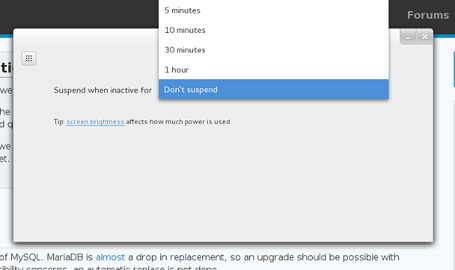
Gnome-shell does not allow a user to set a "Suspend when inactive for" value greater than one hour (see image below). Any ideas how I could customize these options so I could set it for two hours or some arbitrary number.
I already did a bit of poking around in dconf-editor, but what not able to find anything useful.
Offline
#2 2013-03-26 02:11:34
- illusionist
- Member

- From: localhost
- Registered: 2012-04-03
- Posts: 498
Re: How can I customize "Suspend when inactive for" options?
I have no idea how Gnome works but your may try this solution :
https://bbs.archlinux.org/viewtopic.php?id=96203
Last edited by illusionist (2013-03-26 02:12:29)
Never argue with stupid people,They will drag you down to their level and then beat you with experience.--Mark Twain
@github
Offline
#3 2013-03-26 08:51:25
- marko2010
- Member
- Registered: 2010-04-17
- Posts: 70
Re: How can I customize "Suspend when inactive for" options?
I have no idea how Gnome works but your may try this solution :
https://bbs.archlinux.org/viewtopic.php?id=96203
If all else fails, I can always use a script to suspend at an arbitrary time. But I am working on a guide for tweaking Gnome Shell, and certainly adding more options to the suspend would be a real handy tip to include. It seems like this would be a real simple fix if I knew where to look.
Offline