You are not logged in.
- Topics: Active | Unanswered
#1 2013-04-05 11:52:15
- bergqvistjl
- Member
- Registered: 2011-01-05
- Posts: 59
How can I Change Metacity window decorations without installing gnome?
Hi. i'm using metacity as a standalone program (i.e I don't want to have all of gnome installed) and I don't know how to change the Window Decorations. While menu themes etc. work. Window decorations (title bar style, buttons etc.) look wrong and out of place. is there any way to change the window decorations theme for metacity? and how can I do it, without installing the entireity of gnome?
Last edited by bergqvistjl (2013-04-05 13:05:46)
Offline
#2 2013-04-05 12:26:08
- illusionist
- Member

- From: localhost
- Registered: 2012-04-03
- Posts: 498
Re: How can I Change Metacity window decorations without installing gnome?
Use lxappearance to change the theme. Also you need a theme that has support for metacity. Here are a few: http://art.gnome.org/themes/metacity
Never argue with stupid people,They will drag you down to their level and then beat you with experience.--Mark Twain
@github
Offline
#3 2013-04-05 12:35:38
- bergqvistjl
- Member
- Registered: 2011-01-05
- Posts: 59
Re: How can I Change Metacity window decorations without installing gnome?
Use lxappearance to change the theme. Also you need a theme that has support for metacity. Here are a few: http://art.gnome.org/themes/metacity
That's not working. The title bar on metacity still looks like this: 
I want it to look like this: 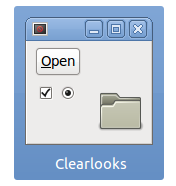
Offline
#4 2013-04-05 12:44:22
- jakobcreutzfeldt
- Member

- Registered: 2011-05-12
- Posts: 1,042
Re: How can I Change Metacity window decorations without installing gnome?
Clearlooks is a GTK2 theme. The screenshot shows Adwaita, a GTK3 theme.
Offline
#5 2013-04-05 12:46:17
- bergqvistjl
- Member
- Registered: 2011-01-05
- Posts: 59
Re: How can I Change Metacity window decorations without installing gnome?
Clearlooks is a GTK2 theme. The screenshot shows Adwaita, a GTK3 theme.
I don't understand. Are you saying that i'm locked to Using Adwaita for the Metacity Window borders? (I don't care about the menu shapes etc. JUST the title bar & Window close, maximise, minimize buttons)
Offline
#6 2013-04-05 12:48:53
- jakobcreutzfeldt
- Member
- Registered: 2011-05-12
- Posts: 1,042
Re: How can I Change Metacity window decorations without installing gnome?
I'm saying that you need to choose themes for both GTK2 and GTK3. Finding a consistent theme between the two is more difficult but it's possible.
Offline
#7 2013-04-05 12:50:10
- bergqvistjl
- Member
- Registered: 2011-01-05
- Posts: 59
Re: How can I Change Metacity window decorations without installing gnome?
I'm saying that you need to choose themes for both GTK2 and GTK3. Finding a consistent theme between the two is more difficult but it's possible.
I'm confused. Can you tell me how to change the window borders in metacity right now? What application do I need to use? lxapperance doesn't do window borders.
Offline
#8 2013-04-05 12:50:30
- illusionist
- Member
- From: localhost
- Registered: 2012-04-03
- Posts: 498
Re: How can I Change Metacity window decorations without installing gnome?
What jakobcreutzfeldt is saying that you need a gtk3 theme.
Edit: i was little late
Last edited by illusionist (2013-04-05 12:51:26)
Never argue with stupid people,They will drag you down to their level and then beat you with experience.--Mark Twain
@github
Offline
#9 2013-04-05 12:55:19
- illusionist
- Member
- From: localhost
- Registered: 2012-04-03
- Posts: 498
Re: How can I Change Metacity window decorations without installing gnome?
lxapperance doesn't do window borders.
Of course it does. The theme should be compatible. It wont do any magic if metacity theme is not compatible with the current version of gnome. Here are some metacity themes you may try:
http://gnome-look.org/index.php?xconten … 8ce468a814
Never argue with stupid people,They will drag you down to their level and then beat you with experience.--Mark Twain
@github
Offline
#10 2013-04-05 12:56:34
- jakobcreutzfeldt
- Member
- Registered: 2011-05-12
- Posts: 1,042
Re: How can I Change Metacity window decorations without installing gnome?
bergqvistjl, see this:
https://wiki.archlinux.org/index.php/Gtk#Themes
Offline
#11 2013-04-05 13:01:46
- bergqvistjl
- Member
- Registered: 2011-01-05
- Posts: 59
Re: How can I Change Metacity window decorations without installing gnome?
bergqvistjl wrote:lxapperance doesn't do window borders.
Of course it does. The theme should be compatible. It wont do any magic if metacity theme is not compatible with the current version of gnome. Here are some metacity themes you may try:
http://gnome-look.org/index.php?xconten … 8ce468a814
No it doesn't. The buttons, text fonts and icons change, but the Window border/title bar does not change, at least for me.
Offline
#12 2013-04-05 13:04:58
- illusionist
- Member
- From: localhost
- Registered: 2012-04-03
- Posts: 498
Re: How can I Change Metacity window decorations without installing gnome?
Which theme are you using ?
Never argue with stupid people,They will drag you down to their level and then beat you with experience.--Mark Twain
@github
Offline
#13 2013-04-05 13:08:09
- bergqvistjl
- Member
- Registered: 2011-01-05
- Posts: 59
Re: How can I Change Metacity window decorations without installing gnome?
Which theme are you using ?
I don't know anymore... I don't have an overall tab for "Theme" on lxapperance. I'm using Clearlooks widgets, with GNOME icons and whiteglass icons.
Offline
#14 2013-04-05 13:08:45
- jakobcreutzfeldt
- Member
- Registered: 2011-05-12
- Posts: 1,042
Re: How can I Change Metacity window decorations without installing gnome?
Try setting it with dconf
org.gnome.desktop.wm.preferences theme
(try searching the forum next time; looks like this has been covered https://bbs.archlinux.org/viewtopic.php?pid=1091976)
Last edited by jakobcreutzfeldt (2013-04-05 13:08:52)
Offline
#15 2013-04-05 13:14:00
- illusionist
- Member
- From: localhost
- Registered: 2012-04-03
- Posts: 498
Re: How can I Change Metacity window decorations without installing gnome?
If you don't know which theme are you using then how do you supposed to know if you have a metacity compatible theme or not.
If you haven't yet, please see the link jakobcreutzfeldt posted. Everything is mentioned there. We can not help you unless you provide enough information.
p.s. Try gnome-tweak-tool
Never argue with stupid people,They will drag you down to their level and then beat you with experience.--Mark Twain
@github
Offline
#16 2013-04-05 13:20:24
- ewaller
- Administrator

- From: Pasadena, CA
- Registered: 2009-07-13
- Posts: 20,709
Re: How can I Change Metacity window decorations without installing gnome?
bergqvistjl:
Just a quick note -- It looks like you have accidentally hit the 'report' link rather than the 'reply' link. That sends a message to the moderators. Generally when that happens, we copy the text back to the thread. In this case, it looks like you recreated the content. In any event, if you were wondering where your posts went .... 
edit: On second look, it is not quite the same....
That's not right, It's still not changing the Title bar theme. I want the top bar to look like this: http://www.stellingwerff.com/clearlooks-metacity.png
NOT like this: http://www.muylinux.com/wp-content/uplo … named3.png Which is how it does at the moment.
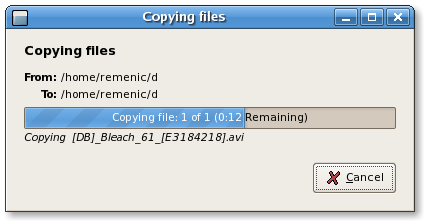
and
I don't know anymore... lxappearance is telling me i'm using the clearlooks widgets, with Default gnome icons, and the whiteglass cursor theme.
Last edited by ewaller (2013-04-05 13:22:50)
Nothing is too wonderful to be true, if it be consistent with the laws of nature -- Michael Faraday
The shortest way to ruin a country is to give power to demagogues.— Dionysius of Halicarnassus
---
How to Ask Questions the Smart Way
Offline