You are not logged in.
- Topics: Active | Unanswered
#1 2015-07-29 17:52:14
- Lucci95
- Member
- Registered: 2014-05-18
- Posts: 6
Starting installation fails: mounting device
http://fs2.directupload.net/images/150729/u5zzsf3t.jpg
Whats wrong an how to fix it?
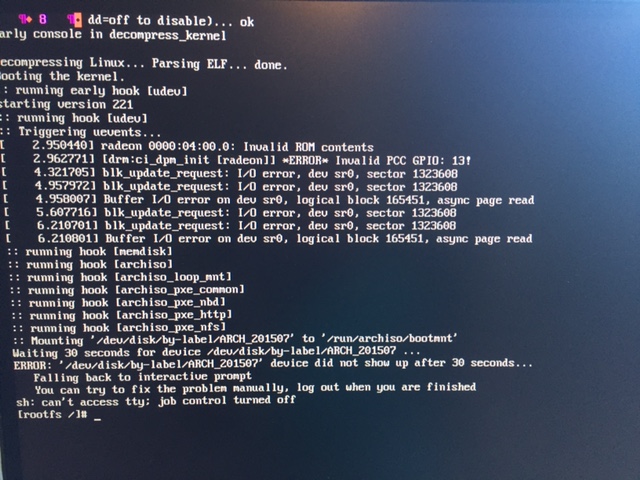
-- mod edit: read the Forum Etiquette and only post thumbnails http://wiki.archlinux.org/index.php/For … s_and_Code [jwr] --
Offline
#2 2015-07-29 17:57:23
- Head_on_a_Stick
- Member

- From: The Wirral
- Registered: 2014-02-20
- Posts: 9,003
- Website
Re: Starting installation fails: mounting device
Try again a few times.
How did you transfer the ISO image to the installation medium?
What is your hardware?
Jin, Jîyan, Azadî
Offline
#3 2015-07-29 18:01:01
- Lucci95
- Member
- Registered: 2014-05-18
- Posts: 6
Re: Starting installation fails: mounting device
I used Win7 the default isoburn provided by the OS.
Hardware: AMD X6 1055T,2.8, Radeon R9 290X, SSD128GB
Tried it several times, thought the medium is damaged first, but normally this should work.
I use no UEFI, but Debian also works here fine with this components.
Last edited by Lucci95 (2015-07-29 18:02:12)
Offline
#4 2015-07-29 18:15:05
- jasonwryan
- Anarchist

- From: .nz
- Registered: 2009-05-09
- Posts: 30,426
- Website
Re: Starting installation fails: mounting device
I used Win7 the default isoburn provided by the OS.
Use `dd`.
Offline
#5 2015-07-29 18:58:17
- Head_on_a_Stick
- Member
- From: The Wirral
- Registered: 2014-02-20
- Posts: 9,003
- Website
Re: Starting installation fails: mounting device
I used Win7 the default isoburn provided by the OS.
From Windows, I would recommend USBWriter:
http://sourceforge.net/p/usbwriter/wiki/
Jin, Jîyan, Azadî
Offline