You are not logged in.
- Topics: Active | Unanswered
#1 2015-10-08 01:09:58
- aruneko99
- Member
- Registered: 2015-10-08
- Posts: 3
[Solved]3D Acceleration makes GTK3 window translucent on VMware Fusion
Hello, everyone.
I installed Arch Linux on VMware Fusion 8.0.1.
Following this article, I installed xf86-video-vmware and open-vm-tools and enabled 3D Acceleration on VMware Fusion.
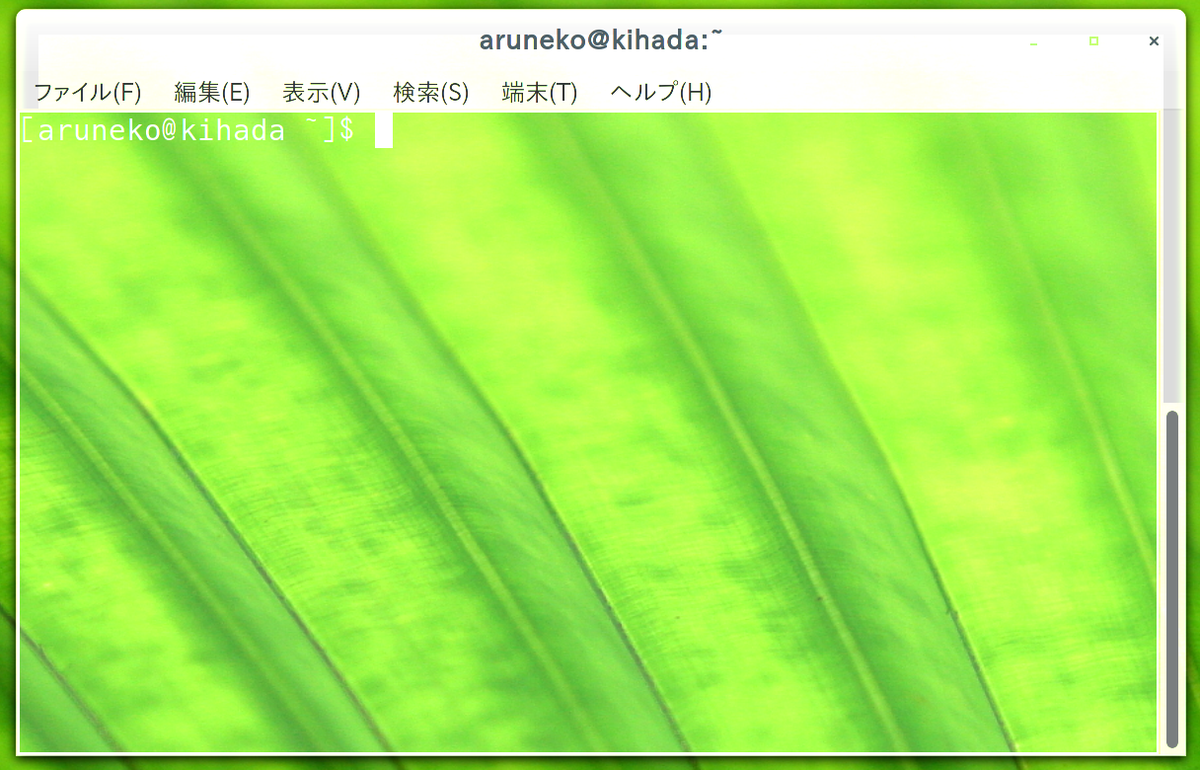
Then I started Gnome-Terminal, I found that the window is translucent. (I use Cinnamon, that is so cool!)
https://pbs.twimg.com/media/CQwWh6fVAAIOdLe.png

Especially, you can look the problem by draging strings.
You can look a little whitish background image.
https://pbs.twimg.com/media/CQwWos7U8AAvnIv.png
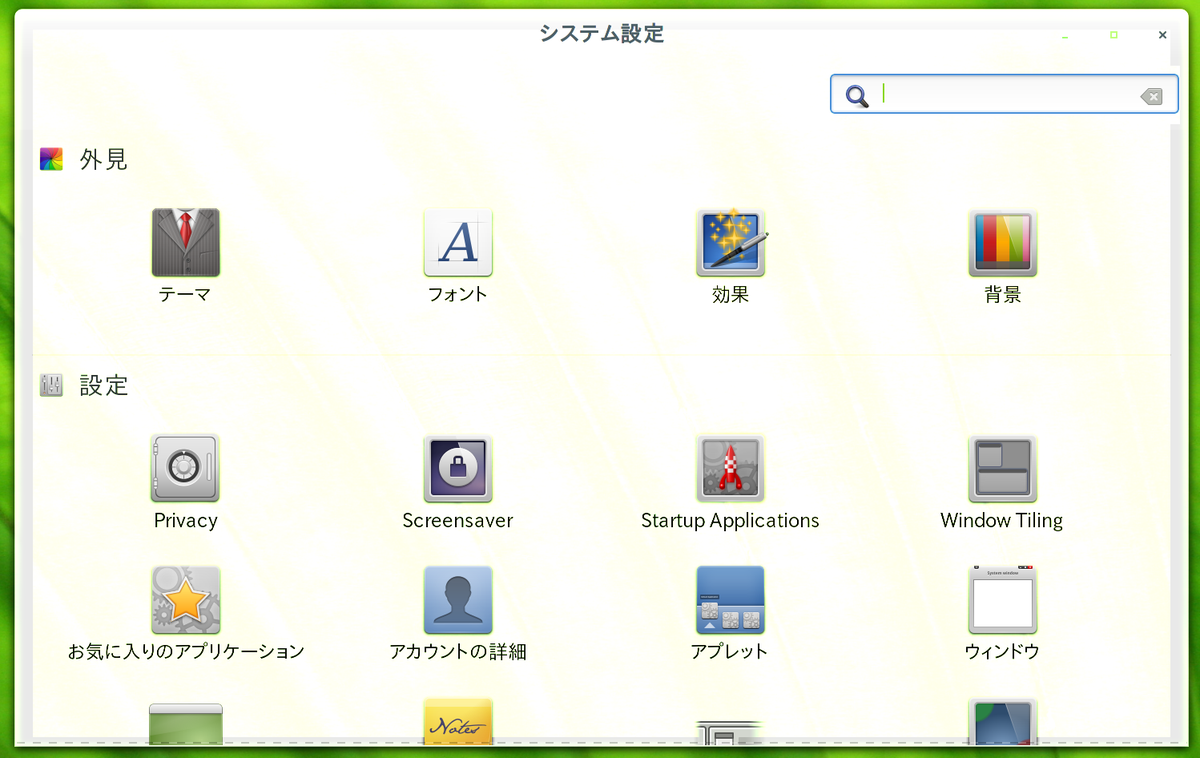
System Settings is same.
https://pbs.twimg.com/media/CQwWvlTU8AAMW1Q.png
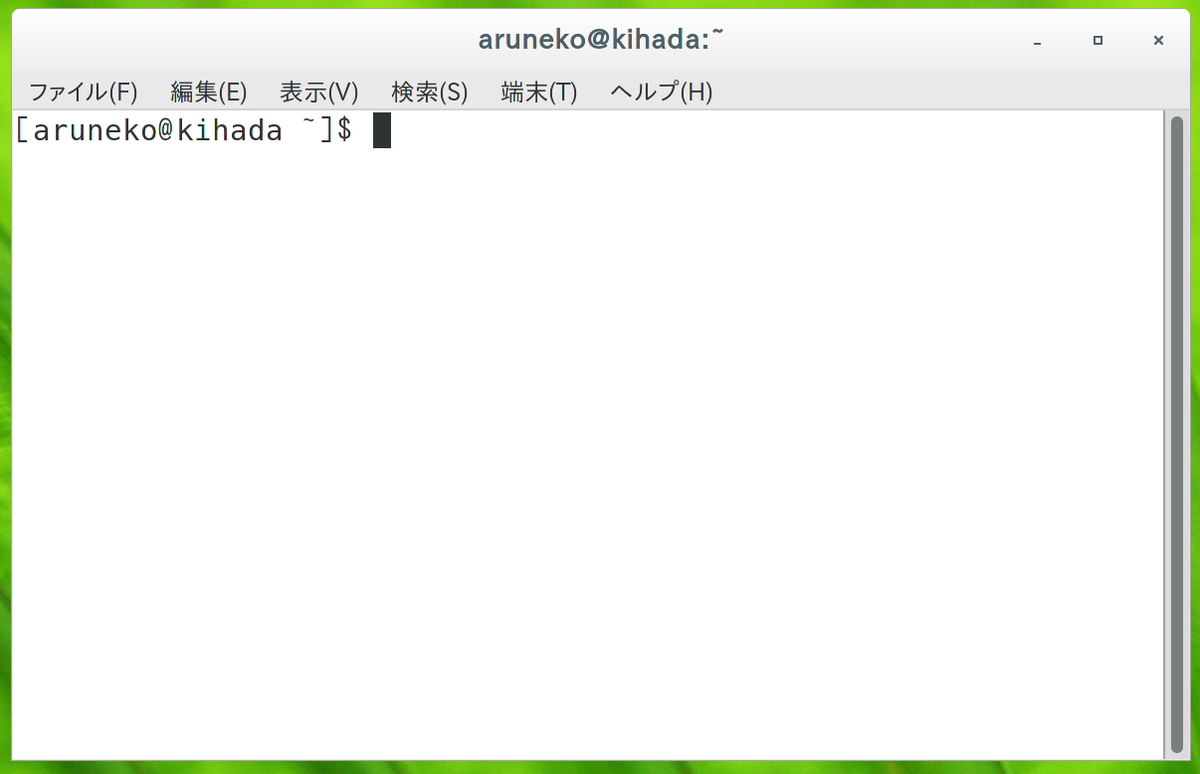
But in case of "Cinnamon Software Rendering", I don't find this problem.
https://pbs.twimg.com/media/CQwW4uSUkAArfWd.png
However, software rendering is too heavy...
Why the problem is occurred?
(By the way, it is October that I found that. I don't found the problem until September.)
Last edited by aruneko99 (2015-12-23 13:21:37)
Offline
#2 2015-10-09 06:53:11
- stefcl
- Member
- Registered: 2015-10-09
- Posts: 8
Re: [Solved]3D Acceleration makes GTK3 window translucent on VMware Fusion
I am using cinnamon in a VmWare workstation 12 box with 3D acceleration and having the exact same problem after a serie of updates during the last weekend. Probably has something to do with xf86-video-vmware or mesa that received recent update. Unfortunately trying to downgrade these two packages along with x server broke my install even more. As a temporary workaround, I have found that removing the wallpaper and configuring a solid black (non-gradient) background helps a lot but you still experience problems on some gtk apps (especially open menubars).
I decided to install Mate with mint-menu until it gets fixed. Unfortunately there is only very little information available on that issue so if you find a way to improve the situation, please share your findings here.
Offline
#3 2015-10-09 06:55:08
- jasonwryan
- Anarchist

- From: .nz
- Registered: 2009-05-09
- Posts: 30,426
- Website
Re: [Solved]3D Acceleration makes GTK3 window translucent on VMware Fusion
Please read the Forum Etiquette and only post thumbnails http://wiki.archlinux.org/index.php/For … s_and_Code
Offline
#4 2015-10-09 09:27:15
- aruneko99
- Member
- Registered: 2015-10-08
- Posts: 3
Re: [Solved]3D Acceleration makes GTK3 window translucent on VMware Fusion
I decided to install Mate with mint-menu until it gets fixed. Unfortunately there is only very little information available on that issue so if you find a way to improve the situation, please share your findings here.
Thank you for advice. I'll try MATE temporarily.
If I get some ideas to solve this problem, I'll share it here.
Please read the Forum Etiquette and only post thumbnails http://wiki.archlinux.org/index.php/For … s_and_Code
Sorry, I had not completely read it, and now, I realize it.
I'll never post full size pictures.
Offline
#5 2015-10-24 07:18:58
- RamZ
- Member
- Registered: 2015-10-24
- Posts: 10
Re: [Solved]3D Acceleration makes GTK3 window translucent on VMware Fusion
I have the same issue on multiple virtual machines on VMWare Workstation 12 with Windows 8.1 host, but oddly NOT on Arch. Arch kicks me straight to software rendering mode.
Seems to be specifically a Cinnamon/Kernel/vmware graphics driver issue.
I have:
Cubuntu 15.10 with Cinnamon 2.8 (upgraded from Cubuntu 15.4 English)
Ubuntu 15.10 with Cinnamon 2.6 installed,
and a fresh install of Cubuntu 15.10 international with Cinnamon 2.8.
(also have Arch from osboxes.org updated, then cinnamon and open-vm-tools 10 installed)
Hard to say what happened as Cubuntu 15.4 with Cinnamon 2.8 was fine with linux kernel 3.9. My guess was the new kernel and the old vmware tools don't play well together. Tried to re-install vmware tools, got messages to use open-vm-tools instead, and that open-vm-tools version 10 was needed for kernels above 4.0. None of the distros I tried had open-vm-tools 10 in their repos except Arch. All the others installed 9.x I read there was a module or two that is now merged with the kernel, so older vmware tools don't compile a module correctly anymore.
I downloaded osbox.org of Arch, updated everything to latest available, installed cinnamon, installed open-vm-tools version 10... and it immediately goes to "software rendering mode" for Arch on Cinnamon login. No idea why I get that behavior instead of the above mentioned behavior on Arch.
other VM ubuntu based distros allow regular Cinnamon login, but have the same behavior as shown above (really visible with the solitaire game). Software rendering mode doesn't show the bleed-thru of background also, as stated above.
I'm guessing I'll have to wait for a driver patch for vmtools/open-vm-tools or an update to Cinnamon, but maybe this info will help. I'm using Mate, KDE, and LXDE on various systems for now.
Offline
#6 2015-10-24 07:27:25
- RamZ
- Member
- Registered: 2015-10-24
- Posts: 10
Re: [Solved]3D Acceleration makes GTK3 window translucent on VMware Fusion
Update -- seems it also affects Arch. I mistakenly had the 3D acceleration turned off in VMware for Arch.
Once enabled, same behavior as original post plus my other 3 Ubuntu based distros.
Offline
#7 2015-10-30 17:47:15
- johskar
- Member
- From: Norway
- Registered: 2010-08-11
- Posts: 8
Re: [Solved]3D Acceleration makes GTK3 window translucent on VMware Fusion
Same issue here too on Arch with Cinnamon, no issues in Linux mint 17.x Cinnamon so far tho.
Conky got issues with transparency when Cinnamon runs with 3D accelleration as well.
Also seems to be issues with it in Gnome 3, but less visible issues there compared to Cinnamon.
Offline
#8 2015-11-16 09:02:12
- stefcl
- Member
- Registered: 2015-10-09
- Posts: 8
Re: [Solved]3D Acceleration makes GTK3 window translucent on VMware Fusion
My tests with the time machine show that the problem started near the end of September with a major update of Mesa 10 -> 11.
Difficult to tell if this is due to a regression in Mesa or something in cinnamon that was broken but without obvious symptoms. Unfortunately, I have not been able to hold back Mesa 10 without breaking a lot more stuff , it appears to be tightly coupled with the graphic layer (Xorg and xf86 drivers) and you can't easily mix things.
This will probably get patched when Mint devs will upgrade to Mesa 11, and even so I'd doubt it would be among their top priority as it only seems to affect a couple of people using the vmware graphic driver.
It's unfortunate but virtualization with accelerated graphics has always been a complex subject.
Offline
#9 2015-11-25 01:07:17
- RamZ
- Member
- Registered: 2015-10-24
- Posts: 10
Re: [Solved]3D Acceleration makes GTK3 window translucent on VMware Fusion
Thanks stefcl for looking into it.
I've submitted the issue to Cinnamon's Github. Maybe they can find the root of the issue. I'm using software rendering mode for Cinnamon for now. I love Cinnamon, but I'll switch to KDE if fixing this isn't a priority since KDE/Plasma has been more stable than Nemo/Cinnamon for me lately.
Offline
#10 2015-12-03 15:54:38
- stefcl
- Member
- Registered: 2015-10-09
- Posts: 8
Re: [Solved]3D Acceleration makes GTK3 window translucent on VMware Fusion
You are welcome
Unfortunately it seem like your issue report received a rather rude unwelcoming reception. No idea why, you were just making them aware of a possible issue.
I keep re-testing my cinnamon install from time to time, there is some hope with Mesa 11.1 that should be released soon. They announced many fixes as well as some progress with the vmWare graphic stack.
Otherwise, Mate with synapse (I avoid mint-menu because it has a few issues with some ssh agent that nobody seems to care about) or XFCE with whisker menu can offer a somewhat similar experience. They are working very well with both virtualbox and vmware and it's not that difficult to make them look good...
Best
Offline
#11 2015-12-22 07:20:23
- stefcl
- Member
- Registered: 2015-10-09
- Posts: 8
Re: [Solved]3D Acceleration makes GTK3 window translucent on VMware Fusion
This is finally fixed with the latest mesa update.
My current setup is the following :
Vmware workstation  12.1.0
mesa                11.1.0-1
cinnamon            2.8.6-1
open-vm-tools       6:10.0.5-1
linux               4.3.3-1
Offline
#12 2015-12-22 16:04:27
- johskar
- Member
- From: Norway
- Registered: 2010-08-11
- Posts: 8
Re: [Solved]3D Acceleration makes GTK3 window translucent on VMware Fusion
Sounds great, now we just need mesa 11.1 in the repos :-)
Offline
#13 2015-12-23 14:30:34
- aruneko99
- Member
- Registered: 2015-10-08
- Posts: 3
Re: [Solved]3D Acceleration makes GTK3 window translucent on VMware Fusion
Thanks all!
I'm looking forward to mesa 11.1 
Offline
#14 2015-12-27 21:59:36
- RamZ
- Member
- Registered: 2015-10-24
- Posts: 10
Re: [Solved]3D Acceleration makes GTK3 window translucent on VMware Fusion
Unfortunately, I have the same setup with a slightly older Kernel -- 4.2.5-1 Arch, and I still have the same behavior. Tried switching between Vmware's drivers and open vm tools, but no difference. The MESA driver release says it now supports newer OpenGL with the VMware driver, which I hoped might have resolved the issue:
"OpenGL 3.3 support for VMware guest VM driver (supported by Workstation 12 and Fusion 8)."
I doubt there's been much change from 4.2.5x kernel to 4.3.x kernel for that to be the fix, but maybe that's the key. I checked and re-checked the versions for VMware, mesa, cinnamon, open-vm-tools... same.
Glad to hear your install is working, though. Maybe my install is just borked. Will try a fresh install when Mesa 11.1.1 stable is released and cross my fingers 
Offline
#15 2015-12-28 10:13:18
- stefcl
- Member
- Registered: 2015-10-09
- Posts: 8
Re: [Solved]3D Acceleration makes GTK3 window translucent on VMware Fusion
I just lost a large form post with detailed info.
Short version : linux 4.3 is part of the recipe for GL3 support, along with mesa 11.1.
http://lists.freedesktop.org/archives/d … 88246.html
You may take a snapshot, switch your Arch guest to testing repo and safely revert if needed.
Offline
#16 2015-12-28 19:53:45
- RamZ
- Member
- Registered: 2015-10-24
- Posts: 10
Re: [Solved]3D Acceleration makes GTK3 window translucent on VMware Fusion
Thanks for the tip, but no dice. I enabled the testing repositories (after the rest), and only updated the kernel to 4.3.3-2 arch... Mesa also updated to the next -2 release prior, but same issue. Maybe I have something else wrong in a config file I may have changed trying to fix the issue a while back. It could also be that some resolutions or output types are more affected than others by the bug. In any case, there's hope!
I also checked an Ubuntu-based install with Cinnamon 2.8.5 and Mesa 11.0 -- updated the kernel to 4.3.3, but had a compile error for MESA 11.1 (nouveau driver file mismatch and other issues... gave up after tinkering with work-arounds). Still an issue on that VM as well w/ 4.3.3 and Mesa 11.0.
I did come across this: http://www.mesa3d.org/vmware-guest.html with some helpful hints on rolling your own -- also has a tip that one can disable OpenGL 3.3 support and default to OpenGL 2.1 to work around issues. I have not tried it, but it might temp fix an issue without having to use software-rendering mode:
"OpenGL 3.3 support can be disabled by setting the environment variable SVGA_VGPU10=0. You will then have OpenGL 2.1 support. This may be useful to work around application bugs (such as incorrect use of the OpenGL 3.x core profile)."
Offline
#17 2016-01-02 08:50:28
- stefcl
- Member
- Registered: 2015-10-09
- Posts: 8
Re: [Solved]3D Acceleration makes GTK3 window translucent on VMware Fusion
Can you post the output of
glxinfo | grep -i openglAnd compare with mine, does it show OpenGL 3.0?
http://imgur.com/AFTn2zK
Edit : added text version
glxinfo | grep OpenGL
OpenGL vendor string: VMware, Inc.
OpenGL renderer string: Gallium 0.4 on SVGA3D; build: RELEASE;  LLVM;
OpenGL core profile version string: 3.3 (Core Profile) Mesa 11.1.0
OpenGL core profile shading language version string: 3.30
OpenGL core profile context flags: (none)
OpenGL core profile profile mask: core profile
OpenGL core profile extensions:
OpenGL version string: 3.0 Mesa 11.1.0
OpenGL shading language version string: 1.30
OpenGL context flags: (none)
OpenGL extensions:
OpenGL ES profile version string: OpenGL ES 3.0 Mesa 11.1.0
OpenGL ES profile shading language version string: OpenGL ES GLSL ES 3.00
OpenGL ES profile extensions:
Last edited by stefcl (2016-01-02 08:51:57)
Offline
#18 2016-01-02 10:02:09
- RamZ
- Member
- Registered: 2015-10-24
- Posts: 10
Re: [Solved]3D Acceleration makes GTK3 window translucent on VMware Fusion
Thanks for the reply. I installed mesa-demos (b/c glxinfo wasn't on the machine) and bingo! I'm apparently running OpenGL 2 instead of 3 with the 11.1 mesa driver.
I have no idea how to tell ARCH to switch. Also, I'm currently using the vmware driver again (b/c was testing), but can switch back to open vm tools driver if that's helpful.
OpenGL vendor string: VMware, Inc.
OpenGL renderer string: Gallium 0.4 on SVGA3D; build: RELEASE; LLVM;
OpenGL version string: 2.1 Mesa 11.1.0
OpenGL shading language version string: 1.20
OpenGL extensions:
OpenGL ES profile version string: OpenGL ES 2.0 Mesa 11.1.0
OpenGL ES profile shading language version string: OpenGL ES GLSL ES 1.0.16
OpenGL ES profile extensions:
uname -r
4.3.3-2-ARCH
glxinfo | grep direct
direct rendering: Yes
Offline
#19 2016-01-02 10:10:31
- RamZ
- Member
- Registered: 2015-10-24
- Posts: 10
Re: [Solved]3D Acceleration makes GTK3 window translucent on VMware Fusion
I also checked to make sure vmwgfx was at version 2.9 (or higher). So, I should have everything necessary to run openGL 3. I don't know why it's not enabled :-/, but that does seem to be the issue.
cat /proc/version
Linux version 4.3.3-2-ARCH (builduser@tobias) (gcc version 5.3.0 (GCC) ) #1 SMP PREEMPT Wed Dec 23 20:09:18 CET 2015
modinfo vmwgfx
filename: /lib/modules/4.3.3-2-ARCH/kernel/drivers/gpu/drm/vmwgfx/vmwgfx.ko.gz
version: 2.9.0.0
license: GPL and additional rights
description: Standalone drm driver for the VMware SVGA device
author: VMware Inc. and others
srcversion: 1997D8E983619835DA302C2
alias: pci:v000015ADd00000405sv*sd*bc*sc*i*
depends: ttm,drm,drm_kms_helper
intree: Y
vermagic: 4.3.3-2-ARCH SMP preempt mod_unload modversions
parm: enable_fbdev:Enable vmwgfx fbdev (int)
parm: force_dma_api:Force using the DMA API for TTM pages (int)
parm: restrict_iommu:Try to limit IOMMU usage for TTM pages (int)
parm: force_coherent:Force coherent TTM pages (int)
parm: restrict_dma_mask:Restrict DMA mask to 44 bits with IOMMU (int)
Offline
#20 2016-01-02 11:34:05
- stefcl
- Member
- Registered: 2015-10-09
- Posts: 8
Re: [Solved]3D Acceleration makes GTK3 window translucent on VMware Fusion
As you noticed, you are running OpenGL 2.1 and this is definitely the problem.
Out of curiosity I did the following :
1) I downloaded an archlinux vmware image on osboxes.org for testing. Normally, I would not trust images found on the net but this seemed good enough for this quick test.
2) I removed KDE and sddm
3) switched to testing repos then performed a full system upgrade
4) finally installed cinnamon and openvm tools
Despite running mesa 11.1 and linux 4.3, I was stuck with openGL 2.1 and got exactly the same, buggy graphics problem. I spent 45 mins trying to figure out what was different between this setup and my other (working) install. I did not find anything relevant on the software end.
I was about to compare the vmx files and suddenly, while selecting the VM in the left menu in the VmWare workstation main interface, along with Power ON and Editing settings, I noticed that I was offered the option to Upgrade this VM . I selected it, vmware had me select the target hardware version, I chose 12, it offered me to clone the VM which I refused.
And then after the next power on, I received GL3 support, magically!
I do not have the previous vmx file to compare, but here is an extract that seems relevant :
.encoding = "windows-1252"
config.version = "8"
virtualHW.version = "12"   <------- THIS LINE
vcpu.hotadd = "FALSE"
scsi0.present = "TRUE"
scsi0.virtualDev = "lsilogic"
memsize = "2048"
mem.hotadd = "FALSE"
scsi0:0.present = "TRUE"
-----
Offline
#21 2016-01-02 11:40:27
- RamZ
- Member
- Registered: 2015-10-24
- Posts: 10
Re: [Solved]3D Acceleration makes GTK3 window translucent on VMware Fusion
I found the culprit! Staring me in the face. VMware's Virtual Hardware configuration was set to 11 (previous version) instead of 12 on several of my VMs. So, the guest OS wasn't the issue -- it was detecting the older hardware config that does not support OpenGL 3. After updating to 12 by editing the vmx text file, OpenGL works properly, and there are no more issues w/ Cinnamon rendering properly.
It was spelled out for me at: http://www.mesa3d.org/vmware-guest.html, but I had assumed all of my VMs were updated to Hardware version 12 when the new release came out, but I had a mix instead. FYI, if anyone else needs help with this, it's simple to manually edit the file per : http://www.eightforums.com/virtualizati … layer.html (though the info is a bit dated, the procedure is the same).
So... issue is resolved, and my configuration is updated to take advantage of it. thx everyone! 
Offline
#22 2016-01-03 16:14:35
- RamZ
- Member
- Registered: 2015-10-24
- Posts: 10
Re: [Solved]3D Acceleration makes GTK3 window translucent on VMware Fusion
Jinx! We figured it out nearly the same time -- posting within 6 minutes of each other. Thank you for all the help. It's much appreciated!
Glad the issue is resolved for future Arch Cinnamon users, but also -- it's great that OpenGL 3 now works on VMware. Hopefully they're already working on OpenGL 4 support!
On the other hand, this also means that something is broken in VMware's fall-back OpenGL 2 support for Mesa 11.1, Linux 4.3.x Kernel with respect to Cinnamon. It's possible that older real hardware systems incapable of OpenGL 3 support might also have issues, but given it's almost an 8 year old spec, most cards today should support it.
Offline
#23 2016-01-06 15:05:40
- stefcl
- Member
- Registered: 2015-10-09
- Posts: 8
Re: [Solved]3D Acceleration makes GTK3 window translucent on VMware Fusion
You are welcome, perhaps it would be worth sharing our findings on the wiki?
https://wiki.archlinux.org/index.php/VM … as_a_guest
Offline
#24 2016-01-06 18:18:38
- RamZ
- Member
- Registered: 2015-10-24
- Posts: 10
Re: [Solved]3D Acceleration makes GTK3 window translucent on VMware Fusion
I'll defer to you on that. I don't have a wiki account to modify it, and the wiki is a bit of a jumble. Perhaps either under the "tips and tricks" --> "OpenGL and GLSL support" section or the Troubleshooting section -- new entry for OpenGL 3.3 on VMware Workstation 12 or higher.
Offline