You are not logged in.
- Topics: Active | Unanswered
Pages: 1
#1 2017-03-21 14:32:11
- platipux
- Member

- Registered: 2017-03-21
- Posts: 3
Malayalam Keyboard lay-out is missing
In the keyboard layout menu, Malayalam Language (ISO 639-1 code - ml) keyboard layout is missing in my system. How to add Malayalam Keyboard layout?
Offline
#2 2017-03-21 14:38:59
- Docbroke
- Member

- From: India
- Registered: 2015-06-13
- Posts: 1,475
Offline
#3 2017-03-21 18:40:16
- platipux
- Member
- Registered: 2017-03-21
- Posts: 3
Re: Malayalam Keyboard lay-out is missing
Docbroke, I have installed ibus-m17n and still the Malayalam keyboard lay out is missing.
Offline
#4 2017-03-22 00:29:33
- Docbroke
- Member
- From: India
- Registered: 2015-06-13
- Posts: 1,475
Re: Malayalam Keyboard lay-out is missing
It shouldn't be. Please describe what exactly you did ? Have you setup ibus properly ? Please read ibus page on wiki.
Arch is home!
https://github.com/Docbroke
Offline
#5 2017-03-22 17:35:58
- platipux
- Member
- Registered: 2017-03-21
- Posts: 3
Re: Malayalam Keyboard lay-out is missing
Ok. When I tried to setup ibus, here is the output I get after configuring:
ibus-setup
Gtk-Message: GtkDialog mapped without a transient parent. This is discouraged.
Gtk-Message: GtkDialog mapped without a transient parent. This is discouraged.
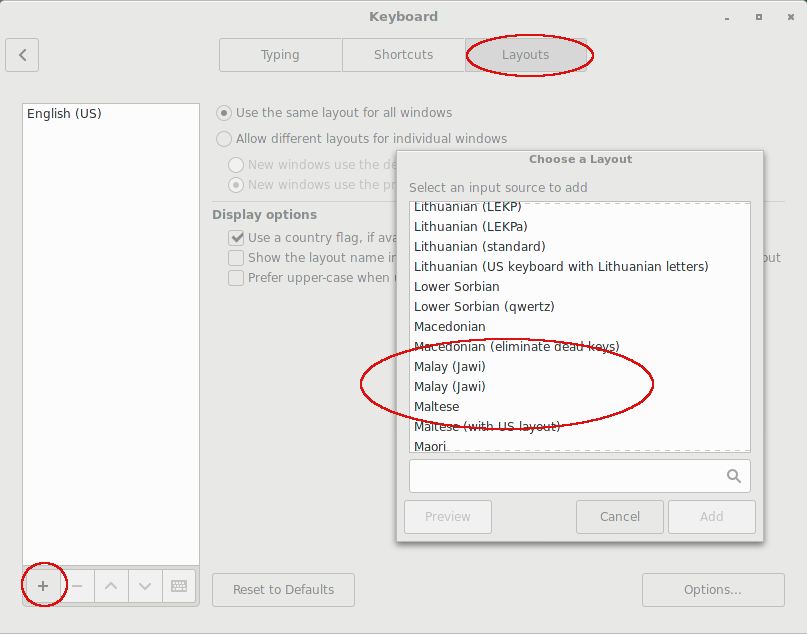
Well, as a matter of fact, I am not searching for iBus, but just just want to know how to add Malayalam and indic keyboard in >Preferences >Keyboard (Please find the screenshot) https://ibin.co/3GSh3qo5z0mY.png
I just want to add Malayalam keyboard there. I am using inscript to key-in Malayalam and other indic languages.
Offline
#6 2017-03-23 05:07:31
- Docbroke
- Member
- From: India
- Registered: 2015-06-13
- Posts: 1,475
Re: Malayalam Keyboard lay-out is missing
To input indic language you need either of ibus/scim/fcitx with m17n. Indic languages are not available where you are searching ( ?some gnome/kde tool). For details look at the respective wiki page.
Arch is home!
https://github.com/Docbroke
Offline
Pages: 1