You are not logged in.
- Topics: Active | Unanswered
#2451 2025-09-13 08:59:58
- UnkleWyan
- Member
- Registered: 2025-09-13
- Posts: 4
Re: Laptops which run Arch
I just installed onto an MSI RAIDER GE78 HX 13V.
Everything is working flawlessly, and I have never been so excited to use it more.
Offline
#2452 2025-10-20 18:52:05
- usr0
- Member
- From: out there
- Registered: 2020-07-01
- Posts: 2
Re: Laptops which run Arch
I am at root tty. again. I was doing so well. Dell e1707, t7600 cpu, 4 Gigs ram, GeForce Go 7950 GTX, 2 TB, multiboot w/ win7 ultimate, Arch/w Blackarch. One of 6.16 uprgades shredded my displays. I was trying to install from the archive. Almost had it. mirrors are 404 today. now, upgraded the install from june to 6.17. None of the linux kernals , 6.10 and up, nouveau or dkms nv nothing. shredded displays...
Oh well we'll see...
Offline
#2453 2025-11-19 05:49:32
- Asriel
- Member
- Registered: 2016-11-28
- Posts: 48
Re: Laptops which run Arch
Honor Magicbook Art 14, 2025 version. Everything works, except fingerprint that will not be ever supported.
Might need libinput quirk if your libinput is too old to make touchpad working.
With some kernel patching pretty efficient EAS can be activated so battery life in Linux will be close to Windows.
Offline
#2454 2025-12-05 21:14:20
- system72
- Member

- Registered: 2025-11-22
- Posts: 572
- Website
Offline
#2455 2025-12-23 15:34:15
- krakalackin
- Member
- Registered: 2025-12-22
- Posts: 3
Re: Laptops which run Arch
I started with a Lenovo T14s ThinkPad Gen1 AMD. Arch and Fedora worked great on it. I let the battery die one time and the laptop stopped registering the charge value/percentage. It would still charge. I troubleshot the issue and eventually came to the conclusion that the charge controller on the battery crapped out. So I bought a new aftermarket battery off Amazon. I installed the new battery and..the laptop stopped posting. It was working fine plugged in just before. In troubleshooting the problem I reinstalled the original battery and it wouldn't post with it either. I spent the next day trying all sorts of things: hard resets, removing the batteries, discharging the capacitors, booting with no battery just AC power, nothing. Eventually I had to give up.
Ultimately I bought a new Lenovo P14s ThinkPad Gen 6 AMD (21QL001WUS) on sale to replace it. It has a warranty and official Linux(Ubuntu & Fedora) support from Lenovo. I was running Fedora on it last month, but have since gone back to Arch. The laptop has been running great.
Offline
#2456 2026-01-01 16:59:15
- Leksii
- Member
- Registered: 2026-01-01
- Posts: 2
Re: Laptops which run Arch
The Samsung ATIV Smart PC Pro 700T XE700T1C tablet (i5-3317U, 4GB RAM, 128GB SSD) works perfectly right after installation. Additional settings were required for:
- Adjusting brightness using Fn + F2/F3;
- TPM 1.2
- The keyboard dock did not work after waking from sleep mode.
Also available (firmware installed), but not used: NFC.
The MacBook Air 6,2 - A1466 - 2632 works perfectly right after installation.
Minor effort was required to configure the network card (BCM4360) and webcam.
The MacBook Pro 11,3 - A1398 - 2745. The installation process is more complex than on the MacBook Air 6,2 due to the NVIDIA GeForce GT 750M graphics card. Nevertheless, this is the only Linux distribution where I managed to install the native nvidia-470xx driver. As a result, the operating system works perfectly.
Last edited by Leksii (2026-01-04 15:16:28)
Offline
#2457 2026-01-16 14:14:29
- muizz
- Member
- Registered: 2025-02-12
- Posts: 9
Re: Laptops which run Arch
I'm using an XMG Apex 17 21M.
XMG/Schenker are just yet more whitelabel brands for Clevo laptops, so really using Tuxedo or System76 is gonna be the same thing if not better. I know installing the Tuxedo DKMS driver basically works, you get all the special keyboard functionality working.
Offline
#2458 2026-01-23 13:17:20
- fluufy
- Member
- Registered: 2026-01-23
- Posts: 1
Re: Laptops which run Arch
Microsoft Surface Laptop 2, i7 1TB
Windows was really giving me the shits, especially when 11 took half my battery life (and half my private life). Since I had been running Endeavor, Manjaro, and finally Arch on an old NUC, I thought why not hack this Surface Laptop? The good news is, it works! The only missing features are the webcam (known issue), but it was a bit crap anyway, and the touchscreen. I could get the touchscreen with the custom linux-surface kernel, but the screen gets quite grotty so I'm not bothered. The best part is, my battery now lasts all day again. Windows really is so flabby it is literally warming the planet. But, there are some things to be aware of beyond what is documented here and at linux-surface:
- The 1TB SL1 and SL2 actually have 2x 500GB SSD drives combined with Microsoft's "Storage Spaces technology". This must be removed or Arch live environment can't use it. I ended up having to use a Windows live USB to remove this, then also overwrite both GUID Partition Tables and the MBR of the boot partition when installing Arch (otherwise they will appear to be 2x 1TB drives and the install will fail).
- Hilariously, to use said Windows live USB (or install Windows for dual-boot), you must connect a USB keyboard - it only installs drivers for the Surface Laptop keyboard once you get online! That means you also need a decent USB3 hub, as these things only have 1 USB A port. If you use the MS Surface Image it does have the drivers, but it also re-combines the SSDs with Storage Spaces so you can't install Arch! FFS. I'm sure I could make a custom ISO of either to get past this, but at the time it seemed like yet another pfaff.
- Unless you have a surface dock with a wired connection, it is essential to install the Marvell drivers from the optional packages. Otherwise you will reboot and have no WiFi, and get no further.
From that point, it is easy enough to find all the other bits you may need or want to install. I went with KDE because it's pretty, and because it can do touch if I ever want it. I did manage to get dual-boot working with Windows and Arch with secure boot, but after using both, Windows just seemed like a waste of space (and electricity) so I got rid of it. It is like having a new laptop. Instead of contemplating replacing the battery (which is incredibly difficult on these), just install Arch. It will double your battery life, even if you only have 85% health - which KDE will tell you in the system tray battery widget, instead of hiding it like Windows does 
Offline
#2459 2026-01-31 10:04:33
- SINO5035
- Member
- Registered: 2026-01-31
- Posts: 2
Re: Laptops which run Arch
Dell Inspiron 15-7548
GPU was broken so i disable it in kernel module
Offline
#2460 2026-02-04 02:08:16
- st4rstr4fe
- Member

- Registered: 2026-02-04
- Posts: 2
Re: Laptops which run Arch
asus chromebook from around 2020. it's the only working laptop i've got at the moment & the battery ribbon connection is broken, but it's working fine enough with XFCE & sum theme tweaks. how else do you think i'm posting this?
there may be a lot wrong with me... was i supposed to say something after ૮ ◞ ⸝⸝ ◟ ྀིა ?
▄▀▄▀▄▀▄▀▄▀▄▀▄▀▄▀▄▀▄▀▄▀▄▀▄▀▄▀▄▀▄▀▄▀▄▀▄▀▄▀▄▀▄▀▄
blobsky ❇ fuck ICE, ACAB, protect trans kids, black lives matter, kindly die if u don't agree ૮₍ ˶ᵔ ᵕ ᵔ˶ ₎ა
Offline
#2461 2026-02-10 14:08:06
- RosaLucy
- Member
- Registered: 2026-01-14
- Posts: 4
Re: Laptops which run Arch
Lenovo Yoga 7i - painless, only needed sof-firmware and linux-firmware drivers for hardware detection, everything else worked ootb.
Lenovo G50-45 - also painless, only needed linux-firmware.
Samsung RC512 - once again painless, only needed linux-firmware.
HP Pavillion 15-ec2041ne - needs nvidia/noveau so thats a pain but other than that worked ootb with linux-firmware.
Surface Pro 7+ - ran but needed a lot of kernel patches for touch and keyboard input as well as the camera, most issues fixed by using the custom linux-surface kernel.
Acer Aspire with an i3-7100 (dont have the exact name) - worked ootb completely, just needed linux-firmware and sof-firmware.
Offline
#2462 2026-02-11 07:18:18
- ArchAspirer762
- Member
- Registered: 2026-02-11
- Posts: 1
Re: Laptops which run Arch
I record one full day of working with my newly purchased Acer Aspire 14 AI laptop after my Arch installation. The experience has actually been a lot smoother than i expected. The intel ultra i7 lunar lake processor seems to be fairly compatible, although i haven't looked into specific benchmarks, or verified whether the npu actually works. Also, Linux seems to handle my wuxga oled panel flawlessly, and i have noticed a significant drop in resource usage (i am using i3). It feels much more lightweight and responsive; the fans are practically silent now and there's no overheating (these were problems on windows).
                  -`                     giorgos@arch-acer
                 .o+`                    -----------------
                `ooo/                    OS: Arch Linux x86_64
               `+oooo:                   Host: Aspire A14-52M (V1.32)
              `+oooooo:                  Kernel: Linux 6.18.8-arch2-1
              -+oooooo+:                 Uptime: 1 min
            `/:-:++oooo+:                Packages: 548 (pacman)
           `/++++/+++++++:               Shell: fish 4.4.0
          `/++++++++++++++:              Display (eDP-1): 1920x1200 @ 1.5x in 14", 60 Hz [Built-in]
         `/+++ooooooooooooo/`            WM: i3 4.25.1 (X11)
        ./ooosssso++osssssso+`           Cursor: Adwaita
       .oossssso-````/ossssss+`          Terminal: alacritty 0.16.1
      -osssssso.      :ssssssso.         Terminal Font: monospace (14.0pt, Regular)
     :osssssss/        osssso+++.        CPU: Intel(R) Core(TM) Ultra 7 256V (8) @ 4.80 GHz
    /ossssssss/        +ssssooo/-        GPU: Intel Arc Graphics 130V / 140V @ 1.95 GHz [Integrated]
  `/ossssso+/:-        -:/+osssso+-      Memory: 1.27 GiB / 15.28 GiB (8%)
 `+sso+:-`                 `.-/+oso:     Swap: 0 B / 7.64 GiB (0%)
`++:.                           `-/+/    Disk (/): 9.50 GiB / 475.94 GiB (2%) - btrfs
.`                                 `/    Local IP (wlan0): 192.168.2.2/24
                                         Battery (AP22ABN): 26% (3 hours, 42 mins remaining) [Discharging]
                                         Locale: en_US.UTF-8
Offline
#2463 2026-03-08 18:29:33
- EJSnow
- Member
- From: /home/ejsnow
- Registered: 2025-04-06
- Posts: 24
- Website
Re: Laptops which run Arch
I've been using a Lenovo Ideapad Flex 5 15IIL05 since August 2025 (hand-me-down from grandparents as the keyboard was within an inch of its life, they've had it since 2020). After fixing the keyboard, everything works flawlessly except the fingerprint reader: it's not officially supported and the third-party driver for it is somewhat buggy (crashes pretty often when waking from suspend). Other than that it works great.  The battery life is somehow twice what it got in Windows 11 and it runs much, much quieter and cooler in Arch. Not to mention it boots Arch in >20 seconds.
Only needed sof-firmware for audio, and everything else just works in KDE Plasma, even the touchscreen and auto-rotate in tablet mode (pretty big tablet though  ). It's impressive how far Linux has come lol.
Last edited by EJSnow (2026-03-08 19:03:42)
I hate the rabbit hole I have fallen down but the sunk-cost fallacy, pacman, and the AUR prevent me from picking up and moving to Fedora or something.
Offline
#2464 2026-03-31 01:58:01
- trintlermint
- Member

- From: <??>< fish land
- Registered: 2026-03-28
- Posts: 23
- Website
Re: Laptops which run Arch
I use a LG Gram 16 Inch, it was difficult to setup grub on it, and I had to fix some firmware issues to control some drivers, otherwise its a great, lightweight laptop!
Competitive Programming, C++ and some art. These are my drugs.
blog.trintler.me | trintler.me | team (() => {})();
Offline
#2465 2026-04-08 20:20:58
- glenjo
- Member
- From: Pacific NW
- Registered: 2020-06-09
- Posts: 70
Re: Laptops which run Arch
I picked up an inexpensive Dell laptop and installed CachyOS KDE. Everything works:
           .-------------------------:                    glen@cachyos-x8664
          .+=========================.                    ------------------
         :++===++==================-       :++-           OS: CachyOS x86_64
        :*++====+++++=============-        .==:           Host: Dell 15 DC15255 (1.1.0)
       -*+++=====+***++==========:                        Kernel: Linux 6.19.10-1-cachyos
      =*++++========------------:                         Uptime: 12 mins
     =*+++++=====-                     ...                Packages: 2197 (pacman)
   .+*+++++=-===:                    .=+++=:              Shell: fish 4.6.0
  :++++=====-==:                     -*****+              Display (BOE0DA6): 1920x1080 in 16", 60 Hz [Built-in]
 :++========-=.                      .=+**+.              DE: KDE Plasma 6.6.4
.+==========-.                          .                 WM: KWin (Wayland)
 :+++++++====-                                .--==-.     WM Theme: Breeze
  :++==========.                             :+++++++:    Theme: Breeze (Dark) [Qt], Breeze-Dark [GTK2], Breeze [GTK3]
   .-===========.                            =*****+*+    Icons: breeze-dark [Qt], breeze-dark [GTK2/3/4]
    .-===========:                           .+*****+:    Font: Noto Sans (10pt) [Qt], Noto Sans (10pt) [GTK2/3/4]
      -=======++++:::::::::::::::::::::::::-:  .---:      Cursor: capitaine (24px)
       :======++++====+++******************=.             Terminal: konsole 25.12.3
        :=====+++==========++++++++++++++*-               CPU: AMD Ryzen 7 7730U (16) @ 4.55 GHz
         .====++==============++++++++++*-                GPU: AMD Barcelo [Integrated]
          .===+==================+++++++:                 Memory: 3.01 GiB / 14.97 GiB (20%)
           .-=======================+++:                  Swap: 0 B / 30.97 GiB (0%)
             ..........................                   Disk (/): 139.00 GiB / 937.33 GiB (15%) - ext4
                                                          Local IP (wlan0): 192.168.1.19/24
                                                          Battery (0x35,0x35,0x39,0x35,0x00,0x00,0x00): 96% (6 hours, 34 mins remaining) [Discharging]
                                                          Locale: en_US.UTF-8
Last edited by glenjo (2026-04-08 20:21:34)
Offline
#2466 2026-04-19 10:53:40
- Salad
- Member
- From: Sweden
- Registered: 2026-04-19
- Posts: 1
Re: Laptops which run Arch
Nitro AN517-41 (BIOS V1.11)
Mostly painless, needed to set the following kernel command-line parameters:
- `nvidia-drm.modeset=1`, avoiding modesetting deadlocks
- `amdgpu.backlight=0`, fixes backlight
- `reboot=cold`, seems to prevent the Wi-Fi/Bluetooth module from misbehaving when OS switching
Caveats:
- dGPU has consistently failed to wake up from inactivity, so stop it from sleeping or fix whatever is causing it to fail when waking up. I turned off { `nvidia-suspend`, `nvidia-hibernate`, `nvidia-resume` } and turned on `nvidia-persistenced`
- Linuwu-Sense (fan/RGB control) does not work without modification (last time I checked). PXDiv's DAMX (comes with a Linuwu-Sense fork) comes with a convenient and useful workaround for unsupported devices, doesn't fix RGB
Last edited by Salad (2026-04-19 12:58:12)
Offline
#2467 2026-05-30 06:36:13
- hyprSpaceOS
- Member
- Registered: 2026-05-30
- Posts: 5
Re: Laptops which run Arch
Thinkpad T440s works excelent i think most Dell and Lenovo laptops works good
Offline
#2468 2026-05-30 17:33:16
- tgs
- Member
- Registered: 2026-05-30
- Posts: 1
Re: Laptops which run Arch
Lenovo Thinkpad X220 Tablet, an old machine that I found lying around. My first foray into Linux (outside of WSL and some remote access), and things are going well - WiFi, Bluetooth, printer all working. Recently hit a mild snag where fonts in some GUI applicatons (e.g. Cursor, Spotify) are displaying in a blocky, illegible manner. Others, e.g. Firefox, are displaying fine.
Offline
#2469 2026-08-29 09:12:34
- MNS1968
- Member
- Registered: 2023-12-28
- Posts: 30
Re: Laptops which run Arch
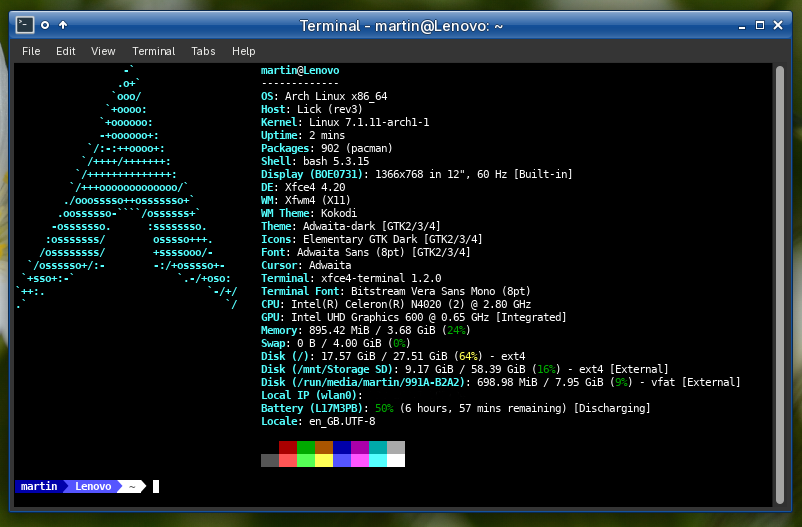
Lenovo ideapad 3i Chromebook - Model number: CB11IGL05 - Laptop running Archlinux for two years without any issues.
Chromebook BIOS replaced with MrChromebox.tech Full ROM firmware BIOS by disconnecting the battery connector to the motherboard but leaving the external power supply connected before install of new BIOS. This means you can disable hardware write-protection ~ Suggest backing up ChromeOS recovery USB before installation.
Link: MrChromebox custom UEFI or legacy firmware (BIOS) *USE WITH CAUTION!*
Once new Lick (rev3) BIOS is installed, installation procedure of Arch ISO was done via Ventoy. Note: with Celeron N4020 being only a 2 core CPU, I suggest either LXQT, Xfce desktop environments or possibly a window manager.
Last edited by MNS1968 (2026-08-29 12:56:31)
Offline
#2470 2026-08-29 20:07:19
- cloverskull
- Member
- Registered: 2018-09-30
- Posts: 280
Re: Laptops which run Arch
Running a System76 Oryx Pro (oryp10) here with everything working using kde plasma. Only issue is secure boot seems to be broken on this computer.
Offline
#2471 2026-08-30 09:20:55
- y8v
- Member

- Registered: 2026-05-28
- Posts: 57
Re: Laptops which run Arch
Thinkpad P50
"I hate snaps because they are snaps and snaps suck"
Offline
#2472 2026-09-21 13:06:31
- luich91
- Member
- Registered: 2021-10-12
- Posts: 49
Re: Laptops which run Arch
MacBook Pro 13" (Late 2011 – MacBookPro8,1)
Arch runs fast and smooth on this older machine after upgrading it with a 256 GB SSD and 4GB RAM.
What works OOTB: Intel HD Graphics (native modesetting), screen brightness, audio (PipeWire/ALSA), keyboard, and the trackpad with multi-touch gestures via libinput.
Wi-Fi / Bluetooth: Requires proprietary Broadcom drivers (broadcom-wl-dkms).
Offline
#2473 2026-09-21 16:27:54
- 42_ftdDEEZY
- Member
- Registered: 2026-09-21
- Posts: 2
Re: Laptops which run Arch
personally i use an old macbook pro (2015) it can run minecraft at 23 fps steadily with performance mods and it runs vs code great - the only bad thing is the broadcom wifi drivers
Offline
#2474 2026-09-30 08:40:08
- reboltalloys
- Member
- Registered: 2026-09-30
- Posts: 1
Re: Laptops which run Arch
I've been using an HP ZD7140 for around two and a half years, and overall it has been a very reliable Linux machine. Almost everything works without any issues; the only real exception is the media card reader, which seems to be a fairly common problem with this model.
The built-in Broadcom Wi-Fi was another challenge initially,since it required ndiswrapper before native support became available. Fortunately, Linux support has improved considerably since then.
I'm also looking forward to trying a ThinkPad T60, which I chose mainly because of its strong Linux compatibility and the amount of community support available for the hardware. I'll share my experience once I've had some time to set it up and test everything.
Offline