You are not logged in.
- Topics: Active | Unanswered
Pages: 1
#1 2017-08-20 13:03:01
- RobStyling
- Member
- Registered: 2017-08-20
- Posts: 2
Pulseaudio wont start
Hey,
A) I am new to Arch Linux and also to that Forum so please dont Judge me if i am posting this in the Wrong Topic, etc.
B) Now to the Main Topic of that Post. When i try to start pulseaudio this happends:
robin@arch /etc/pulse $ pulseaudio
W: [pulseaudio] pid.c: Stale PID file, overwriting.
E: [pulseaudio] module-alsa-card.c: Failed to find a working profile.
E: [pulseaudio] module.c: Failed to load module "module-alsa-card" (argument: "device_id="0" name="platform-bytcht_nocodec" card_name="alsa_card.platform-bytcht_nocodec" namereg_fail=false tsched=yes fixed_latency_range=no ignore_dB=no deferred_volume=yes use_ucm=yes card_properties="module-udev-detect.discovered=1""): initialization failed.
Killed
I dont know what is causing this and i already tried Googling it but the Soultions i found there were not helpful.
When i try to Run pulseaudio in System Mode this is the Output:
robin@arch /etc/pulse $ sudo pulseaudio --system
W: [pulseaudio] main.c: Running in system mode, but --disallow-exit not set.
W: [pulseaudio] main.c: Running in system mode, but --disallow-module-loading not set.
N: [pulseaudio] main.c: Running in system mode, forcibly disabling SHM mode.
N: [pulseaudio] main.c: Running in system mode, forcibly disabling exit idle time.
W: [pulseaudio] main.c: Home directory of user 'pulse' is not '/var/run/pulse', ignoring.
W: [pulseaudio] main.c: OK, so you are running PA in system mode. Please make sure that you actually do want to do that.
W: [pulseaudio] main.c: Please read http://www.freedesktop.org/wiki/Softwar … ystemWide/ for an explanation why system mode is usually a bad idea.
W: [pulseaudio] pid.c: Stale PID file, overwriting.
E: [pulseaudio] module-alsa-card.c: Failed to find a working profile.
E: [pulseaudio] module.c: Failed to load module "module-alsa-card" (argument: "device_id="0" name="platform-bytcht_nocodec" card_name="alsa_card.platform-bytcht_nocodec" namereg_fail=false tsched=yes fixed_latency_range=no ignore_dB=no deferred_volume=yes use_ucm=yes card_properties="module-udev-detect.discovered=1""): initialization failed.
W: [pulseaudio] authkey.c: Failed to open cookie file '/var/run/pulse/.config/pulse/cookie': No such file or directory
W: [pulseaudio] authkey.c: Failed to load authentication key '/var/run/pulse/.config/pulse/cookie': No such file or directory
W: [pulseaudio] authkey.c: Failed to open cookie file '/var/run/pulse/.pulse-cookie': No such file or directory
W: [pulseaudio] authkey.c: Failed to load authentication key '/var/run/pulse/.pulse-cookie': No such file or directory
Killed
I dont know whats causing this 
So if you could help me this would be fantastic.
Thanks,
Rob.
Offline
#2 2017-08-20 14:20:04
- ooo
- Member
- Registered: 2013-04-10
- Posts: 1,638
Re: Pulseaudio wont start
From that error I'm guessing pulseaudio can't use your default ALSA sound card for some reason.
Make sure you get sound working first without pulseaudio, using bare ALSA: https://wiki.archlinux.org/index.php/Ad … chitecture
Offline
#3 2017-08-20 15:41:46
- RobStyling
- Member
- Registered: 2017-08-20
- Posts: 2
Re: Pulseaudio wont start
After installing alsa-firmware, Alsamixer is displaying this:
http://fs5.directupload.net/images/170820/mkgz8pyl.png
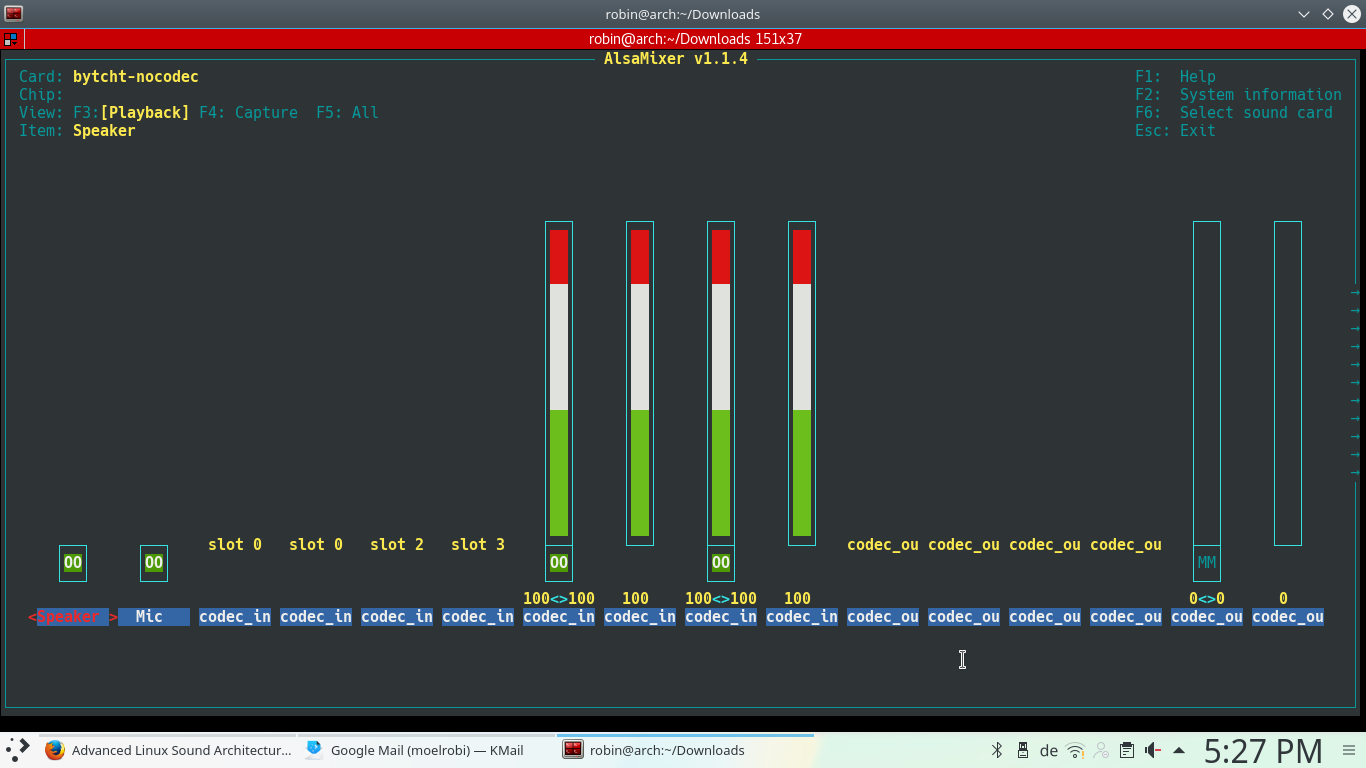
and alot of other "Codecs", "Media / In and Outs", "Modem / In and Outs", "pcm1 and 2 / Ins and Outs" and "sprout_loop_out"'s
When using aplay (soundfile) this is the Output:
robin@arch ~/Downloads $ aplay Dame-Auf.mp3
Playing raw data 'Dame-Auf.mp3' : Unsigned 8 bit, Rate 8000 Hz, Mono
aplay: set_params:1382: Unable to install hw params:
ACCESS: RW_INTERLEAVED
FORMAT: U8
SUBFORMAT: STD
SAMPLE_BITS: 8
FRAME_BITS: 8
CHANNELS: 1
RATE: 8000
PERIOD_TIME: 125000
PERIOD_SIZE: 1000
PERIOD_BYTES: 1000
PERIODS: 4
BUFFER_TIME: 500000
BUFFER_SIZE: 4000
BUFFER_BYTES: 4000
TICK_TIME: 0
but there is no Sound to be Played.
Regards,
Rob
Moderator Edit [ewaller] Converte image tags for over size image to url tags
https://wiki.archlinux.org/index.php/Co … s_and_code
Last edited by ewaller (2017-08-20 16:02:52)
Offline
#4 2017-08-20 19:10:56
- archimboldo
- Member

- Registered: 2016-03-07
- Posts: 232
Re: Pulseaudio wont start
Delete /config/pulse directory and reboot... Note that my answer is just as superficial like your request for help.
Rules for problems.
Everyone has problems. Animals have problems. And buildings. And cats, and trees.
Problems are your friends. Treat them well.
Offline
#5 2017-08-21 19:04:35
- ooo
- Member
- Registered: 2013-04-10
- Posts: 1,638
Re: Pulseaudio wont start
When using aplay (soundfile) this is the Output:
You can't use aplay with mp3 files. I'd suggest using speaker-test for testing anyway..
What's the sound card/chip on your system?
Offline
Pages: 1