You are not logged in.
- Topics: Active | Unanswered
Pages: 1
#1 2020-04-20 21:38:13
- lachesis
- Member
- Registered: 2012-07-17
- Posts: 9
new default console font
I noticed after an upgrade some time in the last month or two (not sure which sadly) that I have a new default font on my /dev/ttyX consoles. I've been trying to track down what this font is so I can set it explicitly in /etc/vconsole.conf (which does not exist on my system). `showconsolefont -i` gives 16x32x256 right after boot. However, this doesn't seem to be the default, as when I run `setfont -v` that terminal is set back to the old, crappy font of 8x16x256 size. I checked in /usr/share/kbd/consolefonts but none of those fonts claim to be 16x32. Just FYI, I don't have terminus-font installed (not that I want to use Terminus anyway).
So: how can I determine the console font that I'm currently using? Does anyone know what component upgraded to give me this new font? systemd? the kernel? kbd itself?
Here's a photo of the new font: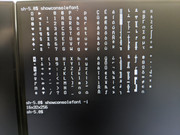
Last edited by lachesis (2020-04-20 21:50:15)
Offline
#2 2020-04-20 21:43:04
- loqs
- Member
- Registered: 2014-03-06
- Posts: 19,078
Re: new default console font
kernel change implementing https://bugs.archlinux.org/task/64861
Offline
#3 2020-04-20 21:57:50
- lachesis
- Member
- Registered: 2012-07-17
- Posts: 9
Re: new default console font
Thanks for the quick reply. Since the font is built into the kernel, is there some way to use vconsole.conf to specify it? Or maybe I'm barking up the wrong tree and have nothing to gain from trying to set up sd-vconsole and vconsole.conf since I'm happy with the given font anyway.
Offline
#4 2020-04-20 22:20:38
- loqs
- Member
- Registered: 2014-03-06
- Posts: 19,078
Re: new default console font
Looking at https://github.com/systemd/systemd/blob … tup.c#L166 vonsole-setup calls setfont without -O or -o so the old font is not written out.
You could call setfont with -O or -o to store the kernel's inbuilt font to resuse with vconsole.conf but I can see no advantage to this over leaving the font entry in vconsole.conf unset.
Offline
#5 2020-04-20 23:12:49
- lachesis
- Member
- Registered: 2012-07-17
- Posts: 9
Re: new default console font
Hey, that worked great! I saved the font with:
setfont -O ter32x16.psfu
gzip ter32x16.psfu
sudo mv ter32x16.psfu.gz /usr/share/kbd/consolefonts
Then I was able to restore the terminal that I'd set to default16x8 to that font by running:
setfont ter32x16I have not yet tested the systemd / vconsole.conf / sd-vconsole side of things. I'll report back here if/when I do.
Last edited by lachesis (2020-04-20 23:13:16)
Offline
Pages: 1