You are not logged in.
- Topics: Active | Unanswered
#1 2020-11-08 15:45:16
- AwesomePan
- Member
- Registered: 2020-11-08
- Posts: 4
Wifi card running hotter on Arch than other distros
So recently I've tried using arch because why not, and I really like my setup, the only thing that is bothering me, is the fact that the wireless card is running hotter than other distros (45°C on arch and 35°C on other distros), tried Fedora, Ubuntu, Pop OS, elementary OS, and only Arch seems to have the problem. Also notice hotter temps on Manjaro and Endeavour OS, both arch based distributions. All the distros were using the same kernel driver iwlwifi, but I only have this problem on arch based distros and Solus.
My wifi Card:
- Intel corporation Cannon Point-LP CNVi [Wireless-AC]
- kernel: 5.9.6-arch1-1
What I have tried:
- configuring power_save on iwlwifi config before boot.
- configuring power save on NetworkManager
- Installing intel microcode
- Regulatory domain
- downloading iwlwifi from AUR
Nothing so far has work.
When running on battery the temps are normal, only happens when connected to AC, so maybe there is a way to leave battery config when plugged in?
I've searched a lot and follow arch wiki tutorials about power saving but nothing seems to work, and I'm really noob when it comes to linux firmware.
Offline
#2 2020-11-08 16:25:53
- ewaller
- Administrator

- From: Pasadena, CA
- Registered: 2009-07-13
- Posts: 20,701
Re: Wifi card running hotter on Arch than other distros
Are other things all equal? That card is an AC card capable of connecting at different bandwidths. It is also (I think) a MIMO device with multiple transmitters and receivers.
Check your connection bandwidth on Arch and Arch forks and compare those against the others; you may find that Arch connects using more of the capability of the NIC. Or not.
Nothing is too wonderful to be true, if it be consistent with the laws of nature -- Michael Faraday
The shortest way to ruin a country is to give power to demagogues.— Dionysius of Halicarnassus
---
How to Ask Questions the Smart Way
Offline
#3 2020-11-08 17:16:48
- AwesomePan
- Member
- Registered: 2020-11-08
- Posts: 4
Re: Wifi card running hotter on Arch than other distros
You mean check bandwith as speed test or there is another way? (sorry kind of a noob), but if that is the case what could I do to make the card not do that? because I dont really see a comparable benefit and the keyboard gets more toasty and I suffer eczema on my fingers so it's not very pleaseant to type on.
Offline
#4 2020-11-08 21:44:19
- seth
- Member

- From: Won't reply 2 private help req
- Registered: 2012-09-03
- Posts: 77,696
Re: Wifi card running hotter on Arch than other distros
THE WIFI CHIP HEATS UP THE KEYBOARD???
That's rather not the wifi chip, there's a legal limit to it's transmit power what should define it's power consumption. That limit is usually 0.1W-0.2W
Have you measured (differences in) the power comsumption of the wifi chip or how did you come to the conclusion that it's the source of the heat?
Online
#5 2020-11-09 14:41:09
- AwesomePan
- Member
- Registered: 2020-11-08
- Posts: 4
Re: Wifi card running hotter on Arch than other distros
THE WIFI CHIP HEATS UP THE KEYBOARD???
That's rather not the wifi chip, there's a legal limit to it's transmit power what should define it's power consumption. That limit is usually 0.1W-0.2WHave you measured (differences in) the power comsumption of the wifi chip or how did you come to the conclusion that it's the source of the heat?
Because I measure the temperature with lm-sensors, and iwlwifi_1-virtual-0 is the only one that varies constantly (from 35° on ubuntu to 45° on arch), also it's the place where the wireless card is connected. I mean is not an unbearable heat source but for my eczema hand is a little bit uncomfortable, and also heat on the keyboard is quite normal on ultrabooks, specially mine which is an ASUS zenbook ux391, that is really light (1kg) and really thin (only has usb-c ports).
About the question of power consumption, I haven't measure it, tried using powertop but couldn't get good or constante results (I dont really know how to use it and it works kind of weird because you cant really measure watts that straightfoward I guess). But I figured, if this doesn't happen on battery, only when connected to AC, maybe that's the problem? But really no idea, that's why I'm in the newbie corner :c.
Offline
#6 2020-11-09 14:56:59
- seth
- Member
- From: Won't reply 2 private help req
- Registered: 2012-09-03
- Posts: 77,696
Re: Wifi card running hotter on Arch than other distros
It might simply be close to the heat pipe.
Things that heat up your notebook will be the CPU, the GPU and a fast charging battery.
Is Fn+F7 the wifi toggle? Does the chip heat up when rfkill'ing it (in doubt in software)?
What does /proc/cpuinfo say on the different systems?
And when comparing on battery and AC?
Also see https://wiki.archlinux.org/index.php/CP … cy_scaling and https://wiki.archlinux.org/index.php/Microcode and https://wiki.archlinux.org/index.php/Power_management
Online
#7 2020-11-09 15:45:32
- ewaller
- Administrator
- From: Pasadena, CA
- Registered: 2009-07-13
- Posts: 20,701
Re: Wifi card running hotter on Arch than other distros
You mean check bandwith as speed test or there is another way? (sorry kind of a noob), but if that is the case what could I do to make the card not do that? because I dont really see a comparable benefit and the keyboard gets more toasty and I suffer eczema on my fingers so it's not very pleaseant to type on.
I would check the bitrate returned by iwconfig and the bandwidth returned by iw wlo1 info (replace wlo1 with the name of your wireless interface)
You are looking to see if the bitrate is on the order of 56Mb/s vs 400Mb/s vs something higher. Again, I am just trying to compare apples to apples; although this is looking as if it is irrelevant.
As Seth points out, that chip is not going to heat up the entire box. That 35 or 45 degree measurement is highly localized and is probably the junction temperature, inside the chip. The heat needs to flow out of the chip through about 20 sq mm (*). The die heats up because of the power dissipated inside the , the thermal resistance through that small cross section, and the ability of the heat sink to keep the surface temperature of the package low. Even if the temperature is the heatsink temperature instead of the junction temperature, that will be a very localized effect; as Seth points out, other components will impact the temperature of the case of the computer by (several) orders of magnitude.
(*) unless the part is a BGA package or other package that thermally couples into power planes of the circuit board. For my purposes, I assume all the heat is removed through convection.
Nothing is too wonderful to be true, if it be consistent with the laws of nature -- Michael Faraday
The shortest way to ruin a country is to give power to demagogues.— Dionysius of Halicarnassus
---
How to Ask Questions the Smart Way
Offline
#8 2020-11-11 03:21:15
- AwesomePan
- Member
- Registered: 2020-11-08
- Posts: 4
Re: Wifi card running hotter on Arch than other distros
AwesomePan wrote:You mean check bandwith as speed test or there is another way? (sorry kind of a noob), but if that is the case what could I do to make the card not do that? because I dont really see a comparable benefit and the keyboard gets more toasty and I suffer eczema on my fingers so it's not very pleaseant to type on.
I would check the bitrate returned by iwconfig and the bandwidth returned by iw wlo1 info (replace wlo1 with the name of your wireless interface)
You are looking to see if the bitrate is on the order of 56Mb/s vs 400Mb/s vs something higher. Again, I am just trying to compare apples to apples; although this is looking as if it is irrelevant.
As Seth points out, that chip is not going to heat up the entire box. That 35 or 45 degree measurement is highly localized and is probably the junction temperature, inside the chip. The heat needs to flow out of the chip through about 20 sq mm (*). The die heats up because of the power dissipated inside the , the thermal resistance through that small cross section, and the ability of the heat sink to keep the surface temperature of the package low. Even if the temperature is the heatsink temperature instead of the junction temperature, that will be a very localized effect; as Seth points out, other components will impact the temperature of the case of the computer by (several) orders of magnitude.
(*) unless the part is a BGA package or other package that thermally couples into power planes of the circuit board. For my purposes, I assume all the heat is removed through convection.
Hi, sorry for responding too late, it has been an awful couple of days with my uni exams. So I checked the bitrate with iwconfig and as you pointed out de bitrate on AC goes a little bit higher, in the morning I read 150Mb/s on AC and 50ish Mb/s on battery, but now at night I read on both state the same bitrate (115Mb/s). About the bandwith haven't checked I still need to figure out how to install and use the iw command but haven't really had any time to do so.
About the heat up in the entire box, it is kind of true but pretty doubtfull it is the cause of the problem here, as the wifi card goes to 46°C on idle while the cpu is at 36°C with 0rpm on the fan, but with that said, when the CPU is toasty (<55°C) the wifi card also goes pretty close to the temperature of the cpu, except I haven't seen it surpassing 65°C. I install kubuntu just to check some things up and there the wifi card stayed at 35°C on idle but on more wifi demanding stuff like a video stream or video conference it too got to 48°C to 56°C depending there more of the CPU heat.
But even tho the cpu might affect temps on load, I don't think is the cause, here I post an image, you can see at the left the wifi card and that is not really near the cpu, and also as I mention before the card goes to 46-48°C while the cpu is at 36°C, so dont think that is the problem.
https://www.laptopmain.com/wp-content/u … iew-20.jpg
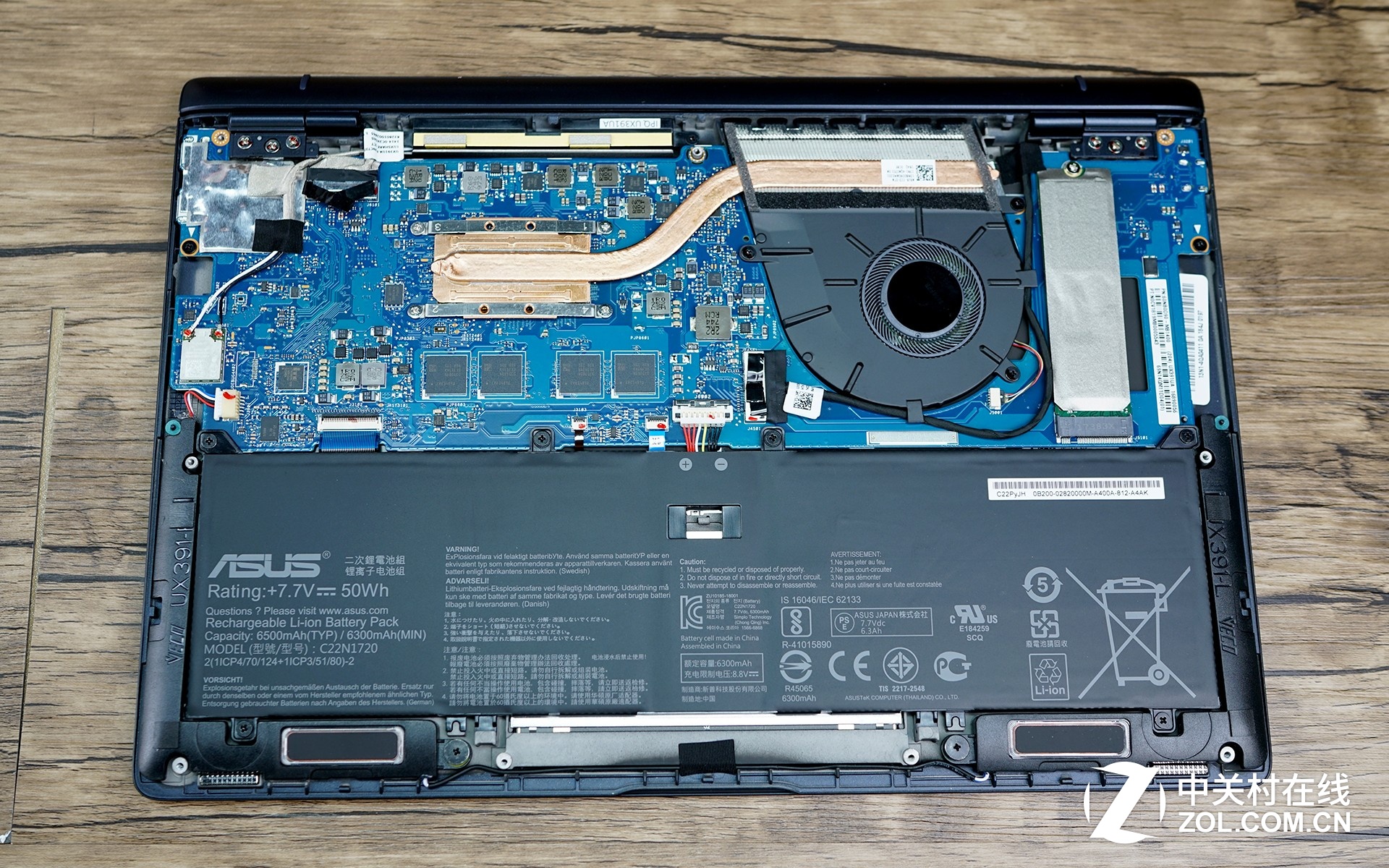
Thanks for trying to help me out, I still would like for the Wireless card on idle to go down to 35°C as it happens on kubuntu and on battery so if someone can still help me out or have the answer I'm eagerd to know and learn about it, but in the meantime, do you think this temps are harmful for the wireless card? because if not maybe I could just get use to it, because now that I'm in the rabbit hole of Arch, I don't really want to come out, love how lightweight and customizable arch is being, and also love AUR and of course the community.
Last edited by HalosGhost (2020-11-11 05:29:39)
Offline
#9 2020-11-11 05:30:45
- HalosGhost
- Forum Fellow

- From: Twin Cities, MN
- Registered: 2012-06-22
- Posts: 2,097
- Website
Re: Wifi card running hotter on Arch than other distros
Welcome to the BBS. Please read the code of conduct in-full before posting again. In particular, take notice of the requirement that images posted to this BBS should be thumbnails only.
All the best,
-HG
Offline
#10 2020-11-11 06:47:11
- seth
- Member
- From: Won't reply 2 private help req
- Registered: 2012-09-03
- Posts: 77,696
Re: Wifi card running hotter on Arch than other distros
Output of
pacman -Qi linux-firmwareAnd compare https://wiki.archlinux.org/index.php/Ne … _interface on cold and hot systems.
Also check "iw dev <interface> get power_save" on battery and AC.
Finally see how "iwlwifi.swcrypto=1" impacts the situation (comparing "systool -vm iwlwifi" among systems might reveal crucial differences)
But to will re-iterate: the wifi chip does not draw enough power to heat up a notebook even if it was turning all of it straight into heat.
If that is the symptom you're operating on, you're chasing a goose here.
Online