You are not logged in.
- Topics: Active | Unanswered
Pages: 1
#1 2020-11-10 23:03:16
- theiades
- Member
- Registered: 2020-11-09
- Posts: 11
[SOLVED] nordvpnd service hangs activating
https://i.postimg.cc/pLW718Fp/image.png
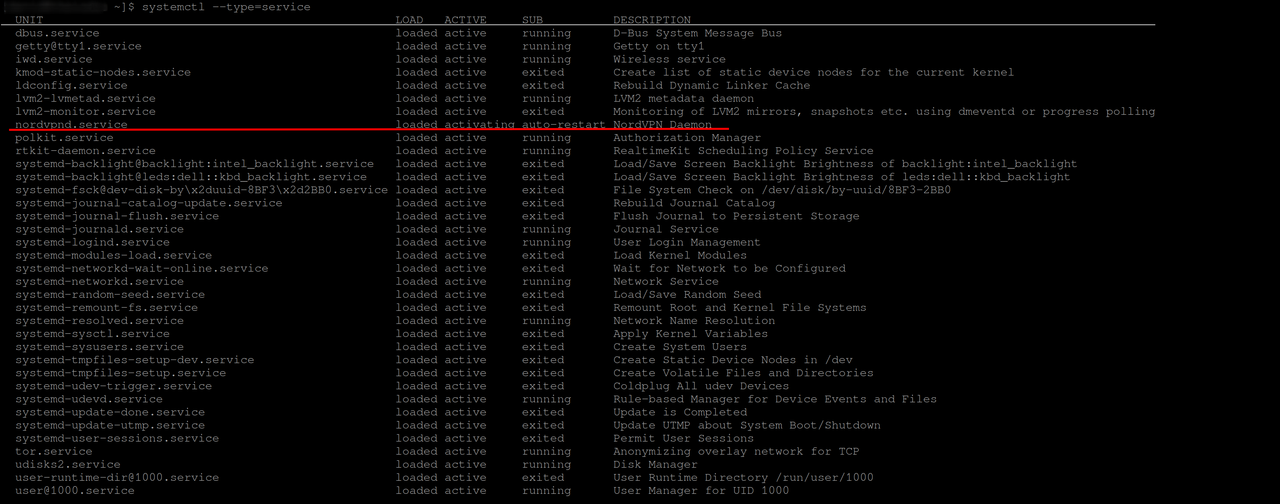
causing
[theia@theiades ~]$ nordvpn status
Whoops! Cannot reach System Daemon.
moderator edit -- replaced oversized image with link.
Pasting pictures and code
Last edited by theiades (2020-11-14 20:17:10)
Offline
#2 2020-11-14 18:58:12
- theiades
- Member
- Registered: 2020-11-09
- Posts: 11
Re: [SOLVED] nordvpnd service hangs activating
I ran
journalctl -u nordvpnd.serviceand I noticed its trying to execute nordvpnd on /usr/sbin, which does not exists. I don't have a /usr/sbin
here's the output
[root@theiades david]# journalctl -u nordvpnd.service
-- Logs begin at Sun 2020-11-08 18:30:41 CST, end at Sat 2020-11-14 13:48:38 CST. --
Nov 10 10:34:45 theiades systemd[1]: Started NordVPN Daemon.
Nov 10 10:34:45 theiades systemd[244337]: nordvpnd.service: Failed to execute command: No such file or directory
Nov 10 10:34:45 theiades systemd[244337]: nordvpnd.service: Failed at step EXEC spawning /usr/sbin/nordvpnd: No such file or directory
Nov 10 10:34:45 theiades systemd[1]: nordvpnd.service: Main process exited, code=exited, status=203/EXEC
Nov 10 10:34:45 theiades systemd[1]: nordvpnd.service: Failed with result 'exit-code'.
nordvpnd does exists on /usr/bin though. Any hints on how should I proceed from here?
Last edited by theiades (2020-11-14 18:59:10)
Offline
#3 2020-11-14 19:01:12
- GaKu999
- Member
- From: US/Eastern
- Registered: 2020-06-21
- Posts: 696
Re: [SOLVED] nordvpnd service hangs activating
/usr/sbin is symlink to /usr/bin, are you sure /usr/sbin is not there?
Post output of:
pacman -Qkk filesystemLast edited by GaKu999 (2020-11-14 19:02:25)
Offline
#4 2020-11-14 19:04:58
- theiades
- Member
- Registered: 2020-11-09
- Posts: 11
Re: [SOLVED] nordvpnd service hangs activating
[david@theiades ~]$ pacman -Qkk filesystem
warning: filesystem: /etc/arch-release (Modification time mismatch)
warning: filesystem: /etc/arch-release (Size mismatch)
backup file: filesystem: /etc/fstab (Modification time mismatch)
backup file: filesystem: /etc/fstab (Size mismatch)
backup file: filesystem: /etc/group (Modification time mismatch)
backup file: filesystem: /etc/group (Size mismatch)
backup file: filesystem: /etc/gshadow (Modification time mismatch)
backup file: filesystem: /etc/gshadow (Size mismatch)
backup file: filesystem: /etc/hosts (Modification time mismatch)
backup file: filesystem: /etc/hosts (Size mismatch)
backup file: filesystem: /etc/passwd (Modification time mismatch)
backup file: filesystem: /etc/passwd (Size mismatch)
warning: filesystem: /etc/resolv.conf (File type mismatch)
backup file: filesystem: /etc/shadow (Modification time mismatch)
backup file: filesystem: /etc/shadow (Size mismatch)
backup file: filesystem: /etc/shells (Modification time mismatch)
backup file: filesystem: /etc/shells (Size mismatch)
warning: filesystem: /usr/sbin (No such file or directory)
filesystem: 118 total files, 3 altered files
Offline
#5 2020-11-14 19:08:43
- GaKu999
- Member
- From: US/Eastern
- Registered: 2020-06-21
- Posts: 696
Re: [SOLVED] nordvpnd service hangs activating
Post output of:
cat /etc/arch-releaseReInstall filesystem.
Any idea of why /usr/sbin got deleted?
Offline
#6 2020-11-14 19:09:59
- graysky
- Wiki Maintainer

- From: :wq
- Registered: 2008-12-01
- Posts: 10,734
- Website
Re: [SOLVED] nordvpnd service hangs activating
As an aside, why not just export an openvpn config from them and use the official openvpn client?
Offline
#7 2020-11-14 19:12:28
- theiades
- Member
- Registered: 2020-11-09
- Posts: 11
Re: [SOLVED] nordvpnd service hangs activating
[david@theiades ~]$ cat /etc/arch-release
Arch Linux releaseAny idea of why /usr/sbin got deleted?
No, I don't remember deleting it. I fresh installed arch a week ago.
Offline
#8 2020-11-14 19:12:54
- GaKu999
- Member
- From: US/Eastern
- Registered: 2020-06-21
- Posts: 696
Re: [SOLVED] nordvpnd service hangs activating
As an aside, why not just export an openvpn config from them and use the official openvpn client?
Wasn't wireshark a thing already. 
Go with wireshark directly, I think I read somewhere that NordVPN was in the progress of implementing wireshark on their end.
(Unless there are reasons/trivia about why OpenVPN is preferred that I don't know due to my 0 usage of VPNs)
Offline
#9 2020-11-14 19:18:26
- GaKu999
- Member
- From: US/Eastern
- Registered: 2020-06-21
- Posts: 696
Re: [SOLVED] nordvpnd service hangs activating
[david@theiades ~]$ cat /etc/arch-release
Arch Linux release
GaKu999 wrote:Any idea of why /usr/sbin got deleted?
No, I don't remember deleting it. I fresh installed arch a week ago.
Aside from the fact that I don't know who is touching /etc/arch-release, a file not in the backup array of filesystem, modifications cleared upon updates...
Everything should be good now that you reinstalled filesystem.
Does it work properly following instructions of graysky if you choose OpenVPN?
Last edited by GaKu999 (2020-11-14 19:19:42)
Offline
#10 2020-11-14 19:25:21
- theiades
- Member
- Registered: 2020-11-09
- Posts: 11
Re: [SOLVED] nordvpnd service hangs activating
As an aside, why not just export an openvpn config from them and use the official openvpn client?
I tried and it won't authenticate, I think openvpn ports are being blocked where I lived, I've heard of some workaround like changing the ports openvpn use but I haven't have time to look into it.
heres the output
2020-11-14 14:16:45 WARNING: --ping should normally be used with --ping-restart or --ping-exit
2020-11-14 14:16:45 Outgoing Control Channel Authentication: Using 512 bit message hash 'SHA512' for HMAC authentication
2020-11-14 14:16:45 Incoming Control Channel Authentication: Using 512 bit message hash 'SHA512' for HMAC authentication
2020-11-14 14:16:45 TCP/UDP: Preserving recently used remote address: [AF_INET]104.149.35.146:1194
2020-11-14 14:16:45 Socket Buffers: R=[212992->212992] S=[212992->212992]
2020-11-14 14:16:45 UDP link local: (not bound)
2020-11-14 14:16:45 UDP link remote: [AF_INET]104.149.35.146:1194
2020-11-14 14:17:45 TLS Error: TLS key negotiation failed to occur within 60 seconds (check your network connectivity)
2020-11-14 14:17:45 TLS Error: TLS handshake failed
2020-11-14 14:17:45 SIGUSR1[soft,tls-error] received, process restarting
Offline
#11 2020-11-14 19:26:30
- theiades
- Member
- Registered: 2020-11-09
- Posts: 11
Re: [SOLVED] nordvpnd service hangs activating
Aside from the fact that I don't know who is touching /etc/arch-release, a file not in the backup array of filesystem, modifications cleared upon updates...
Everything should be good now that you reinstalled filesystem.
I'm not sure what you mean with reinstalled filesystem
Offline
#12 2020-11-14 19:30:01
- GaKu999
- Member
- From: US/Eastern
- Registered: 2020-06-21
- Posts: 696
Re: [SOLVED] nordvpnd service hangs activating
GaKu999 wrote:Aside from the fact that I don't know who is touching /etc/arch-release, a file not in the backup array of filesystem, modifications cleared upon updates...
Everything should be good now that you reinstalled filesystem.I'm not sure what you mean with reinstalled filesystem
Reinstalled the filesystem package? Anyways since you seem confused I assume you made the link directly...which is also an option.
If you face a firewall try other servers of NordVPN.
If none work...you have a problem...
Also, did you configure a local firewall?
Last edited by GaKu999 (2020-11-14 19:33:41)
Offline
#13 2020-11-14 19:36:41
- theiades
- Member
- Registered: 2020-11-09
- Posts: 11
Re: [SOLVED] nordvpnd service hangs activating
Reinstalled the filesystem package? Anyways since you seem confused I assume you made the link directly...which is also an option.
do you mean this? Sorry, I'm not used to the terminology 
Also, did you configure a local firewall?
No
Offline
#14 2020-11-14 19:48:27
- theiades
- Member
- Registered: 2020-11-09
- Posts: 11
Re: [SOLVED] nordvpnd service hangs activating
I assume you made the link directly...which is also an option.
well, I did
ln -s /usr/bin /usr/sbinand now nordvpn seems to work, so I guess that solves it
[david@theiades ~]$ systemctl --type=service
  UNIT                                                  LOAD   ACTIVE SUB     DESCRIPTION
  nordvpnd.service                                      loaded active running NordVPN Daemon


LOAD   = Reflects whether the unit definition was properly loaded.
ACTIVE = The high-level unit activation state, i.e. generalization of SUB.
SUB    = The low-level unit activation state, values depend on unit type.

38 loaded units listed. Pass --all to see loaded but inactive units, too.
To show all installed unit files use 'systemctl list-unit-files'.
[david@theiades ~]$ nordvpn c
Please enter your login details.
Offline
#15 2020-11-14 20:16:28
- theiades
- Member
- Registered: 2020-11-09
- Posts: 11
Re: [SOLVED] nordvpnd service hangs activating
well, I did
ln -s /usr/bin /usr/sbinand now nordvpn seems to work, so I guess that solves it
I removed the link above and did
$ sudo pacman -S $(pacman -Qnq)and now I have a /usr/sbin, so I guess reinstalling the filesystem is the way to go, thanks GaKu999, graysky
Last edited by theiades (2020-11-14 22:30:20)
Offline
#16 2020-11-14 23:36:28
- GaKu999
- Member
- From: US/Eastern
- Registered: 2020-06-21
- Posts: 696
Re: [SOLVED] nordvpnd service hangs activating
I said ‘filesystem’ package buddy, 
pacman -Qo /usr/sbinThere’s one package called filesystem that defines the base Arch filesystem structure.
But no problem, just don’t go again doing a full reinstall because there’s a missing link, but in any case, that may have dealt with stranded missing files if there where more...
Offline
Pages: 1