You are not logged in.
- Topics: Active | Unanswered
#1 2021-03-07 10:21:10
- ArchNewbieKernel
- Banned

- Registered: 2020-09-25
- Posts: 74
[SOLVED] GNOME nautilus Files as default File Manager
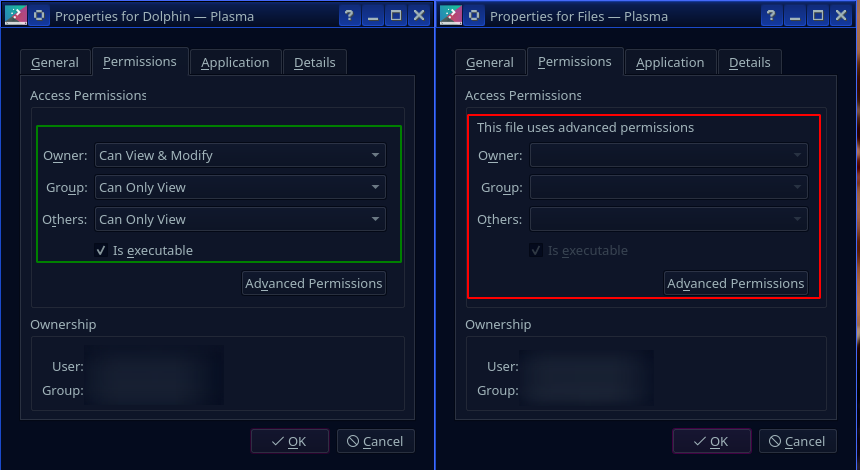
How comes the gnome vers of "file manager", Nautilus, has theirs chmod section outgreyed but Dolphin's file manager not? By checking "Advanced Permissions" for both, they look the same...
I wan't to replace Dolphin File Manager by Nautilus File Manager, so I can use Nautilus File Manager as the default Files-software, how to do so?
Is it troublesome to delete Dolphin FIle Manager afterwards?
Thanks in Advance!
Last edited by ArchNewbieKernel (2021-03-07 12:00:10)
Offline
#2 2021-03-07 11:29:39
- V1del
- Forum Moderator

- Registered: 2012-10-16
- Posts: 25,343
Re: [SOLVED] GNOME nautilus Files as default File Manager
You can change the default file manager application in system settings. The reason one is greyed out and not the other is likely that one shows you a user local .desktop file (because you might've done an adjustment to dolphins desktop file via kmenuedit or so) and the one from nautilus shows the system wide desktop file that can't be manipulated by a normal user.
See https://wiki.archlinux.org/index.php/De … plications and https://wiki.archlinux.org/index.php/Desktop_entries for more general information.
You should be able to remove dolphin normally it's not a hard dep for anything (other than konqueror and dolphin-plugins for obvious reasons).
Last edited by V1del (2021-03-07 12:01:28)
Offline
#3 2021-03-07 11:59:43
- ArchNewbieKernel
- Banned
- Registered: 2020-09-25
- Posts: 74
Re: [SOLVED] GNOME nautilus Files as default File Manager
Thank you so much for the fast replies to my latest Threads!
Offline