You are not logged in.
- Topics: Active | Unanswered
#1 2021-04-22 21:29:55
- BlackSwan
- Member
- From: Toronto, ON, Canada
- Registered: 2009-05-15
- Posts: 6
[WORKAROUND] Random characters missing in KDE Plasma
I've just installed KDE, and Plasma components are missing random characters. The issue seems to effect Plasma elements only, not all KDE applications: you can see in the screenshot that the panel, app launcher and System Settings are messed up, but Dolphin looks fine. It's not a font issue, because any given character (capital "K," lowercase "n," etc.) appears sometimes; just to be sure, I changed the font from Noto to Liberation, but that didn't help. I installed the LXQt desktop to see if there was a more general problem with X or Qt, but everything looks fine there.
Any suggestions would be much appreciated!
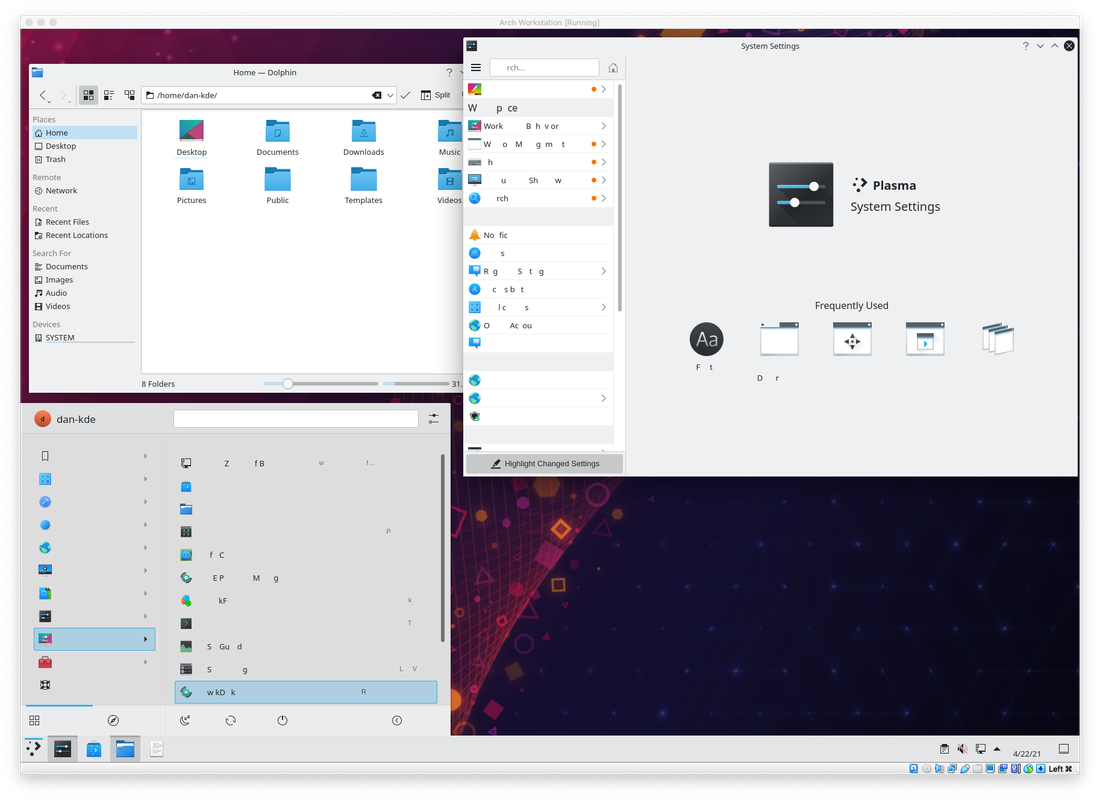
Last edited by BlackSwan (2021-04-24 14:17:17)
Offline
#2 2021-04-24 00:39:45
- BlackSwan
- Member
- From: Toronto, ON, Canada
- Registered: 2009-05-15
- Posts: 6
Re: [WORKAROUND] Random characters missing in KDE Plasma
So I've found a workable solution. My Arch installation is actually a Virtualbox guest, and turning off 3d acceleration fixes the issue. Of course, I really wouldn't mind having 3D acceleration! Any thoughts? I'm using the VMSVGA graphics controller in my Virtualbox settings, and the xf86-video-vmware driver.
Offline
#3 2023-12-15 18:14:35
- codehead
- Member
- Registered: 2023-12-15
- Posts: 1
Re: [WORKAROUND] Random characters missing in KDE Plasma
Thanks for the workaround. I had the same problem running KDE in Debian 12 under VirtualBox so this issue is definitely not Arch-specific, but this is the only relevant result I got from Google. Will try other video device/3D acceleration/antialiasing combinations and report my findings if any.
Offline