You are not logged in.
- Topics: Active | Unanswered
#1 2021-12-30 20:14:21
- gp3x
- Member
- Registered: 2021-12-30
- Posts: 1
The system won't boot after trying to reserve devices with VFIO (wiki)
Hi, I've got a problem:
I want to use a KVM virtual machine with PCI passthrough, so I can use Windows 10 in a container.
Doing that would allow me to play games and use my VR.
I've been trying to get this working for over a week now, and I am stuck in the same place.
I used this Arch Linux wiki article, to be precise I can't get past the Binding vfio-pci via device ID part.
In pure desperation I have uninstalled my previous Arch and I have installed it again using the "archinstall" command, in fear of having fucked up some nvidia driver during the installation, turns out I didn't.
So now I have a fresh installation (2 hours ago) done by "archinstall" (so I can't possibly have fucked up anything) and I still can't get VFIO working.
System Configuration
I have an Intel CPU (i7-9700F) and a NVIDIA GeForce GTX 1660.
In my BIOS I have set my primary VGA to the Onboard one, and Intel Virtualization Technology is enabled (I have used virtual machines before).
I also installed 2 kernels, the standard one and the LTS one.
(The LTS kernel won't be used for VFIO, thus I'm not including it)
This is my /boot/loader/entries/2021-12-30_18-43-49_linux.conf
# Created by: archinstall
# Created on: 2021-12-30_18-43-49
title Arch Linux (linux)
linux /vmlinuz-linux
initrd /intel-ucode.img
initrd /initramfs-linux.img
options root=PARTUUID=c664b092-edac-4115-a8b9-0481f754c1dd rw intel_pstate=no_hwp rootfstype=ext4 intel_iommu=on iommu=pt
Note that I've added "intel_iommu=on" and "iommu=pt"
My /etc/mkinitcpio.conf looks like this
MODULES=(vfio_pci vfio vfio_iommu_type1 vfio_virqfd)
BINARIES=()
FILES=()
HOOKS=(base udev autodetect keyboard keymap modconf block filesystems fsck)
And lastly we have the "/etc/modprobe.d/vfio.conf", please note that when I put "vfio.conf" in "/etc/modprobe.d/" and re-generate the initramfs the system won't boot up
(for the re-generation I use "sudo mkinitcpio -P")
I have also tried passing the IDs in the boot entry file (as kernel parameters) but to no avail.
Here's the content of the file
options vfio-pci ids=10de:2184,10de:1aebThe two IDs are my graphics card and the relative audio controller
BTW, "dmesg" confirms that IOMMU is enabled --> [ 0.059122] DMAR: IOMMU enabled
and Virtualization too --> DMAR: Intel(R) Virtualization Technology for Directed I/O
I'm gonna post the output of "lspci -nn"
00:00.0 Host bridge [0600]: Intel Corporation 8th/9th Gen Core 8-core Desktop Processor Host Bridge/DRAM Registers [Coffee Lake S] [8086:3e30] (rev 0d)
00:01.0 PCI bridge [0604]: Intel Corporation 6th-10th Gen Core Processor PCIe Controller (x16) [8086:1901] (rev 0d)
00:12.0 Signal processing controller [1180]: Intel Corporation Cannon Lake PCH Thermal Controller [8086:a379] (rev 10)
00:14.0 USB controller [0c03]: Intel Corporation Cannon Lake PCH USB 3.1 xHCI Host Controller [8086:a36d] (rev 10)
00:14.2 RAM memory [0500]: Intel Corporation Cannon Lake PCH Shared SRAM [8086:a36f] (rev 10)
00:16.0 Communication controller [0780]: Intel Corporation Cannon Lake PCH HECI Controller [8086:a360] (rev 10)
00:17.0 SATA controller [0106]: Intel Corporation Cannon Lake PCH SATA AHCI Controller [8086:a352] (rev 10)
00:1b.0 PCI bridge [0604]: Intel Corporation Cannon Lake PCH PCI Express Root Port #21 [8086:a32c] (rev f0)
00:1d.0 PCI bridge [0604]: Intel Corporation Cannon Lake PCH PCI Express Root Port #9 [8086:a330] (rev f0)
00:1f.0 ISA bridge [0601]: Intel Corporation Z390 Chipset LPC/eSPI Controller [8086:a305] (rev 10)
00:1f.3 Audio device [0403]: Intel Corporation Cannon Lake PCH cAVS [8086:a348] (rev 10)
00:1f.4 SMBus [0c05]: Intel Corporation Cannon Lake PCH SMBus Controller [8086:a323] (rev 10)
00:1f.5 Serial bus controller [0c80]: Intel Corporation Cannon Lake PCH SPI Controller [8086:a324] (rev 10)
00:1f.6 Ethernet controller [0200]: Intel Corporation Ethernet Connection (7) I219-V [8086:15bc] (rev 10)
01:00.0 VGA compatible controller [0300]: NVIDIA Corporation TU116 [GeForce GTX 1660] [10de:2184] (rev a1)
01:00.1 Audio device [0403]: NVIDIA Corporation TU116 High Definition Audio Controller [10de:1aeb] (rev a1)
01:00.2 USB controller [0c03]: NVIDIA Corporation TU116 USB 3.1 Host Controller [10de:1aec] (rev a1)
01:00.3 Serial bus controller [0c80]: NVIDIA Corporation TU116 USB Type-C UCSI Controller [10de:1aed] (rev a1)
03:00.0 Non-Volatile memory controller [0108]: Micron/Crucial Technology P1 NVMe PCIe SSD [c0a9:2263] (rev 03)
And as you can see the IDs match
Now, when I use the "vfio.conf" file and reboot I get this output and it stays like this forever
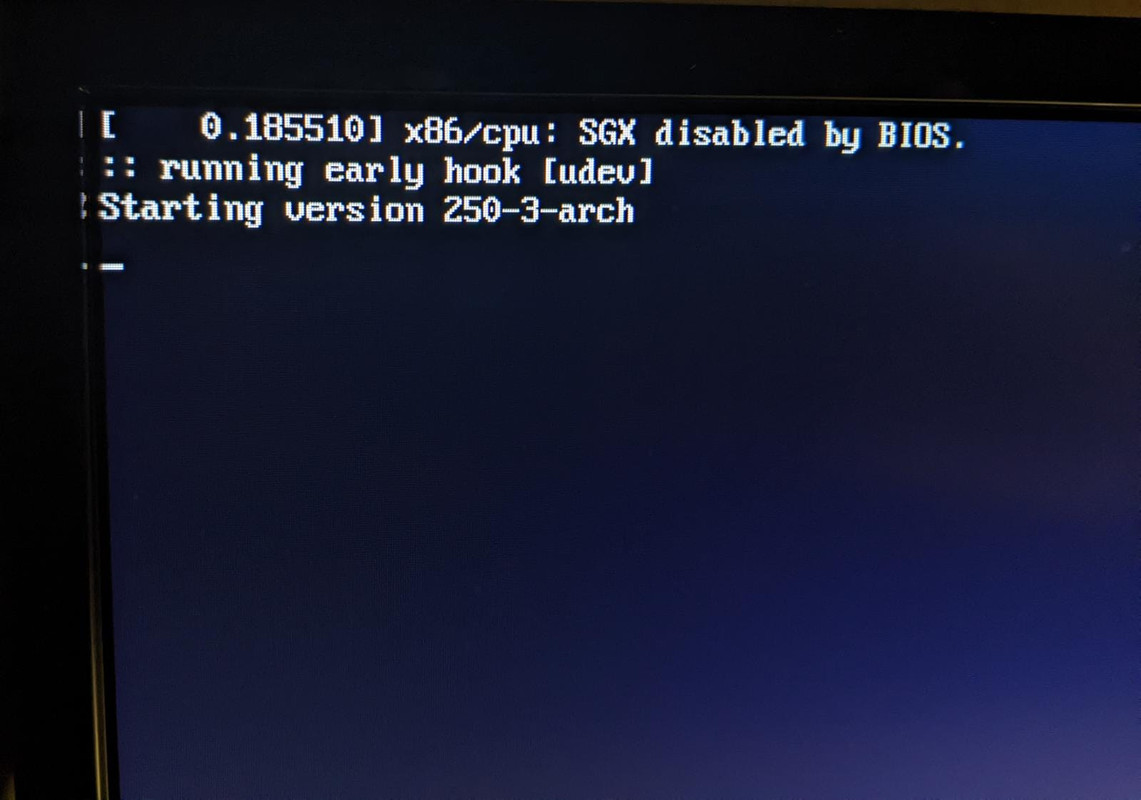
I'm pretty desperate and I don't know what to do, I'm using this forum as a last resort, because I have a pretty terrible experience with forums (stackoverflow), so I was hoping someone could help me, I might have to go back to Windows 10
Thanks to everyone in advance
Offline