You are not logged in.
- Topics: Active | Unanswered
#1 2022-01-09 13:19:48
- WasabiThumbs
- Member
- Registered: 2022-01-09
- Posts: 7
[Solved] CTRL+ALT+F1 doesn't get me into TTY mode
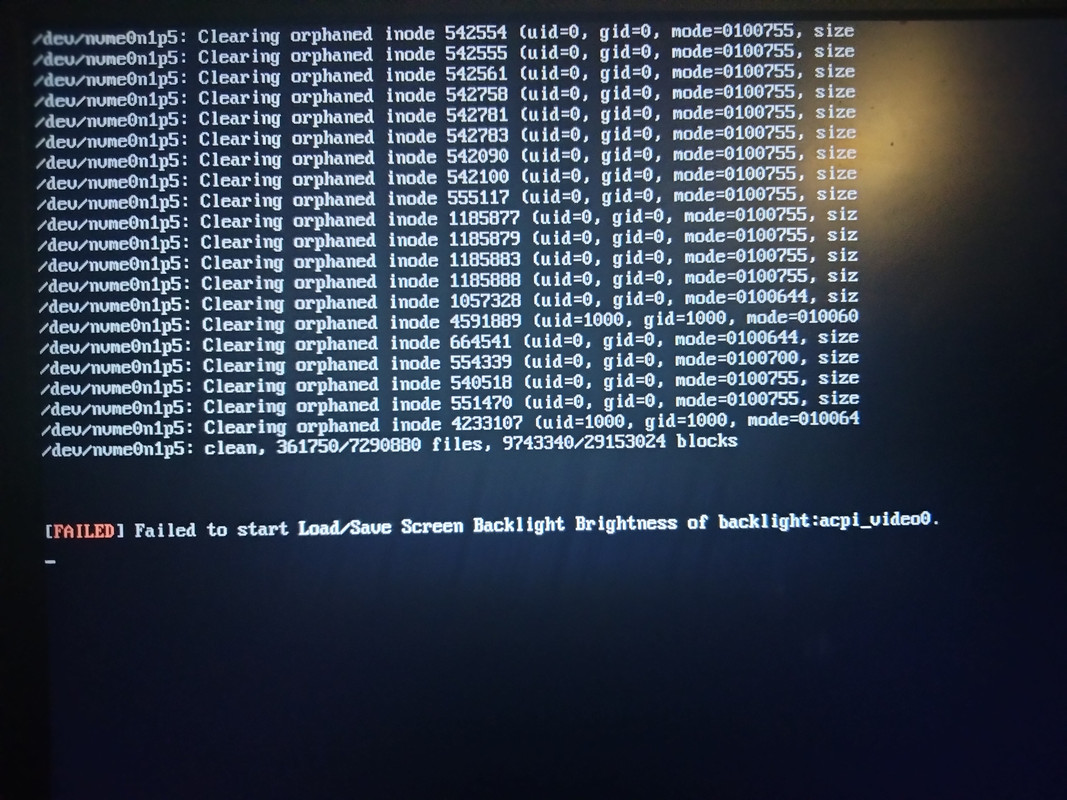
I have just about the most bare-bones Arch setup imaginable (XFCE4/lightdm) dual booting with Windows. I needed to suspend the X server, so I did CTRL+ALT+F1 and it hung. Image below. I also tried F2, however attempting to stop lightdm or xorg from there made it restart immediately and bring me straight to the greeter, also messing up my desktop settings a bit in the process. Sorry for not providing much more information, I'm not really sure what to look for.
https://i.postimg.cc/pTQC0b8Q/IMG-20220109-080703.jpg
moderator edit -- replaced oversized image with link.
Pasting pictures and code
Last edited by WasabiThumbs (2022-01-10 15:35:14)
Offline
#2 2022-01-09 13:38:40
- seth
- Member

- From: Won't reply 2 private help req
- Registered: 2012-09-03
- Posts: 77,109
Re: [Solved] CTRL+ALT+F1 doesn't get me into TTY mode
attempting to stop lightdm or xorg from there made it restart immediately and bring me straight to the greeter
Attempting "how"? You either want to stop the service or isolate the multi-user.target, https://wiki.archlinux.org/title/System … ent_target
Simply killing lightdm will restart it.
Offline
#3 2022-01-09 15:03:49
- Trilby
- Inspector Parrot

- Registered: 2011-11-29
- Posts: 30,492
- Website
Re: [Solved] CTRL+ALT+F1 doesn't get me into TTY mode
This may be a silly question - but have you tried pressing enter on the screen that you showed in the image? Those are all messages that should show up on tty1 (well, most of them shouldn't show up anywhere ... they are disk errors, but if the errors exist, they'll be shown on tty1). It's possible tty1 is just being spammed with those errors but is otherwise working and hitting enter might get the prompt redrawn.
"UNIX is simple and coherent" - Dennis Ritchie; "GNU's Not Unix" - Richard Stallman
Offline
#4 2022-01-09 15:44:42
- Head_on_a_Stick
- Member

- From: The Wirral
- Registered: 2014-02-20
- Posts: 9,003
- Website
Re: [Solved] CTRL+ALT+F1 doesn't get me into TTY mode
The lightdm.service unit file has this line:
Conflicts=getty@tty1.serviceSo TTY1 doesn't run when LightDM is started.
And sorry for going off-topic but I can't resist:
I have just about the most bare-bones Arch setup imaginable (XFCE4/lightdm)
A full desktop environment and a display manager is the complete opposite of "bare-bones".
Jin, Jîyan, Azadî
Offline
#5 2022-01-10 10:02:26
- WasabiThumbs
- Member
- Registered: 2022-01-09
- Posts: 7
Re: [Solved] CTRL+ALT+F1 doesn't get me into TTY mode
You either want to stop the service or isolate the multi-user.target
systemctl stop lightdm did the trick for me. No idea why I didn't try that, seems obvious now. Noobs will be noobs
A full desktop environment and a display manager is the complete opposite of "bare-bones".
I guess, Arch philosophy dictates that anything past the kernel is optional. I was mostly just trying to express that I didn't do anything special that could be expected to change the functionality of the F1/2 hotkeys. Though I bet most people do use a DE if Arch is one of two operating systems on their PC, except in the case of servers where I believe Debian dominates.
Offline
#6 2022-01-10 13:19:57
- Trilby
- Inspector Parrot
- Registered: 2011-11-29
- Posts: 30,492
- Website
Re: [Solved] CTRL+ALT+F1 doesn't get me into TTY mode
Though I bet ...
I wish you really would. We'd make some easy money off of you.
"UNIX is simple and coherent" - Dennis Ritchie; "GNU's Not Unix" - Richard Stallman
Offline
#7 2022-01-10 14:55:34
- seth
- Member
- From: Won't reply 2 private help req
- Registered: 2012-09-03
- Posts: 77,109
Re: [Solved] CTRL+ALT+F1 doesn't get me into TTY mode
He didn't say what he'd bet, though. Might be your right arm 
@WasabiThumbds, please always remember to mark resolved threads by editing your initial posts subject - so others will know that there's no task left, but maybe a solution to find.
Thanks.
Offline
#8 2022-01-10 14:57:52
- Trilby
- Inspector Parrot
- Registered: 2011-11-29
- Posts: 30,492
- Website
Re: [Solved] CTRL+ALT+F1 doesn't get me into TTY mode
He didn't say what he'd bet, though. Might be your right arm
'Tis only a flesh wound!
"UNIX is simple and coherent" - Dennis Ritchie; "GNU's Not Unix" - Richard Stallman
Offline
#9 2022-01-10 15:03:17
- seth
- Member
- From: Won't reply 2 private help req
- Registered: 2012-09-03
- Posts: 77,109
Re: [Solved] CTRL+ALT+F1 doesn't get me into TTY mode
You're gonna bite his legs off?
Offline
#10 2022-01-10 15:39:38
- WasabiThumbs
- Member
- Registered: 2022-01-09
- Posts: 7
Re: [Solved] CTRL+ALT+F1 doesn't get me into TTY mode
He didn't say what he'd bet, though.
I bet my pride and dignity! I had no idea that there were skinwalkers that actually regularly used arch without a DE, I apologize. I have updated the thread title and can now return to polite society.
Offline