You are not logged in.
- Topics: Active | Unanswered
#1 2022-12-20 18:15:54
- ArchDoru
- Member
- From: Tennessee, USA
- Registered: 2020-05-07
- Posts: 36
Cannot login with LTS kernel
Only 3 day old Arch Linux MATE install, on an old Acer ROG G75JX laptop.
No script, no tricks, no gimmicks - just good'ol fashioned CLI type command line install...
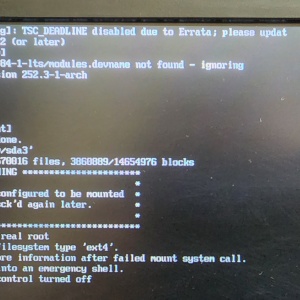
After the latest update from lts-5.18.83 to lts-5.18.84, I can no longer login with the LTS Kernel.
For the LTS boot, after the message post, the keyboard is dead, I cannot type anything, like login to the TTY and such...
Regular Linux Kernel logs in just fine, so I can still use the laptop.
I am using rEFInd as my bootloader, on an old Acer ROG G75JX laptop.
Here is my neofetch:
                   -`                    archdoru@Asus-ROG-G75JX
                  .o+`                   -----------------------
                 `ooo/                   OS: Arch Linux x86_64
                `+oooo:                  Host: G750JX 1.0
               `+oooooo:                 Kernel: 6.0.12-arch1-1
               -+oooooo+:                Uptime: 8 mins
             `/:-:++oooo+:               Packages: 1111 (pacman)
            `/++++/+++++++:              Shell: bash 5.1.16
           `/++++++++++++++:             Resolution: 1920x1080
          `/+++ooooooooooooo/`           DE: MATE 1.26.0
         ./ooosssso++osssssso+`          WM: Metacity (Marco)
        .oossssso-````/ossssss+`         Theme: Arc-Dark [GTK2/3]
       -osssssso.      :ssssssso.        Icons: oxygen-mint9-arch [GTK2/3]
      :osssssss/        osssso+++.       Terminal: mate-terminal
     /ossssssss/        +ssssooo/-       Terminal Font: Monospace Bold 16
   `/ossssso+/:-        -:/+osssso+-     CPU: Intel i7-4700HQ (8) @ 3.400GHz
  `+sso+:-`                 `.-/+oso:    CPU Usage: 2%
 `++:.                           `-/+/   GPU: NVIDIA GeForce GTX 770M
 .`                                 `/   GPU Driver: NVIDIA 470.161.03
                                         Memory: 1359MiB / 32020MiB
Things I tried so far:
Rollback to the previous LTS version 5.18.83 - still will not boot the LTS kernel
re-update to 5.18.84 did not work either
re-install nvidia-470xx-dkms, and also re-install nvidia-470xx-utils still no joy... 
re-install intel-ucode did nothing either.
Here's the boot post snapshot I took with my phone:
Last edited by ArchDoru (2022-12-20 18:51:20)
Offline
#2 2022-12-20 18:18:51
- Scimmia
- Fellow

- Registered: 2012-09-01
- Posts: 13,729
Re: Cannot login with LTS kernel
The warning shown there means your initramfs doesn't match the kernel. Check your bootloader config, make sure you're loading the correct thing.
Offline
#3 2022-12-20 18:35:13
- ArchDoru
- Member
- From: Tennessee, USA
- Registered: 2020-05-07
- Posts: 36
Re: Cannot login with LTS kernel
@Scimmia:
The warning shown there means your initramfs doesn't match the kernel. Check your bootloader config, make sure you're loading the correct thing.
Thank you for your fast reply.
Like I said, the regular linux kernel (6.0.12-arch1-1) boots just fine.
Also, bear in mind that I'm using rEFInd, not GRUB...
I also ran:
su
mkinitcpio -p linux-lts
mkinitcpio -p linux
Maybe you can be a bit more explicit, I'm still rather new to Arch, been using Linux Mint for the last 12 years...
Like how do I check the bootloader? Can you please list the command for that here? Thanks.
Last edited by ArchDoru (2022-12-20 18:56:24)
Offline
#4 2022-12-20 18:37:07
- Scimmia
- Fellow
- Registered: 2012-09-01
- Posts: 13,729
Re: Cannot login with LTS kernel
How did you install this system?
Offline
#5 2022-12-20 18:40:44
- ArchDoru
- Member
- From: Tennessee, USA
- Registered: 2020-05-07
- Posts: 36
Re: Cannot login with LTS kernel
How did you install this system?
The old fashion way, line by line, in a CLI environment.
I did not use any cheat, any script, any shortcut.
I pre-partitioned my drive with GParted off of a live USB with Mint 21, after which I booted into the Arch Installer, SSH into it from my Linux Mint Desktop PC, and kept on typing (or rather copy/pasting) . That is the only "cheat" i used, just to make things a little easier...
Last edited by ArchDoru (2022-12-20 22:19:05)
Offline
#6 2022-12-20 18:42:08
- Scimmia
- Fellow
- Registered: 2012-09-01
- Posts: 13,729
Re: Cannot login with LTS kernel
Then you know what bootloader you're using and how you configured it, as you did it manually, right?
Offline
#7 2022-12-20 18:44:23
- ArchDoru
- Member
- From: Tennessee, USA
- Registered: 2020-05-07
- Posts: 36
Re: Cannot login with LTS kernel
How did you install this system?
And if that's what you meant, here's my partitioning scheme too:
[b][color=blue][archdoru@Asus-ROG-G75JX ~]$ lsblk
NAME   MAJ:MIN RM   SIZE RO TYPE MOUNTPOINTS
sda      8:0    0 111.8G  0 disk
├─sda1   8:1    0   512M  0 part /boot/EFI
├─sda2   8:2    0   512M  0 part
├─sda3   8:3    0  55.9G  0 part /
└─sda4   8:4    0  54.9G  0 part
sdb      8:16   0 931.5G  0 disk
├─sdb1   8:17   0     8G  0 part [SWAP]
└─sdb2   8:18   0 923.5G  0 part /home
sr0     11:0    1  1024M  0 rom  [/color][/b]
sda2 and sda4 are for a future dual boot with Linux Mint 21.1 MATE, once the final version will be released in a few days (BETA is out now).
At the moment, sda2 and sda4 are empty, not used by my system...
Last edited by ArchDoru (2022-12-20 18:50:37)
Offline
#8 2022-12-20 18:46:20
- Slithery
- Administrator

- From: Norfolk, UK
- Registered: 2013-12-01
- Posts: 5,776
Re: Cannot login with LTS kernel
Please edit your posts and put [code] [/code] tags around all commands and their outputs instead of using colours, it makes things much easier to read for everyone.
https://bbs.archlinux.org/help.php#bbcode
Thanks
Offline
#9 2022-12-20 18:49:17
- ArchDoru
- Member
- From: Tennessee, USA
- Registered: 2020-05-07
- Posts: 36
Re: Cannot login with LTS kernel
Then you know what bootloader you're using and how you configured it, as you did it manually, right?
Like I said, I installed rEFINd as my bootloader.
Just a wild guess...
Since the regular kernel 6.0.12-arch1-1 is booting fine, the bootloader works, right?
Maybe for some reason, after the update from 5.18.83 to 5.18.84 it does not see or load the LTS kernel properly???
Last edited by ArchDoru (2022-12-20 18:49:35)
Offline
#10 2022-12-20 18:54:55
- ArchDoru
- Member
- From: Tennessee, USA
- Registered: 2020-05-07
- Posts: 36
Re: Cannot login with LTS kernel
Please edit your posts and put [code] [/code] tags around all commands and their outputs instead of using colours, it makes things much easier to read for everyone.
https://bbs.archlinux.org/help.php#bbcodeThanks
Sorry, I'm not used to this forum layout...
On the Linux Mint forum they have buttons that do that for you automatically, as well as insert pics, emojis, links, etc ...
Had to Google how to add BOLD and color, so please forgive for now
BTW, I did edit everything with code /code, as requested.
Offline
#11 2022-12-20 19:00:40
- schard
- Forum Moderator

- From: Hannover
- Registered: 2016-05-06
- Posts: 2,705
- Website
Re: Cannot login with LTS kernel
We still haven't seen your rEFInd config...
Inofficial first vice president of the Rust Evangelism Strike Force
Offline
#12 2022-12-20 19:08:08
- ArchDoru
- Member
- From: Tennessee, USA
- Registered: 2020-05-07
- Posts: 36
Re: Cannot login with LTS kernel
Then you know what bootloader you're using and how you configured it, as you did it manually, right?
I looked over my /boot/refind_linux.conf
As far as I can tell, there's nothing wrong there...
"Boot with minimal options" "ro root=UUID=ae544fdc-edcd-4040-b8e2-feef77c713d1 video1920x1080"And the ROOT ("/") partition UUID is matching...
# Static information about the filesystems.
# See fstab(5) for details.

# <file system> <dir> <type> <options> <dump> <pass>
# /dev/sda3 UUID=ae544fdc-edcd-4040-b8e2-feef77c713d1
LABEL=ROOT-ARCH         /               ext4            rw,relatime     0 1

# /dev/sdb2 UUID=0973d114-b26c-486f-b397-7e59ff5cb11f
LABEL=LINUX-HOMES       /home           ext4            rw,relatime     0 2

# /dev/sda1 UUID=C13C-F050
LABEL=ARCH              /boot/EFI       vfat            rw,relatime,fmask=0022,>

# /dev/sdb1 UUID=62a9217a-a972-4525-b2e7-bc749fd42ae5
LABEL=SWAP-LINUX        none            swap            defaults        0 0
Offline
#13 2022-12-20 19:20:48
- ArchDoru
- Member
- From: Tennessee, USA
- Registered: 2020-05-07
- Posts: 36
Re: Cannot login with LTS kernel
We still haven't seen your rEFInd config...
Here it is:
/boot/refind_linux.conf
"Boot with minimal options" "ro root=UUID=ae544fdc-edcd-4040-b8e2-feef77c713d1 video1920x1080"Also, the /etc/mkinitcpio.conf...
 vim:set ft=sh
# MODULES
# The following modules are loaded before any boot hooks are
# run.  Advanced users may wish to specify all system modules
# in this array.  For instance:
#     MODULES=(usbhid xhci_hcd)
MODULES=()

# BINARIES
# This setting includes any additional binaries a given user may
# wish into the CPIO image.  This is run last, so it may be used to
# override the actual binaries included by a given hook
# BINARIES are dependency parsed, so you may safely ignore libraries
BINARIES=()

# FILES
# This setting is similar to BINARIES above, however, files are added
# as-is and are not parsed in any way.  This is useful for config files.
FILES=()

# HOOKS
# This is the most important setting in this file.  The HOOKS control the
# modules and scripts added to the image, and what happens at boot time.
# Order is important, and it is recommended that you do not change the
# order in which HOOKS are added.  Run 'mkinitcpio -H <hook name>' for
# help on a given hook.
# 'base' is _required_ unless you know precisely what you are doing.
# 'udev' is _required_ in order to automatically load modules
# 'filesystems' is _required_ unless you specify your fs modules in MODULES
# Examples:
##   This setup specifies all modules in the MODULES setting above.
##   No RAID, lvm2, or encrypted root is needed.
#    HOOKS=(base)
#
##   This setup will autodetect all modules for your system and should
##   work as a sane default
#    HOOKS=(base udev autodetect modconf block filesystems fsck)
#
##   This setup will generate a 'full' image which supports most systems.
##   No autodetection is done.
#    HOOKS=(base udev modconf block filesystems fsck)
#
##   This setup assembles a mdadm array with an encrypted root file system.
##   Note: See 'mkinitcpio -H mdadm_udev' for more information on RAID devices.
#    HOOKS=(base udev modconf keyboard keymap consolefont block mdadm_udev encrypt filesystems fsck)
#
##   This setup loads an lvm2 volume group.
#    HOOKS=(base udev modconf block lvm2 filesystems fsck)
#
##   NOTE: If you have /usr on a separate partition, you MUST include the
#    usr and fsck hooks.
HOOKS=(base udev autodetect modconf kms keyboard keymap consolefont block filesystems fsck)

# COMPRESSION
# Use this to compress the initramfs image. By default, zstd compression
# is used. Use 'cat' to create an uncompressed image.
#COMPRESSION="zstd"
#COMPRESSION="gzip"
#COMPRESSION="bzip2"
#COMPRESSION="lzma"
#COMPRESSION="xz"
#COMPRESSION="lzop"
#COMPRESSION="lz4"

# COMPRESSION_OPTIONS
# Additional options for the compressor
#COMPRESSION_OPTIONS=()

# MODULES_DECOMPRESS
# Decompress kernel modules during initramfs creation.
# Enable to speedup boot process, disable to save RAM
# during early userspace. Switch (yes/no).
#MODULES_DECOMPRESS="yes"
Offline
#14 2022-12-20 19:22:10
- Scimmia
- Fellow
- Registered: 2012-09-01
- Posts: 13,729
Re: Cannot login with LTS kernel
If that's all you've configured, you're relying on automatic configuration, and it's screwing up. Not a surprise, really, automatic bootloader configuration sucks. Do it manually.
Offline
#15 2022-12-20 19:31:16
- ArchDoru
- Member
- From: Tennessee, USA
- Registered: 2020-05-07
- Posts: 36
Re: Cannot login with LTS kernel
UPDATE
I tried re-installing both
pacman -S linux-firmwareas well as...
pacman -S sof-firmwareStill the LTS kernel will not boot...
Offline
#16 2022-12-20 19:38:44
- Scimmia
- Fellow
- Registered: 2012-09-01
- Posts: 13,729
Re: Cannot login with LTS kernel
The error has nothing to do with firmware, that never had any chance of working. The problem is in the bootloader configuration.
Offline
#17 2022-12-20 19:55:20
- ArchDoru
- Member
- From: Tennessee, USA
- Registered: 2020-05-07
- Posts: 36
Re: Cannot login with LTS kernel
The error has nothing to do with firmware, that never had any chance of working. The problem is in the bootloader configuration.
OK, maybe you can help me by telling me more precisely what to do...
A step-by-step code line instruction will be greatly appreciated. ❤️❤️❤️
Like I said, I'm still fairly new to Arch, thus my knowledge is somewhat limited. But I'm willing to learn...
So...
Help me Obi-Wan-Kenobi, you're my only hope
Offline
#18 2022-12-20 19:59:26
- Scimmia
- Fellow
- Registered: 2012-09-01
- Posts: 13,729
Re: Cannot login with LTS kernel
It's all on the refind wiki page.
Offline
#19 2022-12-20 20:01:52
- 2ManyDogs
- Forum Fellow
- Registered: 2012-01-15
- Posts: 4,648
Re: Cannot login with LTS kernel
OK, maybe you can help me by telling me more precisely what to do...
Read the wiki: https://wiki.archlinux.org/title/REFInd#Configuration
A step-by-step code line instruction will be greatly appreciated.
We don't do that here. Read the wiki, try something, and post a detailed description of what you did and what happened if it didn't work.
And stop using bold and colored text. They are annoying and not necessary.
Offline
#20 2022-12-20 20:38:54
- schard
- Forum Moderator
- From: Hannover
- Registered: 2016-05-06
- Posts: 2,705
- Website
Re: Cannot login with LTS kernel
I also ran:
su
mkinitcpio -p linux-lts
mkinitcpio -p linux
What's the full output of those commands?
"Boot with minimal options" "ro root=UUID=ae544fdc-edcd-4040-b8e2-feef77c713d1 video1920x1080"
So much for the ro-warning.
Inofficial first vice president of the Rust Evangelism Strike Force
Offline
#21 2022-12-20 21:11:44
- ArchDoru
- Member
- From: Tennessee, USA
- Registered: 2020-05-07
- Posts: 36
Re: Cannot login with LTS kernel
Read the wiki: https://wiki.archlinux.org/title/REFInd#Configuration
A step-by-step code line instruction will be greatly appreciated.
We don't do that here. Read the wiki, try something, and post a detailed description of what you did and what happened if it didn't work.
OK, point taken. I will try to limit the use of colors and bold. Thank you for letting me know that it annoys you.
Just a personal thought, if I may. Or maybe a suggestion...
And I sincerely hope that it will not annoy you...
You said:
We don't do that here.
Well, maybe you should...
At least to a certain extent.
That way more and more people might be inclined to try and use Arch, knowing that real-time human help is available.
I'm on many FB Linux groups, as well as other Distro forums. And one of the topics that come on often is just this, the Arch forum, and how they always send you to the wiki.
And you, me or nobody else for that matter wants to hear what some people have to say about that, and in what terms.
Granted, the Arch Wiki is a great source of information, but it does not always address a specific problem, situation, case or issue. Human input is always much to the point.
FINAL NOTE:
It is not my intention to aggravate or offend anyone, and if I did in any way shape or form, I apologize.
I just wanted to answer to your comment, that's all. Sounded just a tad harsh to me...
None of us were born with a mouse in our hand and a keyboard in our lap. We all learned from somewhere and/or somebody. It is just a question of chronology.
Like for example, you learned a while ago what I'm trying to learn just now.
Have a lovely day @2ManyDogs, and thanks for your input.
Offline
#22 2022-12-20 21:23:39
- ArchDoru
- Member
- From: Tennessee, USA
- Registered: 2020-05-07
- Posts: 36
Re: Cannot login with LTS kernel
@schard
ArchDoru wrote:I also ran:
su
mkinitcpio -p linux-lts
mkinitcpio -p linux
What's the full output of those commands?
ArchDoru wrote:"Boot with minimal options" "ro root=UUID=ae544fdc-edcd-4040-b8e2-feef77c713d1 video1920x1080"So much for the ro-warning.
Thanks again for your reply.
No errors in RED if that's what you mean...
Just a bunch of WARNINGS in yellow, which as far as I know, I should just ignore, right?
At least that's what all tutorials for installation say...
Here are the posts:
[root@Asus-ROG-G75JX archdoru]# mkinitcpio -p linux-lts
==> Building image from preset: /etc/mkinitcpio.d/linux-lts.preset: 'default'
  -> -k /boot/vmlinuz-linux-lts -c /etc/mkinitcpio.conf -g /boot/initramfs-linux-lts.img
==> Starting build: 5.15.84-1-lts
  -> Running build hook: [base]
  -> Running build hook: [udev]
  -> Running build hook: [autodetect]
  -> Running build hook: [modconf]
  -> Running build hook: [kms]
  -> Running build hook: [keyboard]
  -> Running build hook: [keymap]
/etc/vconsole.conf: line 1: ...: command not found
  -> Running build hook: [consolefont]
/etc/vconsole.conf: line 1: ...: command not found
  -> Running build hook: [block]
  -> Running build hook: [filesystems]
  -> Running build hook: [fsck]
==> Generating module dependencies
==> Creating zstd-compressed initcpio image: /boot/initramfs-linux-lts.img
==> Image generation successful
==> Building image from preset: /etc/mkinitcpio.d/linux-lts.preset: 'fallback'
  -> -k /boot/vmlinuz-linux-lts -c /etc/mkinitcpio.conf -g /boot/initramfs-linux-lts-fallback.img -S autodetect
==> Starting build: 5.15.84-1-lts
  -> Running build hook: [base]
  -> Running build hook: [udev]
  -> Running build hook: [modconf]
  -> Running build hook: [kms]
==> WARNING: Possibly missing firmware for module: ast
  -> Running build hook: [keyboard]
==> WARNING: Possibly missing firmware for module: xhci_pci
  -> Running build hook: [keymap]
/etc/vconsole.conf: line 1: ...: command not found
  -> Running build hook: [consolefont]
/etc/vconsole.conf: line 1: ...: command not found
  -> Running build hook: [block]
==> WARNING: Possibly missing firmware for module: aic94xx
==> WARNING: Possibly missing firmware for module: qed
==> WARNING: Possibly missing firmware for module: bfa
==> WARNING: Possibly missing firmware for module: qla1280
==> WARNING: Possibly missing firmware for module: wd719x
==> WARNING: Possibly missing firmware for module: qla2xxx
  -> Running build hook: [filesystems]
  -> Running build hook: [fsck]
==> Generating module dependencies
==> Creating zstd-compressed initcpio image: /boot/initramfs-linux-lts-fallback.img
==> Image generation successful
And...
[root@Asus-ROG-G75JX archdoru]# mkinitcpio -p linux
==> Building image from preset: /etc/mkinitcpio.d/linux.preset: 'default'
  -> -k /boot/vmlinuz-linux -c /etc/mkinitcpio.conf -g /boot/initramfs-linux.img
==> Starting build: 6.0.12-arch1-1
  -> Running build hook: [base]
  -> Running build hook: [udev]
  -> Running build hook: [autodetect]
  -> Running build hook: [modconf]
  -> Running build hook: [kms]
  -> Running build hook: [keyboard]
  -> Running build hook: [keymap]
/etc/vconsole.conf: line 1: ...: command not found
  -> Running build hook: [consolefont]
/etc/vconsole.conf: line 1: ...: command not found
  -> Running build hook: [block]
  -> Running build hook: [filesystems]
  -> Running build hook: [fsck]
==> Generating module dependencies
==> Creating zstd-compressed initcpio image: /boot/initramfs-linux.img
==> Image generation successful
==> Building image from preset: /etc/mkinitcpio.d/linux.preset: 'fallback'
  -> -k /boot/vmlinuz-linux -c /etc/mkinitcpio.conf -g /boot/initramfs-linux-fallback.img -S autodetect
==> Starting build: 6.0.12-arch1-1
  -> Running build hook: [base]
  -> Running build hook: [udev]
  -> Running build hook: [modconf]
  -> Running build hook: [kms]
==> WARNING: Possibly missing firmware for module: ast
  -> Running build hook: [keyboard]
==> WARNING: Possibly missing firmware for module: xhci_pci
  -> Running build hook: [keymap]
/etc/vconsole.conf: line 1: ...: command not found
  -> Running build hook: [consolefont]
/etc/vconsole.conf: line 1: ...: command not found
  -> Running build hook: [block]
==> WARNING: Possibly missing firmware for module: aic94xx
==> WARNING: Possibly missing firmware for module: qed
==> WARNING: Possibly missing firmware for module: bfa
==> WARNING: Possibly missing firmware for module: qla1280
==> WARNING: Possibly missing firmware for module: wd719x
==> WARNING: Possibly missing firmware for module: qla2xxx
  -> Running build hook: [filesystems]
  -> Running build hook: [fsck]
==> Generating module dependencies
==> Creating zstd-compressed initcpio image: /boot/initramfs-linux-fallback.img
==> Image generation successful
Last edited by ArchDoru (2022-12-20 21:24:52)
Offline
#23 2022-12-20 21:30:47
- ArchDoru
- Member
- From: Tennessee, USA
- Registered: 2020-05-07
- Posts: 36
Re: Cannot login with LTS kernel
@schard
I'm sorry, what exactly do you mean by
"Boot with minimal options" "ro root=UUID=ae544fdc-edcd-4040-b8e2-feef77c713d1 video1920x1080"So much for the ro-warning.
Offline
#24 2022-12-20 21:56:35
- Slithery
- Administrator
- From: Norfolk, UK
- Registered: 2013-12-01
- Posts: 5,776
Re: Cannot login with LTS kernel
Well, maybe you should...
At least to a certain extent.
That way more and more people might be inclined to try and use Arch.
No offense taken  - but it has never been the goal of Arch to gain more users in that fashion...
https://wiki.archlinux.org/title/Arch_L … centrality
https://wiki.archlinux.org/title/Freque … rtisement)
https://xyne.dev/notes/arch/ethos.html
Offline
#25 2022-12-20 22:25:35
- ArchDoru
- Member
- From: Tennessee, USA
- Registered: 2020-05-07
- Posts: 36
Re: Cannot login with LTS kernel
ArchDoru wrote:Well, maybe you should...
At least to a certain extent.
That way more and more people might be inclined to try and use Arch.No offense taken
https://wiki.archlinux.org/title/Arch_L … centrality
https://wiki.archlinux.org/title/Freque … rtisement)
https://xyne.dev/notes/arch/ethos.html
@Slithery
Dully noted. And again, thanks for your input.
Maybe you can at least point me in the right direction, if it's not too much to ask...
Regards,
Doru
Offline