You are not logged in.
- Topics: Active | Unanswered
#1 2023-02-22 20:50:42
- myscha
- Member
- Registered: 2018-12-17
- Posts: 6
Different .desktop files, icons and task bar grouping for VScode
Hello,
I'm on Arch with Plasma and currently I have multiple portable VScode directories. I'll refer to those as "installations". E.g. there is one installation with PlatformIO, another one for web development, one for C++ and so on. Each of those installations contains the necessary VScode structure and a data folder with extensions and user-data. To be able to choose the desired installation I have a .desktop file for each, which contains the path to the according binary, the icon, etc. I can start any of the installations once or multiple times, the grouping in the task bar works fine and different installations are grouped separately from each other, although the WM_CLASS of all installations is the same:
WM_CLASS(STRING) = "code", "Code"The downside is, that I must update all installations manually. Therefore I would like to install code or vscodium. When I installed that and changed the Exec line in the .desktop files to
Exec=code --user-data-dir ~/path/to/user-data --extensions-dir ~/path/to/extensionsthe installations behave like before, except that all installations have the same icon and are grouped as one.
The following image shows the difference although the same installations were started.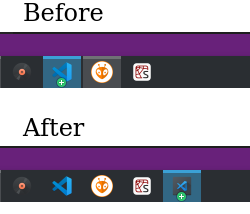
I read that some applications accept --class or --name as argument, but VScode doesn't. Is there a possibility to have different starters, icons and task groups but with the same base application?
Last edited by myscha (2023-02-22 20:52:19)
Offline