You are not logged in.
- Topics: Active | Unanswered
#1 2023-10-06 13:05:42
- Megarock90
- Member

- Registered: 2012-01-18
- Posts: 66
[SOLVED] systemd-boot not recognizing (all) kernel parameters.
So I'm trying to run the zen kernel with
options root=UUID=fb3576eb-5fcb-4931-8973-3a95e4922605 rw iommu=pt pci=noaer quiet nowatchdog modprobe.blacklist=sp5100_tco nvme_core.default_ps_max_latency_us=5500the weird thing is that the nvme_core one is needed for my system to even work, so that one at least is working properly, however quiet isnt working and sp5100-tco shows up on my journal. How do I even begin to figure what's wrong here?
Last edited by Megarock90 (2023-10-06 17:38:23)
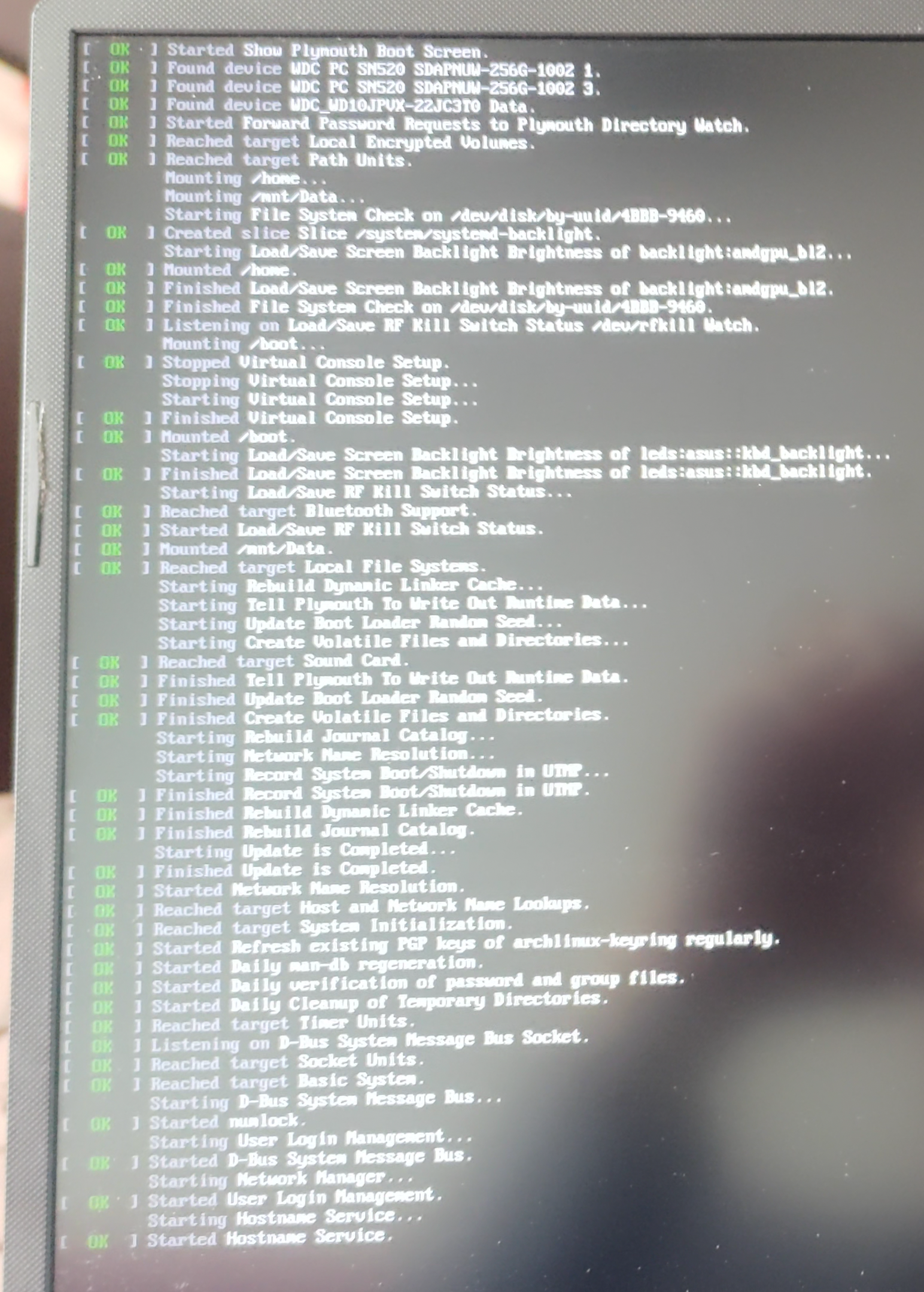
Offline
#2 2023-10-06 14:15:03
- V1del
- Forum Moderator

- Registered: 2012-10-16
- Posts: 25,378
Re: [SOLVED] systemd-boot not recognizing (all) kernel parameters.
cat /proc/cmdlineIf all your parameters are there then systemd-boot is irrelevant and all your kernel parameters are there. What's your definition of "quiet not working"? quiet will generally silence things once the kernel is actively running, there's a bunch of stuff prior to that that will give output regardless unrelated to the running system. See https://wiki.archlinux.org/title/Silent_boot for the conditions under which messages might still pop up and what you can do to silence it harder. For the modprobe issue that's because the kernel parameter for blacklisting is
module_blacklist=and not modprobe.blacklist: https://wiki.archlinux.org/title/Kernel … and_line_2
Online
#3 2023-10-06 14:42:16
- seth
- Member

- From: Won't reply 2 private help req
- Registered: 2012-09-03
- Posts: 77,804
Re: [SOLVED] systemd-boot not recognizing (all) kernel parameters.
https://man.archlinux.org/man/core/kmod … ESCRIPTION
modprobe.blacklist is for modprobe and akin to placing a blacklist in its config.
module_blacklist tells the kernel to not load that module. Ever.
@Megarock90, "shows up" *how*?
Offline
#4 2023-10-06 15:51:57
- Megarock90
- Member
- Registered: 2012-01-18
- Posts: 66
Re: [SOLVED] systemd-boot not recognizing (all) kernel parameters.
quiet not working as this. This is after setting loglevel=0 which I had forgotten to.
Running journalctl | grep sp5100-tco returns
Oct 06 10:38:03 cfsa00C kernel: Command line: initrd=\amd-ucode.img initrd=\initramfs-linux-zen.img root=UUID=fb3576eb-5fcb-4931-8973-3a95e4922605 rw iommu=pt pci=noaer quiet loglevel=0 nowatchdog module_blacklist=sp5100-tco nvme_core.default_ps_max_latency_us=5500
Oct 06 10:38:03 cfsa00C kernel: Kernel command line: initrd=\amd-ucode.img initrd=\initramfs-linux-zen.img root=UUID=fb3576eb-5fcb-4931-8973-3a95e4922605 rw iommu=pt pci=noaer quiet loglevel=0 nowatchdog module_blacklist=sp5100-tco nvme_core.default_ps_max_latency_us=5500
Oct 06 10:38:04 cfsa00C kernel: sp5100-tco sp5100-tco: Using 0xfeb00000 for watchdog MMIO address
Oct 06 10:38:04 cfsa00C kernel: sp5100-tco sp5100-tco: initialized. heartbeat=60 sec (nowayout=0)
Happens with both modprobe.blacklist and module_blacklist
edit: journalctl input wasnt right
Last edited by Megarock90 (2023-10-06 16:11:52)
Offline
#5 2023-10-06 15:58:16
- seth
- Member
- From: Won't reply 2 private help req
- Registered: 2012-09-03
- Posts: 77,804
Re: [SOLVED] systemd-boot not recognizing (all) kernel parameters.
cat /proc/cmdline
Offline
#6 2023-10-06 16:06:52
- V1del
- Forum Moderator
- Registered: 2012-10-16
- Posts: 25,378
Re: [SOLVED] systemd-boot not recognizing (all) kernel parameters.
Also note that that kind of journalctl invocation will include the entire history of the journal. If you want to check for the current boot use
journalctl -b #or journalctl -k/dmesg for kernel messagesLast edited by V1del (2023-10-06 16:07:45)
Online
#7 2023-10-06 16:21:14
- Megarock90
- Member
- Registered: 2012-01-18
- Posts: 66
Re: [SOLVED] systemd-boot not recognizing (all) kernel parameters.
Yeah, pasted the wrong journal, edited that post and just in case rebooted, same result.
Offline
#8 2023-10-06 16:21:25
- seth
- Member
- From: Won't reply 2 private help req
- Registered: 2012-09-03
- Posts: 77,804
Re: [SOLVED] systemd-boot not recognizing (all) kernel parameters.
Fwwi, disfunctional "quiet" recently showed up along misconfigured plymouth.
Offline
#9 2023-10-06 16:59:24
- Megarock90
- Member
- Registered: 2012-01-18
- Posts: 66
Re: [SOLVED] systemd-boot not recognizing (all) kernel parameters.
This is a 2 days old install, havent installed plymouth.
Offline
#10 2023-10-06 17:02:49
- loqs
- Member
- Registered: 2014-03-06
- Posts: 19,065
Re: [SOLVED] systemd-boot not recognizing (all) kernel parameters.
Have you tried the method mentioned in the note from Kernel_module#Blacklisting?
Offline
#11 2023-10-06 17:04:44
- seth
- Member
- From: Won't reply 2 private help req
- Registered: 2012-09-03
- Posts: 77,804
Re: [SOLVED] systemd-boot not recognizing (all) kernel parameters.
Your screenshot suggests differently in the very first line.
Maybe post a complete system journal of the last boot.
Offline
#12 2023-10-06 17:38:06
- Megarock90
- Member
- Registered: 2012-01-18
- Posts: 66
Re: [SOLVED] systemd-boot not recognizing (all) kernel parameters.
Goddammit, is plymouth part of the 'plasma' group then? I hadnt explicitly installed it and that's the only big group I have gotten.
The quiet bit was a waste of time, but the module still keeps saying initialized on the journal for every boot. Marking this thread as closed and looking for that elsewhere. fixed for real, look further down.
Thanks to all.
Last edited by Megarock90 (2023-10-06 18:47:11)
Offline
#13 2023-10-06 18:16:53
- seth
- Member
- From: Won't reply 2 private help req
- Registered: 2012-09-03
- Posts: 77,804
Re: [SOLVED] systemd-boot not recognizing (all) kernel parameters.
Becomes an optional dep for https://archlinux.org/packages/extra/any/plasma-meta/
Can you please post your complete system journal for the boot:
sudo journalctl -b | curl -F 'file=@-' 0x0.stI don't see a way in hell how sp5100-tco / sp5100_tco gets loaded w/ module_blacklist=sp5100-tco in place and am kinda curious when why and how that happens 
Offline
#14 2023-10-06 18:21:47
- Megarock90
- Member
- Registered: 2012-01-18
- Posts: 66
Re: [SOLVED] systemd-boot not recognizing (all) kernel parameters.
Offline
#15 2023-10-06 18:25:01
- seth
- Member
- From: Won't reply 2 private help req
- Registered: 2012-09-03
- Posts: 77,804
Re: [SOLVED] systemd-boot not recognizing (all) kernel parameters.
Can you "module_blacklist=sp5100_tco"?
(it's the actual module name and I suspect that the kernel unlike modprobe doesn't flatten dash and underscore here)
Offline
#16 2023-10-06 18:41:39
- Megarock90
- Member
- Registered: 2012-01-18
- Posts: 66
Re: [SOLVED] systemd-boot not recognizing (all) kernel parameters.
it's the actual module name
Yep that worked.
How should I read the modules' names next time? I was basing it off what journalctl was throwing at me which had the normal dash instead of the underscore.
Once again, thanks for the help.
Offline
#17 2023-10-06 18:58:18
- seth
- Member
- From: Won't reply 2 private help req
- Registered: 2012-09-03
- Posts: 77,804
Re: [SOLVED] systemd-boot not recognizing (all) kernel parameters.
modinfo sp5100-tco | grep -E '^name:'Whenever you're dealing w/ modprobe, dash and underscore become the same (ignored) but it's good to know that kmod actually cares and one has to be precise.
Offline