You are not logged in.
- Topics: Active | Unanswered
#1 2023-11-14 20:33:27
- sweet_tea
- Member
- Registered: 2022-12-29
- Posts: 7
Reboot hangs due to systemd sd-sync. Taking 5-10 minutes to reboot.
Im having a really annoying issue with my Arch install involving systemd. Every time I reboot, it takes around 10 minutes or so to complete. It hangs due to "sd-sync" and only stops after being killed by systemd.
I've also noticed that this may be causing issues with my disks. I end up getting "lost+found" folders on my drives occasionally because of this process. Ive tried to run the "sync" command while my PC is running
but it literally just never completes. It'll run for quite literally more than 10 hours and not complete whatsoever. So I suspected it was an issue with my disks.
I ended up reinstalling Arch, reformatting my root partition. But it didn't work. I also tried killing off my user session before rebooting by jumping back out to sddm before rebooting and unmounting all of my disks before rebooting but
it still happens. I ran `sudo smartctl -t short -a /dev/nvme0n**` on all of my drives and smartctl says that they pass. I genuinely do not know what to do at this point. I cannot find anything about a similar issue online and Ive only used Linux for a year.
output of lsblk
NAME        MAJ:MIN RM   SIZE RO TYPE MOUNTPOINTS
sda           8:0    0   3.6T  0 disk
└─sda1        8:1    0   3.6T  0 part /home/sweet/hdd
nvme1n1     259:0    0 931.5G  0 disk
└─nvme1n1p1 259:1    0 931.5G  0 part /home/sweet/ssd
nvme0n1     259:2    0   1.8T  0 disk
└─nvme0n1p1 259:3    0   1.8T  0 part /home/sweet/sdx
nvme3n1     259:4    0 931.5G  0 disk
├─nvme3n1p1 259:5    0  1000M  0 part /efi
└─nvme3n1p2 259:6    0 930.5G  0 part /
nvme2n1     259:7    0 931.5G  0 disk
└─nvme2n1p1 259:8    0 931.5G  0 part /home/sweet/sda
Prior to re-formatting I had set the SD timeout to be way shorter, but it never fixed the issue and only sped up the process by about a minute or so.
I also opened an issue on the systemd github which has images of the process
https://github.com/systemd/systemd/issues/30025
example:
https://user-images.githubusercontent.c … 6f7aa4.jpg
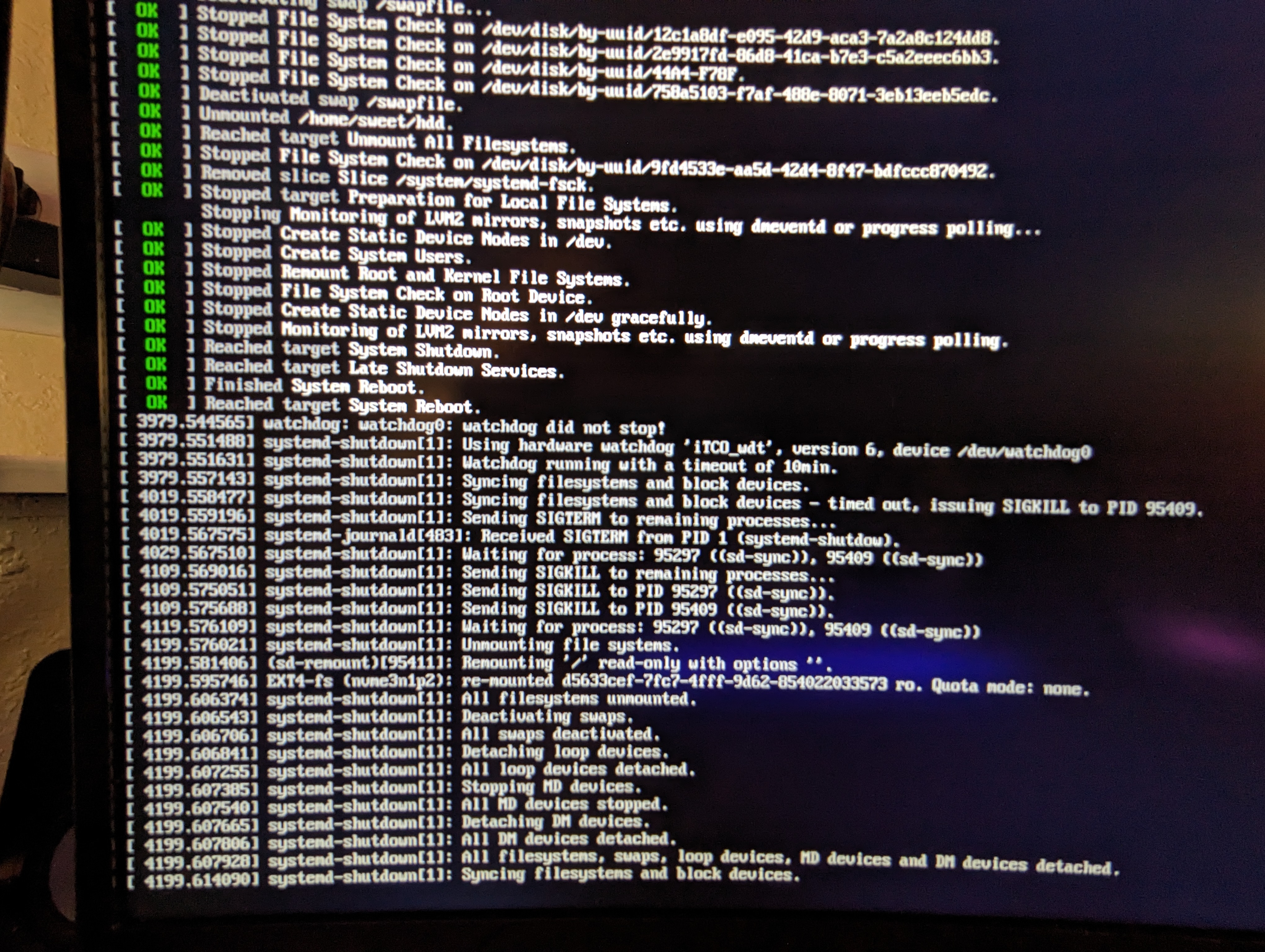
Any advice or suggestions would be greatly welcomed. This issue is causing me so much annoyance. I literally cannot reboot without the process being 15 minutes of pure pain.
Mod edit: Replaced oversized image -- V1del
Last edited by V1del (2023-11-15 01:21:13)
Offline
#2 2023-11-14 21:19:03
- Zod
- Member

- From: Hoosiertucky
- Registered: 2019-03-10
- Posts: 636
Re: Reboot hangs due to systemd sd-sync. Taking 5-10 minutes to reboot.
Just for testing, see if you have an sd card reader that could be dis-abled in the bios.
Offline
#3 2023-11-14 21:55:05
- sweet_tea
- Member
- Registered: 2022-12-29
- Posts: 7
Re: Reboot hangs due to systemd sd-sync. Taking 5-10 minutes to reboot.
I didn't see anything but I'm still looking around. I built this PC so its not impossible that something may be mis-configured in that sense
Bus 001 Device 001: ID 1d6b:0002 Linux Foundation 2.0 root hub
Bus 001 Device 003: ID 1462:7d25 Micro Star International MYSTIC LIGHT
Bus 001 Device 004: ID 05e3:0608 Genesys Logic, Inc. Hub
Bus 001 Device 005: ID 05e3:0608 Genesys Logic, Inc. Hub
Bus 001 Device 006: ID 3233:6301 Ducky Ducky One2 Mini RGB
Bus 001 Device 007: ID 03f0:0f8f HP, Inc HyperX Pulsefire Haste
Bus 001 Device 008: ID 045e:028e Microsoft Corp. Xbox360 Controller
Bus 001 Device 009: ID 1b1c:0c32 Corsair CORSAIR iCUE COMMANDER Core
Bus 002 Device 001: ID 1d6b:0003 Linux Foundation 3.0 root hub
For example Im not sure what some of these things are from the output of `lsusb` mainly the "Foundation X.0 root hub" and the "Genysys Logic Hub." The CPU cooler I bought has a controller that I don't really use idk if that could cause issues. I have a keyboard, mouse, controller, and a USB 3.0 cord that I sometimes plug my phone into.
Its weird though because if I unmount all of my secondary disks, and then use systemctl reboot (VS just reboot) there is a decently higher chance that it will just reboot normally. But its not exactly consistent unfortunately. Ive never had an issue that is this obscure.
Offline
#4 2023-11-14 23:45:12
- Zod
- Member
- From: Hoosiertucky
- Registered: 2019-03-10
- Posts: 636
Re: Reboot hangs due to systemd sd-sync. Taking 5-10 minutes to reboot.
https://wiki.archlinux.org/title/Improv … #Watchdogs
You might give this a shot, I ran across your bug report and noticed in the log snippet you posted that iTCO_wdt had a 10 minute timeout.
Edit: Some other things to consider... Are you dual booted with windows?
https://wiki.archlinux.org/title/Dual_b … ibernation
You could try to down-grade the kernel or try the lts kernel.
You could try to down-grade systemd.
Any of the things you try should be done one at a time and thoroughly tested.
If it doesn't fix it, put it back like it was before you move on to the next thing.
Last edited by Zod (2023-11-15 00:53:19)
Offline
#5 2023-11-15 01:17:32
- loqs
- Member
- Registered: 2014-03-06
- Posts: 18,928
Re: Reboot hangs due to systemd sd-sync. Taking 5-10 minutes to reboot.
Please post the full system journal for a reboot with the issue.
Offline
#6 2023-11-15 01:23:01
- sweet_tea
- Member
- Registered: 2022-12-29
- Posts: 7
Re: Reboot hangs due to systemd sd-sync. Taking 5-10 minutes to reboot.
https://0x0.st/Hvu2.log
heres Journalctl from the last boot where this happened.
Thanks Zod, I will give it a try and see how it goes. Im not dual-booting or anything like that.
Offline
#7 2023-11-15 01:41:43
- Zod
- Member
- From: Hoosiertucky
- Registered: 2019-03-10
- Posts: 636
Re: Reboot hangs due to systemd sd-sync. Taking 5-10 minutes to reboot.
Nov 14 11:08:56 sweetd systemd-fsck[424]: endeavouros: clean, 1277316/60989440 files, 43984950/243933496 blocks
Unfortunate but their support channel should be able to help.
Offline
#8 2023-11-15 07:46:39
- seth
- Member

- From: Won't reply 2 private help req
- Registered: 2012-09-03
- Posts: 76,064
Re: Reboot hangs due to systemd sd-sync. Taking 5-10 minutes to reboot.
There were known issues around SDDM, see whether you can reboot normally by first logging out and rebooting from SDDM
Offline
#9 2023-11-15 07:46:59
- Khere
- Member

- From: Italy
- Registered: 2020-03-04
- Posts: 170
Re: Reboot hangs due to systemd sd-sync. Taking 5-10 minutes to reboot.
Look like the org.freedesktop.home1 take 5 minutes every time you boot up your system
Activation via systemd failed for unit 'dbus-org.freedesktop.home1.service': Unit dbus-org.freedesktop.home1.service not foundCan you check if the service is enabled ?
Fan of Giorgio Moroder & Mohammad Ammax enemy
Offline
#10 2023-11-15 07:56:06
- seth
- Member
- From: Won't reply 2 private help req
- Registered: 2012-09-03
- Posts: 76,064
Re: Reboot hangs due to systemd sd-sync. Taking 5-10 minutes to reboot.
https://www.google.com/search?q=%22Unit … 20found%22
lennart will spam you until you figure a usecase for homed…
You can comment the pam modules and that error should™ be gone.
Offline