You are not logged in.
- Topics: Active | Unanswered
Pages: 1
#1 2023-12-29 11:41:13
- MNS1968
- Member
- Registered: 2023-12-28
- Posts: 30
A few odd issues... SOLVED
Hi all, hope we all had a great Christmas.
I'm not new to Linux but a new to Arch. I've been using various distros for 13 years now but over holiday I thought I'd give Arch a try having never used it. I downloaded the ISO direct from Arch Linux website, checksum matched and installed it.
Couple of issues I have noticed, nothing major and system seems to be running very well. There is an error that flashes up during restart or shutdown and the notice is so quick, it took four attempts to catch it! Googling this error brings up with little information on the web.
[5382.277530] spi-nor spi0.0: software reset failed: -524
Posting $ systemctl --failed in the terminal, returns the following;
$ systemctl --failed
  UNIT LOAD ACTIVE SUB DE
SCRIPTION

0 loaded units listed.
Using $ lspci -nnk, $ systemd-analyze blame I get the following:
$ lspci -nnk
00:00.0 Host bridge [0600]: Intel Corporation Device [8086:4c53] (rev 01)
	Subsystem: ASRock Incorporation Device [1849:4c53]
	Kernel driver in use: icl_uncore
00:01.0 PCI bridge [0604]: Intel Corporation Device [8086:4c01] (rev 01)
	Subsystem: ASRock Incorporation Device [1849:4c01]
	Kernel driver in use: pcieport
00:06.0 PCI bridge [0604]: Intel Corporation Device [8086:4c09] (rev 01)
	Kernel driver in use: pcieport
00:14.0 USB controller [0c03]: Intel Corporation Tiger Lake-H USB 3.2 Gen 2x1 xHCI Host Controller [8086:43ed] (rev 11)
	Subsystem: ASRock Incorporation Tiger Lake-H USB 3.2 Gen 2x1 xHCI Host Controller [1849:43ed]
	Kernel driver in use: xhci_hcd
	Kernel modules: xhci_pci
00:14.2 RAM memory [0500]: Intel Corporation Tiger Lake-H Shared SRAM [8086:43ef] (rev 11)
00:16.0 Communication controller [0780]: Intel Corporation Tiger Lake-H Management Engine Interface [8086:43e0] (rev 11)
	Subsystem: ASRock Incorporation Tiger Lake-H Management Engine Interface [1849:43e0]
	Kernel driver in use: mei_me
	Kernel modules: mei_me
00:17.0 SATA controller [0106]: Intel Corporation Device [8086:43d2] (rev 11)
	Subsystem: ASRock Incorporation Device [1849:43d2]
	Kernel driver in use: ahci
00:1b.0 PCI bridge [0604]: Intel Corporation Device [8086:43c3] (rev 11)
	Subsystem: ASRock Incorporation Device [1849:43c3]
	Kernel driver in use: pcieport
00:1b.4 PCI bridge [0604]: Intel Corporation Device [8086:43c4] (rev 11)
	Kernel driver in use: pcieport
00:1c.0 PCI bridge [0604]: Intel Corporation Tiger Lake-H PCIe Root Port #4 [8086:43bb] (rev 11)
	Subsystem: ASRock Incorporation Tiger Lake-H PCIe Root Port [1849:43bb]
	Kernel driver in use: pcieport
00:1d.0 PCI bridge [0604]: Intel Corporation Tiger Lake-H PCI Express Root Port #9 [8086:43b0] (rev 11)
	Subsystem: ASRock Incorporation Tiger Lake-H PCI Express Root Port [1849:43b0]
	Kernel driver in use: pcieport
00:1d.4 PCI bridge [0604]: Intel Corporation Device [8086:43b4] (rev 11)
	Subsystem: ASRock Incorporation Device [1849:43b4]
	Kernel driver in use: pcieport
00:1f.0 ISA bridge [0601]: Intel Corporation Z590 LPC/eSPI Controller [8086:4385] (rev 11)
	Subsystem: ASRock Incorporation Z590 LPC/eSPI Controller [1849:4385]
00:1f.3 Audio device [0403]: Intel Corporation Tiger Lake-H HD Audio Controller [8086:43c8] (rev 11)
	Subsystem: ASRock Incorporation Tiger Lake-H HD Audio Controller [1849:1897]
	Kernel driver in use: snd_hda_intel
	Kernel modules: snd_hda_intel, snd_sof_pci_intel_tgl
00:1f.4 SMBus [0c05]: Intel Corporation Tiger Lake-H SMBus Controller [8086:43a3] (rev 11)
	Subsystem: ASRock Incorporation Tiger Lake-H SMBus Controller [1849:43a3]
	Kernel driver in use: i801_smbus
	Kernel modules: i2c_i801
00:1f.5 Serial bus controller [0c80]: Intel Corporation Tiger Lake-H SPI Controller [8086:43a4] (rev 11)
	Subsystem: ASRock Incorporation Tiger Lake-H SPI Controller [1849:43a4]
	Kernel driver in use: intel-spi
	Kernel modules: spi_intel_pci
01:00.0 PCI bridge [0604]: Advanced Micro Devices, Inc. [AMD/ATI] Navi 10 XL Upstream Port of PCI Express Switch [1002:1478] (rev c5)
	Kernel driver in use: pcieport
02:00.0 PCI bridge [0604]: Advanced Micro Devices, Inc. [AMD/ATI] Navi 10 XL Downstream Port of PCI Express Switch [1002:1479]
	Subsystem: Advanced Micro Devices, Inc. [AMD/ATI] Navi 10 XL Downstream Port of PCI Express Switch [1002:1479]
	Kernel driver in use: pcieport
03:00.0 VGA compatible controller [0300]: Advanced Micro Devices, Inc. [AMD/ATI] Navi 22 [Radeon RX 6700/6700 XT/6750 XT / 6800M/6850M XT] [1002:73df] (rev c5)
	Subsystem: Sapphire Technology Limited Sapphire Radeon RX 6700 [1da2:e445]
	Kernel driver in use: amdgpu
	Kernel modules: amdgpu
03:00.1 Audio device [0403]: Advanced Micro Devices, Inc. [AMD/ATI] Navi 21/23 HDMI/DP Audio Controller [1002:ab28]
	Subsystem: Advanced Micro Devices, Inc. [AMD/ATI] Navi 21/23 HDMI/DP Audio Controller [1002:ab28]
	Kernel driver in use: snd_hda_intel
	Kernel modules: snd_hda_intel
04:00.0 Non-Volatile memory controller [0108]: Seagate Technology PLC FireCuda 520/IronWolf 525 SSD [1bb1:5016] (rev 01)
	Subsystem: Seagate Technology PLC FireCuda 520/IronWolf 525 SSD [1bb1:5016]
	Kernel driver in use: nvme
	Kernel modules: nvme
05:00.0 Network controller [0280]: Intel Corporation Wi-Fi 6 AX200 [8086:2723] (rev 1a)
	Subsystem: Intel Corporation Wi-Fi 6 AX200 [8086:0080]
	Kernel driver in use: iwlwifi
	Kernel modules: iwlwifi
06:00.0 Non-Volatile memory controller [0108]: Samsung Electronics Co Ltd NVMe SSD Controller SM981/PM981/PM983 [144d:a808]
	Subsystem: Samsung Electronics Co Ltd SSD 970 EVO/PRO [144d:a801]
	Kernel driver in use: nvme
	Kernel modules: nvme
07:00.0 USB controller [0c03]: Renesas Technology Corp. uPD720201 USB 3.0 Host Controller [1912:0014] (rev 03)
	Kernel driver in use: xhci_hcd
	Kernel modules: xhci_pci
08:00.0 Non-Volatile memory controller [0108]: Kingston Technology Company, Inc. NV2 NVMe SSD E21T [2646:5019]
	Subsystem: Kingston Technology Company, Inc. NV2 NVMe SSD E21T [2646:5019]
	Kernel driver in use: nvme
	Kernel modules: nvme
09:00.0 Ethernet controller [0200]: Realtek Semiconductor Co., Ltd. RTL8125 2.5GbE Controller [10ec:8125] (rev 05)
	Subsystem: ASRock Incorporation RTL8125 2.5GbE Controller [1849:8125]
	Kernel driver in use: r8169
	Kernel modules: r8169
$ systemd-analyze blame
741ms dev-nvme0n1p2.device
374ms udisks2.service
300ms systemd-udev-trigger.service
280ms systemd-remount-fs.service
261ms systemd-network-generator.service
236ms systemd-tmpfiles-setup.service
228ms systemd-modules-load.service
184ms modprobe@loop.service
159ms mnt-Timeshift\x20drive.mount
158ms modprobe@fuse.service
151ms user@1000.service
127ms lvm2-monitor.service
125ms modprobe@drm.service
122ms systemd-journal-flush.service
99ms mnt-Storage.mount
94ms mnt-Media\x20drive.mount
87ms systemd-tmpfiles-setup-dev-early.service
78ms systemd-networkd.service
76ms iwd.service
75ms accounts-daemon.service
66ms upower.service
63ms modprobe@dm_mod.service
54ms systemd-zram-setup@zram0.service
53ms systemd-random-seed.service
53ms systemd-user-sessions.service
52ms mnt-Utilities\x20drive.mount
50ms systemd-vconsole-setup.service
50ms systemd-resolved.service
50ms systemd-tmpfiles-setup-dev.service
48ms systemd-timesyncd.service
48ms systemd-update-utmp.service
41ms kmod-static-nodes.service
40ms modprobe@configfs.service
35ms systemd-journald.service
33ms dev-zram0.swap
31ms systemd-sysctl.service
31ms systemd-tmpfiles-clean.service
29ms user-runtime-dir@1000.service
29ms polkit.service
28ms systemd-udevd.service
28ms systemd-logind.service
27ms mnt-Games.mount
21ms boot.mount
16ms bluetooth.service
15ms mnt-Photography.mount
14ms dev-hugepages.mount
12ms dev-mqueue.mount
12ms dbus.service
12ms lightdm.service
11ms sys-kernel-debug.mount
10ms sys-kernel-tracing.mount
10ms sys-fs-fuse-connections.mount
9ms sys-kernel-config.mount
5ms systemd-rfkill.service
1ms tmp.mountMaybe nothing and I'm not seeing any errors list related to this in the journal. From what information I have found online, the culprit could be the optical disk software but the drive works satisfactorily.
$ lsscsi
[1:0:0:0]    disk    ATA      Samsung SSD 860  1B6Q  /dev/sda
[2:0:0:0]    cd/dvd  ASUS     DRW-24D5MT       1.00  /dev/sr0
[3:0:0:0]    disk    ATA      SanDisk SSD PLUS 04RL  /dev/sdb
[4:0:0:0]    disk    ATA      ST2000DM008-2FR1 0001  /dev/sdc
[5:0:0:0]    disk    ATA      ST2000DM008-2FR1 0001  /dev/sdd
[N:0:4:1]    disk    Samsung SSD 970 EVO Plus 250GB__1          /dev/nvme0n1
[N:1:1:1]    disk    Seagate FireCuda 520 SSD ZP2000GM30002__1  /dev/nvme1n1
[N:2:0:1]    disk    KINGSTON SNV2S500G__1                      /dev/nvme2n1
---------------------------------------------------------------------------------------------------------------------------------------------------------------------------------------------------------------------------------------------------------------------------------------------------------------------------------------------------------------------------------------------------------------------------------------------------------------------------------------------------------------
The other issue is really strange one. The Bluetooth, throws up errors when checking the system using $ sudo journalctl -p 3 -xb
$ sudo journalctl -p 3 -xb
[sudo] password for martin:
Dec 29 09:28:29 archlinux kernel: Bluetooth: hci0: FW download error recovery failed (-19)
Dec 29 09:28:29 archlinux kernel: Bluetooth: hci0: sending frame failed (-19)
Dec 29 09:28:29 archlinux kernel: Bluetooth: hci0: Reading supported features failed (-19)
Dec 29 09:28:29 archlinux kernel: Bluetooth: hci0: sending frame failed (-19)
Dec 29 09:28:29 archlinux kernel: Bluetooth: hci0: Failed to read MSFT supported features (-19)
Dec 29 09:28:31 archlinux kernel: Bluetooth: hci0: Malformed MSFT vendor event: 0x02
And yet my Bluetooth works, no problems what so ever, as you can see below ...even picks up next doors TV! 
https://i.postimg.cc/sX6J42MV/Screensho … -39-27.jpg
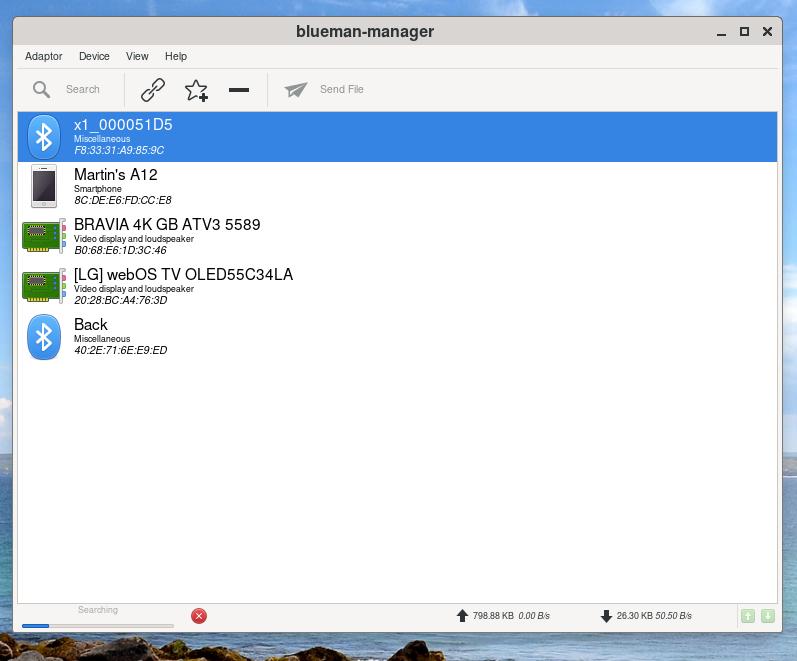
Software used as before with Debian which didn't show any errors:
blueman-git 2.3.beta1.r192.g76cdb501-1 (PACMAN)
bluez-firmware 1.2-9 (AUR)
I tried $ journalctl -b -1 and did find the following:
Dec 29 08:07:26 archlinux kernel: Bluetooth: hci0: FW download error recovery failed (-19)
Dec 29 08:07:26 archlinux kernel: Bluetooth: hci0: sending frame failed (-19)
Dec 29 08:07:26 archlinux kernel: Bluetooth: hci0: Reading supported features failed (-19)
Dec 29 08:07:26 archlinux kernel: Bluetooth: hci0: Error reading debug features
Dec 29 08:07:26 archlinux kernel: Bluetooth: hci0: HCI LE Coded PHY feature bit is set, but its usage is not supported.
Dec 29 08:07:26 archlinux kernel: Bluetooth: hci0: sending frame failed (-19)
Dec 29 08:07:26 archlinux kernel: Bluetooth: hci0: Failed to read MSFT supported features (-19)


Dec 29 08:07:26 archlinux bluetoothd[495]: src/plugin.c:plugin_init() System does not support csip plugin
Dec 29 08:07:26 archlinux bluetoothd[495]: profiles/audio/micp.c:micp_init() D-Bus experimental not enabled
Dec 29 08:07:26 archlinux bluetoothd[495]: src/plugin.c:plugin_init() System does not support micp plugin
Dec 29 08:07:26 archlinux bluetoothd[495]: src/plugin.c:plugin_init() System does not support vcp plugin
Dec 29 08:07:26 archlinux bluetoothd[495]: src/plugin.c:plugin_init() System does not support mcp plugin
Dec 29 08:07:26 archlinux bluetoothd[495]: src/plugin.c:plugin_init() System does not support bass plugin
Dec 29 08:07:26 archlinux bluetoothd[495]: src/plugin.c:plugin_init() System does not support bap plugin


Dec 29 08:07:28 archlinux kernel: Bluetooth: hci0: Malformed MSFT vendor event: 0x02
Dec 29 08:07:28 archlinux kernel: Bluetooth: hci0: Found Intel DDC parameters: intel/ibt-20-1-3.ddc
Dec 29 08:07:28 archlinux kernel: Bluetooth: hci0: Applying Intel DDC parameters completed
Dec 29 08:07:28 archlinux kernel: Bluetooth: hci0: Firmware revision 0.3 build 249 week 27 2023
Dec 29 08:07:28 archlinux kernel: Bluetooth: hci0: HCI LE Coded PHY feature bit is set, but its usage is not supported.
I'm wondering it might be a firmware problem or unlike the Debian, the copy of Blueman 2.3 from the Arch repositories is a Beta version.
Maybe I should just ignore it as it's working or there's something else I've missed that one of you might see?
All the best, Martin.
moderator edit -- replaced oversized image with link.
Pasting pictures and code
Last edited by MNS1968 (2023-12-29 17:32:47)
Offline
#2 2023-12-29 16:59:56
- Lone_Wolf
- Administrator

- From: Netherlands, Europe
- Registered: 2005-10-04
- Posts: 15,522
Re: A few odd issues... SOLVED
[5382.277530] spi-nor spi0.0: software reset failed: -524spi-nor appears to be a kernel module for NOR flash, http://events17.linuxfoundation.org/sit … 20v3_0.pdf should be somewhat helpful.
Dec 29 08:07:28 archlinux kernel: Bluetooth: hci0: Malformed MSFT vendor event: 0x02It is probably harmless, see https://bbs.archlinux.org/viewtopic.php?id=276815 .
both issues are most likely only solvable by efi/firmware updates (and may never be solved) .
Disliking systemd intensely, but not satisfied with alternatives so focusing on taming systemd.
clean chroot building not flexible enough ?
Try clean chroot manager by graysky
Offline
#3 2023-12-29 17:32:03
- MNS1968
- Member
- Registered: 2023-12-28
- Posts: 30
Re: A few odd issues... SOLVED
both issues are most likely only solvable by efi/firmware updates (and may never be solved) .
Thought as much, thank you.
Offline
Pages: 1