You are not logged in.
- Topics: Active | Unanswered
#1 2024-01-06 06:54:18
- farfuglinn94
- Member
- Registered: 2023-12-30
- Posts: 7
Cinnamon extremely slow load after a fresh installation [SOLVED]
Good time of the day everyone! I'm here with a pretty frustrating nitpick I have after getting my hands dirty with a clean Arch installation. I'm 98% sure this has everything to do with my own "arm curvature", but still I would highly appreciate if you helped me to pinpoint the exact reason.
So... TL;DR - the title. I went through most of the stages of wiki during the installation, and for the desktop flavour I've chosen Cinnamon. Having installed everything I noticed though that after leaving the login screen it sometimes takes up to 10-15 seconds for Cinnamon to load. I use LightDM + lightdm-slick-greeter for my login. I tried to dig around to figure out what might cause it, but the info I managed to salvage isn't saying that much specific to me, so again, I would gladly appreciate any help. Anyhow, here comes the output of
sudo systemd-analyze blame:
11.166s sys-devices-platform-serial8250-tty-ttyS11.device
11.166s dev-ttyS11.device
11.165s sys-devices-platform-serial8250-tty-ttyS1.device
11.165s dev-ttyS1.device
11.164s dev-ttyS0.device
11.164s sys-devices-platform-serial8250-tty-ttyS0.device
11.164s sys-devices-platform-serial8250-tty-ttyS10.device
11.164s dev-ttyS10.device
11.163s sys-devices-platform-serial8250-tty-ttyS13.device
11.163s dev-ttyS13.device
11.163s dev-ttyS14.device
11.163s sys-devices-platform-serial8250-tty-ttyS14.device
11.162s dev-ttyS12.device
11.162s sys-devices-platform-serial8250-tty-ttyS12.device
11.161s sys-devices-platform-serial8250-tty-ttyS15.device
11.161s dev-ttyS15.device
11.161s dev-ttyS16.device
11.161s sys-devices-platform-serial8250-tty-ttyS16.device
11.160s sys-devices-platform-serial8250-tty-ttyS17.device
11.160s dev-ttyS17.device
11.159s dev-ttyS18.device
11.159s sys-devices-platform-serial8250-tty-ttyS18.device
11.159s sys-devices-platform-serial8250-tty-ttyS2.device
11.159s dev-ttyS2.device
11.159s sys-devices-platform-serial8250-tty-ttyS20.device
11.159s dev-ttyS20.device
11.158s dev-ttyS21.device
11.158s sys-devices-platform-serial8250-tty-ttyS21.device
11.157s sys-devices-platform-serial8250-tty-ttyS22.device
11.157s dev-ttyS22.device
11.156s sys-devices-platform-serial8250-tty-ttyS25.device
11.156s dev-ttyS25.device
11.155s dev-ttyS19.device
11.155s sys-devices-platform-serial8250-tty-ttyS19.device
11.155s dev-ttyS26.device
11.155s sys-devices-platform-serial8250-tty-ttyS26.device
11.154s sys-devices-platform-serial8250-tty-ttyS23.device
11.154s dev-ttyS23.device
11.154s sys-devices-platform-serial8250-tty-ttyS28.device
11.154s dev-ttyS28.device
11.153s sys-devices-platform-serial8250-tty-ttyS27.device
11.153s dev-ttyS27.device
11.153s sys-devices-platform-serial8250-tty-ttyS24.device
11.153s dev-ttyS24.device
11.152s dev-ttyS29.device
11.152s sys-devices-platform-serial8250-tty-ttyS29.device
11.152s dev-ttyS3.device
11.152s sys-devices-platform-serial8250-tty-ttyS3.device
11.151s dev-ttyS30.device
11.151s sys-devices-platform-serial8250-tty-ttyS30.device
11.151s dev-ttyS31.device
11.151s sys-devices-platform-serial8250-tty-ttyS31.device
11.150s dev-ttyS4.device
11.150s sys-devices-platform-serial8250-tty-ttyS4.device
11.150s dev-ttyS5.device
11.150s sys-devices-platform-serial8250-tty-ttyS5.device
11.148s dev-ttyS6.device
11.148s sys-devices-platform-serial8250-tty-ttyS6.device
11.148s dev-ttyS7.device
11.148s sys-devices-platform-serial8250-tty-ttyS7.device
11.147s dev-ttyS8.device
11.147s sys-devices-platform-serial8250-tty-ttyS8.device
11.146s dev-ttyS9.device
11.146s sys-devices-platform-serial8250-tty-ttyS9.device
11.126s sys-module-configfs.device
10.585s dev-disk-by\x2ddiskseq-1.device
10.585s sys-devices-pci0000:00-0000:00:1d.0-0000:55:00.0-nvme-nvme0-nvme0n1.device
10.585s dev-disk-by\x2did-nvme\x2deui.ace42e000a5965792ee4ac0000000001.device
10.585s dev-disk-by\x2did-nvme\x2dSKHynix_HFS512GD9TNI\x2dL2B0B_NY06N091510706P0V_1.device
10.585s dev-nvme0n1.device
10.585s dev-disk-by\x2dpath-pci\x2d0000:55:00.0\x2dnvme\x2d1.device
10.585s dev-disk-by\x2did-nvme\x2dSKHynix_HFS512GD9TNI\x2dL2B0B_NY06N091510706P0V.device
10.583s sys-devices-pci0000:00-0000:00:1d.0-0000:55:00.0-nvme-nvme0-nvme0n1-nvme0n1p3.device
10.583s dev-disk-by\x2duuid-4eee7bab\x2d2c84\x2d48ae\x2d8993\x2da4cc0fb3b122.device
10.583s dev-nvme0n1p3.device
10.583s dev-disk-by\x2dpath-pci\x2d0000:55:00.0\x2dnvme\x2d1\x2dpart3.device
10.583s dev-disk-by\x2did-nvme\x2dSKHynix_HFS512GD9TNI\x2dL2B0B_NY06N091510706P0V\x2dpart3.device
10.583s dev-disk-by\x2dpartuuid-9220b7cd\x2dabef\x2d4587\x2da53b\x2d75f804a0fb4a.device
10.583s dev-disk-by\x2did-nvme\x2dSKHynix_HFS512GD9TNI\x2dL2B0B_NY06N091510706P0V_1\x2dpart3.device
10.583s dev-disk-by\x2ddiskseq-1\x2dpart3.device
10.583s dev-disk-by\x2did-nvme\x2deui.ace42e000a5965792ee4ac0000000001\x2dpart3.device
10.578s dev-disk-by\x2duuid-6d4861f2\x2d3326\x2d4ece\x2d9d3e\x2d49e0fd26ae7b.device
10.578s dev-disk-by\x2did-nvme\x2deui.ace42e000a5965792ee4ac0000000001\x2dpart2.device
10.578s dev-disk-by\x2did-nvme\x2dSKHynix_HFS512GD9TNI\x2dL2B0B_NY06N091510706P0V_1\x2dpart2.device
10.578s dev-disk-by\x2ddiskseq-1\x2dpart2.device
10.578s dev-disk-by\x2dpartuuid-0cc4cfbb\x2d8f3d\x2d49b4\x2d882e\x2d5d6973f85aa9.device
10.578s dev-nvme0n1p2.device
10.578s sys-devices-pci0000:00-0000:00:1d.0-0000:55:00.0-nvme-nvme0-nvme0n1-nvme0n1p2.device
10.578s dev-disk-by\x2did-nvme\x2dSKHynix_HFS512GD9TNI\x2dL2B0B_NY06N091510706P0V\x2dpart2.device
10.578s dev-disk-by\x2dpath-pci\x2d0000:55:00.0\x2dnvme\x2d1\x2dpart2.device
10.576s dev-disk-by\x2dpartuuid-d06eee34\x2dd313\x2d446e\x2da670\x2d9dc6b7ee658b.device
10.576s dev-disk-by\x2ddiskseq-1\x2dpart1.device
10.576s dev-disk-by\x2duuid-F56D\x2dB476.device
10.576s sys-devices-pci0000:00-0000:00:1d.0-0000:55:00.0-nvme-nvme0-nvme0n1-nvme0n1p1.device
10.576s dev-disk-by\x2did-nvme\x2dSKHynix_HFS512GD9TNI\x2dL2B0B_NY06N091510706P0V_1\x2dpart1.device
10.576s dev-disk-by\x2did-nvme\x2dSKHynix_HFS512GD9TNI\x2dL2B0B_NY06N091510706P0V\x2dpart1.device
10.576s dev-nvme0n1p1.device
10.576s dev-disk-by\x2dpath-pci\x2d0000:55:00.0\x2dnvme\x2d1\x2dpart1.device
10.576s dev-disk-by\x2did-nvme\x2deui.ace42e000a5965792ee4ac0000000001\x2dpart1.device
 6.991s sys-devices-pci0000:00-0000:00:02.0-drm-card0-card0\x2deDP\x2d1-intel_backlight.device
 5.478s plymouth-switch-root.service
 2.988s optimus-manager.service
  830ms NetworkManager.service
  603ms initrd-switch-root.service
  302ms systemd-udev-trigger.service
  273ms systemd-remount-fs.service
  240ms systemd-modules-load.service
  200ms user@1000.service
  191ms systemd-fsck@dev-disk-by\x2duuid-4eee7bab\x2d2c84\x2d48ae\x2d8993\x2da4cc0fb3b122.service
  186ms modprobe@loop.service
  181ms systemd-tmpfiles-setup.service
  170ms systemd-tmpfiles-setup-dev-early.service
  162ms systemd-backlight@backlight:intel_backlight.service
  153ms modprobe@fuse.service
  130ms boot.mount
  123ms lvm2-monitor.service
  121ms modprobe@drm.service
  118ms systemd-vconsole-setup.service
  114ms plymouth-quit.service
  113ms systemd-journald.service
  104ms upower.service
  104ms systemd-sysctl.service
   97ms plymouth-start.service
   72ms accounts-daemon.service
   69ms systemd-tmpfiles-setup-dev.service
   69ms systemd-journal-flush.service
   65ms modprobe@dm_mod.service
   65ms plymouth-quit-wait.service
   63ms systemd-udevd.service
   63ms dev-zram0.swap
   55ms plymouth-read-write.service
   44ms systemd-random-seed.service
   43ms user-runtime-dir@1000.service
   39ms polkit.service
   38ms systemd-zram-setup@zram0.service
   38ms systemd-timesyncd.service
   38ms udisks2.service
   37ms initrd-parse-etc.service
   37ms systemd-logind.service
   37ms systemd-user-sessions.service
   35ms systemd-update-utmp.service
   35ms kmod-static-nodes.service
   34ms lightdm.service
   26ms systemd-fsck-root.service
   25ms dbus.service
   21ms colord.service
   20ms home.mount
   18ms dev-hugepages.mount
   18ms systemd-rfkill.service
   17ms dev-mqueue.mount
   15ms sys-kernel-debug.mount
   13ms sys-kernel-tracing.mount
   10ms sys-fs-fuse-connections.mount
   10ms systemd-battery-check.service
    9ms sys-kernel-config.mount
    9ms initrd-cleanup.service
    8ms rtkit-daemon.service
    8ms wpa_supplicant.service
    5ms tmp.mount
    4ms initrd-udevadm-cleanup-db.service
    3ms modprobe@configfs.service
Followed by
sudo systemd-analyze critical-chain:
graphical.target @4.881s
└─lightdm.service @4.844s +34ms
  └─optimus-manager.service @1.851s +2.988s
    └─basic.target @1.849s
      └─sockets.target @1.849s
        └─dbus.socket @1.849s
          └─sysinit.target @1.848s
            └─systemd-timesyncd.service @1.809s +38ms
              └─systemd-tmpfiles-setup.service @1.587s +181ms
                └─local-fs.target @1.584s
                  └─home.mount @1.562s +20ms
                    └─systemd-fsck@dev-disk-by\x2duuid-4eee7bab\x2d2c84\x2d48ae\x2d8993\x2da4cc0fb3b122.service @1.337s +191ms
                      └─dev-disk-by\x2duuid-4eee7bab\x2d2c84\x2d48ae\x2d8993\x2da4cc0fb3b122.device @584542y 2w 2d 20h 1min 40.301s +10.583s
Eventually leading up to the graph output of sudo systemd-analyze plot
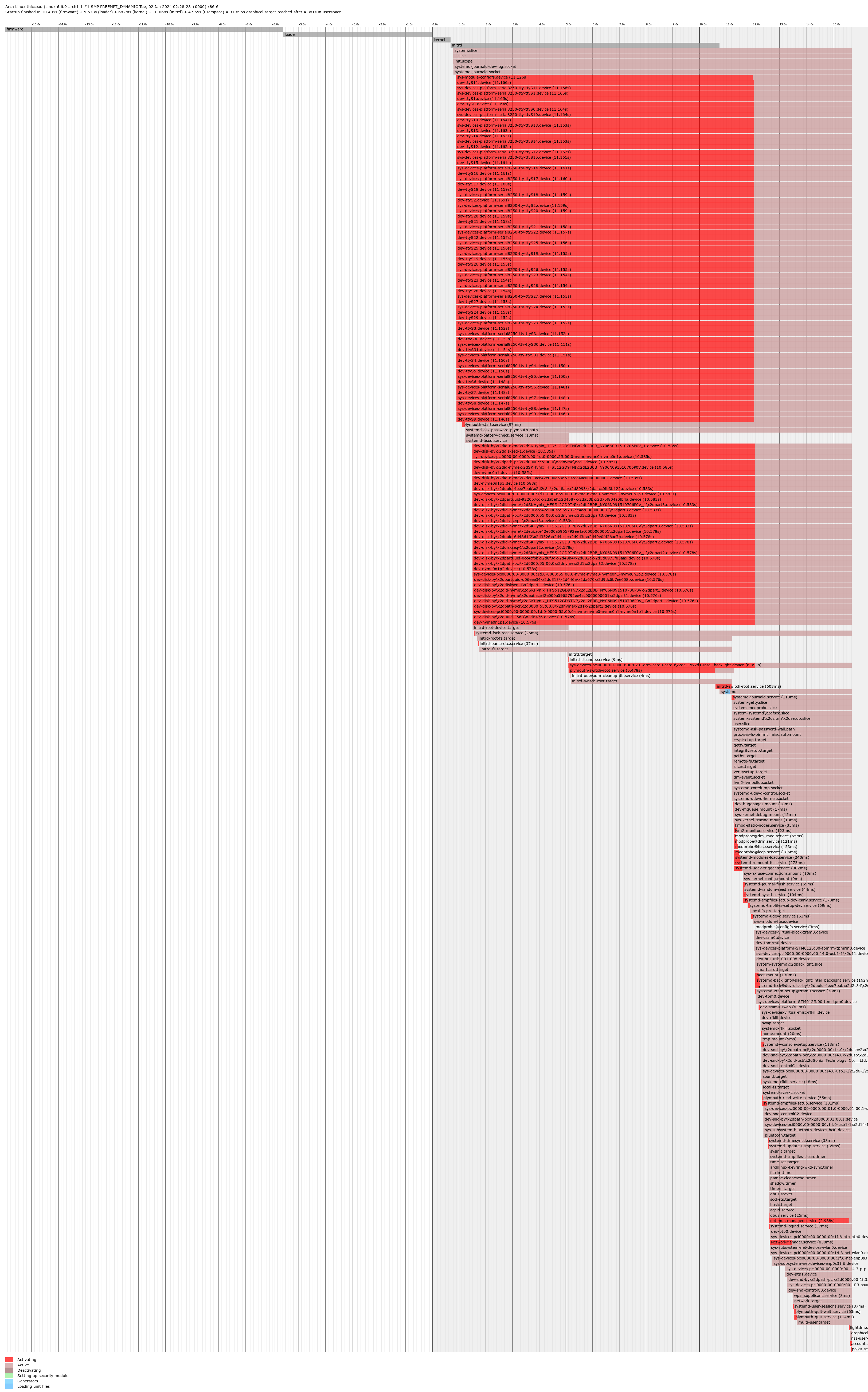
The whole boot process is taking up to 30+ seconds and what stroke me most is the fact that systemd-journald takes a royal slice of that timeframe pie. Just in case, here is my journald configuration:
[Journal]
#Storage=auto
#Compress=yes
#Seal=yes
#SplitMode=uid
#SyncIntervalSec=5m
#RateLimitIntervalSec=30s
#RateLimitBurst=10000
SystemMaxUse=50M
#SystemKeepFree=
SystemMaxFileSize=10M
SystemMaxFiles=100
#RuntimeMaxUse=
#RuntimeKeepFree=
#RuntimeMaxFileSize=
#RuntimeMaxFiles=100
#MaxRetentionSec=
#MaxFileSec=1month
#ForwardToSyslog=no
#ForwardToKMsg=no
#ForwardToConsole=no
#ForwardToWall=yes
#TTYPath=/dev/console
MaxLevelStore=debug
MaxLevelSyslog=debug
MaxLevelKMsg=notice
MaxLevelConsole=info
MaxLevelWall=emerg
LineMax=48K
#ReadKMsg=yes
#Audit=yes
But still, even though I suspect journald being the culprit behind plymouth splash screen looking jarred, the thing that the user eye catches most is 10-ish seconds of a pitch-black void screen with a solitary cursor inbetween lightdm login and cinnamon loading. If required, here go my mkinitcpio.conf and grub.cfg:
###### /etc/mkinitcpio.conf ###########
MODULES=(i915 nvidia nvidia_modeset nvidia_uvm nvidia_drm)
BINARIES=()
FILES=()
HOOKS=(base systemd plymouth autodetect modconf keyboard sd-vconsole block filesystems fsck)
COMPRESSION=lz4
##### /etc/default/grub ###########
GRUB_DEFAULT=0
GRUB_TIMEOUT=5
GRUB_DISTRIBUTOR="Arch"
GRUB_CMDLINE_LINUX_DEFAULT="loglevel=3 nvidia_drm.modeset=1 nvidia_drm.fbdev=1 quiet splash acpi_osi=linux acpi_backlight=native"
GRUB_CMDLINE_LINUX="zswap.enabled=0 rootfstype=ext4"
# Preload both GPT and MBR modules so that they are not missed
GRUB_PRELOAD_MODULES="part_gpt part_msdos"
# Uncomment to enable booting from LUKS encrypted devices
#GRUB_ENABLE_CRYPTODISK=y
# Set to 'countdown' or 'hidden' to change timeout behavior,
# press ESC key to display menu.
GRUB_TIMEOUT_STYLE=menu
# Uncomment to use basic console
GRUB_TERMINAL_INPUT=console
# Uncomment to disable graphical terminal
#GRUB_TERMINAL_OUTPUT=console
# The resolution used on graphical terminal
# note that you can use only modes which your graphic card supports via VBE
# you can see them in real GRUB with the command `videoinfo'
GRUB_GFXMODE=auto
# Uncomment to allow the kernel use the same resolution used by grub
GRUB_GFXPAYLOAD_LINUX=keep
# Uncomment if you want GRUB to pass to the Linux kernel the old parameter
# format "root=/dev/xxx" instead of "root=/dev/disk/by-uuid/xxx"
#GRUB_DISABLE_LINUX_UUID=true
# Uncomment to disable generation of recovery mode menu entries
GRUB_DISABLE_RECOVERY=true
# Uncomment and set to the desired menu colors. Used by normal and wallpaper
# modes only. Entries specified as foreground/background.
#GRUB_COLOR_NORMAL="light-blue/black"
#GRUB_COLOR_HIGHLIGHT="light-cyan/blue"
# Uncomment one of them for the gfx desired, a image background or a gfxtheme
#GRUB_BACKGROUND="/path/to/wallpaper"
#GRUB_THEME="/path/to/gfxtheme"
# Uncomment to get a beep at GRUB start
#GRUB_INIT_TUNE="480 440 1"
# Uncomment to make GRUB remember the last selection. This requires
# setting 'GRUB_DEFAULT=saved' above.
#GRUB_SAVEDEFAULT=true
# Uncomment to disable submenus in boot menu
#GRUB_DISABLE_SUBMENU=y
# Probing for other operating systems is disabled for security reasons. Read
# documentation on GRUB_DISABLE_OS_PROBER, if still want to enable this
# functionality install os-prober and uncomment to detect and include other
# operating systems.
#GRUB_DISABLE_OS_PROBER=falseI humbly thank in advance anyone deciding to waste some of their time on this issue, or, if someone had a similar experience with either Cinnamon, or LightDM, or any other WE/DM at this rate - if you managed to solve it, kindly share here how. Have a nice day everyone and looking forward to hearing from you!
P.S. Using Occam's razor, could this be just a sign of my NVMe drive already dying? This is a Lenovo ThinkPad P15 Gen 1 which had a misfortune to be a corporate machine for three full years, during which it had to endure Windows 10 + BitLocker + quite a little amount of downtime - and as I've heard, BitLocker, even after being purged, just physically slows down the drives in the best case scenario. I anyway considered upgrading some stuff, just curious whether I was pulling my hair for 3 days straight for zero reason at all 
Last edited by farfuglinn94 (2024-02-10 07:46:58)
2ce54a7a
Offline
#2 2024-01-06 09:50:07
- seth
- Member

- From: Won't reply 2 private help req
- Registered: 2012-09-03
- Posts: 78,421
Re: Cinnamon extremely slow load after a fresh installation [SOLVED]
Please replace the oversized image w/ a link, the board has a 250x250px max rule.
Several devices definitively take their time, but the introspected data will not explain
after leaving the login screen it sometimes takes up to 10-15 seconds for Cinnamon to load
Please post your complete system journal for the boot:
sudo journalctl -b | curl -F 'file=@-' 0x0.stOffline
#3 2024-01-06 10:00:11
- farfuglinn94
- Member
- Registered: 2023-12-30
- Posts: 7
Re: Cinnamon extremely slow load after a fresh installation [SOLVED]
Please replace the oversized image w/ a link, the board has a 250x250px max rule.
My apologies, done!
Please post your complete system journal for the boot:
sudo journalctl -b | curl -F 'file=@-' 0x0.st
Here's the system journal, should I look for something specific?
2ce54a7a
Offline
#4 2024-01-06 10:21:43
- seth
- Member
- From: Won't reply 2 private help req
- Registered: 2012-09-03
- Posts: 78,421
Re: Cinnamon extremely slow load after a fresh installation [SOLVED]
Remove "nvidia_drm.fbdev=1" for now.
There're plenty of i915/drm errors, and the delay even the initramfs
січ 06 11:52:26 archlinux systemd[1]: Reached target Switch Root.
січ 06 11:52:27 archlinux kernel: i915 0000:00:02.0: [drm] *ERROR* Failed to probe lspcon
січ 06 11:52:27 archlinux kernel: i915 0000:00:02.0: [drm] *ERROR* LSPCON init failed on port D
січ 06 11:52:29 archlinux kernel: i915 0000:00:02.0: [drm] *ERROR* Failed to probe lspcon
січ 06 11:52:29 archlinux kernel: i915 0000:00:02.0: [drm] *ERROR* LSPCON init failed on port D
січ 06 11:52:31 archlinux kernel: i915 0000:00:02.0: [drm] *ERROR* Failed to probe lspcon
січ 06 11:52:31 archlinux kernel: i915 0000:00:02.0: [drm] *ERROR* LSPCON init failed on port D
січ 06 11:52:31 archlinux systemd[1]: Finished Plymouth switch root service.
and have similar patterns after your login.
Try the behavior w/ the LTS kernel (pay attention to the i915 errors)
And please post your Xorg log, https://wiki.archlinux.org/title/Xorg#General and most likely you do not want to use optimus-manager (it's setting "hybrid" anyway and delays the init of the nvidia modules)
Offline
#5 2024-01-07 07:19:29
- farfuglinn94
- Member
- Registered: 2023-12-30
- Posts: 7
Re: Cinnamon extremely slow load after a fresh installation [SOLVED]
Good morning! Apologies for the late response, I'm back with some data.
Since yesterday, the changes I made were the following (in chronological order):
most likely you do not want to use optimus-manager
- stopped and disabled the service, ran optimus-manager --cleanup to delete all the stray Xorg configurations that may have been created, then removed the package from my system.
Remove "nvidia_drm.fbdev=1" for now.
- removed it from the kernel params in GRUB config; uninstalled the previously installed proprietary NVIDIA driver and installed nvidia-dkms instead.
Try the behavior w/ the LTS kernel
- then, as you had suggested, I rebuilt initcpio using the linux-lts kernel, and then recreated the GRUB config.
Unfortunately, rebooting has shown that nothing of this helped - in fact, the whole boot took almost 33s now, with cinnamon still loading longer than anything else. Here come the systemd-analyze results after the last reboot with the new LTS kernel
- sudo systemd-analyze blame output.
- sudo systemd-analyze critical-chain yields the following:
graphical.target @3.812s
└─lightdm.service @3.795s +15ms
  └─plymouth-quit.service @3.590s +181ms
    └─systemd-user-sessions.service @3.554s +34ms
      └─nss-user-lookup.target @3.812s
- and finally, the resulting graph of sudo systemd-analyze plot.
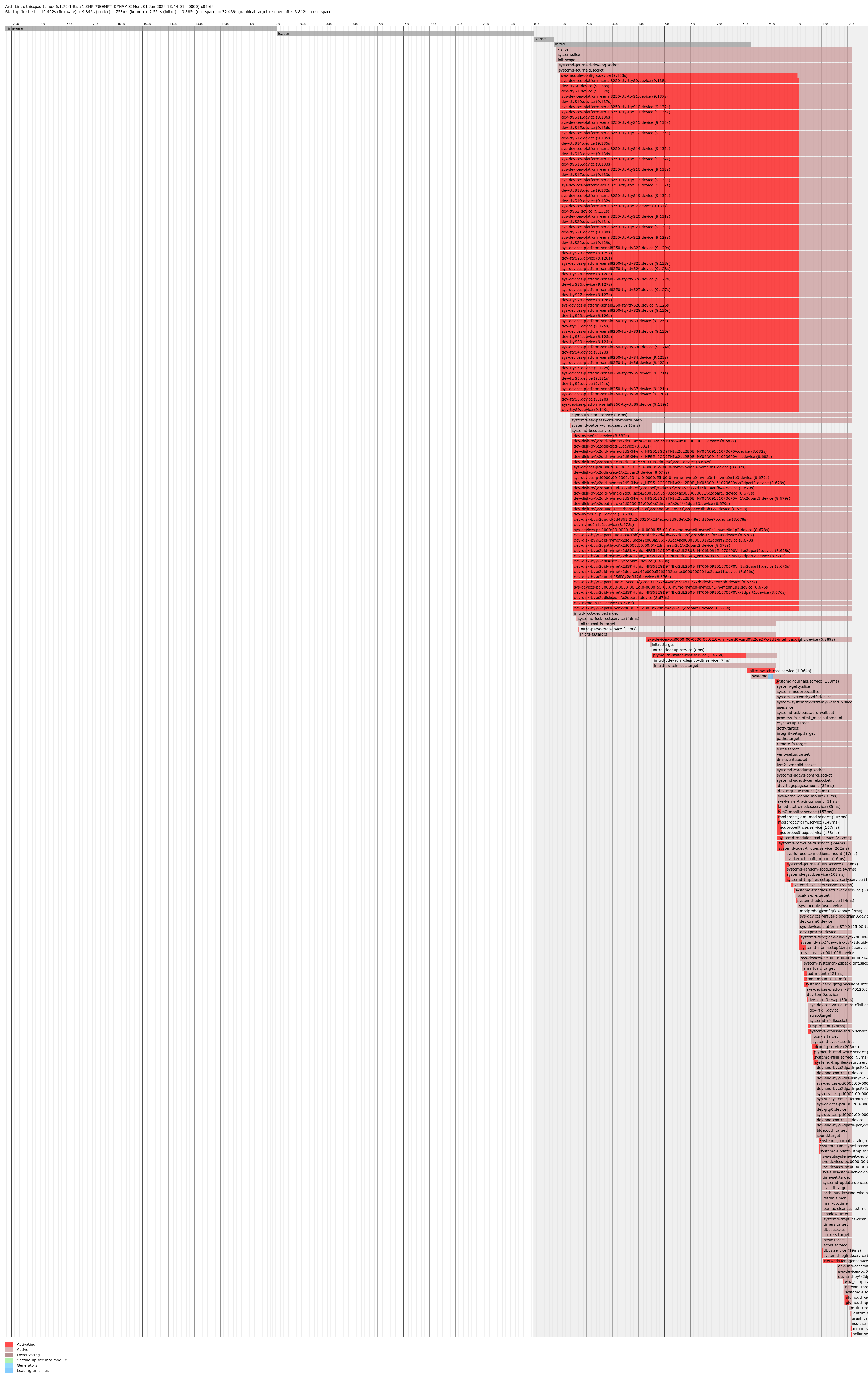
As you requested, here you can find the latest Xorg.0.log, and just for the good measure, a new boot journal. Aaaand, just in case. ~/.xsession-errors. Hope any of this sheds some proper light!
2ce54a7a
Offline
#6 2024-01-07 08:08:46
- seth
- Member
- From: Won't reply 2 private help req
- Registered: 2012-09-03
- Posts: 78,421
Re: Cinnamon extremely slow load after a fresh installation [SOLVED]
systemd-analyze won't tell you why your session (specifically) starts slow.
uninstalled the previously installed proprietary NVIDIA driver and installed nvidia-dkms instead
nvidia{-lts,-dkms} /is/ the "proprietary NVIDIA driver" - and it loads early now, so that's no it.
You're still facing
січ 07 08:35:32 archlinux kernel: i915 0000:00:02.0: [drm] *ERROR* Failed to probe lspcon
січ 07 08:35:33 archlinux kernel: i915 0000:00:02.0: [drm] *ERROR* Failed to probe lspcon
січ 07 08:35:33 archlinux kernel: i915 0000:00:02.0: [drm] *ERROR* LSPCON init failed on port D
січ 07 08:35:35 archlinux kernel: i915 0000:00:02.0: [drm] *ERROR* Failed to probe lspcon
січ 07 08:35:35 archlinux kernel: i915 0000:00:02.0: [drm] *ERROR* LSPCON init failed on port D
січ 07 08:35:36 archlinux kernel: i915 0000:00:02.0: [drm] *ERROR* Failed to probe lspcon
січ 07 08:35:36 archlinux kernel: i915 0000:00:02.0: [drm] *ERROR* LSPCON init failed on port D
січ 07 08:35:37 archlinux kernel: i915 0000:00:02.0: [drm] *ERROR* Failed to probe lspcon
січ 07 08:35:37 archlinux kernel: i915 0000:00:02.0: [drm] *ERROR* LSPCON init failed on port D
січ 07 08:35:43 thiccpad kernel: i915 0000:00:02.0: [drm] *ERROR* Failed to probe lspcon
січ 07 08:35:43 thiccpad kernel: i915 0000:00:02.0: [drm] *ERROR* LSPCON init failed on port D
січ 07 08:35:44 thiccpad kernel: i915 0000:00:02.0: [drm] *ERROR* Failed to probe lspcon
січ 07 08:35:44 thiccpad kernel: i915 0000:00:02.0: [drm] *ERROR* LSPCON init failed on port D
січ 07 08:35:57 thiccpad kernel: i915 0000:00:02.0: [drm] *ERROR* Failed to probe lspcon
січ 07 08:35:57 thiccpad kernel: i915 0000:00:02.0: [drm] *ERROR* LSPCON init failed on port D
січ 07 08:35:58 thiccpad kernel: i915 0000:00:02.0: [drm] *ERROR* Failed to probe lspcon
січ 07 08:35:58 thiccpad kernel: i915 0000:00:02.0: [drm] *ERROR* LSPCON init failed on port D
січ 07 08:35:59 thiccpad kernel: i915 0000:00:02.0: [drm] *ERROR* Failed to probe lspcon
січ 07 08:35:59 thiccpad kernel: i915 0000:00:02.0: [drm] *ERROR* LSPCON init failed on port D
січ 07 08:36:01 thiccpad kernel: i915 0000:00:02.0: [drm] *ERROR* Failed to probe lspcon
січ 07 08:36:01 thiccpad kernel: i915 0000:00:02.0: [drm] *ERROR* LSPCON init failed on port D
січ 07 08:36:02 thiccpad kernel: i915 0000:00:02.0: [drm] *ERROR* Failed to probe lspcon
січ 07 08:36:02 thiccpad kernel: i915 0000:00:02.0: [drm] *ERROR* LSPCON init failed on port D
січ 07 08:36:04 thiccpad kernel: i915 0000:00:02.0: [drm] *ERROR* Failed to probe lspcon
січ 07 08:36:04 thiccpad kernel: i915 0000:00:02.0: [drm] *ERROR* LSPCON init failed on port D
січ 07 08:36:05 thiccpad kernel: i915 0000:00:02.0: [drm] *ERROR* Failed to probe lspcon
січ 07 08:36:05 thiccpad kernel: i915 0000:00:02.0: [drm] *ERROR* LSPCON init failed on port D
січ 07 08:36:06 thiccpad kernel: i915 0000:00:02.0: [drm] *ERROR* Failed to probe lspcon
січ 07 08:36:06 thiccpad kernel: i915 0000:00:02.0: [drm] *ERROR* LSPCON init failed on port D
січ 07 08:36:09 thiccpad kernel: i915 0000:00:02.0: [drm] *ERROR* Failed to probe lspcon
січ 07 08:36:09 thiccpad kernel: i915 0000:00:02.0: [drm] *ERROR* LSPCON init failed on port D
січ 07 08:36:10 thiccpad kernel: i915 0000:00:02.0: [drm] *ERROR* Failed to probe lspcon
січ 07 08:36:10 thiccpad kernel: i915 0000:00:02.0: [drm] *ERROR* LSPCON init failed on port D
on the lts kernel.
Also
[    14.858] (II) modeset(0): Output eDP-1 connected
[    14.858] (II) modeset(0): Output DP-1 disconnected
[    14.858] (II) modeset(0): Output HDMI-1 disconnected
[    14.858] (II) modeset(0): Output DP-2 disconnected
[    14.858] (II) modeset(0): Output HDMI-2 disconnected
[    14.858] (II) modeset(0): Output DP-3 disconnected
…
[    14.949] (--) NVIDIA(GPU-0): Samsung C34H89x (DFP-3): connected
…
[    15.393] (WW) NVIDIA(G0): Cannot find size of first mode for Samsung C34H89x (DFP-3);
[    15.393] (WW) NVIDIA(G0):     cannot compute DPI from Samsung C34H89x (DFP-3)'s EDID.
There's nothing attached to any of the external i915 outputs, but you've an acting up monitor attached to the nvidia GPU.
On a limb: remove that (and any external output you might have attached)
The stall seems to come from the drm probing errors and it's not a kernel regression.
On a limb, blacklist snd_hda_codec_hdmi - https://wiki.archlinux.org/title/Kernel … and_line_2
Offline
#7 2024-01-07 17:36:37
- farfuglinn94
- Member
- Registered: 2023-12-30
- Posts: 7
Re: Cinnamon extremely slow load after a fresh installation [SOLVED]
remove that (and any external output you might have attached)
- Unplugged everything (USB hub, keyboard+mouse, external speakers, external monitor) save for the power cable
blacklist snd_hda_codec_hdmi
- And added this module to the blacklist, which as of now looks like this (with all the configurations):
$ sudo systemd-analyze cat-config modprobe.d

# /etc/modprobe.d/blacklist.conf
blacklist snd_hda_codec_hdmi

# /usr/lib/modprobe.d/bluetooth-usb.conf
# use "reset=1" as default, since it should be safe for recent devices and
# solves all kind of problems.
options btusb reset=1

# /usr/lib/modprobe.d/nvidia-utils.conf
blacklist nouveau

# /usr/lib/modprobe.d/systemd.conf
#  SPDX-License-Identifier: LGPL-2.1-or-later
#
#  This file is part of systemd.
#
#  systemd is free software; you can redistribute it and/or modify it
#  under the terms of the GNU Lesser General Public License as published by
#  the Free Software Foundation; either version 2.1 of the License, or
#  (at your option) any later version.
#
# When bonding module is loaded, it creates bond0 by default due to max_bonds
# option default value 1. This interferes with the network configuration
# management / networkd, as it is not possible to detect whether this bond0 was
# intentionally configured by the user, or should be managed by
# networkd/NM/etc. Therefore disable bond0 creation.

options bonding max_bonds=0

# Do the same for dummy0.

options dummy numdummies=0
Booting up after the system shutdown still was slow, and took about the same amount of time to load cinnamon. Here are the respective boot journal, /var/log/Xorg.0.log and ~/.xsession-errors.
Should I have blacklisted this module with all the dependencies, i.e. by install snd_hda_codec_hdmi /bin/true?
2ce54a7a
Offline
#8 2024-01-07 17:45:43
- seth
- Member
- From: Won't reply 2 private help req
- Registered: 2012-09-03
- Posts: 78,421
Re: Cinnamon extremely slow load after a fresh installation [SOLVED]
I'd go for the kernel commandline "module_blacklist=snd_hda_codec_hdmi" b/c if it's in the initramfs and you didn't regenerated that, the blacklist doesn't apply.
"lsmod | grep hdmi" will tell you whether it's currently still loaded
січ 07 19:21:42 archlinux kernel: i915 0000:00:02.0: [drm] *ERROR* Failed to probe lspcon
січ 07 19:21:42 archlinux kernel: i915 0000:00:02.0: [drm] *ERROR* LSPCON init failed on port D
січ 07 19:21:43 archlinux kernel: i915 0000:00:02.0: [drm] *ERROR* Failed to probe lspcon
січ 07 19:21:43 archlinux kernel: i915 0000:00:02.0: [drm] *ERROR* LSPCON init failed on port D
січ 07 19:21:44 archlinux kernel: i915 0000:00:02.0: [drm] *ERROR* Failed to probe lspcon
січ 07 19:21:44 archlinux kernel: i915 0000:00:02.0: [drm] *ERROR* LSPCON init failed on port D
is still happening.
Unplugging random USB devices isn't relevant (at least not following the theory that the i915 probes are causing the stall)
Can you attach outputs to the i915 chip?
Offline
#9 2024-01-07 18:16:54
- farfuglinn94
- Member
- Registered: 2023-12-30
- Posts: 7
Re: Cinnamon extremely slow load after a fresh installation [SOLVED]
the blacklist doesn't apply.
Oh, I see, I've checked and it's still being loaded.
snd_hda_codec_hdmi     86016  2
snd_hda_codec         188416  7 snd_hda_codec_generic,snd_hda_codec_hdmi,snd_hda_intel,snd_hda_codec_realtek,snd_soc_hdac_hda,snd_soc_skl,snd_sof_intel_hda
snd_hda_core          118784  10 snd_hda_codec_generic,snd_hda_codec_hdmi,snd_hda_intel,snd_hda_ext_core,snd_hda_codec,snd_hda_codec_realtek,snd_sof_intel_hda_common,snd_soc_hdac_hda,snd_soc_skl,snd_sof_intel_hda
snd_pcm               172032  12 snd_hda_codec_hdmi,snd_hda_intel,snd_hda_codec,soundwire_intel,snd_sof,snd_sof_intel_hda_common,snd_compress,snd_soc_core,snd_sof_utils,snd_soc_skl,snd_hda_core,snd_pcm_dmaengine
snd 131072 21 snd_ctl_led,snd_hda_codec_generic,snd_seq,snd_seq_device,snd_hda_codec_hdmi,snd_hwdep,snd_hda_intel,snd_hda_codec,snd_hda_codec_realtek,snd_sof,snd_timer,snd_compress,thinkpad_acpi,snd_soc_core,snd_pcmkernel commandline "module_blacklist=snd_hda_codec_hdmi"
- Added this to "/etc/default/grub", regenerated the boot loader configuration:
$ sudo grub-mkconfig -o /boot/grub/grub.cfg

Generating grub configuration file ...
Found linux image: /boot/vmlinuz-linux-lts
Found initrd image: /boot/intel-ucode.img /boot/initramfs-linux-lts.img
Found fallback initrd image(s) in /boot:  intel-ucode.img initramfs-linux-lts-fallback.img
Found linux image: /boot/vmlinuz-linux
Found initrd image: /boot/intel-ucode.img
Warning: os-prober will not be executed to detect other bootable partitions.
Systems on them will not be added to the GRUB boot configuration.
Check GRUB_DISABLE_OS_PROBER documentation entry.
Adding boot menu entry for UEFI Firmware Settings ...
done
And also regenerated initramfs just in case for the good measure:
$ sudo mkinitcpio -p linux-lts

==> Building image from preset: /etc/mkinitcpio.d/linux-lts.preset: 'default'
==> Using default configuration file: '/etc/mkinitcpio.conf'
  -> -k /boot/vmlinuz-linux-lts -g /boot/initramfs-linux-lts.img --microcode /boot/intel-ucode.img
==> Starting build: '6.1.70-1-lts'
  -> Running build hook: [base]
  -> Running build hook: [systemd]
  -> Running build hook: [plymouth]
  -> Running build hook: [autodetect]
  -> Running build hook: [modconf]
  -> Running build hook: [keyboard]
==> WARNING: Possibly missing firmware for module: 'xhci_pci'
  -> Running build hook: [sd-vconsole]
  -> Running build hook: [block]
  -> Running build hook: [filesystems]
  -> Running build hook: [fsck]
==> Generating module dependencies
==> Creating lz4-compressed initcpio image: '/boot/initramfs-linux-lts.img'
==> Image generation successful
==> Building image from preset: /etc/mkinitcpio.d/linux-lts.preset: 'fallback'
==> Using default configuration file: '/etc/mkinitcpio.conf'
  -> -k /boot/vmlinuz-linux-lts -g /boot/initramfs-linux-lts-fallback.img -S autodetect --microcode /boot/intel-ucode.img
==> Starting build: '6.1.70-1-lts'
  -> Running build hook: [base]
  -> Running build hook: [systemd]
  -> Running build hook: [plymouth]
  -> Running build hook: [modconf]
  -> Running build hook: [keyboard]
==> WARNING: Possibly missing firmware for module: 'xhci_pci'
  -> Running build hook: [sd-vconsole]
  -> Running build hook: [block]
==> WARNING: Possibly missing firmware for module: 'aic94xx'
==> WARNING: Possibly missing firmware for module: 'qla2xxx'
==> WARNING: Possibly missing firmware for module: 'bfa'
==> WARNING: Possibly missing firmware for module: 'qla1280'
==> WARNING: Possibly missing firmware for module: 'wd719x'
==> WARNING: Possibly missing firmware for module: 'qed'
  -> Running build hook: [filesystems]
  -> Running build hook: [fsck]
==> Generating module dependencies
==> Creating lz4-compressed initcpio image: '/boot/initramfs-linux-lts-fallback.img'
==> Image generation successful
Having done all this, I rebooted, but haven't noticed any visible change in boot time. The only difference I noticed that this time the default cinnamon login sound was not played. Here are the respective log entries - boot journal, xorg and xsession errors. Reviewing the latter before replying I noticed that the first log entry is at 19:59:15, while Cinnamon is initiated at 19:59:27, which gives us "good" 12 seconds between assumingly leaving lightdm greeter and loading Cinnamon. Could all those css parsing errors and warnings be the reason it takes this slow to load?
2ce54a7a
Offline
#10 2024-01-07 18:20:49
- seth
- Member
- From: Won't reply 2 private help req
- Registered: 2012-09-03
- Posts: 78,421
Re: Cinnamon extremely slow load after a fresh installation [SOLVED]
Could all those css parsing errors and warnings be the reason it takes this slow to load?
Create a new user account and log in as that - is that significantly faster?
(I'll point out that you're spending 8 seconds in the initramfs, what's crazy-slow)
Offline
#11 2024-02-10 07:44:41
- farfuglinn94
- Member
- Registered: 2023-12-30
- Posts: 7
Re: Cinnamon extremely slow load after a fresh installation [SOLVED]
My apologies for a long absence and late response to everyone! Responding just to let you know I have upgraded my SSD drives since then and decided to switch from Cinnamon to KDE with a clean installation. Thus, I will mark this topic as resolved and closed. Thank you seth for your kind help and for bearing with me!
2ce54a7a
Offline