You are not logged in.
- Topics: Active | Unanswered
#1 2024-02-21 23:37:29
- dab9966
- Member
- Registered: 2023-12-05
- Posts: 44
How to set default browser app from within Settings in Gnome?
Navigating to Settings -> Default Apps in Gnome I cannot set default web/mail/music nor change existing ones calendar/video/photos. It's as if I am missing a package?
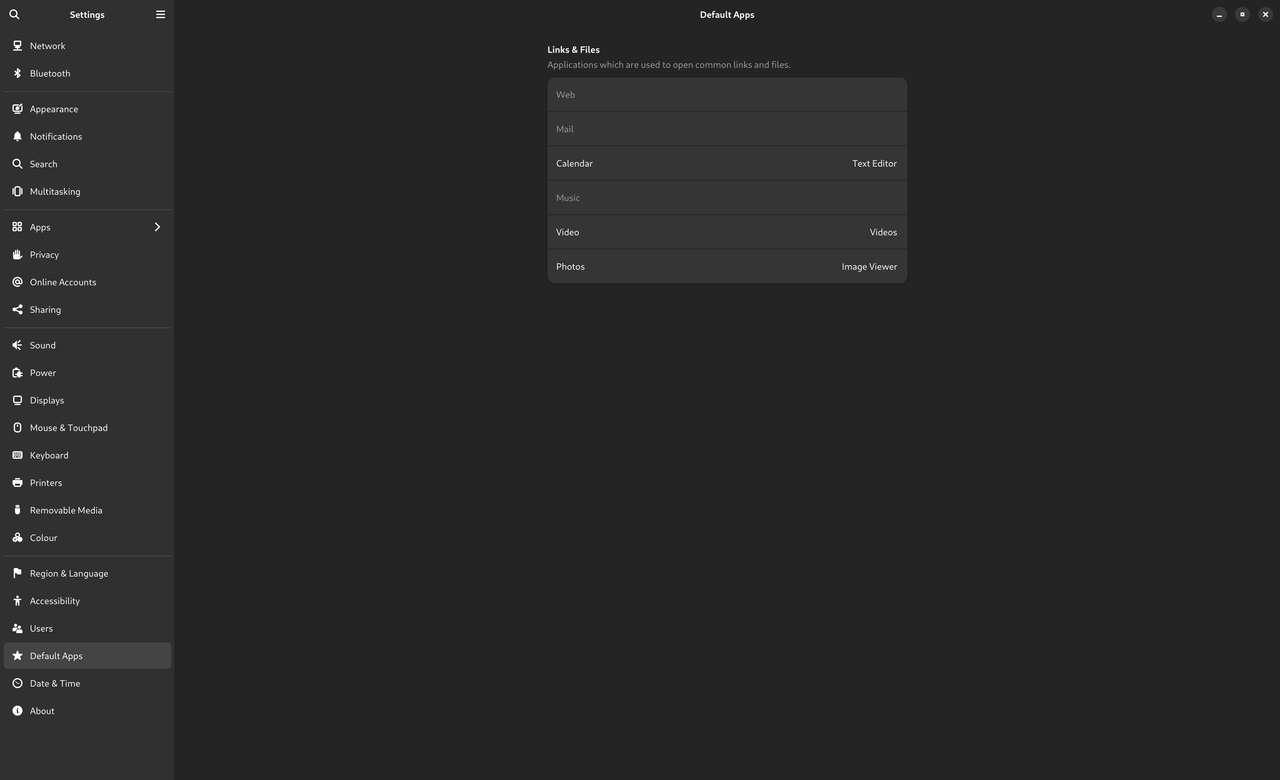
So what happens is, if you have a link let's say in you terminal and you do CTRL+Mouse Click to open it, it will open in a builder app
xdg-mime query default text/html
librewolf.desktopcat /usr/share/applications/mimeinfo.cache | grep librewolf
application/json=librewolf.desktop;org.gnome.Builder.desktop;
application/pdf=librewolf.desktop;
application/x-xpinstall=librewolf.desktop;
application/xhtml+xml=librewolf.desktop;
text/html=librewolf.desktop;org.gnome.Builder.desktop;
text/xml=librewolf.desktop;org.gnome.Builder.desktop;
x-scheme-handler/http=librewolf.desktop;
x-scheme-handler/https=librewolf.desktop;
gio mime text/html
Default application for “text/html”: org.gnome.Builder.desktop
Registered applications:
	org.gnome.Builder.desktop
	org.gnome.TextEditor.desktop
Recommended applications:
	org.gnome.Builder.desktop
I went and check source code here https://gitlab.gnome.org/GNOME/gnome-co … plications for cc-default-apps-* files but I already have glib2 installed, is there anything else I miss?
Offline
#2 2024-02-23 19:04:50
- obelisk
- Member

- From: Germany
- Registered: 2021-01-10
- Posts: 80
Re: How to set default browser app from within Settings in Gnome?
Hi, I have no gnome, but I had in the past similar case with default application. For me it was something in
~/.config/mimeapps.list
or in...
/usr/share/applications/mimeinfo.cache
Offline