You are not logged in.
- Topics: Active | Unanswered
#1 2024-05-24 18:01:47
- Roverp
- Member
- Registered: 2024-05-24
- Posts: 4
[SOLVED] Cant use nvidia GPU on a hybrid laptop
Hi, I'm using asus tuf gaming laptop, it has two GPU's: an integrated Intel i5-11400H, and a dedicated NVIDIA GeForce RTX 3050 Ti Mobile. For nvidia I've installed drivers following this guide https://github.com/korvahannu/arch-nvid … tion-guide, picking drivers for Maxwell (NV110) series and newer.
I'm having troubles making my system/apps to use nvidia GPU. Currently when launching Civilization 6, the game uses intel graphics. How can i make it use nvidia GPU instead?
I've tried few things:
1. Supergfxctl:
only modes I can set here is:
❯ supergfxctl -s
[Integrated, Hybrid, NvidiaNoModeset]
with currently using Hybrid mode, the result is the same as it was before installing supergfxctl.
2. prime-run
if running prime-run steam, steam opens and is displayed in nvidia-smi:
|=========================================================================================|
|    0   N/A  N/A       820      G   Hyprland                                        1MiB |
|    0   N/A  N/A     21038      G   ...local/share/Steam/ubuntu12_32/steam          2MiB |
|    0   N/A  N/A     21441      G   ./steamwebhelper                               33MiB |
+-----------------------------------------------------------------------------------------+
however, Civilization 6 wont launch, with following output:
/bin/sh\0-c\0/home/roverp/.local/share/Steam/ubuntu12_32/reaper SteamLaunch AppId=289070 -- /home/roverp/.local/share/Steam/ubuntu12_32/steam-launch-wrapper -- '/home/roverp/.local/share/Steam/steamapps/common/Sid Meier'\''s Civilization VI/./Civ6'\0
chdir "/home/roverp/.local/share/Steam/steamapps/common/Sid Meier's Civilization VI"
ERROR: ld.so: object '/home/roverp/.local/share/Steam/ubuntu12_32/gameoverlayrenderer.so' from LD_PRELOAD cannot be preloaded (wrong ELF class: ELFCLASS32): ignored.
ERROR: ld.so: object '/home/roverp/.local/share/Steam/ubuntu12_64/gameoverlayrenderer.so' from LD_PRELOAD cannot be preloaded (wrong ELF class: ELFCLASS64): ignored.
ERROR: ld.so: object '/home/roverp/.local/share/Steam/ubuntu12_32/gameoverlayrenderer.so' from LD_PRELOAD cannot be preloaded (wrong ELF class: ELFCLASS32): ignored.
ERROR: ld.so: object '/home/roverp/.local/share/Steam/ubuntu12_32/gameoverlayrenderer.so' from LD_PRELOAD cannot be preloaded (wrong ELF class: ELFCLASS32): ignored.
Shutdown handler: initalize.
Setting breakpad minidump AppID = 289070
Steam_SetMinidumpSteamID:  Caching Steam ID:  76561198851106898 [API loaded no]
ERROR: ld.so: object '/home/roverp/.local/share/Steam/ubuntu12_32/gameoverlayrenderer.so' from LD_PRELOAD cannot be preloaded (wrong ELF class: ELFCLASS32): ignored.
ERROR: ld.so: object '/home/roverp/.local/share/Steam/ubuntu12_32/gameoverlayrenderer.so' from LD_PRELOAD cannot be preloaded (wrong ELF class: ELFCLASS32): ignored.
ERROR: ld.so: object '/home/roverp/.local/share/Steam/ubuntu12_32/gameoverlayrenderer.so' from LD_PRELOAD cannot be preloaded (wrong ELF class: ELFCLASS32): ignored.
Game 289070 created interface STEAMAPPLIST_INTERFACE_VERSION001 / AppList
Game 289070 created interface STEAMAPPS_INTERFACE_VERSION007 / Apps
Game 289070 created interface STEAMHTMLSURFACE_INTERFACE_VERSION_003 / HTMLSurface
Game 289070 created interface STEAMHTTP_INTERFACE_VERSION002 / HTTP
Game 289070 created interface STEAMINVENTORY_INTERFACE_V001 / Inventory
Game 289070 created interface STEAMMUSICREMOTE_INTERFACE_VERSION001 / MusicRemote
Game 289070 created interface STEAMMUSIC_INTERFACE_VERSION001 / Music
Game 289070 created interface STEAMREMOTESTORAGE_INTERFACE_VERSION013 / RemoteStorage
Game 289070 created interface STEAMSCREENSHOTS_INTERFACE_VERSION002 / Screenshots
Game 289070 created interface STEAMUGC_INTERFACE_VERSION007 / UGC
Game 289070 created interface STEAMUNIFIEDMESSAGES_INTERFACE_VERSION001 / UnifiedMessages
Game 289070 created interface STEAMUSERSTATS_INTERFACE_VERSION011 / UserStats
Game 289070 created interface STEAMVIDEO_INTERFACE_V001 / Video
Game 289070 created interface SteamController003 / Controller
Game 289070 created interface SteamFriends015 / Friends
Game 289070 created interface SteamMatchMaking009 / Matchmaking
Game 289070 created interface SteamMatchMakingServers002 / MatchmakingServers
Game 289070 created interface SteamNetworking005 / Networking
Game 289070 created interface SteamUser018 / User
Game 289070 created interface SteamUtils007 / Utils
Game 289070 method call count for IClientUserStats::RequestCurrentStats : 1
Game 289070 method call count for IClientAppManager::GetCurrentLanguage : 1
Game 289070 method call count for IClientUtils::RecordSteamInterfaceCreation : 20
Game 289070 method call count for IClientUtils::GetAppID : 21
Game 289070 method call count for IClientUser::BIsSubscribedApp : 1
Game 289070 method call count for IClientUser::GetSteamID : 1
Game 289070 method call count for IClientUser::BLoggedOn : 1
Uploaded AppInterfaceStats to Steam
3. nvidia-settings
For some reason nvidia-settings, gives me very little options
https://imgur.com/a/gGoijOG
compared to what I've seen on internet: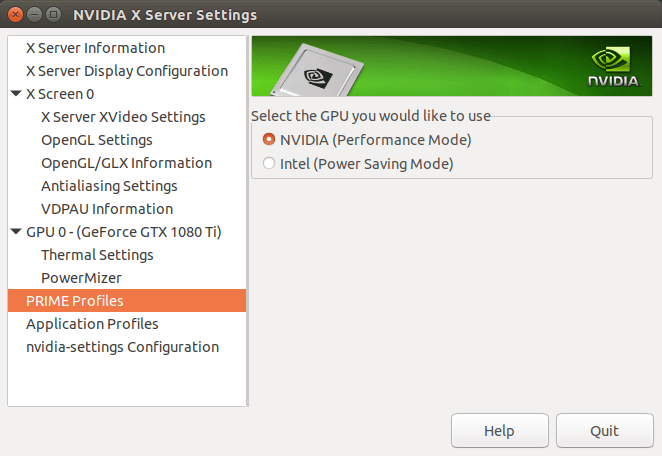
nvidia-settings logs:
❯ nvidia-settings

(nvidia-settings:35865): GLib-GObject-CRITICAL **: 19:37:59.007: g_object_unref: assertion 'G_IS_OBJECT (object)' failednvidia-smi:
While Steam and Civilization 6 are running in background:
❯ nvidia-smi
Fri May 24 19:29:21 2024
+-----------------------------------------------------------------------------------------+
| NVIDIA-SMI 550.78                 Driver Version: 550.78         CUDA Version: 12.4     |
|-----------------------------------------+------------------------+----------------------+
| GPU  Name                 Persistence-M | Bus-Id          Disp.A | Volatile Uncorr. ECC |
| Fan  Temp   Perf          Pwr:Usage/Cap |           Memory-Usage | GPU-Util  Compute M. |
|                                         |                        |               MIG M. |
|=========================================+========================+======================|
|   0  NVIDIA GeForce RTX 3050 ...    Off |   00000000:01:00.0 Off |                  N/A |
| N/A   48C    P0            749W /   60W |       5MiB /   4096MiB |      0%      Default |
|                                         |                        |                  N/A |
+-----------------------------------------+------------------------+----------------------+

+-----------------------------------------------------------------------------------------+
| Processes:                                                                              |
|  GPU   GI   CI        PID   Type   Process name                              GPU Memory |
|        ID   ID                                                               Usage      |
|=========================================================================================|
|    0   N/A  N/A       820      G   Hyprland                                        1MiB |
+-----------------------------------------------------------------------------------------+
output of sudo nvidia-bug-report.sh
https://drive.google.com/file/d/1yVGf-B … sp=sharing
Last edited by Roverp (2024-06-01 06:38:09)
Offline
#2 2024-05-26 08:31:16
- seth
- Member

- From: Won't reply 2 private help req
- Registered: 2012-09-03
- Posts: 77,200
Re: [SOLVED] Cant use nvidia GPU on a hybrid laptop
https://wiki.archlinux.org/title/PRIME# … figuration
Do you have lib32-nvidia-utils installed?
Does it work (w/ prime-run, in doubt along setting the vulkan environment) in an X11 (eg. openbox) session?
nvidia-settings is gonna be constrained by
1. this isn't an X11 session, no point in having X11 options
2. the GPU is possibly not even a VGA device (doesn't control outputs)
so that's not really surprsing. Please replace the oversized images w/ links.
Offline
#3 2024-05-28 09:02:57
- Roverp
- Member
- Registered: 2024-05-24
- Posts: 4
Re: [SOLVED] Cant use nvidia GPU on a hybrid laptop
Thank you for the help! Looks like its problem with nvidia on wayland, as prime-run worked flawlessly in dwm with no tweaks.
Do you have lib32-nvidia-utils installed?
- yes, I have lib32-nvidia-utils installed.
Does it work (w/ prime-run, in doubt along setting the vulkan environment) in an X11 (eg. openbox) session?
-yes, I've tried running prime-run in dwm session, it launched Civilization 6 using nvidia gpu, which was dispayed in nvidia-smi.
https://wiki.archlinux.org/title/PRIME# … figuration
-prepending DRI_PRIME=, like bellow and then running running prime-run in the same terminal session, changed nothing
❯ DRI_PRIME=pci-0000_01_00_0 __VK_LAYER_NV_optimus=NVIDIA_only __GLX_VENDOR_LIBRARY_NAME=nvidia glxinfo | grep 'OpenGL renderer string'
OpenGL renderer string: NVIDIA GeForce RTX 3050 Ti Laptop GPU/PCIe/SSE2
~ ❯
Offline
#4 2024-05-28 09:54:56
- Lone_Wolf
- Administrator

- From: Netherlands, Europe
- Registered: 2005-10-04
- Posts: 15,270
Re: [SOLVED] Cant use nvidia GPU on a hybrid laptop
-prepending DRI_PRIME=, like bellow and then running running prime-run in the same terminal session, changed nothing
It's only supposed to change the card seen by the command at the end .
Try replacing glxinfo | grep 'OpenGL renderer string' with the command used to start CIV 6 .
Disliking systemd intensely, but not satisfied with alternatives so focusing on taming systemd.
clean chroot building not flexible enough ?
Try clean chroot manager by graysky
Offline
#5 2024-05-28 10:45:29
- Roverp
- Member
- Registered: 2024-05-24
- Posts: 4
Re: [SOLVED] Cant use nvidia GPU on a hybrid laptop
DRI_PRIME=pci-0000_01_00_0 __VK_LAYER_NV_optimus=NVIDIA_only __GLX_VENDOR_LIBRARY_NAME=nvidia %command%
- at launch option of steam, changed nothing.
Same if launching steam with:
❯ DRI_PRIME=pci-0000_01_00_0 __VK_LAYER_NV_optimus=NVIDIA_only __GLX_VENDOR_LIBRARY_NAME=nvidia steamit produces the same output as when running only prime-run steam:
/bin/sh\0-c\0DRI_PRIME=pci-0000_01_00_0 __VK_LAYER_NV_optimus=NVIDIA_only __GLX_VENDOR_LIBRARY_NAME=nvidia /home/roverp/.local/share/Steam/ubuntu12_32/reaper SteamLaunch AppId=289070 -- /home/roverp/.local/share/Steam/ubuntu12_32/steam-launch-wrapper -- '/home/roverp/.local/share/Steam/steamapps/common/Sid Meier'\''s Civilization VI/./Civ6'\0
chdir "/home/roverp/.local/share/Steam/steamapps/common/Sid Meier's Civilization VI"
ERROR: ld.so: object '/home/roverp/.local/share/Steam/ubuntu12_32/gameoverlayrenderer.so' from LD_PRELOAD cannot be preloaded (wrong ELF class: ELFCLASS32): ignored.
ERROR: ld.so: object '/home/roverp/.local/share/Steam/ubuntu12_64/gameoverlayrenderer.so' from LD_PRELOAD cannot be preloaded (wrong ELF class: ELFCLASS64): ignored.
ERROR: ld.so: object '/home/roverp/.local/share/Steam/ubuntu12_32/gameoverlayrenderer.so' from LD_PRELOAD cannot be preloaded (wrong ELF class: ELFCLASS32): ignored.
ERROR: ld.so: object '/home/roverp/.local/share/Steam/ubuntu12_32/gameoverlayrenderer.so' from LD_PRELOAD cannot be preloaded (wrong ELF class: ELFCLASS32): ignored.
Shutdown handler: initalize.
Setting breakpad minidump AppID = 289070
Steam_SetMinidumpSteamID:  Caching Steam ID:  76561198851106898 [API loaded no]
ERROR: ld.so: object '/home/roverp/.local/share/Steam/ubuntu12_32/gameoverlayrenderer.so' from LD_PRELOAD cannot be preloaded (wrong ELF class: ELFCLASS32): ignored.
ERROR: ld.so: object '/home/roverp/.local/share/Steam/ubuntu12_32/gameoverlayrenderer.so' from LD_PRELOAD cannot be preloaded (wrong ELF class: ELFCLASS32): ignored.
ERROR: ld.so: object '/home/roverp/.local/share/Steam/ubuntu12_32/gameoverlayrenderer.so' from LD_PRELOAD cannot be preloaded (wrong ELF class: ELFCLASS32): ignored.
Game 289070 created interface STEAMAPPLIST_INTERFACE_VERSION001 / AppList
Game 289070 created interface STEAMAPPS_INTERFACE_VERSION007 / Apps
Game 289070 created interface STEAMHTMLSURFACE_INTERFACE_VERSION_003 / HTMLSurface
Game 289070 created interface STEAMHTTP_INTERFACE_VERSION002 / HTTP
Game 289070 created interface STEAMINVENTORY_INTERFACE_V001 / Inventory
Game 289070 created interface STEAMMUSICREMOTE_INTERFACE_VERSION001 / MusicRemote
Game 289070 created interface STEAMMUSIC_INTERFACE_VERSION001 / Music
Game 289070 created interface STEAMREMOTESTORAGE_INTERFACE_VERSION013 / RemoteStorage
Game 289070 created interface STEAMSCREENSHOTS_INTERFACE_VERSION002 / Screenshots
Game 289070 created interface STEAMUGC_INTERFACE_VERSION007 / UGC
Game 289070 created interface STEAMUNIFIEDMESSAGES_INTERFACE_VERSION001 / UnifiedMessages
Game 289070 created interface STEAMUSERSTATS_INTERFACE_VERSION011 / UserStats
Game 289070 created interface STEAMVIDEO_INTERFACE_V001 / Video
Game 289070 created interface SteamController003 / Controller
Game 289070 created interface SteamFriends015 / Friends
Game 289070 created interface SteamMatchMaking009 / Matchmaking
Game 289070 created interface SteamMatchMakingServers002 / MatchmakingServers
Game 289070 created interface SteamNetworking005 / Networking
Game 289070 created interface SteamUser018 / User
Game 289070 created interface SteamUtils007 / Utils
Game 289070 method call count for IClientUserStats::RequestCurrentStats : 1
Game 289070 method call count for IClientAppManager::GetCurrentLanguage : 1
Game 289070 method call count for IClientUtils::RecordSteamInterfaceCreation : 20
Game 289070 method call count for IClientUtils::GetAppID : 21
Game 289070 method call count for IClientUser::BIsSubscribedApp : 1
Game 289070 method call count for IClientUser::GetSteamID : 1
Game 289070 method call count for IClientUser::BLoggedOn : 1
Uploaded AppInterfaceStats to Steam
Offline
#6 2024-05-28 16:22:51
- seth
- Member
- From: Won't reply 2 private help req
- Registered: 2012-09-03
- Posts: 77,200
Re: [SOLVED] Cant use nvidia GPU on a hybrid laptop
if running prime-run steam, steam opens and is displayed in nvidia-smi […] however, Civilization 6 wont launch
Since glxinfo clearly picks up the nvidia GPU, does https://wiki.archlinux.org/title/Steam/ … _emulation work?
Otherwise there's actually no obvious error in teh steam output but have you seen https://wiki.archlinux.org/title/Steam/ … ization_VI ?
Offline
#7 2024-05-31 06:04:31
- Roverp
- Member
- Registered: 2024-05-24
- Posts: 4
Re: [SOLVED] Cant use nvidia GPU on a hybrid laptop
but have you seen https://wiki.archlinux.org/title/Steam/ … ization_VI ?
Thank you for this article. Turns out it was just game specific problem, I've tried launching other native linux games through prime-run steam, they worked without any tweaks using nvidia GPU.
For Civ 6, using windows version of the game fixed the problem.
Thank you for your help.
Offline
#8 2024-05-31 07:13:41
- seth
- Member
- From: Won't reply 2 private help req
- Registered: 2012-09-03
- Posts: 77,200
Re: [SOLVED] Cant use nvidia GPU on a hybrid laptop
\o/
Please always remember to mark resolved threads by editing your initial posts subject - so others will know that there's no task left, but maybe a solution to find.
Thanks.
Offline