You are not logged in.
- Topics: Active | Unanswered
#1 2024-12-28 04:27:49
- tugoese
- Member
- Registered: 2023-10-15
- Posts: 63
[CLOSED] VSCode: kernel select is empty on Jupyter extension
Python extension is already installed
Here's the example in Vscode

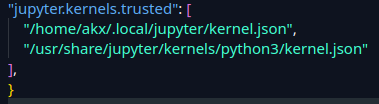
I already provide the kernel path in Settings.json
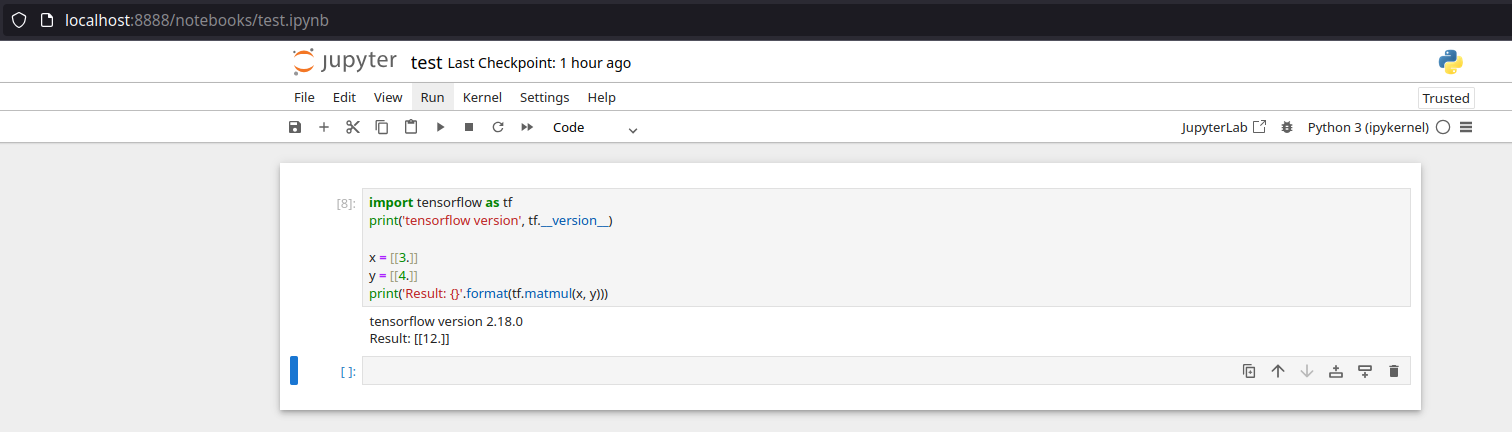
It's working fine on Notebook
Last edited by tugoese (2026-01-06 09:47:26)
Offline
#2 2024-12-28 13:49:44
- ewaller
- Administrator

- From: Pasadena, CA
- Registered: 2009-07-13
- Posts: 20,701
Re: [CLOSED] VSCode: kernel select is empty on Jupyter extension
Python has been upgraded recently. Is your system fully up to date? Have you rebuilt and reinstalled all foreign pacman packages?
Nothing is too wonderful to be true, if it be consistent with the laws of nature -- Michael Faraday
The shortest way to ruin a country is to give power to demagogues.— Dionysius of Halicarnassus
---
How to Ask Questions the Smart Way
Offline
#3 2024-12-28 14:16:46
- tugoese
- Member
- Registered: 2023-10-15
- Posts: 63
Re: [CLOSED] VSCode: kernel select is empty on Jupyter extension
My system is up to date, what do you mean by
rebuilt and reinstalled all foreign pacman packages
Is `pacman -Syu` not enough?
Offline
#4 2024-12-28 14:36:30
- ewaller
- Administrator
- From: Pasadena, CA
- Registered: 2009-07-13
- Posts: 20,701
Re: [CLOSED] VSCode: kernel select is empty on Jupyter extension
If you have installed python packages from the AUR, you may need to update those by hand. What is the output of
pacman -Qm?
Also, has this ever worked? I might be tilting at the wrong windmill.
Nothing is too wonderful to be true, if it be consistent with the laws of nature -- Michael Faraday
The shortest way to ruin a country is to give power to demagogues.— Dionysius of Halicarnassus
---
How to Ask Questions the Smart Way
Offline
#5 2024-12-28 14:45:08
- tugoese
- Member
- Registered: 2023-10-15
- Posts: 63
Re: [CLOSED] VSCode: kernel select is empty on Jupyter extension
Here it is
$ pacman -Qm
7-zip 24.08-1
airgeddon-git r2839.6afc39d-1
downgrade 11.4.2-1
dxvk-bin 2.5.2-1
epson-inkjet-printer-202101w 1.0.2-1
fvs 0.3.4-2
gdown 5.2.0-1
golang-golang-x-net 0.0.20220826-1
golang-golang-x-sys 0.0.20230208-1
golang-golang-x-term 0.0.20220722-1
golang-golang-x-text 0.3.3-2
golang-golang-x-tools 0.0.20191225-2
httpfs2-2gbplus 0.1.5-1
icoextract 0.1.5-1
lib32-nvidia-utils-tkg 565.57.01-260
lib32-opencl-nvidia-tkg 565.57.01-260
linux611-tkg-bmq 6.11.3-273
linux611-tkg-bmq-headers 6.11.3-273
linux612-tkg-bmq 6.12.7-273
linux612-tkg-bmq-headers 6.12.7-273
megabasterd-bin 8.22-1
mod_fcgid 2.3.9-5
nvidia-dkms-tkg 565.57.01-260
nvidia-egl-wayland-tkg 565.57.01-260
nvidia-settings-tkg 565.57.01-260
nvidia-utils-tkg 565.57.01-260
oh-my-zsh-git r7344.d6f84f3e7-1
opencl-nvidia-tkg 565.57.01-260
packettracer 8.2.2-1
powershell-bin 7.4.6-1
python-lesscpy 0.15.1-2
python-pathvalidate 3.2.1-1
python-steamgriddb 1.0.5-2
qt5-singleapplication 2.6_20170914-1
qt5-singleapplication-doc 2.6_20170914-1
qt5-singlecoreapplication 2.6_20170914-1
qt5-singlecoreapplication-doc 2.6_20170914-1
riseup-vpn-git 0.24.10.rc.1.r0.g91a2ce8d-1
sdx 20110317-1
tclkit 8.6.14-1
virtualbox-ext-oracle 7.1.4-1
virtualbox-unattended-templates 7.0.12-1
vlc-pause-click-plugin 2.2.0-1
wine-tkg-valve-exp-bleeding 9.0.127711.20241015-327
xampp 8.2.12-1
I did install Python 3.11 once via AUR but ended up using downgrade
Offline
#6 2024-12-28 15:00:18
- ewaller
- Administrator
- From: Pasadena, CA
- Registered: 2009-07-13
- Posts: 20,701
Re: [CLOSED] VSCode: kernel select is empty on Jupyter extension
Okay, that looks okay. Sorry, most Python issues lately have to do with the recent upgrade. I don't think it is your problem; sorry for the noise. I don't use vcode, so I am afraid I'm out.
Nothing is too wonderful to be true, if it be consistent with the laws of nature -- Michael Faraday
The shortest way to ruin a country is to give power to demagogues.— Dionysius of Halicarnassus
---
How to Ask Questions the Smart Way
Offline
#7 2025-01-06 06:30:05
- Charly La Celle
- Member
- Registered: 2021-10-19
- Posts: 17
Re: [CLOSED] VSCode: kernel select is empty on Jupyter extension
Same here.
VScode and python installed via AUR. Both up to date.
Python runs ok in VSCode, but not jupyter notebooks. Seems a plugin problem.
Offline