You are not logged in.
- Topics: Active | Unanswered
#1 2025-01-11 20:50:28
- ReilyS
- Member
- Registered: 2024-03-16
- Posts: 12
System keeps crashing within 10 seconds to 5 minutes after booting up
Hi everyone,
This is a terrible issue I'm facing and I'm getting desperate. I was working on a more expensive posts with crash logs to support this post but the issue is now so drastic I dont even have time to boot up my browser and make this post on my PC so I'm typing on mobile.
Long story short: after playing the Witcher 3 for around 50 hours the past 3 weeks I've experienced FPS issues when turning the camera, temporary and permanent game freezes, and game crashes. I knew linux isnt the best for gaming so I ignored these issues as my CPU and GPU never got above 65 degrees so a hardware issue seemed unlikely to me.
Then things got worse. Not just the game crashed but my entire PC. Then my PC started crashing even whilst not gaming. Last night I could shut down my PC normally after a one hour session. Today after trouble shooting and updating packages my PC crashed after a 4 hour session. And now it keeps crashing after 5 minutes or sometimes even 10 seconds.
I'm running a new system less than a year old (see my previous post for specifics), so any hardware issues would seem strange to me. But I'd also think this is something which can unlikely be caused by a software problem, especially after successfully updating my packages prior to crashing. Maybe there's something wrong with my PSU?
I could go more in detail on the nature of these crashes, but this post is already quite lengthy. Any opinikns on this issue would be much appreciated
The same for advice on how to do hardware tests or on any commands to run if I can get a successful boot going would be appreciated. Sorry, I cant provide any more info as of now.
Offline
#2 2025-01-11 21:26:07
- seth
- Member

- From: Won't reply 2 private help req
- Registered: 2012-09-03
- Posts: 77,737
Re: System keeps crashing within 10 seconds to 5 minutes after booting up
What's the nature of the "crash" - does the system shut down or reboot or just "freeze"?
Have you tried to boot a different software stack (live distro like grml.org) on the system?
This system: https://bbs.archlinux.org/viewtopic.php … 4#p2157734 ?
Does it help to disable the GPU and enable the APU again?
Online
#3 2025-01-11 22:29:33
- ReilyS
- Member
- Registered: 2024-03-16
- Posts: 12
Re: System keeps crashing within 10 seconds to 5 minutes after booting up
Thanks for your response seth. The crash is the system immediately powering off. One moment there is power and one moment after power is off. When I press the power button to turn it on again it does not work. I have to switch off the power supply for 10 seconds, and switch it back on again and then I can boot it up again.
I have already forced the PC to only use integrated graphics, but it didn't prevent this issue. And yes that's the system I'm currently still using.
I havent tried using live distro yet. Currently dont have access to a different PC yet. So by trying to boot from a live distro I should be able to figure out of it's a hardware issue right? Because if it still crashes then there should be something wrong with my system. If it runs fine then there likely isnt an issue with the hardware. Or is it not as straightforward?
Offline
#4 2025-01-11 22:41:37
- seth
- Member
- From: Won't reply 2 private help req
- Registered: 2012-09-03
- Posts: 77,737
Re: System keeps crashing within 10 seconds to 5 minutes after booting up
The crash is the system immediately powering off.
Underpowered, overheated, broken RAM or CPU. A kernel panic/halt does not result in a power cut.
I have to switch off the power supply for 10 seconds
You mean like in a switch controlled outlet, like https://images.thdstatic.com/productIma … 64_600.jpg ?
Did you recently update the firmware (uefi/bios)?
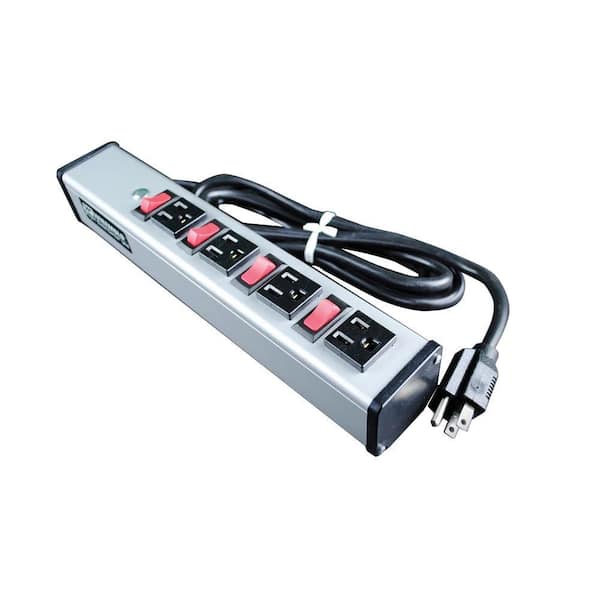
Can you adjust the CPU voltage?
https://wiki.archlinux.org/title/Ryzen#Random_reboots
For RAM see https://wiki.archlinux.org/title/Stress … MemTest86+ (you'll have to run that for days - or until the system crashes or you get errors - for meaningful results, at least make it 16h)
Sanity check: is there a parallel windows installation?
Online
#5 2025-01-11 23:16:20
- ReilyS
- Member
- Registered: 2024-03-16
- Posts: 12
Re: System keeps crashing within 10 seconds to 5 minutes after booting up
You mean like in a switch controlled outlet, like https://images.thdstatic.com/productIma … 64_600.jpg ?
I mean a switch like this: https://d33v4339jhl8k0.cloudfront.net/d … pi6vKi.jpg

Did you recently update the firmware (uefi/bios)? installation?
No, I have not. As someone recommended in my previous forum post I updated the firmware then and havent changed it since. I only used pacman to make my packages up to date, but this was already after the issues started.
Underpowered, overheated, broken RAM or CPU. A kernel panic/halt does not result in a power cut.
To add further context. I had played this game (the Witcher 3) in October of last year as well. And at the time it crashed my PC (shutdown no power) twice whilst playing the game. So I stopped playing it and had no issue playing other games (like the outer worlds, dragon age inquisition). Now I just played the game again a lot and suddenly these issues came back. It seems as if running it has accumulated and turned in this issue, but how that's at all possible I can't imagine. Whilst playing temps for my CPU and GPU rarely got into the 60 degrees.
Can you adjust the CPU voltage?
https://wiki.archlinux.org/title/Ryzen#Random_reboots
I'll try this tomorrow as its currently midnight. I'll also try using one RAM stick only in a different slot to see if that makes a difference. My dad also has an old PSU so maybe I can try switching that around and see how that goes. It should be enough watt, especially if I remove the GPU.
For RAM see https://wiki.archlinux.org/title/Stress … MemTest86+ (you'll have to run that for days - or until the system crashes or you get errors - for meaningful results, at least make it 16h)
Can I do this on a live distro as well?
Sanity check: is there a parallel windows installation?
No. Just Arch linux with two profiles on my 2TB M2 drive. No other hard drives or SSDs on the machine. Thanks for your help so far. Ever encountered something similar to this issue?
Last edited by ReilyS (2025-01-11 23:19:06)
Offline
#6 2025-01-11 23:30:40
- seth
- Member
- From: Won't reply 2 private help req
- Registered: 2012-09-03
- Posts: 77,737
Re: System keeps crashing within 10 seconds to 5 minutes after booting up
I mean a switch like this
Same result 
The ryzen situation is typically degrading, ie. it gets worse over time - so that fits.
It should be enough watt, especially if I remove the GPU.
If you could run the system w/ teh GPU and now can't w/o that would indeed be the worst kind of PSU decay ever heard of.
Can I do this on a live distro as well?
Yes, I'm pretty sure the grml isos come w/ memtest86+
Ever encountered something similar to this issue?
You mean like there would be some systemic issue w/ ryzen CPUs that's discussed all over the internet and even addressed in the arch wik?
Maybe 
Online
#7 2025-01-12 15:25:15
- ReilyS
- Member
- Registered: 2024-03-16
- Posts: 12
Re: System keeps crashing within 10 seconds to 5 minutes after booting up
Alright, I haven't tried fixing anything yet but I had enough time to make some crash logs and upload them so I can access them whenever. I used the sudo journalctl -b -# | curl -F 'file=@-' 0x0.st command to get a bunch of log files. I will list them in chronological order and mention the more important ones.
This is when the problem started 1: https://0x0.st/8-vg.txt I usually put my system in sleep mode so this session lasted several days, but it ended up crashing even when I wasn't gaming. It just powered off. Here my system crashed right after starting steam 2: https://0x0.st/8-vY.txt These next ones had no display showing I believe so I had to press the power button and shut the system down a few times in a row: 3: https://0x0.st/8-vx.txt 4: https://0x0.st/8-vt.txt 5: https://0x0.st/8-vy.txt
This is when I turned the system off normally without crashing 6: https://0x0.st/8-vW.txt In these logs I booted in my second profile then switched to my other one and put it in sleep mode only for the system to crash whilst it was in sleep mode: 7: https://0x0.st/8-vV.txt 8: https://0x0.st/8-vO.txt Here my system lasted quite a while but still ended up crashing unexpectedly 9: https://0x0.st/8-vL.txt
This was my last boot before I started seeking help 10: https://0x0.st/8-3v.txt it lasted quite a while but crashed after updating packages. Here are more crashes where the system booted for 10 seconds up to 5 minutes or so: https://0x0.st/8-3w.txt, https://0x0.st/8-3x.txt, https://0x0.st/8-3k.txt, https://0x0.st/8-DH.txt
I'd guess the most important logs are 1, 2, 8, 9, and 10. And perhaps 6 to contrast with a normal boot and shutdown on my system. I'll keep this post updated as soon as I've done more testing. If anyone can diagnose something from these crash logs please let me know.
Offline
#8 2025-01-12 15:59:50
- seth
- Member
- From: Won't reply 2 private help req
- Registered: 2012-09-03
- Posts: 77,737
Re: System keeps crashing within 10 seconds to 5 minutes after booting up
If the system spontaneously hard-reboots/powers down the logs preceeding the crash cannot be preserved, you're looking for MCE errors in the subsequent boot (this is the HW informing the OS that there was some oopsie) - there's probably nothing to see in the one for the boot that shut down.
Online
#9 2025-01-12 16:12:55
- ReilyS
- Member
- Registered: 2024-03-16
- Posts: 12
Re: System keeps crashing within 10 seconds to 5 minutes after booting up
If the system spontaneously hard-reboots/powers down the logs preceeding the crash cannot be preserved, you're looking for MCE errors in the subsequent boot (this is the HW informing the OS that there was some oopsie) - there's probably nothing to see in the one for the boot that shut down.
Nothing like that is showing up at all for any of the logs. It only mentions MCE once here:
Jan 07 19:38:49 archlinux kernel: MCE: In-kernel MCE decoding enabled. and that's the same for all of the logs. No mention of hardware errors either.
Offline
#10 2025-01-12 16:26:02
- cryptearth
- Member
- Registered: 2024-02-03
- Posts: 2,315
Re: System keeps crashing within 10 seconds to 5 minutes after booting up
One moment there is power and one moment after power is off. When I press the power button to turn it on again it does not work. I have to switch off the power supply for 10 seconds, and switch it back on again and then I can boot it up again.
that sounds like over-current protection
not able to power on the system right away is caused by a self-resetting thermal fuse which needs to cool down first before in conducts again - which means that the power to the psu is cut on the input which hints to a faulty psu as there has to be a reason for that over-current - a fuse doesn't blow for nothing
I just had a rough over the other topic - but 850w should be enough for a 7800x3d + a 7900xtx - but I'm a bit puzzle about the 5ghz in the neofetch in the other topic: according to amd the 7800x3d is speced for a base clock of 4.2ghz with 5ghz as upper boost - your neofetch shows the 5ghz in a what I presume idle state?
have you set that manual?
have you tried to reset your uefi to its default settings to wipe everything overclocking/undervolting?
what's your cooler? air or liquid?
noob question: have you removed the plastic protection from the cooler? have you applied thermal paste yourself or was it pre-applied?
is this a self built or pre built?
but if you swap the PSU - as said: there has to be a reason for the over-current - and unless its the psu itself at fault you would blow another one after swapping anyway
Offline
#11 2025-01-12 16:45:59
- Al.Piotrowicz
- Member
- Registered: 2017-08-07
- Posts: 179
Re: System keeps crashing within 10 seconds to 5 minutes after booting up
Best way to measure PSU is just launch it outside the rig with a few devices plugged in (HDD, usb hubs etc) and to check the inputs with the voltage gauge. It easily shows one dying like possible in this case.
Offline
#12 2025-01-12 17:02:22
- ReilyS
- Member
- Registered: 2024-03-16
- Posts: 12
Re: System keeps crashing within 10 seconds to 5 minutes after booting up
is this a self built or pre built?
Thanks for the response. I did assemble this build myself with my dad. We went through all steps and removed the plastic protector and applied the thermal paste which came with the CPU. But if we misapplied the thermal paste surely my temps would get much hotter than the 60 degrees when gaming? When I'm in bios CPU temps are in the low 40 degrees which should also be fine.
I'm using the following air based cooler: Scythe Fuma 3 and this is the PSU: Cooler Master V850 Gold i power supply unit 850 W 24-pin ATX. This should be fine for the 7900GRE and 7800x3D I'm using. I just checked and it still mentions the clockspeed is 5.05GHz for the CPU. I'm not sure what's the reason for this, as I've not done any changes in the bios myself besides updating the firmware that one time. I'll try resetting it to default settings. I think it's more likely it's a display error though. For instance, for my GPU it now mentions the following: GPU: AMD ATI Radeon RX 7900 XT/7900 XTX/7900 GRE/7900M. Maybe I should update the firmware again? They've made quite a few new releases.
Offline
#13 2025-01-12 17:10:22
- Al.Piotrowicz
- Member
- Registered: 2017-08-07
- Posts: 179
Re: System keeps crashing within 10 seconds to 5 minutes after booting up
One moment there is power and one moment after power is off. When I press the power button to turn it on again it does not work. I have to switch off the power supply for 10 seconds, and switch it back on again and then I can boot it up again.
I'd try to exclude the PSU factor at first
Offline
#14 2025-01-12 19:44:01
- seth
- Member
- From: Won't reply 2 private help req
- Registered: 2012-09-03
- Posts: 77,737
Re: System keeps crashing within 10 seconds to 5 minutes after booting up
Try to feed more voltage to the CPU - ryzens are notorious for that behavior so it's the obvious candidate.
Online