You are not logged in.
- Topics: Active | Unanswered
#1 2025-03-18 13:32:01
- raphix
- Member

- From: France
- Registered: 2008-09-27
- Posts: 56
- Website
Select printers appearing in Gtk apps printing dialog
I work in a university, in which there are a lot of printers managed by the same printing server.
I have learnt about cups-browsed.conf so that
lpstat -aonly displays the two printers I can print on.
However, when using Evince/Zathura/Firefox, the printing dialog displays all the printers. I guess it's because it lists all the printers advertised via dnssd.
Is there a way to filter that list, so that I see only the selected printers?
On the image, you can see the problem. The two rectangles highlight the printers I can print on. The green rectangle at the top list the printers I have filtered and that appear through lpstat -a, the red rectangle at the bottom list the same printers but with their dnssd names. I would like to only see the green rectangle's content.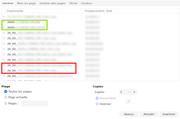
I use AwesomeWM, so no Gnome DE, but I rely a lot on Gtk apps (more than Qt/KDE), if it's important.
configs files on github -- keep up the good work, arch devs
Offline
#2 2025-03-18 15:13:04
- seth
- Member

- From: Won't reply 2 private help req
- Registered: 2012-09-03
- Posts: 77,708
Re: Select printers appearing in Gtk apps printing dialog
https://gitlab.gnome.org/GNOME/gtk/-/issues/1158
Nobody showed an interest in fixing this

I guess if you don't care about bonjours/avahi/mdns you could deactivate it locally?
Offline
#3 2025-03-21 09:27:35
- raphix
- Member
- From: France
- Registered: 2008-09-27
- Posts: 56
- Website
Re: Select printers appearing in Gtk apps printing dialog
I could probably deactivate some of those protocols, but… the printers I care for are among those network printers.
I think that the only thing distinguishing the printers I want from the ones I don't want are just some characters in their names.
Thank you for finding the bug in GTk, you really know how to find the root cause of problems. Unfortunately, it looks like it won't be solved anytime soon.
I guess the topic can be closed now.
configs files on github -- keep up the good work, arch devs
Offline