You are not logged in.
- Topics: Active | Unanswered
#1 2025-04-02 22:23:47
- sonicheo
- Member
- Registered: 2025-04-02
- Posts: 3
During archiso_pxe_common hook, pxe times out trying to get an IP
Hi,
I'm new to archlinux and wanted to add its image as an option for my pxe process.
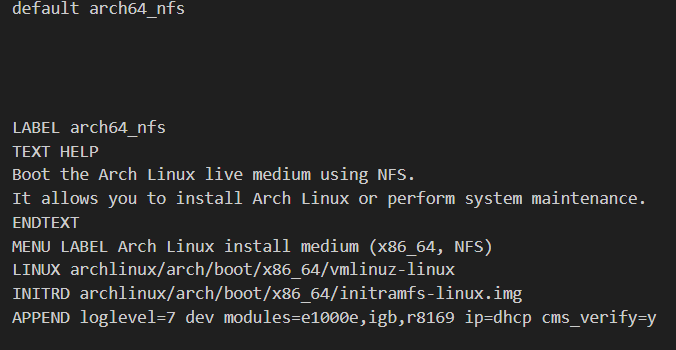
^The above is my /var/lib/tftpboot/pxelinux.cfg/default
I'm using a fresh image straight from the website: archlinux-2025.04.01-x86_64.iso
It runs through every hook, then stops at trying to get an IP
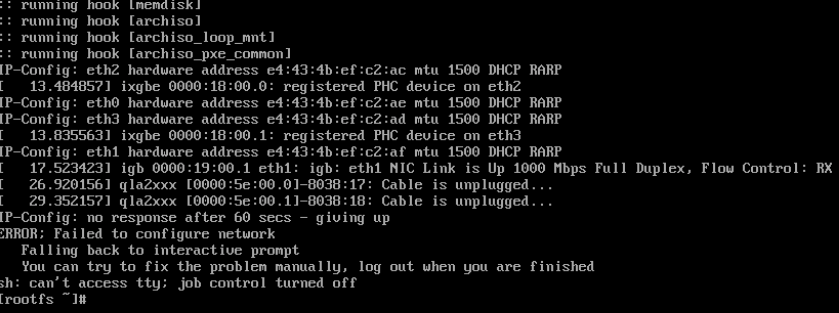
My dhcp server is working fine because I'm able to pxe other linux flavors like Ubuntu, Centos and Rocky. But I can't seem to get this one to get an IP.
I attempted to also create my own image using mkarchiso and created the image with by taking out dhcpcd and keeping dhclient in /root/archlive/packages.x86_64. As well as vice versa with no luck.
I'm completely stuck on what to do, any nudge in the right direction is very much appreciated.
Offline
#2 2025-04-03 03:54:55
- goro9922
- Member
- Registered: 2019-04-12
- Posts: 45
Re: During archiso_pxe_common hook, pxe times out trying to get an IP
I have no experience trying to do a pxe boot with ArchLinux, but you might want to check out the ArchWiki page on Netboot and see if that helps.
https://wiki.archlinux.org/title/Netboot
Good luck!
Offline
#3 2025-04-03 17:39:48
- sonicheo
- Member
- Registered: 2025-04-02
- Posts: 3
Re: During archiso_pxe_common hook, pxe times out trying to get an IP
Thanks for the response!
The first thing that I did was follow the instructions of both https://wiki.archlinux.org/title/Preboo … nvironment and https://wiki.archlinux.org/title/Netboot
Without any luck.
Offline
#4 2025-04-03 18:16:50
- cryptearth
- Member
- Registered: 2024-02-03
- Posts: 2,321
Re: During archiso_pxe_common hook, pxe times out trying to get an IP
have you checked the logs of the dhcp server? depending on its config it could just ignore the 2nd stage dhcp request due to some changed identifier
I have setup pxe on my network, too - in order to use it along the dhcp of my regular router I've set a different range (the dhcp of my router serves .20 up to .200 - to not conflict my pxe dhcp serves .210 to .240) and also a filter to only reply to pxe-dhcp packets while ignoring regular non-pxe packets
so when you struggle to get a dhcpoffer at this point start at checking if the dhcp server gets the dhcpdiscover and if its config is set to reply to it
Offline
#5 2025-04-03 21:57:09
- sonicheo
- Member
- Registered: 2025-04-02
- Posts: 3
Re: During archiso_pxe_common hook, pxe times out trying to get an IP
I think I might have figured out what the issue is.
For some reason it either lingers or it doesn't run ipconfig at all.
Because if I run it manually in rootfs I get an IP
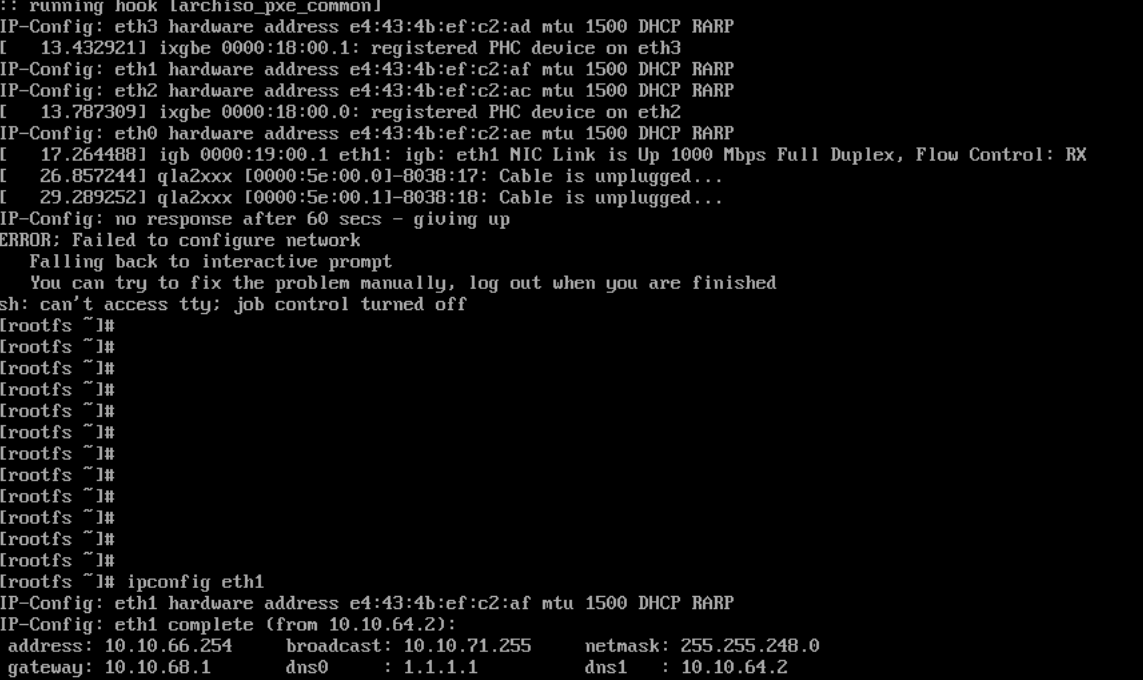
I might need to create a hook that turns the interfaces off and on then runs ipconfig
Do you guys know the best way to go about that?
Offline
#6 2025-04-18 13:01:03
- starfry
- Member
- From: Surrey, UK
- Registered: 2010-08-18
- Posts: 238
Re: During archiso_pxe_common hook, pxe times out trying to get an IP
Hello, just thought I'd say that you are not alone. I think you'll find that it does call "ipconfig" but it times out and drops to the prompt.
The ipconfig tool, part of klibc used in early boot seems very fragile when trying to get an IP over DHCP.
I have seen this happening on several machines. My boot sequence is hardware NIC PXE -> iPXE -> Arch netboot. That's 3 stages that that use DHCP. Everything works fine and fast, except the 3rd which is "ipconfig" in the initramfs. I can tcpdump the DHCP server and can see that it does its part immediately but ipconfig fails to respond. Retrying allows it to work (sometimes). I recommend adding a timeout in case you need to retry more than once - it doesn't need to be too long because, by my experience, it'll either work immediately or not at all.
I just tried it, for example, and I had to retry ten times before it worked.
ipconfig -t5 eth0In case it's useful, here is how I tcpdump my dhcp server (which is in a container on one of my Arch servers).
tcpdump -e -n -i eno1 -e port 67 or port 68 or port 69And here's an example of what I see, immediately after ipconfig launches:
13:31:39.694013 30:0e:d5:19:4b:24 > ff:ff:ff:ff:ff:ff, ethertype 802.1Q (0x8100), length 317: vlan 4, p 0, ethertype IPv4 (0x0800), 0.0.0.0.68 > 255.255.255.255.67: BOOTP/DHCP, Request from 30:0e:d5:19:4b:24, length 271
13:31:39.694637 fa:21:ca:fe:ba:be > 30:0e:d5:19:4b:24, ethertype 802.1Q (0x8100), length 380: vlan 4, p 0, ethertype IPv4 (0x0800), 192.168.21.2.67 > 192.168.21.97.68: BOOTP/DHCP, Reply, length 334
Offline