You are not logged in.
- Topics: Active | Unanswered
Pages: 1
#1 2025-07-31 16:41:49
- voltage017
- Member

- Registered: 2024-09-05
- Posts: 6
Steam download speeds are dropping
Hello everyone, I'm having issue my Steam download speed are not stable (it takes long time to download)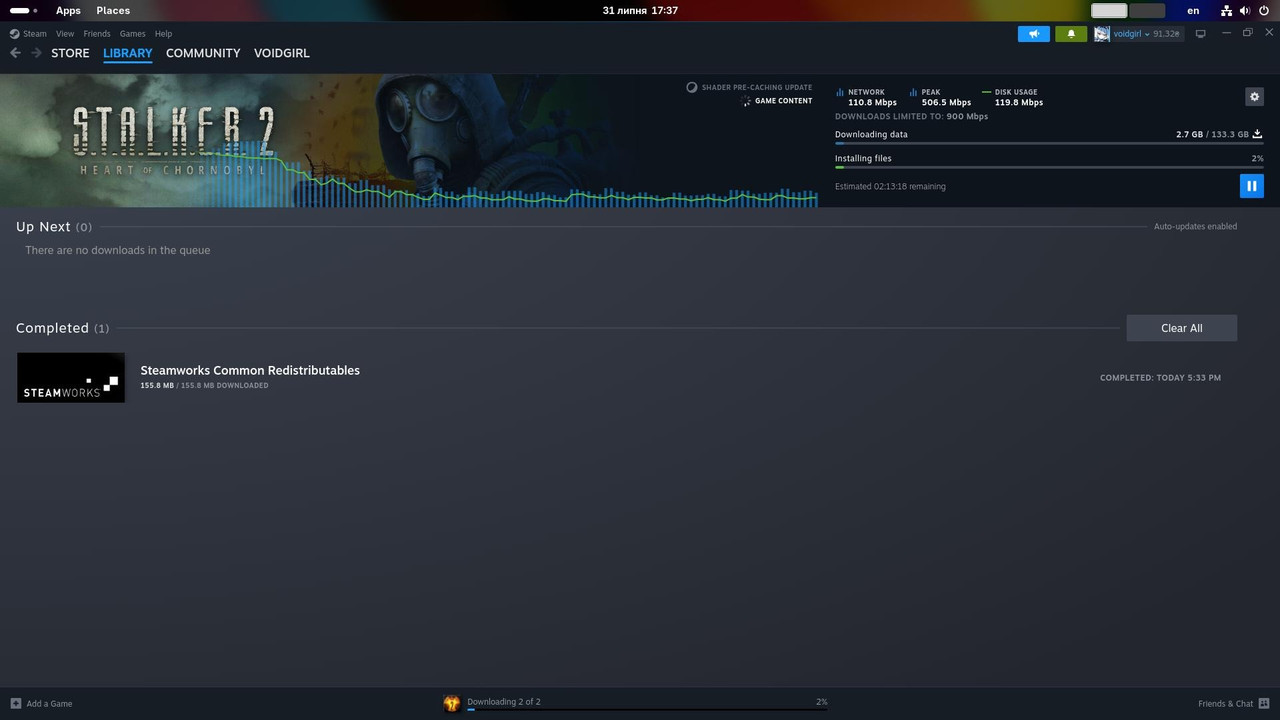
I'm connected to LAN, I've tried downloading games from Steam on Windows and speed was 550-650 MBPS (pretty stable, it's speed of my SATA SSD)
Other files downloading flawlessly, torrenting, direct download speeds are really fast, network is not busy I'm sure
nmcli output
[voidgirl@overdose ~]$ nmcli
enp0s31f6: connected to Wired connection 1
"Intel I219-V"
ethernet (e1000e), B0:6E:BF:7F:E4:91, hw, mtu 1500
ip4 default
inet4 192.168.0.109/24
route4 192.168.0.0/24 metric 100
route4 default via 192.168.0.1 metric 100
inet6 fe80::5a53:ef5c:83d0:d9cc/64
route6 fe80::/64 metric 1024lo: connected (externally) to lo
"lo"
loopback (unknown), 00:00:00:00:00:00, sw, mtu 65536
inet4 127.0.0.1/8
inet6 ::1/128DNS configuration:
servers: 1.1.1.1 9.9.9.9
interface: enp0s31f6Use "nmcli device show" to get complete information about known devices and
"nmcli connection show" to get an overview on active connection profiles.Consult nmcli(1) and nmcli-examples(7) manual pages for complete usage details.
I saw also that post where Steam users discussed this problem and some user managed to troubleshoot their issue
But my router does not have in configuration this settings...
I'm really not sure what I'm doing wrong, what it could be
Network speed 
voltage, she/they, 18, INFP-T, Ukraine
Discord: voltage017
Telegram: @nemajesency
feel free to DM 
Offline
#2 2025-07-31 17:35:49
- cryptearth
- Member
- Registered: 2024-02-03
- Posts: 2,320
Re: Steam download speeds are dropping
wild random guess in the blue: saturation of cache of system and drive
reason: I have 32gb of ram using zfs - as default about half of ram is taken for cache
using 8 hdds on a cheap chinesium sata hba (asm 1064 pci-e 3.0 x1 to 4 sata + 4x 1-5 jmcron jm575 port multippliers - able to saturate full 8gbit/s of tge pci-e link) - and as my drives are able to sustain the write speed of my uplink downstream (264mbit/s - roughly 30mb/s) I also have a high start speed settling down to the writespeeds of my drive cause I max out 32gb ram + 32gb nvme swap
also: steams' cdn is the only service even able to sustain my full bandwidth and system resources
I just don't have the money for fast nvme storage - but anyway - your bandwidth likely just exceeds the high spped pseudo-slc cache of your drive
it's pretty much the best you can hope for: fuly fill any cache + sustain whatever your hardware is capable
ltt recently tested thier steam cache - it was the users system run outof high speed cache to take advantage of that monster of cache system
Offline
#3 2025-07-31 18:00:04
- voltage017
- Member
- Registered: 2024-09-05
- Posts: 6
Re: Steam download speeds are dropping
wild random guess in the blue: saturation of cache of system and drive
reason: I have 32gb of ram using zfs - as default about half of ram is taken for cache
using 8 hdds on a cheap chinesium sata hba (asm 1064 pci-e 3.0 x1 to 4 sata + 4x 1-5 jmcron jm575 port multippliers - able to saturate full 8gbit/s of tge pci-e link) - and as my drives are able to sustain the write speed of my uplink downstream (264mbit/s - roughly 30mb/s) I also have a high start speed settling down to the writespeeds of my drive cause I max out 32gb ram + 32gb nvme swap
also: steams' cdn is the only service even able to sustain my full bandwidth and system resources
I just don't have the money for fast nvme storage - but anyway - your bandwidth likely just exceeds the high spped pseudo-slc cache of your drive
it's pretty much the best you can hope for: fuly fill any cache + sustain whatever your hardware is capableltt recently tested thier steam cache - it was the users system run outof high speed cache to take advantage of that monster of cache system
thank you, well I have 2 SATA SSDS (Samsung 1 TB and 2 TB)
I tried executing command "echo 3 | sudo tee /proc/sys/vm/drop_caches" to drop caches and turning off swap with swapoff (I have ext4, TRIM and no zram) but it did not helped, on Windows I have default settings (TRIM on, Defender always checking, MemCompression / SysMain) enabled and with 32 GB of DDR4 it does thing really great I really think that's not my case... Maybe it's my ISP issue?
voltage, she/they, 18, INFP-T, Ukraine
Discord: voltage017
Telegram: @nemajesency
feel free to DM
Offline
Pages: 1