You are not logged in.
- Topics: Active | Unanswered
#1 2025-08-08 09:01:58
- Lr2bej77n892lio
- Member
- Registered: 2025-04-30
- Posts: 20
[SOLVED] in VLC, Can't select 'hardware-accelerated decoding'.
Previously, I was able to select options like VDPAU, VA-API. But for some reason, they are now unavailable.
I'm not sure if this is a VLC issue or a problem with my system settings.
image: https://i.postimg.cc/x8sc2tVT/1234.png
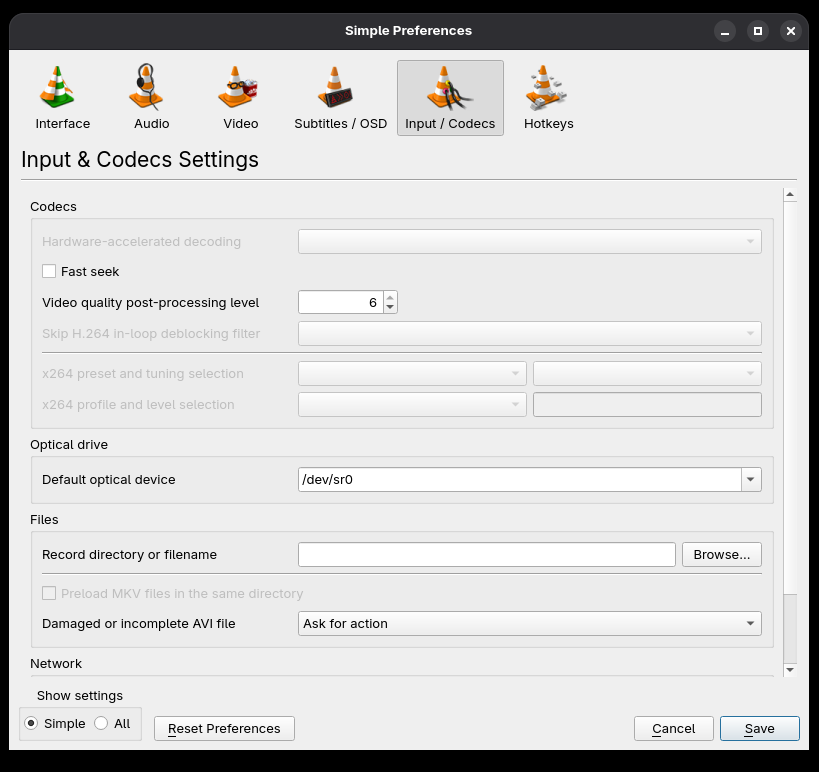
$ vdpauinfo
Information string: NVIDIA VDPAU Driver Shared Library  575.64.05  Fri Jul 18 15:42:48 UTC 2025
$ vainfo
Trying display: wayland
vainfo: VA-API version: 1.22 (libva 2.22.0)
vainfo: Driver version: VA-API NVDEC driver [direct backend]Last edited by Lr2bej77n892lio (2025-08-09 10:33:38)
Offline
#2 2025-08-08 18:00:37
- V1del
- Forum Moderator

- Registered: 2012-10-16
- Posts: 25,396
Re: [SOLVED] in VLC, Can't select 'hardware-accelerated decoding'.
The vlc package got recently split into subcomponents, for VDPAU and most general playback purposes you at least want vlc-plugin-ffmpeg, to restore full functionality vlc-plugins-all would also be a good option. For a general overview of your options
pacman -Qi vlcpacman will have told you about this during the update that introduced the split.
Last edited by V1del (2025-08-08 18:01:16)
Offline
#3 2025-08-09 10:33:24
- Lr2bej77n892lio
- Member
- Registered: 2025-04-30
- Posts: 20
Re: [SOLVED] in VLC, Can't select 'hardware-accelerated decoding'.
That makes sense.
Thank you for clarifying.
Offline