You are not logged in.
- Topics: Active | Unanswered
#1 2025-09-03 19:29:28
- rogerlakoski
- Member
- Registered: 2025-09-03
- Posts: 3
Low disk space warning on boot / login screen
Hi there guys,
I tried googling and some actions to remove the popup warning I get before I login to my user account, that says that I have low space on my <<boot>> directory (It has 0 mb).
I would like the message to not appear for that folder.
I tried the gsettings set org.gnome.settings-daemon.plugins.housekeeping ignore-paths "['/boot']" and the value was set (I used the get in gsettings to check). When I restarted the computer, the value was erased.
So I made a systemd service to run this command at startup and made it enabled with systemctl, but the message still appears.
I am using Gnome 48.3.
Someone have any tips of what I should do to remove the warning for that folder?
Offline
#2 2025-09-04 05:46:14
- Head_on_a_Stick
- Member

- From: The Wirral
- Registered: 2014-02-20
- Posts: 9,003
- Website
Re: Low disk space warning on boot / login screen
I think it would be better to correctly manage your /boot/ partition. What is filling it up?
Jin, Jîyan, Azadî
Offline
#3 2025-09-04 07:01:52
- seth
- Member

- From: Won't reply 2 private help req
- Registered: 2012-09-03
- Posts: 77,762
Re: Low disk space warning on boot / login screen
I think it would be better to correctly manage your /boot/ partition. What is filling it up?
ftfy 
@rogerlakoski, don't be like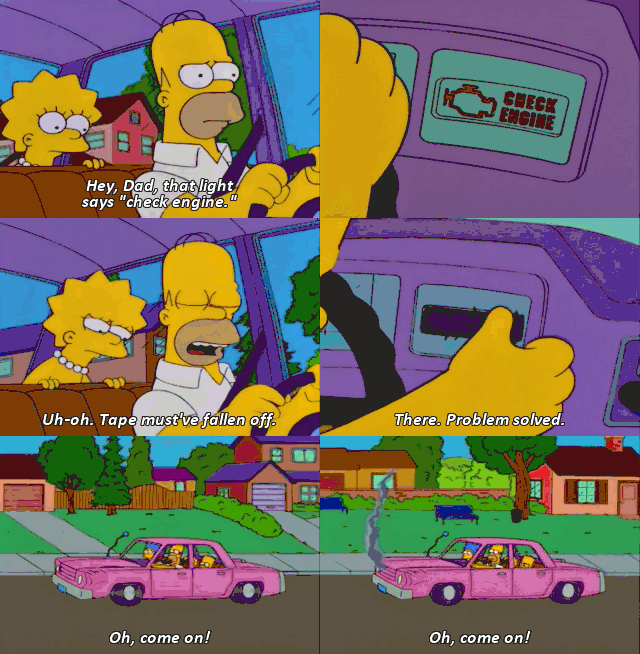
Offline
#4 2025-09-04 09:43:31
- rogerlakoski
- Member
- Registered: 2025-09-03
- Posts: 3
Re: Low disk space warning on boot / login screen
When I first created the partitions table I made it that way.
I know that is probably better to increase the partition size, but I'm a learning enthusiast and I want to know how to tweak my system to remove the warning. It's about the knowledge.
Does anyone know how to do it?
Offline
#5 2025-09-04 12:39:26
- seth
- Member
- From: Won't reply 2 private help req
- Registered: 2012-09-03
- Posts: 77,762
Re: Low disk space warning on boot / login screen
You figured how to turn it off, the problem is that the value reverts.
I'd first and foremost try to run gsettings outside a gnome session because there's likely just some daemon that writes it back.
I'll stress that this is not a solution and you'll run into trouble because the situation will eventually lead to truncated files on your boot partition which in the worst case scenario will mean that the system will no longer boot.
Address the low disk space, eg. skip the fallback image or avoid large firmware files etc. in the initramfs - or split ESP and /boot and move the latter to the root partition.
Anything, but don't be a Homer Simpson meme.
Offline
#6 2025-09-04 19:50:55
- Head_on_a_Stick
- Member
- From: The Wirral
- Registered: 2014-02-20
- Posts: 9,003
- Website
Re: Low disk space warning on boot / login screen
I've had a sticker over the ABS warning light on my motorbike for several months now and it's fine, the brakes feel _much_ better without the ABS servos killing all feedback at the lever (I removed the fuse).
And in that spirit:
the popup warning I get before I login to my user account
Try running gsettings under the GDM user account, for example:
# su -s /bin/sh - _gdm
$ gsettings set org.gnome.settings-daemon.plugins.housekeeping ignore-paths "['/boot']"
(The GDM account is called _gdm on my Chimera Linux system, Arch might not need the leading underscore.)
Jin, Jîyan, Azadî
Offline