You are not logged in.
- Topics: Active | Unanswered
#1 2025-09-04 03:23:08
- ttshaw1
- Member
- Registered: 2020-04-12
- Posts: 47
[Solved] Portal 2 splitscreen controls not working as expected
I have two Xbox 360 controllers that Steam recognizes without issue. My hope is that I can use both of them to play Portal 2 splitscreen, or use one and mouse/keyboard.
https://steamsolo.com/guide/linux-porta … -portal-2/ says it should just require three quick console commands. The first one does load me into co-op mode. At this point, mouse+keyboard and both controllers control player one (Atlas, the fat robot). If I then turn on cheats and do `in_forceuser 1`, the mouse and keyboard control P-body, the skinny robot; but on both controllers, the left stick moves both players. Every other control seems to apply only to Atlas. So, the only thing stopping me from playing the game splitscreen with mouse+keyboard and a controller is the fact that the controller's left stick moves both players.
Has anyone gotten this to work recently? Any advice? I'm using an AMD GPU, Proton hotfix, and KDE Plasma with Wayland.
Also, if anyone knows how to get the two controllers to control different players, and ideally know how to stretch Portal 2's output so the splitscreening will output one player to each of my two side-by-side monitors, that's even better.
Edit: I just tried running the Steam Linux Runtime 1.0 (Scout) version rather than Proton and got the same behavior.
Last edited by ttshaw1 (2025-09-16 00:30:21)
Offline
#2 2025-09-16 00:30:00
- ttshaw1
- Member
- Registered: 2020-04-12
- Posts: 47
Re: [Solved] Portal 2 splitscreen controls not working as expected
Somehow I overlooked the "Local splitscreen" button in the game's co-op menu. That solves the control issue.
Gamescope seems like it should be able to help me get the video output to do what I want, but I haven't quite been able to get it to work. `gamescope -W 3840 -H 1080 -- steam steam://rungameid/620` gave an error `wlserver: [xwayland/sockets.c:64] Failed to bind socket @/tmp/.X11-unix/X0: Address already in use` Adding to Portal 2's launch options `gamescope -W 3840 -H 1080 -- %command%` is better. I can get the output to span both monitors, but there's no way to fullscreen it; gamescope's meta-f shortcut makes the video fullscreen on only one physical monitor. The fullscreen video option in the game does seemingly nothing. And to make matters slightly worse, the video doesn't fill a large portion of the screen on each monitor. It might have to do with my monitors being set to different heights, i.e. there's a y offset moving the mouse between the two on my desktop. 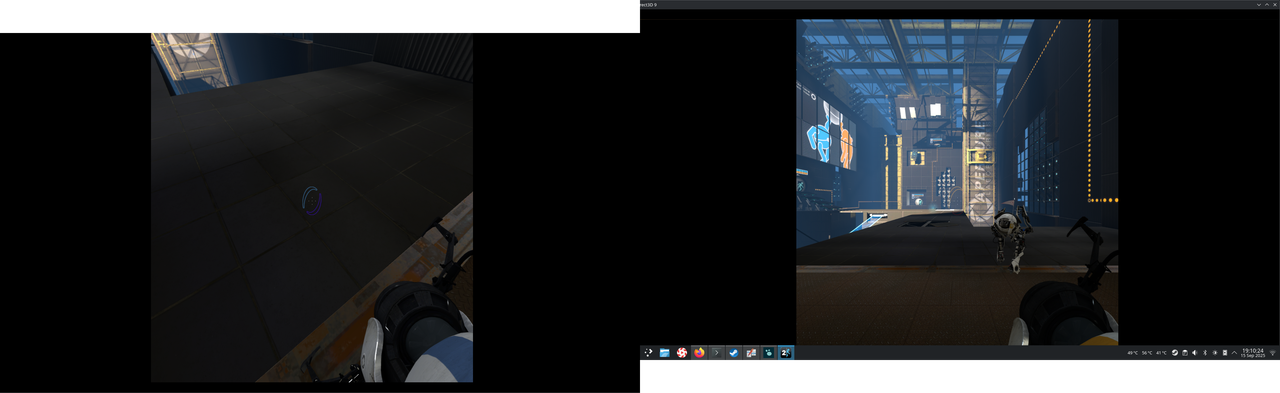 https://i.postimg.cc/7Znc01bP/Screensho … 191024.png
So, the control thing is solved, spanning the video well across both monitors isn't.
Offline