You are not logged in.
- Topics: Active | Unanswered
#1 2025-12-14 17:48:12
- JRKNL
- Member
- Registered: 2025-12-14
- Posts: 11
[SOLVED] Gnome 49 Dark Mode is grey compared to other distro's.
Hi there.
In other distro's, like Fedora/Ubuntu the dark mode makes everything dark/black. It's really soft on the eyes. Arch, however, makes it dark grey, but the dropdown (I don't know the official name) when you click on the date/time and/or power/sound/network-icons are light grey.
Everywhere I look on the internet, showcases of other people's video and on the official pages. They all have very dark tones. I noticed this difference immediately after a fresh install of Arch. Is there something that I have missed during the installation of Archinstall? I really would like to have it darker.
Thanks for the reply in advance.
Last edited by JRKNL (2025-12-14 23:53:36)
Offline
#2 2025-12-14 20:23:56
- seth
- Member

- From: Won't reply 2 private help req
- Registered: 2012-09-03
- Posts: 77,552
Re: [SOLVED] Gnome 49 Dark Mode is grey compared to other distro's.
Arch really just packages the gnome defaults, other distros might install and configure some brand themes.
Everywhere I look on the internet, showcases of other people's video and on the official pages.
For instance?
https://release.gnome.org/49/ has no dark-mode screenshot at all?
Offline
#3 2025-12-14 20:30:56
- JRKNL
- Member
- Registered: 2025-12-14
- Posts: 11
Re: [SOLVED] Gnome 49 Dark Mode is grey compared to other distro's.
example: https://duckduckgo.com/?q=gnome+fedora& … 44-f38.jpg
https://release.gnome.org/49/ has screenshots of GTK4 applications that have much darker colors
https://itsfoss.com/news/fedora-43-release/
https://www.youtube.com/watch?v=SwSEWsUCkuE
https://www.youtube.com/watch?v=knG2mLQR0mI
https://duckduckgo.com/?q=gnome+49+exam … iax=images

... etc, etc, etc. I can give you more examples if you want, but the thing is, that they all show a much darker color than Gnome in Arch.
Last edited by JRKNL (2025-12-14 20:34:26)
Offline
#4 2025-12-14 20:37:21
- seth
- Member
- From: Won't reply 2 private help req
- Registered: 2012-09-03
- Posts: 77,552
Re: [SOLVED] Gnome 49 Dark Mode is grey compared to other distro's.
I mean "the official pages"
https://release.gnome.org/49/ has screenshots of GTK4 applications that have much darker colors
Not here. Link one.
https://itsfoss.com/news/fedora-43-release/ has the same mix of black and dark gray - your image really just looks like the default adwaita [edit: dark] mode.
Do you have problems w/ the contrast setup?
Does the picture you posted look different in your browser from what you see on screen?
Edit: this here https://itsfoss.com/content/images/size … ome-49.png is gnome.
This here shows a terminal emulator: https://itsfoss.com/content/images/size … output.png - not some popup.
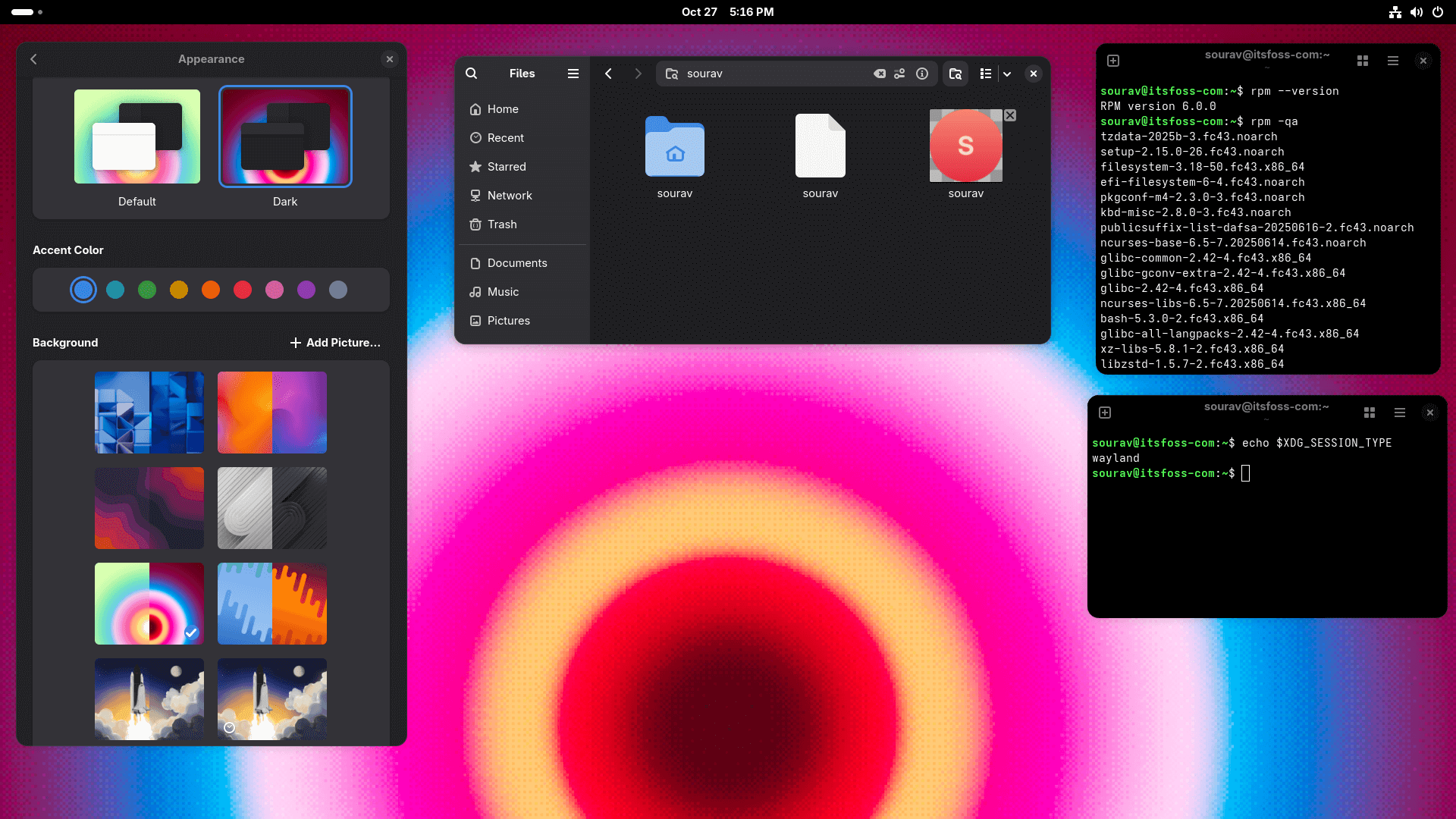
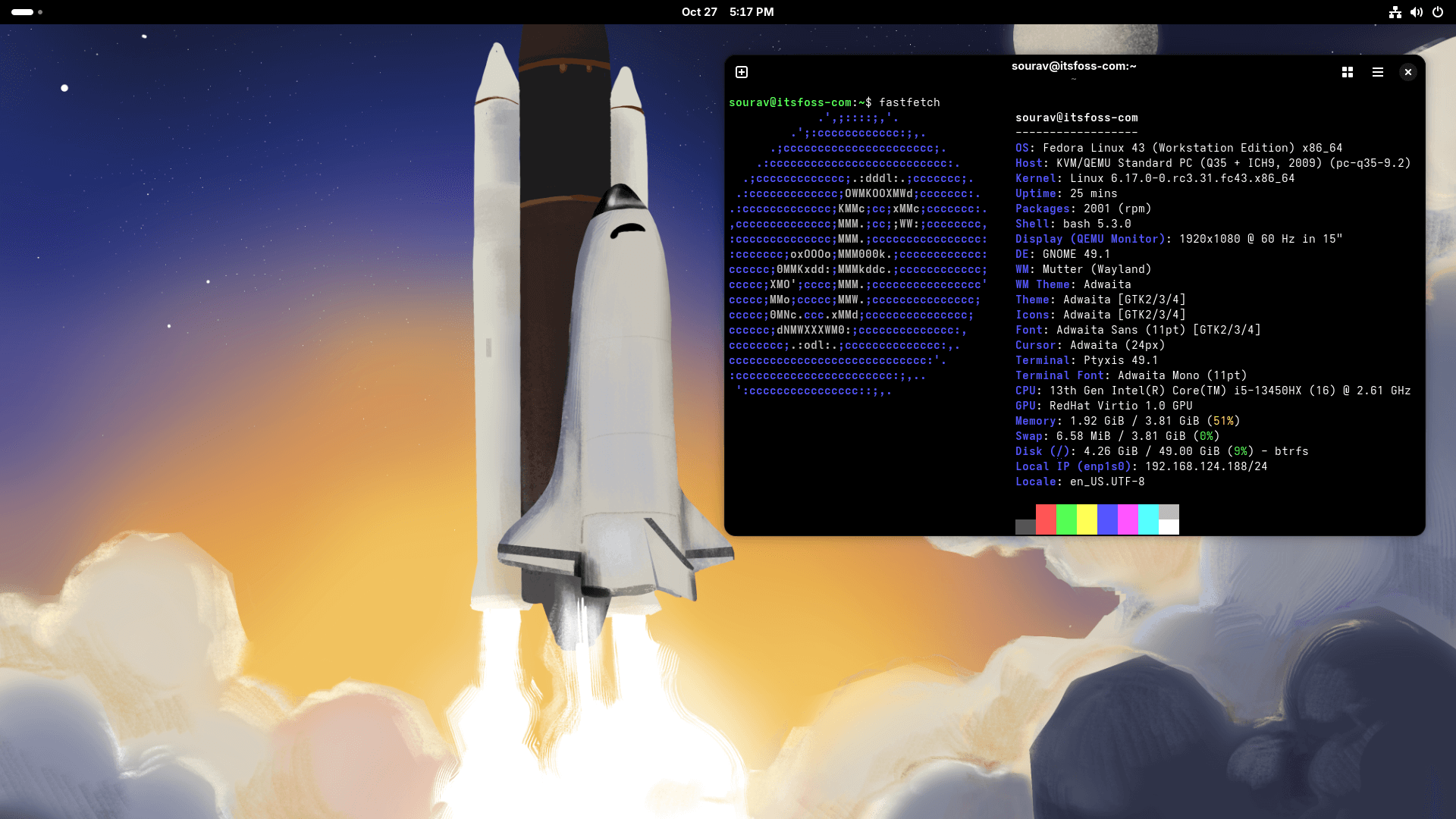
Last edited by seth (2025-12-14 20:39:04)
Offline
#5 2025-12-14 20:45:17
- JRKNL
- Member
- Registered: 2025-12-14
- Posts: 11
Re: [SOLVED] Gnome 49 Dark Mode is grey compared to other distro's.
- Color in the the picture looks different
- Colors of Adwaita-dark in Fedora looks the same as the colors on the images (I used Fedora, hence I know);
- Colors in the video's I've watched from people schowcasing look different then gnome-arch;
- I have no issues with contrast on every distro I've been on and I tried may already. They all look the same as in video's or website images on my screen.
- The screenshots taken from it's foss show much darker colors then my screenshot.
Offline
#6 2025-12-14 20:50:43
- seth
- Member
- From: Won't reply 2 private help req
- Registered: 2012-09-03
- Posts: 77,552
Re: [SOLVED] Gnome 49 Dark Mode is grey compared to other distro's.
https://i.imgur.com/31DZppE.png : #36363a / #1d1d20
https://itsfoss.com/content/images/size … ome-49.png : #333237 / #1f1f22

There's some dithering, so they're not the exact same colors (I'm not gonna average out a square to proof the obvious) but they're clearly in the same value range.
Fetch a picture and circle what you're talking about.
Offline
#7 2025-12-14 21:24:36
- JRKNL
- Member
- Registered: 2025-12-14
- Posts: 11
Re: [SOLVED] Gnome 49 Dark Mode is grey compared to other distro's.
I apologize for late reply. It seems like imgur is being overloaded and all my uploads failed.
> Arch: https://i.postimg.cc/pdpP1qCn/notificationarea-arch.png
> Other : https://i.postimg.cc/J7bMgyNP/notificat … -other.png
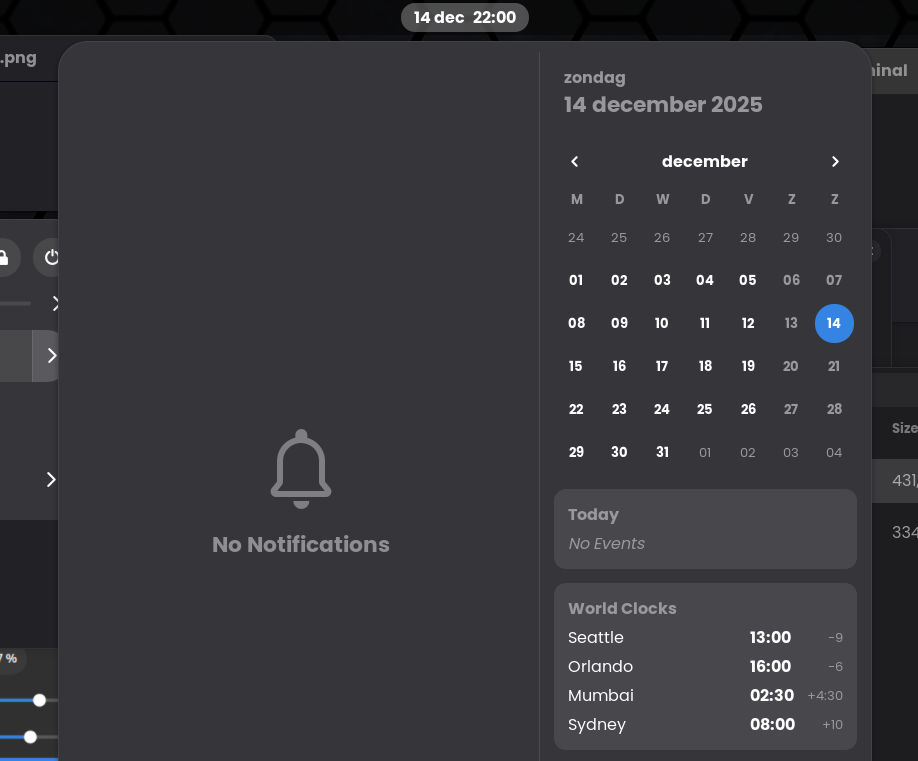
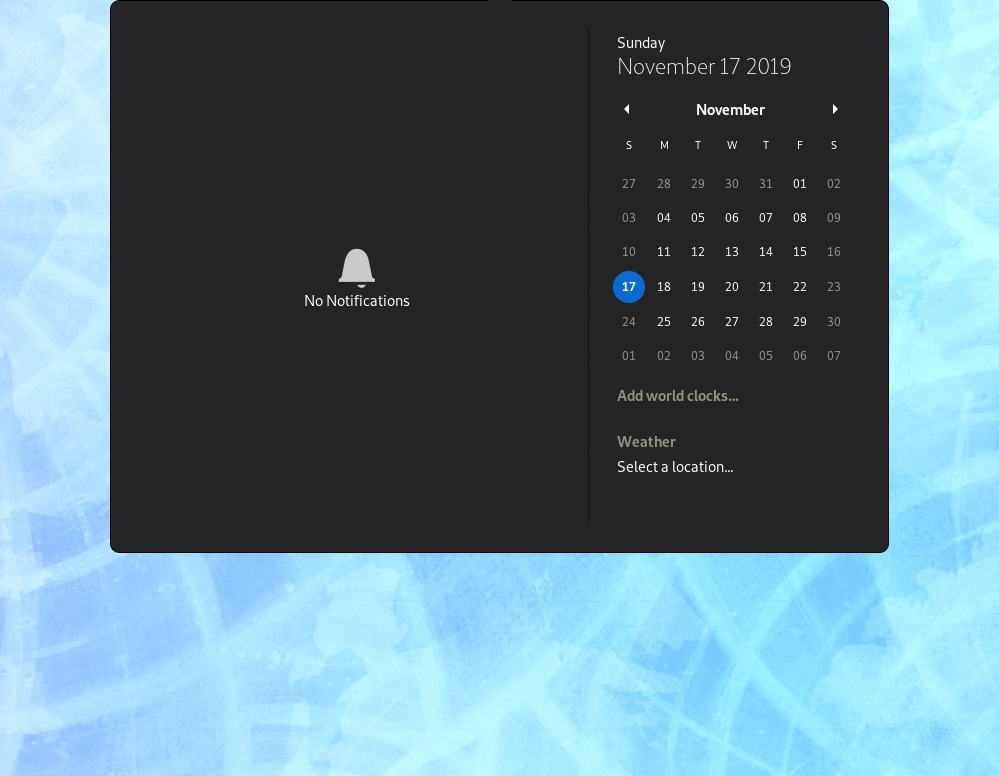
> Arch: https://i.postimg.cc/gkmXBbZ6/power-menu-gnome.png
> Other: https://i.postimg.cc/xTf83Gw0/power-menu-other.png
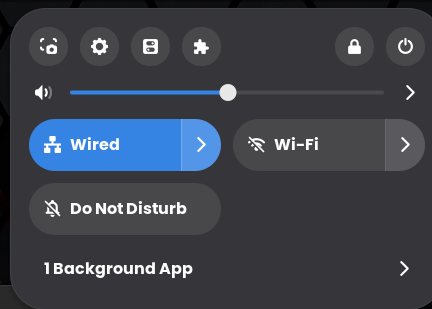
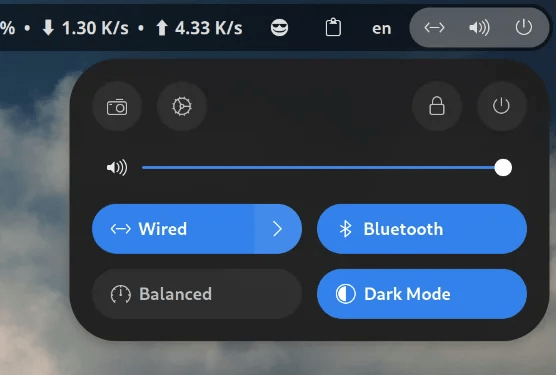
What I do not understand though is that you don't see the difference. I'm on an IPS, calibrated, 1440p. Even on my old laptop (tft) the colors are clearly different. Not even close to speak of "dithering".
Offline
#8 2025-12-14 21:35:53
- Scimmia
- Fellow

- Registered: 2012-09-01
- Posts: 13,729
Re: [SOLVED] Gnome 49 Dark Mode is grey compared to other distro's.
That looks like it's just a different theme
Offline
#9 2025-12-14 21:40:43
- seth
- Member
- From: Won't reply 2 private help req
- Registered: 2012-09-03
- Posts: 77,552
Re: [SOLVED] Gnome 49 Dark Mode is grey compared to other distro's.
That's not from the fedora screenshot nor from gnome.org - What's the source of "other"?
And, ftr: I don't "see", I checked the colors w/ a color picker. No random guessing , intuition or feelings involved.
The shades on the fedora screenshot and yours are the same.
Offline
#10 2025-12-14 21:49:14
- JRKNL
- Member
- Registered: 2025-12-14
- Posts: 11
Re: [SOLVED] Gnome 49 Dark Mode is grey compared to other distro's.
So, you are getting the same colors from the images (arch and in fedora) when you use a color picker. I had not installed one , so I did. Now, that is very strange, because I get #242424 for fedora and #36363a from Arch. Some kind of voodoo-magic is going on here.
But it seems like that it's better for me to stop, because if you need a color picker to see the difference, then I don't know what to say. I will however not defy the fact that it is possible that other distro's do something with the shell, therefore I kindly thank you for your time and I will move on now.
Last edited by JRKNL (2025-12-14 21:53:08)
Offline
#11 2025-12-14 21:57:52
- seth
- Member
- From: Won't reply 2 private help req
- Registered: 2012-09-03
- Posts: 77,552
Re: [SOLVED] Gnome 49 Dark Mode is grey compared to other distro's.
But it seems like that it's better for me to stop, because if you need a color picker to see the difference, then I don't know what to say.
No, I don't needs tools to see the obvious, just to prove it.
So what pixels did you click?
Cause there're #000000 and #ffffff in *your* screenshot and there's #333237 in the fedora screenshot - leaving aside that they've a variety of colors gnome by default OBVIOUSLY uses two different shades for different elements and you're simply comparing the brighter to the darker one now.
But I kindly thank you for your time and I will move on now.
Yeah, I guess /we/ have wasted /your/ time with debates about nothing to see enough now.
You btw. still have not answered
What's the source of "other"?
But I also don't care for any more trolling.
Offline
#12 2025-12-14 22:05:11
- JRKNL
- Member
- Registered: 2025-12-14
- Posts: 11
Re: [SOLVED] Gnome 49 Dark Mode is grey compared to other distro's.
I can assure you that there is 0 trolling. Merely some frustration, since the difference is obvious on my side.
Naming of the files was poorly from my side, but it's Fedora.
So what pixels did you click?
Cause there're #000000 and #ffffff in *your* screenshot and there's #333237 in the fedora screenshot - leaving aside that they've a variety of colors gnome by default OBVIOUSLY uses two different shades for different elements and you're simply comparing the brighter to the darker one now.
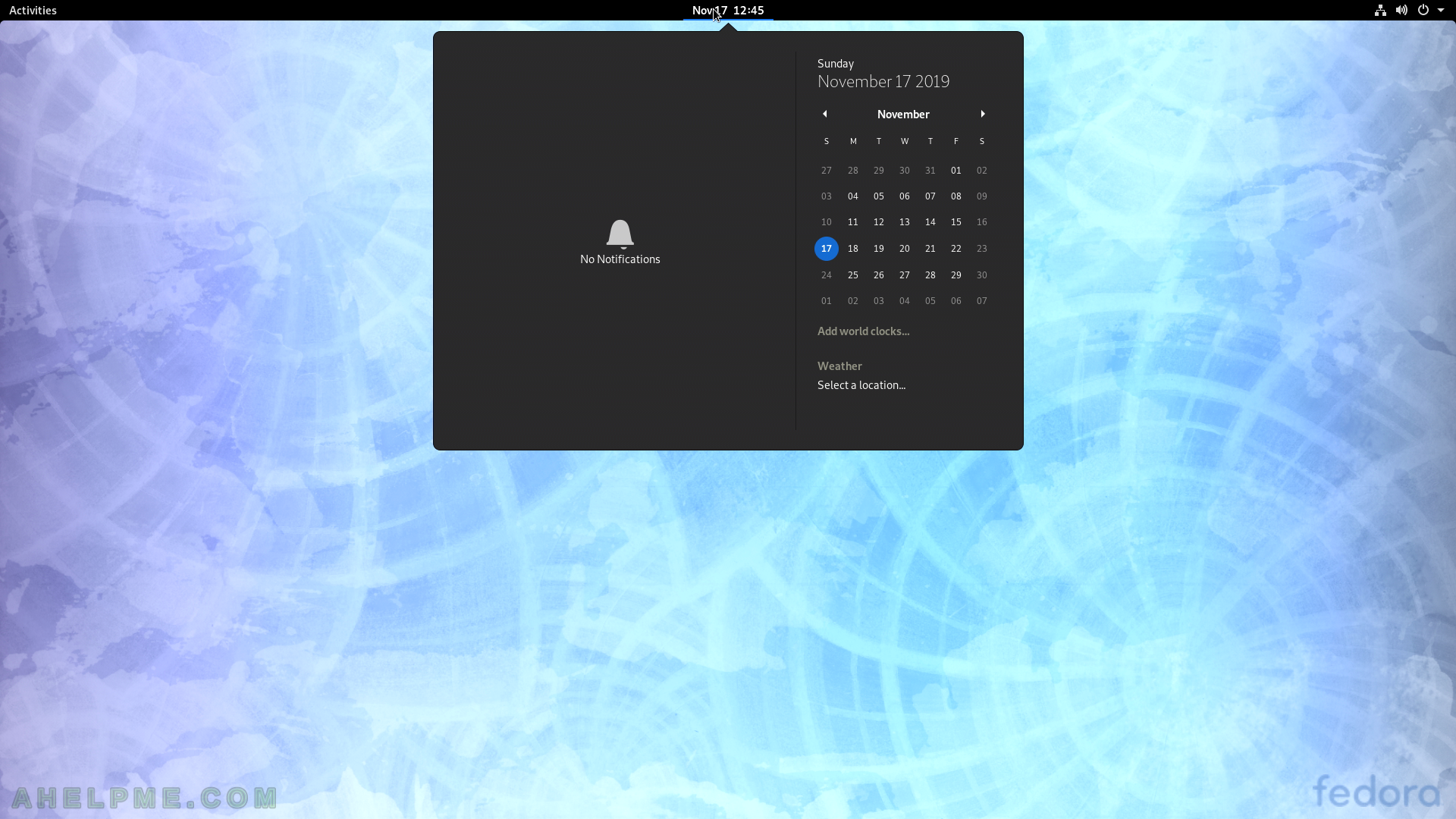
The color was taken from the area above the bell with the "no notifications".
Above the bell I get the color #36363a in Arch and #24242 in Fedora.
From the power menu the colors were taken from the grey area below the Wi-Fi button
EDIT: I switched the colors on accident.
Last edited by JRKNL (2025-12-14 22:09:04)
Offline
#13 2025-12-14 22:09:58
- seth
- Member
- From: Won't reply 2 private help req
- Registered: 2012-09-03
- Posts: 77,552
Re: [SOLVED] Gnome 49 Dark Mode is grey compared to other distro's.
There is no bell in https://itsfoss.com/content/images/size … ome-49.png
Last chance:
What's the source of "other"?
Ie where does https://i.postimg.cc/J7bMgyNP/notificat … -other.png come from because it is *clearly* very different from yours and the fedora-43-workstation-gnome-49.png screenshot.
Offline
#14 2025-12-14 22:25:32
- JRKNL
- Member
- Registered: 2025-12-14
- Posts: 11
Re: [SOLVED] Gnome 49 Dark Mode is grey compared to other distro's.
There is no bell in your image, because I did not use that image
I uploaded a screenshot of an area of my screen and a screenshot from Fedora. I did not use the same images that I posted as an example.
I looked up new files and took only the part from where I took the color. Images with the notification area seem hard to find.
I thought I already mentioned that the screenshot was from Fedora in my previous post.
All the files from Fedora I have come from the internet, since I don't have it installed anymore. But they all look the same as when I was using it. Willing to install it again and make screenshots as proof.
Here's the link of the image: https://ahelpme.com/public/media/tutori … 61687d.png
Offline
#15 2025-12-14 22:28:41
- someUser
- Member
- Registered: 2021-01-03
- Posts: 21
Re: [SOLVED] Gnome 49 Dark Mode is grey compared to other distro's.
https://release.gnome.org/49/ has no dark-mode screenshot at all?
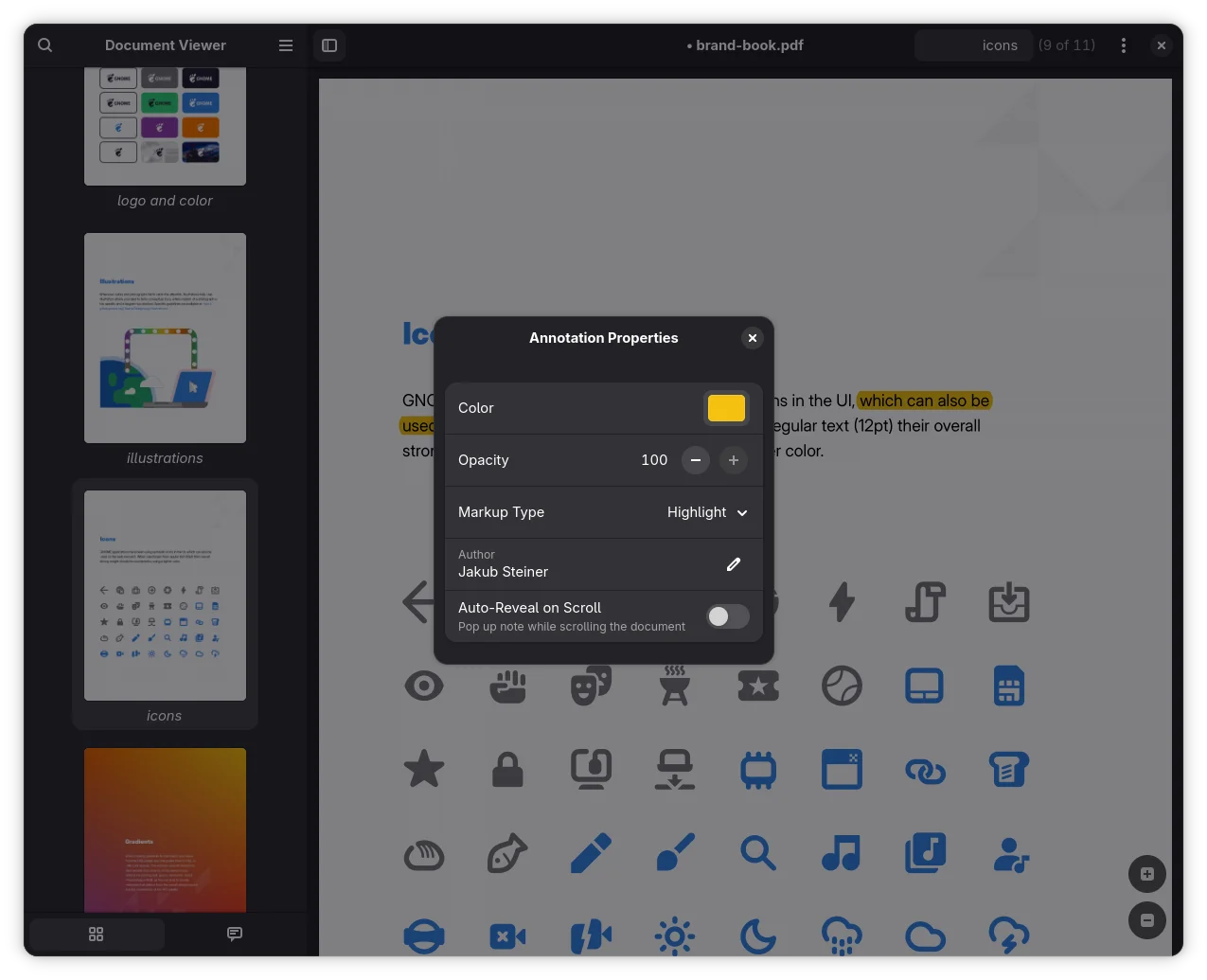
Whether you see light-mode or dark-mode screenshots on https://release.gnome.org/49/ depends on the appearance settings of your browser/system. When the dark-mode on your system is enabled, you should see dark-mode screenshots.
Here are, for example, links to the different screenshots of papers:
* https://release.gnome.org/49/papers-screenshot.webp
* https://release.gnome.org/49/papers-dar … nshot.webp

Offline
#16 2025-12-14 22:34:54
- JRKNL
- Member
- Registered: 2025-12-14
- Posts: 11
Re: [SOLVED] Gnome 49 Dark Mode is grey compared to other distro's.
How the modes work is clear to me. The thing is that Dark Mode on Arch is lighter in the Notification/Calendar-area and in the area where the Powerbutton/Sound/etc (on the right side), compare to distro's like Fedora or Ubuntu.
(I have read that Ubuntu does things different, so I'm not sure if that's a fair distro to use to compare it with + you already stated that others might do as well)
Offline
#17 2025-12-14 23:49:29
- seth
- Member
- From: Won't reply 2 private help req
- Registered: 2012-09-03
- Posts: 77,552
Re: [SOLVED] Gnome 49 Dark Mode is grey compared to other distro's.
https://ahelpme.com/public/media/tutori … 61687d.png is fedora 31 w/ gnome 3.34 and gtk3 - what also fits the year in that calendar.
https://archives.fedoraproject.org/pub/ … leases/31/
Setting gtk4 themes other than adwaita is iffy, see https://wiki.archlinux.org/title/GTK#GTK_3_and_GTK_4
But you're looking for a different theme for sure - https://www.pling.com/browse?cat=135&ord=latest
Offline
#18 2025-12-14 23:51:59
- JRKNL
- Member
- Registered: 2025-12-14
- Posts: 11
Re: [SOLVED] Gnome 49 Dark Mode is grey compared to other distro's.
Was hoping not to need to theme it, but thank you for the clarification and time.
And apologies for the confusion I caused.
(after some reflecting, I can understand the confusion)
Last edited by JRKNL (2025-12-14 23:55:23)
Offline
#19 2025-12-15 16:20:38
- tekstryder
- Member

- Registered: 2013-02-14
- Posts: 592
Re: [SOLVED] Gnome 49 Dark Mode is grey compared to other distro's.
Related, see this thread regarding the change in Gnome 48 of the gray to a slightly more blue-ish #222226 from the previous #242424.
• https://discourse.gnome.org/t/adwaita-t … e-48/27577
It's long and whiney and argumentative, but contains info on how to tune the color you're interested in.
Offline