You are not logged in.
- Topics: Active | Unanswered
#1 2025-12-17 00:22:55
- msl09
- Member
- Registered: 2022-10-01
- Posts: 16
[SOLVED] I broke an icon in the kde's system tray :(
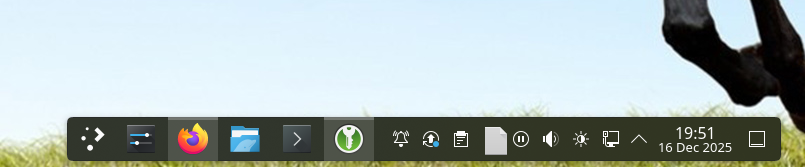
I removed some old packages with pacman -Rsc xfce4 mousepad rygel and after rebooting an icon from kde's system tray is gone, I thought I wasn't removing anything from kde while reviewing the log from pacman but it seems I was wrong.
Do you guys have any suggestions on how to fix that issue? Is there a way to reinstall plasma-meta and all its dependencies? Would that work?
Last edited by msl09 (2025-12-17 16:45:55)
Offline
#2 2025-12-17 00:44:23
- WayfarerCodes
- Member

- Registered: 2025-05-30
- Posts: 11
Re: [SOLVED] I broke an icon in the kde's system tray :(
After a quick look at pacman's man page, it looks like the -c remove option might be to blame. I wouldn't recommend using it when you're removing packages. Simply reinstalling plasma-meta with pacman -S plasma-meta should bring in all of its dependencies as well, but you should take a close look at the logs to see if anything non-KDE related got uninstalled too.
For future reference, I highly recommend reading up on commands like this before you use them.
Offline
#3 2025-12-17 09:21:53
- seth
- Member

- From: Won't reply 2 private help req
- Registered: 2012-09-03
- Posts: 77,552
Re: [SOLVED] I broke an icon in the kde's system tray :(
What /is/ that "icon"? (Ie. what does/did it trigger)
Since the cascade - which is rarely a good idea - didn't remove plasma, re-installing plasma will not drag in that thing as hard dependency.
Edit: you can also inspect /var/log/pacman.log to see what was actually removed
Last edited by seth (2025-12-17 09:22:21)
Offline
#4 2025-12-17 11:04:44
- V1del
- Forum Moderator

- Registered: 2012-10-16
- Posts: 25,343
Re: [SOLVED] I broke an icon in the kde's system tray :(
I ran into this and seems to be a side effect of the kweather update to 25.12 ... technically it has a specific plasmoid which is only really intended as a desktop widget but for some reason it's marked as systray compatible and doesn't really have an icon to display in that case. Technically a KDE bug that one might want to report https://bugs.kde.org/show_bug.cgi?id=513262 , but you can also just edit your tray settings and configure the "KWeather_1x4" entry to be disabled. Technically the icon isn't gone it's "new", but wrong 
Last edited by V1del (2025-12-17 11:12:10)
Offline
#5 2025-12-17 11:52:18
- msl09
- Member
- Registered: 2022-10-01
- Posts: 16
Re: [SOLVED] I broke an icon in the kde's system tray :(
I wouldn't recommend using it when you're removing packages.
Yeah I didn't want to run it either but pacman -Rsu xfce4 selected almost no packages so I thought going with the nuclear option would be better as long as I reviewed the packages being uninstalled.
"KWeather_1x4"
Oh thanks! That's exactly the name that appears when I hover the cursor over it. I'll check the bug report.
Thanks everyone!
Offline
#6 2025-12-17 14:08:07
- seth
- Member
- From: Won't reply 2 private help req
- Registered: 2012-09-03
- Posts: 77,552
Re: [SOLVED] I broke an icon in the kde's system tray :(
\o/
Technically 
Please always remember to mark resolved threads by editing your initial posts subject - so others will know that there's no task left, but maybe a solution to find.
Thanks.
Offline