You are not logged in.
- Topics: Active | Unanswered
#1 2026-01-14 13:29:34
- medusa_l
- Member
- Registered: 2025-08-12
- Posts: 1
Switching keyboard layouts Arch + Cinnamon
Good time of day. I need help setting up the keyboard layout in Arch Linux.
That's the thing, I've been looking for a long time. how to switch to the usual layout and in general, I found the system Settings - Keyboard, there are 4 Input tabs: Quick commands, Layouts, XKB Settings. If you press + in the XKB Parameters, a list appears where you can select the layout: Left Alt + Left Shift.
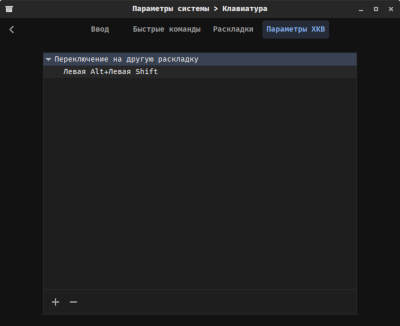
After selecting it, it is suggested to restart Cinnamon, but the problem is, that after restarting, this setting stops working, that is, it only works within this session and I don't understand how to fix it. Thanks.
System:
Kernel: 6.18.4-arch1-1 arch: x86_64 bits: 64 compiler: gcc v: 15.2.1 clocksource: tsc
Desktop: Cinnamon v: 6.6.4 tk: GTK v: 3.24.51 wm: Muffin v: 6.6.1 vt: 2 dm: SDDM
Distro: Arch Linux
Offline