You are not logged in.
- Topics: Active | Unanswered
#1 2026-01-20 04:33:47
- MaidenLuminous
- Member
- Registered: 2026-01-20
- Posts: 22
Somewhat Intermittent System Crashing When Running Certain Games
Hi all, I've been trying to debug and fix this issue myself for a number of months now, but to no success, which is why I come here.
As the title says, I am experiencing a complete system freeze/crash, unrecoverable outside of SysRq reboots. As far as I can tell, it's not specific to games and moreso intensive applications, but this system is overwhelmingly affected when running games. Not all games either, mind you, just some. Everything from CS2, to Lies of P, to Ultrakill, to Passpartout. Not restricted to steam games either. I typically use CS2 as my benchmark/test because it's fairly quick to boot up and crashes the system almost instantly upon loading into the main menu (Although weirdly enough, sometimes it just...doesn't). I want to say it's intensive programs causing the crash; however, I can run something like Minecraft with full shaders, but no crashing there.
As for the system, these are the specs:
OS: Arch Linux x86_64
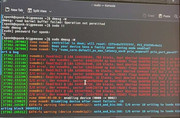
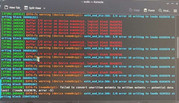
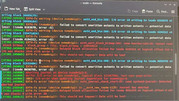
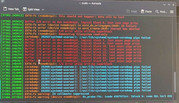
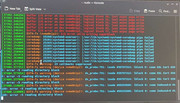
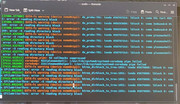
Host: Z390 AORUS PRO WIFI
CPU: Intel(R) Core(TM) i5-9600K (6) @ 4.60 GHz
GPU: NVIDIA GeForce RTX 3060 Ti Lite Hash Rate [Discrete]
Memory: 2.36 GiB / 15.53 GiB (15%)
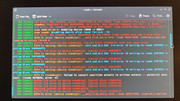
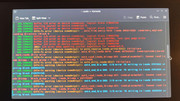
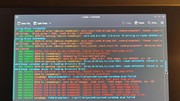
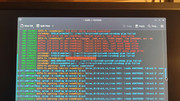
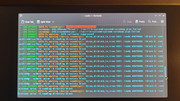
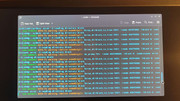
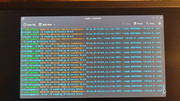
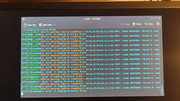
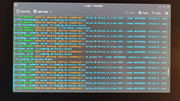
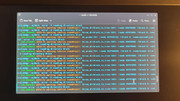
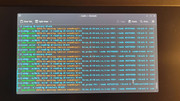
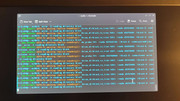
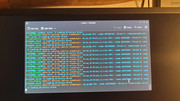
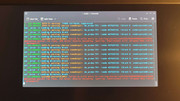
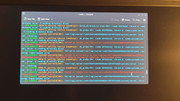
Swap: 0 B / 4.00 GiB (0%)
Kernel: Linux 6.18.5-arch1-1
DE: KDE Plasma 6.5.5
WM: KWin (Wayland)
Disk (/): 392.96 GiB / 914.83 GiB (43%) - ext4
What's weirder, this system used to have EndeavourOS installed on it then it started happening one day. Might've been after an update, but hard to say. If it was, I had hoped that in the worst-case scenario it would fix itself shortly, or I'd be able to figure out what went wrong and fix it. I could not fix it. Eventually, said screw it and just went to arch, which I've personally been daily driving for like 4 years at this point, and had practically zero issues with. Even after a complete drive wipe, the issue persisted across versions. That was like 3 months ago now. Now, at that point I strongly suspected that it was some kind of hardware issue because how could it have persisted across an entire drive wipe and new distro if it hadn't, forgetting of course, that if it was a software issue Arch and Endeavour would most likely have the same packages (or at least, a significant overlap).
As for the crash itself, this is the commonly exhibited behaviour (using CS2 as the example):
1. Launch CS2 - game loads to main menu.
2. One of two things: A few frames with the character moving and then freeze, or a big hitch, and then smooth sailing for an indeterminant amount of time, but never long. Funnily, I can usually hear the menu music continue playing in the background, although even that will eventually stop.
3. If it made it past the menu screen, usually doing something else will cause an issue. This can include: Entering settings, going to the play/inventory tab, compiling shaders for a map while loading in, entering the map, or playing the game for a very limited window.
4. Whenever it's frozen, plasma completely crashes first. The wallpaper goes black, the taskbar stops responding and eventually disappears. Other windows like terminals, discord, etc. will stay open for a moment (10-30 seconds max), but will eventually shut down. Then, the entire screen freezes. At this point, a hardware reboot or a SysRq reboot is the only thing that still works.
Problem Solving
Running `journalctl -f` and watching it reveals nothing. Reviewing it afterwards is the same deal. Maybe there's something in there I'm missing, but nothing stands out to me that didn't turn out to be a dead end. Running steam from the terminal results in the same thing - even with the debugger flag. Happens on both the flatpak and the regular package from extra.
In terms of research, I have searched down every rabbit hole I could think of.
In terms of debugging steps, I have tried (non-exhaustive, and not necessarily in order):
1. Updates. System is always as up-to-date as I can keep it.
2. Verifying game files.
3. Reinstalling games.
4. Reinstalling Steam.
5. Trying the Steam flatpak.
6. Trying different launch arguments (gamemode, gamescope, `LD_PRELOAD=""`, etc.)
7. Trying different proton versions. (Which doesn't matter for linux-native apps)
8. Reinstalling GPU drivers. (and trying different drivers)
9. Pre-compiling Vulkan shaders.
10. Trying plasma with X11
11. Trying a completely different DE (tried gnome on x11 and wayland, and Hyprland)
12. Manually set GPU flags in kernel parameters
13. Tweaking uefi settings including, but not limited to: CPU Boosting On/Off, XMP Profiles On/Off, ReBar On/Off, C-states On/off, secure boot on/off, legacy mode on/off, OS mode Windows 10/Window 8/Other
14. Drive integrity check (passed)
15. Memtest86 (passed)
16. Reseating all hardware.
17. Checking hardware temperatures (none get above even 60 at the hottest)
18. Unplugging all drives other than the main drive with OS partition
19. Installing another distro on a separate drive and testing there (Same issue)
20. Unplugging all unneeded hardware (So strictly mouse, keyboard, monitor)
21. Reinstalling all packages
22. Bios updates
23. Disabling integrated graphics altogether
There's probably a few other things in there, but I think that covers most of them. And certainly enough to get the picture.
In terms of things I haven't tried that I can think of:
1. Installing windows
2. Installing a non-arch-based distro
3. Completely swapping out components.
One other thing I'd like to note is that the motherboard in this system is supposed to have onboard wifi and bluetooth, but I have never managed to get it working at all. Not in windows, nor in linux. Nothing from the manufacturer, and this system was purchases 2nd hand so no warranty/RMA. I have no idea if it's related, but it is an issue I noticed that could maybe point to a hardware fault with the motherboard. Why/how it would cause such a weird system crash? No idea.
And lastly, `journalctl -b -1` output from a crash: http://0x0.st/PKgl.txt
Please do let me know if there's something I've missed, or an idea on what it could be, etc. I'm fairly defeated overall at the point, so I'd appreciate anything. Thanks.
Last edited by MaidenLuminous (2026-01-26 00:23:21)
Offline
#2 2026-01-20 12:08:42
- Lone_Wolf
- Administrator

- From: Netherlands, Europe
- Registered: 2005-10-04
- Posts: 15,352
Re: Somewhat Intermittent System Crashing When Running Certain Games
Jan 19 23:12:49 sponk-bigpeesee kernel: DMI: Gigabyte Technology Co., Ltd. Z390 AORUS PRO WIFI/Z390 AORUS PRO WIFI-CF, BIOS F13 12/21/2023https://www.gigabyte.com/Motherboard/Z3 … pport-Bios lists a newer bios version, F14a .
Have you tried with that one ?
Jan 19 23:12:49 sponk-bigpeesee kernel: Command line: BOOT_IMAGE=/vmlinuz-linux root=UUID=41bb91d4-65ff-46da-9085-8babfac42ac7 rw rootfstype=ext4 nvidia nvidia_modeset nvidia_uvm nvidia_drm loglevel=3 pci=nomsi quiet

Jan 19 23:12:49 sponk-bigpeesee kernel: NVRM: GPU 0000:01:00.0: Failed to enable MSI; falling back to PCIe virtual-wire interrupts.
Why did you disable MSI ?
Jan 19 23:12:50 sponk-bigpeesee nvidia-powerd[484]: nvidia-powerd version:2.0 (build 1)
Jan 19 23:12:50 sponk-bigpeesee nvidia-powerd[484]: DBus Connection is established
Jan 19 23:12:50 sponk-bigpeesee nvidia-powerd[484]: ERROR! Running on an unsupported system (PCI device Id: 0x2489)
Jan 19 23:12:50 sponk-bigpeesee nvidia-powerd[484]: Quit successfully
Jan 19 23:12:50 sponk-bigpeesee systemd[1]: nvidia-powerd.service: Deactivated successfully.
Please post the full output of
$ lspci -knn
$ pacman -Qs nvidia
Disliking systemd intensely, but not satisfied with alternatives so focusing on taming systemd.
clean chroot building not flexible enough ?
Try clean chroot manager by graysky
Offline
#3 2026-01-20 14:58:29
- MaidenLuminous
- Member
- Registered: 2026-01-20
- Posts: 22
Re: Somewhat Intermittent System Crashing When Running Certain Games
Have you tried with that one ?
I did try F14a, but if I recall correctly it caused some sort of issue when booting, so I tried F13 and that worked.
Why did you disable MSI ?
Disabling msi was another troubleshooting step I tried based on what I saw in journalctl at one point. Didn't fix the issue, but seems like I forgot to undo it.
lspci -knn
00:00.0 Host bridge [0600]: Intel Corporation 8th Gen Core Processor Host Bridge/DRAM Registers [8086:3ec2] (rev 0d)
        DeviceName: Onboard - Other
        Subsystem: Gigabyte Technology Co., Ltd Device [1458:5000]
        Kernel driver in use: skl_uncore
        Kernel modules: ie31200_edac
00:01.0 PCI bridge [0604]: Intel Corporation 6th-10th Gen Core Processor PCIe Controller (x16) [8086:1901] (rev 0d)
        Subsystem: Gigabyte Technology Co., Ltd Device [1458:5000]
        Kernel driver in use: pcieport
        Kernel modules: shpchp
00:12.0 Signal processing controller [1180]: Intel Corporation Cannon Lake PCH Thermal Controller [8086:a379] (rev 10)
        DeviceName: Onboard - Other
        Subsystem: Gigabyte Technology Co., Ltd Device [1458:8888]
        Kernel driver in use: intel_pch_thermal
        Kernel modules: intel_pch_thermal
00:14.0 USB controller [0c03]: Intel Corporation Cannon Lake PCH USB 3.1 xHCI Host Controller [8086:a36d] (rev 10)
        DeviceName: Onboard - Other
        Subsystem: Gigabyte Technology Co., Ltd Device [1458:5007]
        Kernel driver in use: xhci_hcd
        Kernel modules: xhci_pci
00:14.2 RAM memory [0500]: Intel Corporation Cannon Lake PCH Shared SRAM [8086:a36f] (rev 10)
        DeviceName: Onboard - Other
        Subsystem: Intel Corporation Device [8086:7270]
00:16.0 Communication controller [0780]: Intel Corporation Cannon Lake PCH HECI Controller [8086:a360] (rev 10)
        DeviceName: Onboard - Other
        Subsystem: Gigabyte Technology Co., Ltd Device [1458:1c3a]
        Kernel driver in use: mei_me
        Kernel modules: mei_me
00:17.0 RAID bus controller [0104]: Intel Corporation SATA Controller [RAID mode] [8086:2822] (rev 10)
        DeviceName: Onboard - Other
        Subsystem: Gigabyte Technology Co., Ltd Device [1458:b005]
        Kernel driver in use: ahci
        Kernel modules: ahci
00:1b.0 PCI bridge [0604]: Intel Corporation Cannon Lake PCH PCI Express Root Port #17 [8086:a340] (rev f0)
        Subsystem: Gigabyte Technology Co., Ltd Device [1458:5001]
        Kernel modules: shpchp
00:1c.0 PCI bridge [0604]: Intel Corporation Cannon Lake PCH PCI Express Root Port #1 [8086:a338] (rev f0)
        Subsystem: Gigabyte Technology Co., Ltd Device [1458:5001]
        Kernel modules: shpchp
00:1c.7 PCI bridge [0604]: Intel Corporation Cannon Lake PCH PCI Express Root Port #8 [8086:a33f] (rev f0)
        Subsystem: Gigabyte Technology Co., Ltd Device [1458:5001]
        Kernel driver in use: pcieport
        Kernel modules: shpchp
00:1d.0 PCI bridge [0604]: Intel Corporation Cannon Lake PCH PCI Express Root Port #9 [8086:a330] (rev f0)
        Subsystem: Gigabyte Technology Co., Ltd Device [1458:5001]
        Kernel driver in use: pcieport
        Kernel modules: shpchp
00:1f.0 ISA bridge [0601]: Intel Corporation Z390 Chipset LPC/eSPI Controller [8086:a305] (rev 10)
        DeviceName: Onboard - Other
        Subsystem: Gigabyte Technology Co., Ltd Device [1458:5001]
00:1f.3 Audio device [0403]: Intel Corporation Cannon Lake PCH cAVS [8086:a348] (rev 10)
        DeviceName: Onboard - Sound
        Subsystem: Gigabyte Technology Co., Ltd Device [1458:a0c3]
        Kernel driver in use: snd_hda_intel
        Kernel modules: snd_soc_avs, snd_sof_pci_intel_cnl, snd_hda_intel
00:1f.4 SMBus [0c05]: Intel Corporation Cannon Lake PCH SMBus Controller [8086:a323] (rev 10)
        DeviceName: Onboard - Other
        Subsystem: Gigabyte Technology Co., Ltd Device [1458:5001]
        Kernel driver in use: i801_smbus
        Kernel modules: i2c_i801
00:1f.5 Serial bus controller [0c80]: Intel Corporation Cannon Lake PCH SPI Controller [8086:a324] (rev 10)
        DeviceName: Onboard - Other
        Subsystem: Intel Corporation Device [8086:7270]
        Kernel driver in use: intel-spi
        Kernel modules: spi_intel_pci
00:1f.6 Ethernet controller [0200]: Intel Corporation Ethernet Connection (7) I219-V [8086:15bc] (rev 10)
        DeviceName: Onboard - Ethernet
        Subsystem: Gigabyte Technology Co., Ltd Device [1458:e000]
        Kernel driver in use: e1000e
        Kernel modules: e1000e
01:00.0 VGA compatible controller [0300]: NVIDIA Corporation GA104 [GeForce RTX 3060 Ti Lite Hash Rate] [10de:2489] (rev a1)
        Subsystem: Micro-Star International Co., Ltd. [MSI] Device [1462:3972]
        Kernel driver in use: nvidia
        Kernel modules: nouveau, nvidia_drm, nvidia
01:00.1 Audio device [0403]: NVIDIA Corporation GA104 High Definition Audio Controller [10de:228b] (rev a1)
        Subsystem: Micro-Star International Co., Ltd. [MSI] Device [1462:3972]
        Kernel driver in use: snd_hda_intel
        Kernel modules: snd_hda_intel
04:00.0 Network controller [0280]: Realtek Semiconductor Co., Ltd. RTL8812AE 802.11ac PCIe Wireless Network Adapter [10ec:8812] (rev 01)
        Subsystem: D-Link System Inc Device [1186:3305]
        Kernel driver in use: rtl8821ae
        Kernel modules: rtl8821ae
05:00.0 Non-Volatile memory controller [0108]: Samsung Electronics Co Ltd NVMe SSD Controller S4LV008[Pascal] [144d:a80c]
        Subsystem: Samsung Electronics Co Ltd SSD 990 PRO [144d:a801]
        Kernel driver in use: nvme
        Kernel modules: nvme
pacman -Qs nvidia
local/cuda 13.1.1-1
    NVIDIA's GPU programming toolkit
local/egl-gbm 1.1.2.1-1
    The GBM EGL external platform library
local/egl-wayland 4:1.1.21-1
    EGLStream-based Wayland external platform
local/egl-wayland2 1.0.0.rc.r57.g1893c37-1
    EGLStream-based Wayland external platform (2)
local/egl-x11 1.0.4-1
    NVIDIA XLib and XCB EGL Platform Library
local/lib32-libvdpau 1.5-3
    Nvidia VDPAU library
local/lib32-nvidia-utils 590.48.01-1
    NVIDIA drivers utilities (32-bit)
local/libva-nvidia-driver 0.0.14-1
    VA-API implementation that uses NVDEC as a backend
local/libvdpau 1.5-3
    Nvidia VDPAU library
local/libxnvctrl 590.48.01-1
    NVIDIA NV-CONTROL X extension
local/linux-firmware-nvidia 20260110-1
    Firmware files for Linux - Firmware for NVIDIA GPUs and SoCs
local/nvidia-open 590.48.01-7
    NVIDIA open kernel modules
local/nvidia-settings 590.48.01-1
    Tool for configuring the NVIDIA graphics driver
local/nvidia-utils 590.48.01-2
    NVIDIA drivers utilities
local/opencl-nvidia 590.48.01-2
    OpenCL implemention for NVIDIA
Offline
#4 2026-01-20 15:35:05
- seth
- Member

- From: Won't reply 2 private help req
- Registered: 2012-09-03
- Posts: 77,550
Re: Somewhat Intermittent System Crashing When Running Certain Games
At this point, a hardware reboot or a SysRq reboot is the only thing that still works.
http://0x0.st/PKgl.txt doesn't suggest a reboot w/ sysrq+REISUB
If the latter works, it'll preserve the critical tail of the journal that's lost when holding the power button.
Offline
#5 2026-01-20 16:03:33
- MaidenLuminous
- Member
- Registered: 2026-01-20
- Posts: 22
Re: Somewhat Intermittent System Crashing When Running Certain Games
http://0x0.st/PKgl.txt doesn't suggest a reboot w/ sysrq+REISUB
I'm sorry, but I don't know what to say other than I rebooted with Alt+SysRq+B.
Offline
#6 2026-01-20 16:05:35
- seth
- Member
- From: Won't reply 2 private help req
- Registered: 2012-09-03
- Posts: 77,550
Re: Somewhat Intermittent System Crashing When Running Certain Games
"REISUB" - notably the "S" and "U" are *really* important.
Offline
#7 2026-01-20 16:26:42
- MaidenLuminous
- Member
- Registered: 2026-01-20
- Posts: 22
Re: Somewhat Intermittent System Crashing When Running Certain Games
Ah, okay, gotcha. That makes sense.
Here's the journalctl output after doing the full RSEIUB reboot process: http://0x0.st/PKGT.txt
Offline
#8 2026-01-20 16:30:15
- seth
- Member
- From: Won't reply 2 private help req
- Registered: 2012-09-03
- Posts: 77,550
Re: Somewhat Intermittent System Crashing When Running Certain Games
Nope - if you're rushing through the shortcuts: don't. Give each a good second.
Otherwise the problem might be w/ the root partition/disk… 
Offline
#9 2026-01-20 16:32:50
- MaidenLuminous
- Member
- Registered: 2026-01-20
- Posts: 22
Re: Somewhat Intermittent System Crashing When Running Certain Games
I gave each button push about 3 seconds each, but I'll try again, giving it even more time.
Offline
#10 2026-01-20 16:45:06
- MaidenLuminous
- Member
- Registered: 2026-01-20
- Posts: 22
Re: Somewhat Intermittent System Crashing When Running Certain Games
Alright, this is what I've got: http://0x0.st/PKGO.txt
For extra clarity, this is the command I'm running to upload the results to 0x0.st:
journalctl -b -1 | curl -F 'file=@-' 0x0.stOffline
#11 2026-01-21 10:17:28
- seth
- Member
- From: Won't reply 2 private help req
- Registered: 2012-09-03
- Posts: 77,550
Re: Somewhat Intermittent System Crashing When Running Certain Games
No 
You're probably loosing the root partition
Can you keep "dmesg -W" running in a visible window when causing the crash/freeze?
(And be ready to take a picture…)
Offline
#12 2026-01-22 20:26:17
- MaidenLuminous
- Member
- Registered: 2026-01-20
- Posts: 22
Re: Somewhat Intermittent System Crashing When Running Certain Games
Alright, did that. I suspect you're onto something regarding the root partition.
I wrote this all out by hand so forgive me if there's a typo in here:
[37392.207002] nvme nvme0: controller is down; will reset: CSTS=0xffffffff, PCI_STATUS=0x11
[37392.207006] nvme nvme0: Does your device have a faulty power saving mode enabled?
[37392.207006] nvme nvme0: Try "nvme_core.default_ps_max_latency_us=0 pcie_aspm=off pcie_port_pm=off" and report a bug
[37392.222188] nvme nvme0n1: Read(0x2) @ LBA 1446159104, 768 blocks, Host Aborted Command (sct 0x3 / sc 0x71)
[37392.222192] nvme nvme0n1: I/O error, dev nvme0n1, sector 1446159104, op 0x0:(READ) flags 0x80700 phys_seg 2 prio class 2
[37392.222196] nvme nvme0n1: Read(0x2) @ LBA 1394318440, 224 blocks, Host Aborted Command (sct 0x3 / sc 0x71)
[37392.222198] nvme nvme0n1: I/O error, dev nvme0n1, sector 1394318440, op 0x0:(READ) flags 0x80700 phys_seg 2 prio class 2
[37392.222202] nvme nvme0n1: Read(0x2) @ LBA 1458058808, 64 blocks, Host Aborted Command (sct 0x3 / sc 0x71)
[37392.222203] nvme nvme0n1: I/O error, dev nvme0n1, sector 1458058808, op 0x0:(READ) flags 0x80700 phys_seg 2 prio class 2
[37392.222209] nvme nvme0n1: Read(0x2) @ LBA 1264985600, 32 blocks, Host Aborted Command (sct 0x3 / sc 0x71)
[37392.222210] nvme nvme0n1: I/O error, dev nvme0n1, sector 1264985600, op 0x0:(READ) flags 0x80700 phys_seg 2 prio class 2
[37392.222214] nvme nvme0n1: Read(0x2) @ LBA 1446158720, 384 blocks, Host Aborted Command (sct 0x3 / sc 0x71)
[37392.222215] nvme nvme0n1: I/O error, dev nvme0n1, sector 1446158720, op 0x0:(READ) flags 0x80700 phys_seg 2 prio class 2
[37392.222218] nvme nvme0n1: Read(0x2) @ LBA 1519470592, 256 blocks, Host Aborted Command (sct 0x3 / sc 0x71)
[37392.222219] nvme nvme0n1: I/O error, dev nvme0n1, sector 1519470592, op 0x0:(READ) flags 0x80700 phys_seg 2 prio class 2
[37392.238911] nvme nvme0n1: nvme 0000:05:00.0: enabling device (0000 -> 0002)
[37392.239025] nvme nvme0n1: nvme nvme0: Disabling device as reset failure: -19
[37392.245307] EXT4-fs warning (device nvme0n1p2): ext4_end_bio:368: I/O error 10 writing to inode 6163670 starting block 36689312)
[37392.245312] EXT4-fs warning (device nvme0n1p2): ext4_end_bio:368: I/O error 10 writing to inode 6163670 starting block 36689152)
[37392.245314] Buffer I/O error on device nvme0n1p2, logical block 36426752
[37392.245318] Buffer I/O error on device nvme0n1p2, logical block 36426753
[37392.245319] Buffer I/O error on device nvme0n1p2, logical block 36426754
[37392.245320] Buffer I/O error on device nvme0n1p2, logical block 36426755
[37392.245321] Buffer I/O error on device nvme0n1p2, logical block 36426756
[37392.245322] EXT4-fs warning (device nvme0n1p2): ext4_end_bio:368: I/O error 10 writing to inode 6163670 starting block 36689162)
This type of error continues on for a bit until this:
[37392.248858] coredump: 25268(systemd-userwor): |/usr/lib/systemd/systemd-coredump pipe failed
...
[37392.377350] EXT4-fs warning: 23 callbacks suppressed
[37392.377989] EXT4-fs warning (device nvme0n1p2): dx_probe:791: inode #38797314: lblock 0: comm SL Cert #205: error -5 reading directory block
...
[37414.433513] coredump_pipe: 83 callbacks suppressed
[37414.433533] coredump: 822(plasmashell): |/usr/lib/systemd/systemd-coreddump pipe failed
[37414.592608] coredump: 221(steamwebhelper): |/usr/lib/systemd/systemd-coreddump pipe failed
[37415.092205] EXT4-fs warning (device nvme0n1p2): htree_dirblock_to_tree:1051: inode #3679088: lblock 0: comm CFileWriterThre: error -5 reading directory block
...
And then it ended there
Offline
#13 2026-01-22 21:21:33
- seth
- Member
- From: Won't reply 2 private help req
- Registered: 2012-09-03
- Posts: 77,550
Re: Somewhat Intermittent System Crashing When Running Certain Games
I wrote this all out by hand so
Don't - it's kind but tedious and error-prone.
Rather link pictures than transcribing text manually.
On topic
=> https://wiki.archlinux.org/title/Solid_ … leshooting
Offline
#14 2026-01-22 21:38:11
- MaidenLuminous
- Member
- Registered: 2026-01-20
- Posts: 22
Re: Somewhat Intermittent System Crashing When Running Certain Games
Alright, here are the images themselves: https://postimg.cc/gallery/HyQj5Fy
Offline
#15 2026-01-22 21:42:49
- seth
- Member
- From: Won't reply 2 private help req
- Registered: 2012-09-03
- Posts: 77,550
Re: Somewhat Intermittent System Crashing When Running Certain Games
That was just meant as general remark and for the fugure.
Disable APST.
Offline
#16 2026-01-22 22:24:18
- MaidenLuminous
- Member
- Registered: 2026-01-20
- Posts: 22
Re: Somewhat Intermittent System Crashing When Running Certain Games
Disabled APST with
nvme_core.default_ps_max_latency_us=0and tested again. This time, different behaviour; just the same error repeating over and over (the freezing persisted):
[   41.869021] pcieport 0000:00:1c.7: AER: Correctable error message received from 0000:04:00.0
[   41.869034] rtl8821ae 0000:04:00.0: PCIe Bus Error: severity=Correctable, type=Physical Layer, (Receiver ID)
[   41.869036] rtl8821ae 0000:04:00.0:   device [10ec:8812] error status/mask=00000001/00006000
[   41.869037] rtl8821ae 0000:04:00.0:    [ 0] RxErr                  (First)
Then, as per the wiki, added
pcie_aspm=offand
pcie_port_pm=off, which made the above error go away, but the crashing persisted. This time, however, I didn't even get any events in dmesg.
I tried again after checking the BIOS for anything that was related to PCIE power, but came back empty. Tried again and this time I once again got a nice big error log: https://postimg.cc/gallery/GLXNcDV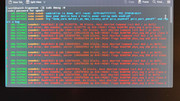
Offline
#17 2026-01-23 10:44:06
- seth
- Member
- From: Won't reply 2 private help req
- Registered: 2012-09-03
- Posts: 77,550
Re: Somewhat Intermittent System Crashing When Running Certain Games
You perfectly fit the APST pattern,
cat /proc/cmdlineto ensure those parameters were properly applied and add iommu=soft to the list.
Offline
#18 2026-01-23 14:35:31
- MaidenLuminous
- Member
- Registered: 2026-01-20
- Posts: 22
Re: Somewhat Intermittent System Crashing When Running Certain Games
I wish I had good news, but alas, I do not.
I added iommu=soft to the list, verified with cat /proc/cmdline that all kernel parameters were present and tried again, only to be met with another system freeze.
I suppose this time, the biggest difference was that it all took less time to do so!
Offline
#19 2026-01-23 14:57:51
- seth
- Member
- From: Won't reply 2 private help req
- Registered: 2012-09-03
- Posts: 77,550
Re: Somewhat Intermittent System Crashing When Running Certain Games
Let's see what the bus looks like
lspci -tvnnSanity check: is there a parallel windows installation?
Offline
#20 2026-01-23 16:12:01
- MaidenLuminous
- Member
- Registered: 2026-01-20
- Posts: 22
Re: Somewhat Intermittent System Crashing When Running Certain Games
-[0000:00]-+-00.0  Intel Corporation 8th Gen Core Processor Host Bridge/DRAM Registers [8086:3ec2]
           +-01.0-[01]--+-00.0  NVIDIA Corporation GA104 [GeForce RTX 3060 Ti Lite Hash Rate] [10de:2489]
           |            \-00.1  NVIDIA Corporation GA104 High Definition Audio Controller [10de:228b]
           +-12.0  Intel Corporation Cannon Lake PCH Thermal Controller [8086:a379]
           +-14.0  Intel Corporation Cannon Lake PCH USB 3.1 xHCI Host Controller [8086:a36d]
           +-14.2  Intel Corporation Cannon Lake PCH Shared SRAM [8086:a36f]
           +-16.0  Intel Corporation Cannon Lake PCH HECI Controller [8086:a360]
           +-17.0  Intel Corporation SATA Controller [RAID mode] [8086:2822]
           +-1b.0-[02]--
           +-1c.0-[03]--
           +-1c.7-[04]----00.0  Realtek Semiconductor Co., Ltd. RTL8812AE 802.11ac PCIe Wireless Network Adapter [10ec:8812]
           +-1d.0-[05]----00.0  Samsung Electronics Co Ltd NVMe SSD Controller S4LV008[Pascal] [144d:a80c]
           +-1f.0  Intel Corporation Z390 Chipset LPC/eSPI Controller [8086:a305]
           +-1f.3  Intel Corporation Cannon Lake PCH cAVS [8086:a348]
           +-1f.4  Intel Corporation Cannon Lake PCH SMBus Controller [8086:a323]
           +-1f.5  Intel Corporation Cannon Lake PCH SPI Controller [8086:a324]
           \-1f.6  Intel Corporation Ethernet Connection (7) I219-V [8086:15bc]
And there is no parallel windows installation.
Offline
#21 2026-01-23 19:57:31
- seth
- Member
- From: Won't reply 2 private help req
- Registered: 2012-09-03
- Posts: 77,550
Re: Somewhat Intermittent System Crashing When Running Certain Games
           +-1b.0-[02]--
           +-1c.0-[03]--
Is this lost in copypasta? (card reader? Webcam?)
+-17.0 Intel Corporation SATA Controller [RAID mode] [8086:2822]Same if you switch this to AHCI?
Offline
#22 2026-01-24 02:47:49
- MaidenLuminous
- Member
- Registered: 2026-01-20
- Posts: 22
Re: Somewhat Intermittent System Crashing When Running Certain Games
Nope. That's literally just what it looks like.
-[0000:00]-+-00.0  Intel Corporation 8th Gen Core Processor Host Bridge/DRAM Registers [8086:3ec2]
           +-01.0-[01]--+-00.0  NVIDIA Corporation GA104 [GeForce RTX 3060 Ti Lite Hash Rate] [10de:2489]
           |            \-00.1  NVIDIA Corporation GA104 High Definition Audio Controller [10de:228b]
           +-12.0  Intel Corporation Cannon Lake PCH Thermal Controller [8086:a379]
           +-14.0  Intel Corporation Cannon Lake PCH USB 3.1 xHCI Host Controller [8086:a36d]
           +-14.2  Intel Corporation Cannon Lake PCH Shared SRAM [8086:a36f]
           +-16.0  Intel Corporation Cannon Lake PCH HECI Controller [8086:a360]
           +-17.0  Intel Corporation Cannon Lake PCH SATA AHCI Controller [8086:a352]
           +-1b.0-[02]--
           +-1c.0-[03]--
           +-1c.7-[04]----00.0  Realtek Semiconductor Co., Ltd. RTL8812AE 802.11ac PCIe Wireless Network Adapter [10ec:8812]
           +-1d.0-[05]----00.0  Samsung Electronics Co Ltd NVMe SSD Controller S4LV008[Pascal] [144d:a80c]
           +-1f.0  Intel Corporation Z390 Chipset LPC/eSPI Controller [8086:a305]
           +-1f.3  Intel Corporation Cannon Lake PCH cAVS [8086:a348]
           +-1f.4  Intel Corporation Cannon Lake PCH SMBus Controller [8086:a323]
           +-1f.5  Intel Corporation Cannon Lake PCH SPI Controller [8086:a324]
           \-1f.6  Intel Corporation Ethernet Connection (7) I219-V [8086:15bc]
And same result, even after switching to AHCI
Offline
#23 2026-01-24 09:16:22
- seth
- Member
- From: Won't reply 2 private help req
- Registered: 2012-09-03
- Posts: 77,550
Re: Somewhat Intermittent System Crashing When Running Certain Games
Is this self-assmebled? Is the nvme properly seated or under tension (over-fastened a screw)?
Offline
#24 2026-01-24 20:01:51
- MaidenLuminous
- Member
- Registered: 2026-01-20
- Posts: 22
Re: Somewhat Intermittent System Crashing When Running Certain Games
The PC was bought used, except for the SSD, which was purchased new.
And I took a look at it again, remounted it twice (first time didn't even show it was plugged in), and now the freezing issue seems to have completely gone away.
I then removed all of the kernel parameters we'd added during this troubleshooting thread, and it still worked completely. All stutters and slowness during loading has also completely disappeared.
So that was it. Not the CPU, not the GPU, not the power supply, not the motherboard, and not even the RAM.
It wasn't a software conflict, it wasn't a BIOS setting....It was a loose SSD.
Tight enough to still work and boot from, but as soon as it got put under load, then it would crash. Honestly, with all the stress tests I'd put the entire system under, I don't know why that didn't cross my mind sooner.
Thanks so much.
Offline
#25 2026-01-26 00:25:59
- MaidenLuminous
- Member
- Registered: 2026-01-20
- Posts: 22
Re: Somewhat Intermittent System Crashing When Running Certain Games
Alright, update:
Despite working for multiple tests in a row across multiple games, the issue has persisted. False flag, red herring, whatever you want to call it. So it was not a loose SSD. I have since tried it in an entirely different slot, but was still met with the same crashing issue. I will say, it does seem to be slightly better. For instance, loading up CS2 would normally get a number of serious stutters when loading the main menu, but those are still gone. Now it's just a matter of waiting a few more seconds before it breaks the system.
Offline