You are not logged in.
- Topics: Active | Unanswered
#1 2026-01-30 19:14:52
- calyx
- Member

- Registered: 2024-08-26
- Posts: 23
Problems attaching a fourth external screen using USB-C
Hello, all.
I have another newbie question. I have tried attaching a fourth external monitor to my laptop, using USB-C. However, to no avail. Hence, I would love some help debugging what might be wrong.
I have had a look at another topic, that seemed related:
[SOLVED] USB-C monitor not detected after pacman -Syu
As well as the following page:
DisplayLink
To summarise what I have done:
I installed:
~ aur:evdi-dkms
~ aur:displaylink
~ linux-headers
I enabled and started displaylink.service.
I created 20-evdi.conf:
Section "OutputClass"
	Identifier "DisplayLink"
	MatchDriver "evdi"
	Driver "modesetting"
	Option "AccelMethod" "none"
EndSection
However, the fourth monitor does not get activated:
$ xrandr --listmonitors
Monitors: 4
 0: +*DP-1 3840/697x2160/392+6000+1680  DP-1
 1: +DP-2 3840/381x2160/214+0+1680  DP-2
 2: +HDMI-0 1600/641x2560/401+9840+1280  HDMI-0
 3: +DP-3 2160/697x3840/392+3840+0  DP-3
Last edited by calyx (2026-02-02 09:39:59)
calyx — outer covering of a flower
Offline
#2 2026-01-31 23:17:19
- Lone_Wolf
- Administrator

- From: Netherlands, Europe
- Registered: 2005-10-04
- Posts: 15,392
Re: Problems attaching a fourth external screen using USB-C
DisplayLink requires specific hardware that has little to do with connecting displays over usb-c .
What is the brand & model of your laptop ?
Please post the outputs of
$ lspci -k
$ lsusb -tv
Disliking systemd intensely, but not satisfied with alternatives so focusing on taming systemd.
clean chroot building not flexible enough ?
Try clean chroot manager by graysky
Offline
#3 2026-01-31 23:54:46
- calyx
- Member
- Registered: 2024-08-26
- Posts: 23
Re: Problems attaching a fourth external screen using USB-C
Thanks for the reply, Lone_Wolf!
It is a TUXEDO Book XUX7 - Gen11.
$ lspci -k
00:00.0 Host bridge: Intel Corporation Comet Lake-S 6c Host Bridge/DRAM Controller (rev 05)
	Subsystem: CLEVO/KAPOK Computer Device 7714
	Kernel driver in use: skl_uncore
00:01.0 PCI bridge: Intel Corporation 6th-10th Gen Core Processor PCIe Controller (x16) (rev 05)
	Subsystem: CLEVO/KAPOK Computer Device 7714
	Kernel driver in use: pcieport
	Kernel modules: shpchp
00:04.0 Signal processing controller: Intel Corporation Xeon E3-1200 v5/E3-1500 v5/6th Gen Core Processor Thermal Subsystem (rev 05)
	Subsystem: CLEVO/KAPOK Computer Device 7714
	Kernel driver in use: proc_thermal
	Kernel modules: processor_thermal_device_pci_legacy
00:12.0 Signal processing controller: Intel Corporation Comet Lake PCH Thermal Controller
	Subsystem: CLEVO/KAPOK Computer Device 7714
	Kernel driver in use: intel_pch_thermal
	Kernel modules: intel_pch_thermal
00:14.0 USB controller: Intel Corporation Comet Lake USB 3.1 xHCI Host Controller
	Subsystem: CLEVO/KAPOK Computer Device 7714
	Kernel driver in use: xhci_hcd
	Kernel modules: xhci_pci
00:14.2 RAM memory: Intel Corporation Comet Lake PCH Shared SRAM
	Subsystem: CLEVO/KAPOK Computer Device 7714
00:15.0 Serial bus controller: Intel Corporation Comet Lake PCH Serial IO I2C Controller #0
	Subsystem: CLEVO/KAPOK Computer Device 7714
	Kernel driver in use: intel-lpss
	Kernel modules: intel_lpss_pci
00:15.1 Serial bus controller: Intel Corporation Comet Lake PCH Serial IO I2C Controller #1
	Subsystem: CLEVO/KAPOK Computer Device 7714
	Kernel driver in use: intel-lpss
	Kernel modules: intel_lpss_pci
00:16.0 Communication controller: Intel Corporation Comet Lake HECI Controller
	Subsystem: CLEVO/KAPOK Computer Device 7714
	Kernel driver in use: mei_me
	Kernel modules: mei_me
00:17.0 SATA controller: Intel Corporation Comet Lake SATA AHCI Controller
	Subsystem: CLEVO/KAPOK Computer Device 7714
	Kernel driver in use: ahci
	Kernel modules: ahci
00:1b.0 PCI bridge: Intel Corporation Comet Lake PCI Express Root Port #17 (rev f0)
	Subsystem: CLEVO/KAPOK Computer Device 7714
	Kernel driver in use: pcieport
	Kernel modules: shpchp
00:1b.4 PCI bridge: Intel Corporation Comet Lake PCI Express Root Port #21 (rev f0)
	Subsystem: CLEVO/KAPOK Computer Device 7714
	Kernel driver in use: pcieport
	Kernel modules: shpchp
00:1c.0 PCI bridge: Intel Corporation Comet Lake PCIe Root Port #1 (rev f0)
	Subsystem: CLEVO/KAPOK Computer Device 7714
	Kernel driver in use: pcieport
	Kernel modules: shpchp
00:1c.4 PCI bridge: Intel Corporation Device 06bc (rev f0)
	Subsystem: CLEVO/KAPOK Computer Device 7714
	Kernel driver in use: pcieport
	Kernel modules: shpchp
00:1d.0 PCI bridge: Intel Corporation Comet Lake PCI Express Root Port #9 (rev f0)
	Subsystem: CLEVO/KAPOK Computer Device 7714
	Kernel driver in use: pcieport
	Kernel modules: shpchp
00:1d.4 PCI bridge: Intel Corporation Device 06b4 (rev f0)
	Subsystem: CLEVO/KAPOK Computer Device 7714
	Kernel driver in use: pcieport
	Kernel modules: shpchp
00:1d.5 PCI bridge: Intel Corporation Device 06b5 (rev f0)
	Subsystem: CLEVO/KAPOK Computer Device 7714
	Kernel driver in use: pcieport
	Kernel modules: shpchp
00:1d.6 PCI bridge: Intel Corporation Device 06b6 (rev f0)
	Subsystem: CLEVO/KAPOK Computer Device 7714
	Kernel driver in use: pcieport
	Kernel modules: shpchp
00:1f.0 ISA bridge: Intel Corporation Z490 Chipset LPC/eSPI Controller
	Subsystem: CLEVO/KAPOK Computer Device 7714
00:1f.3 Audio device: Intel Corporation Comet Lake PCH cAVS
	Subsystem: CLEVO/KAPOK Computer Device 7714
	Kernel driver in use: snd_hda_intel
	Kernel modules: snd_soc_avs, snd_sof_pci_intel_cnl, snd_hda_intel
00:1f.4 SMBus: Intel Corporation Comet Lake PCH SMBus Controller
	Subsystem: CLEVO/KAPOK Computer Device 7714
	Kernel driver in use: i801_smbus
	Kernel modules: i2c_i801
00:1f.5 Serial bus controller: Intel Corporation Comet Lake PCH SPI Controller
	Subsystem: CLEVO/KAPOK Computer Device 7714
	Kernel driver in use: intel-spi
	Kernel modules: spi_intel_pci
01:00.0 VGA compatible controller: NVIDIA Corporation TU104BM [GeForce RTX 2080 SUPER Mobile / Max-Q] (rev a1)
	Subsystem: CLEVO/KAPOK Computer Device 7714
	Kernel driver in use: nvidia
	Kernel modules: nouveau, nvidia_drm, nvidia
01:00.1 Audio device: NVIDIA Corporation TU104 HD Audio Controller (rev a1)
	Subsystem: CLEVO/KAPOK Computer Device 7714
	Kernel driver in use: snd_hda_intel
	Kernel modules: snd_hda_intel
01:00.2 USB controller: NVIDIA Corporation TU104 USB 3.1 Host Controller (rev a1)
	Subsystem: CLEVO/KAPOK Computer Device 7714
	Kernel driver in use: xhci_hcd
	Kernel modules: xhci_pci
01:00.3 Serial bus controller: NVIDIA Corporation TU104 USB Type-C UCSI Controller (rev a1)
	Subsystem: CLEVO/KAPOK Computer Device 7714
	Kernel driver in use: nvidia-gpu
	Kernel modules: i2c_nvidia_gpu
06:00.0 Non-Volatile memory controller: Samsung Electronics Co Ltd NVMe SSD Controller SM981/PM981/PM983
	Subsystem: Samsung Electronics Co Ltd SSD 970 EVO/PRO
	Kernel driver in use: nvme
	Kernel modules: nvme
07:00.0 Non-Volatile memory controller: Samsung Electronics Co Ltd NVMe SSD Controller SM981/PM981/PM983
	Subsystem: Samsung Electronics Co Ltd SSD 970 EVO/PRO
	Kernel driver in use: nvme
	Kernel modules: nvme
08:00.0 PCI bridge: Intel Corporation JHL7540 Thunderbolt 3 Bridge [Titan Ridge 2C 2018] (rev 06)
	Subsystem: CLEVO/KAPOK Computer Device 7714
	Kernel driver in use: pcieport
	Kernel modules: shpchp
09:00.0 PCI bridge: Intel Corporation JHL7540 Thunderbolt 3 Bridge [Titan Ridge 2C 2018] (rev 06)
	Subsystem: CLEVO/KAPOK Computer Device 7714
	Kernel driver in use: pcieport
	Kernel modules: shpchp
09:01.0 PCI bridge: Intel Corporation JHL7540 Thunderbolt 3 Bridge [Titan Ridge 2C 2018] (rev 06)
	Subsystem: CLEVO/KAPOK Computer Device 7714
	Kernel driver in use: pcieport
	Kernel modules: shpchp
09:02.0 PCI bridge: Intel Corporation JHL7540 Thunderbolt 3 Bridge [Titan Ridge 2C 2018] (rev 06)
	Subsystem: CLEVO/KAPOK Computer Device 7714
	Kernel driver in use: pcieport
	Kernel modules: shpchp
0a:00.0 System peripheral: Intel Corporation JHL7540 Thunderbolt 3 NHI [Titan Ridge 2C 2018] (rev 06)
	Subsystem: CLEVO/KAPOK Computer Device 7714
	Kernel driver in use: thunderbolt
	Kernel modules: thunderbolt
41:00.0 USB controller: Intel Corporation JHL7540 Thunderbolt 3 USB Controller [Titan Ridge 2C 2018] (rev 06)
	Subsystem: CLEVO/KAPOK Computer Device 7714
	Kernel driver in use: xhci_hcd
	Kernel modules: xhci_pci
42:00.0 USB controller: ASMedia Technology Inc. ASM3242 USB 3.2 Host Controller
	Subsystem: ASMedia Technology Inc. ASM3242 USB 3.2 Host Controller
	Kernel driver in use: xhci_hcd
	Kernel modules: xhci_pci
43:00.0 Non-Volatile memory controller: INNOGRIT Corporation NVMe SSD Controller IG5236 [RainierPC] (rev 01)
	Subsystem: INNOGRIT Corporation NVMe SSD Controller IG5236 [RainierPC]
	Kernel driver in use: nvme
	Kernel modules: nvme
64:00.0 Network controller: Intel Corporation Wi-Fi 6 AX200 (rev 1a)
	Subsystem: Intel Corporation Wi-Fi 6 AX200NGW
	Kernel driver in use: iwlwifi
	Kernel modules: iwlwifi
65:00.0 Ethernet controller: Realtek Semiconductor Co., Ltd. Killer E3000 2.5GbE Controller (rev 06)
	Subsystem: CLEVO/KAPOK Computer Device 7714
	Kernel driver in use: r8169
	Kernel modules: r8169
66:00.0 Unassigned class [ff00]: Realtek Semiconductor Co., Ltd. RTS5260 PCI Express Card Reader (rev 01)
	Subsystem: CLEVO/KAPOK Computer Device 7714
	Kernel driver in use: rtsx_pci
	Kernel modules: rtsx_pci
$ lsusb -tv
/: Bus 001.Port 001: Dev 001, Class=root_hub, Driver=xhci_hcd/16p, 480M
ID 1d6b:0002 Linux Foundation 2.0 root hub
|__ Port 001: Dev 002, If 0, Class=Hub, Driver=hub/4p, 480M
ID 0bda:5411 Realtek Semiconductor Corp. RTS5411 Hub
|__ Port 004: Dev 004, If 0, Class=Hub, Driver=hub/4p, 480M
ID 0bda:5411 Realtek Semiconductor Corp. RTS5411 Hub
|__ Port 003: Dev 003, If 0, Class=Audio, Driver=snd-usb-audio, 12M
ID 31b2:0010
|__ Port 003: Dev 003, If 1, Class=Audio, Driver=snd-usb-audio, 12M
ID 31b2:0010
|__ Port 003: Dev 003, If 2, Class=Audio, Driver=snd-usb-audio, 12M
ID 31b2:0010
|__ Port 003: Dev 003, If 3, Class=Human Interface Device, Driver=usbhid, 12M
ID 31b2:0010
|__ Port 004: Dev 005, If 0, Class=Hub, Driver=hub/4p, 480M
ID 0bda:5411 Realtek Semiconductor Corp. RTS5411 Hub
|__ Port 001: Dev 007, If 0, Class=Hub, Driver=hub/4p, 480M
ID 0bda:5411 Realtek Semiconductor Corp. RTS5411 Hub
|__ Port 002: Dev 010, If 0, Class=Audio, Driver=snd-usb-audio, 480M
ID 2972:0047 FiiO Electronics Technology
|__ Port 002: Dev 010, If 1, Class=Audio, Driver=snd-usb-audio, 480M
ID 2972:0047 FiiO Electronics Technology
|__ Port 002: Dev 010, If 2, Class=Application Specific Interface, Driver=[none], 480M
ID 2972:0047 FiiO Electronics Technology
|__ Port 003: Dev 012, If 0, Class=Human Interface Device, Driver=usbhid, 12M
ID 046d:c08c Logitech, Inc.
|__ Port 003: Dev 012, If 1, Class=Human Interface Device, Driver=usbhid, 12M
ID 046d:c08c Logitech, Inc.
|__ Port 004: Dev 015, If 0, Class=Human Interface Device, Driver=usbhid, 12M
ID 362d:0306
|__ Port 004: Dev 015, If 1, Class=Human Interface Device, Driver=usbhid, 12M
ID 362d:0306
|__ Port 004: Dev 015, If 2, Class=Human Interface Device, Driver=usbhid, 12M
ID 362d:0306
|__ Port 002: Dev 009, If 0, Class=Video, Driver=uvcvideo, 480M
ID 046d:09a6 Logitech, Inc. QuickCam Vision Pro
|__ Port 002: Dev 009, If 1, Class=Video, Driver=uvcvideo, 480M
ID 046d:09a6 Logitech, Inc. QuickCam Vision Pro
|__ Port 002: Dev 009, If 2, Class=Audio, Driver=snd-usb-audio, 480M
ID 046d:09a6 Logitech, Inc. QuickCam Vision Pro
|__ Port 002: Dev 009, If 3, Class=Audio, Driver=snd-usb-audio, 480M
ID 046d:09a6 Logitech, Inc. QuickCam Vision Pro
|__ Port 003: Dev 013, If 0, Class=Human Interface Device, Driver=usbhid, 12M
ID 262a:180e SAVITECH Corp.
|__ Port 003: Dev 013, If 1, Class=Audio, Driver=snd-usb-audio, 12M
ID 262a:180e SAVITECH Corp.
|__ Port 003: Dev 013, If 3, Class=Audio, Driver=snd-usb-audio, 12M
ID 262a:180e SAVITECH Corp.
|__ Port 005: Dev 006, If 0, Class=Human Interface Device, Driver=usbhid, 12M
ID 048d:8910 Integrated Technology Express, Inc.
|__ Port 008: Dev 008, If 0, Class=Video, Driver=uvcvideo, 480M
ID 04f2:b685 Chicony Electronics Co., Ltd
|__ Port 008: Dev 008, If 1, Class=Video, Driver=uvcvideo, 480M
ID 04f2:b685 Chicony Electronics Co., Ltd
|__ Port 009: Dev 011, If 0, Class=Human Interface Device, Driver=usbhid, 12M
ID 048d:8297 Integrated Technology Express, Inc. IT8297 RGB LED Controller
|__ Port 010: Dev 014, If 0, Class=Vendor Specific Class, Driver=[none], 12M
ID 06cb:00a8 Synaptics, Inc.
|__ Port 014: Dev 016, If 0, Class=Wireless, Driver=btusb, 12M
ID 8087:0029 Intel Corp. AX200 Bluetooth
|__ Port 014: Dev 016, If 1, Class=Wireless, Driver=btusb, 12M
ID 8087:0029 Intel Corp. AX200 Bluetooth
/: Bus 002.Port 001: Dev 001, Class=root_hub, Driver=xhci_hcd/10p, 10000M
ID 1d6b:0003 Linux Foundation 3.0 root hub
|__ Port 001: Dev 002, If 0, Class=Hub, Driver=hub/4p, 5000M
ID 0bda:0411 Realtek Semiconductor Corp. Hub
|__ Port 004: Dev 003, If 0, Class=Hub, Driver=hub/4p, 5000M
ID 0bda:0411 Realtek Semiconductor Corp. Hub
/: Bus 003.Port 001: Dev 001, Class=root_hub, Driver=xhci_hcd/2p, 480M
ID 1d6b:0002 Linux Foundation 2.0 root hub
/: Bus 004.Port 001: Dev 001, Class=root_hub, Driver=xhci_hcd/4p, 10000M
ID 1d6b:0003 Linux Foundation 3.0 root hub
/: Bus 005.Port 001: Dev 001, Class=root_hub, Driver=xhci_hcd/2p, 480M
ID 1d6b:0002 Linux Foundation 2.0 root hub
/: Bus 006.Port 001: Dev 001, Class=root_hub, Driver=xhci_hcd/2p, 10000M
ID 1d6b:0003 Linux Foundation 3.0 root hub
/: Bus 007.Port 001: Dev 001, Class=root_hub, Driver=xhci_hcd/1p, 480M
ID 1d6b:0002 Linux Foundation 2.0 root hub
/: Bus 008.Port 001: Dev 001, Class=root_hub, Driver=xhci_hcd/1p, 20000M/x2
ID 1d6b:0003 Linux Foundation 3.0 root hubLast edited by calyx (2026-02-01 00:01:30)
calyx — outer covering of a flower
Offline
#4 2026-02-01 10:37:14
- seth
- Member

- From: Won't reply 2 private help req
- Registered: 2012-09-03
- Posts: 77,706
Re: Problems attaching a fourth external screen using USB-C
Please post your Xorg log, https://wiki.archlinux.org/title/Xorg#General and the output of "xrandr --verbose"
Offline
#5 2026-02-01 12:12:41
- calyx
- Member
- Registered: 2024-08-26
- Posts: 23
Re: Problems attaching a fourth external screen using USB-C
calyx — outer covering of a flower
Offline
#6 2026-02-01 13:02:50
- calyx
- Member
- Registered: 2024-08-26
- Posts: 23
Re: Problems attaching a fourth external screen using USB-C
I noticed the following error in the Xorg log:
(EE) open /dev/dri/card0: No such file or directoryHowever, not sure if this is a problem?
$ sudo lspci | grep -i "vga\|3d\|2d"
01:00.0 VGA compatible controller: NVIDIA Corporation TU104BM [GeForce RTX 2080 SUPER Mobile / Max-Q] (rev a1)

$ sudo dmesg | grep -i drm
[    2.625895] ACPI: bus type drm_connector registered
[    3.323309] simple-framebuffer simple-framebuffer.0: [drm] Registered 1 planes with drm panic
[    3.323310] [drm] Initialized simpledrm 1.0.0 for simple-framebuffer.0 on minor 0
[    3.362280] simple-framebuffer simple-framebuffer.0: [drm] fb0: simpledrmdrmfb frame buffer device
[    7.145502] systemd[1]: Load Kernel Module drm was skipped because of an unmet condition check (ConditionKernelModuleLoaded=!drm).
[    7.735800] [drm] [nvidia-drm] [GPU ID 0x00000100] Loading driver
[    9.409716] [drm] Initialized nvidia-drm 0.0.0 for 0000:01:00.0 on minor 1
[    9.671258] fbcon: nvidia-drmdrmfb (fb0) is primary device
[   10.713270] nvidia 0000:01:00.0: [drm] fb0: nvidia-drmdrmfb frame buffer device
calyx — outer covering of a flower
Offline
#7 2026-02-01 14:40:39
- seth
- Member
- From: Won't reply 2 private help req
- Registered: 2012-09-03
- Posts: 77,706
Re: Problems attaching a fourth external screen using USB-C
card0 is because of the simpledrm device, you can ignore that
There're 4 active outputs
DP-1 connected primary 3840x2160+6000+947 (0x1be) normal (normal left inverted right x axis y axis) 697mm x 392mm
  3840x2160 (0x1be) 297.000MHz +HSync +VSync *current +preferred
HDMI-0 connected 1600x2560+9840+547 (0x1d1) left (normal left inverted right x axis y axis) 641mm x 401mm
  2560x1600 (0x1d1) 268.500MHz +HSync -VSync *current +preferred
DP-2 connected 3840x2160+0+947 (0x1e0) normal (normal left inverted right x axis y axis) 381mm x 214mm
  3840x2160 (0x1e0) 533.500MHz -HSync -VSync *current +preferred
DP-3 connected 2160x3840+3840+0 (0x1e3) right (normal left inverted right x axis y axis) 697mm x 392mm
  3840x2160 (0x1e3) 533.250MHz +HSync -VSync *current +preferred
All are connected to the (only) nvidia GPU
[ 31751.577] (--) NVIDIA(GPU-0): LG Electronics LG HDR 4K (DFP-1): connected
[ 31751.624] (--) NVIDIA(GPU-0): DELL U3014 (DFP-2): connected
[ 31751.626] (--) NVIDIA(GPU-0): AU Optronics Corporation (DFP-3): connected
[ 31751.627] (--) NVIDIA(GPU-0): LG Electronics LG HDR 4K (DFP-4): connected
and arranged in in a horizontal strip.
I have tried attaching a fourth external monitor to my laptop, using USB-C. However, to no avail.
Please elaborate on the symptoms beyond "no avail"
Offline
#8 2026-02-01 18:06:20
- calyx
- Member
- Registered: 2024-08-26
- Posts: 23
Re: Problems attaching a fourth external screen using USB-C
Yes. You are correct. The LGs and the Dell are external monitors, and the AU Optronics is the laptop screen. But, I do not see the DisplayLink / Thunderbolt / USB-C attached monitor. There is no new provider for the DisplayLink monitor:
$ xrandr --listproviders
Providers: number : 1
Provider 0: id: 0x1b7 cap: 0x1, Source Output crtcs: 4 outputs: 8 associated providers: 0 name:NVIDIA-0
I have also checked the BIOS, and made sure "Discrete Thunderbolt(TM) Support" is enabled, and the security level is disabled (I also tried setting the security to "Display Port only"). I have also tried different DisplayPort-cables, in case that was the problem.
So, the symptoms is that the DisplayLink monitor is nowhere to be found on the system. It is as if the system does not recognise it at all.
Last edited by calyx (2026-02-01 18:15:06)
calyx — outer covering of a flower
Offline
#9 2026-02-01 19:21:54
- Lone_Wolf
- Administrator
- From: Netherlands, Europe
- Registered: 2005-10-04
- Posts: 15,392
Re: Problems attaching a fourth external screen using USB-C
What is the exact brand & model of that monitor ?
Do you have other devices from the DisplayLink Corp (owned by synaptics since 2020 ) ?
Disliking systemd intensely, but not satisfied with alternatives so focusing on taming systemd.
clean chroot building not flexible enough ?
Try clean chroot manager by graysky
Offline
#10 2026-02-01 21:37:00
- calyx
- Member
- Registered: 2024-08-26
- Posts: 23
Re: Problems attaching a fourth external screen using USB-C
It is a Samsung U28R55UQR.
Unfortunately, I do not have any devices from DisplayLink Corp.
Last edited by calyx (2026-02-01 21:37:27)
calyx — outer covering of a flower
Offline
#11 2026-02-01 21:44:34
- seth
- Member
- From: Won't reply 2 private help req
- Registered: 2012-09-03
- Posts: 77,706
Re: Problems attaching a fourth external screen using USB-C
https://downloadcenter.samsung.com/cont … 2A-Eng.pdf
Page 13
There're 2 HDMI and 1 DP input,the usb plug is for service, not video in.
If your cable connects USB to DP, the USB port needs to support the alt-mode (there's typically a little DP icon next to it, the manual will know for sure)
This is not https://en.wikipedia.org/wiki/DisplayLink
If the problem is the available outputs you *might* be able to daisy-chain DP (if one of the monitors supports that)
Offline
#12 2026-02-01 22:42:59
- calyx
- Member
- Registered: 2024-08-26
- Posts: 23
Re: Problems attaching a fourth external screen using USB-C
Thanks again. I believe I am using the right connections though.
This is my computer, connected to the DP out: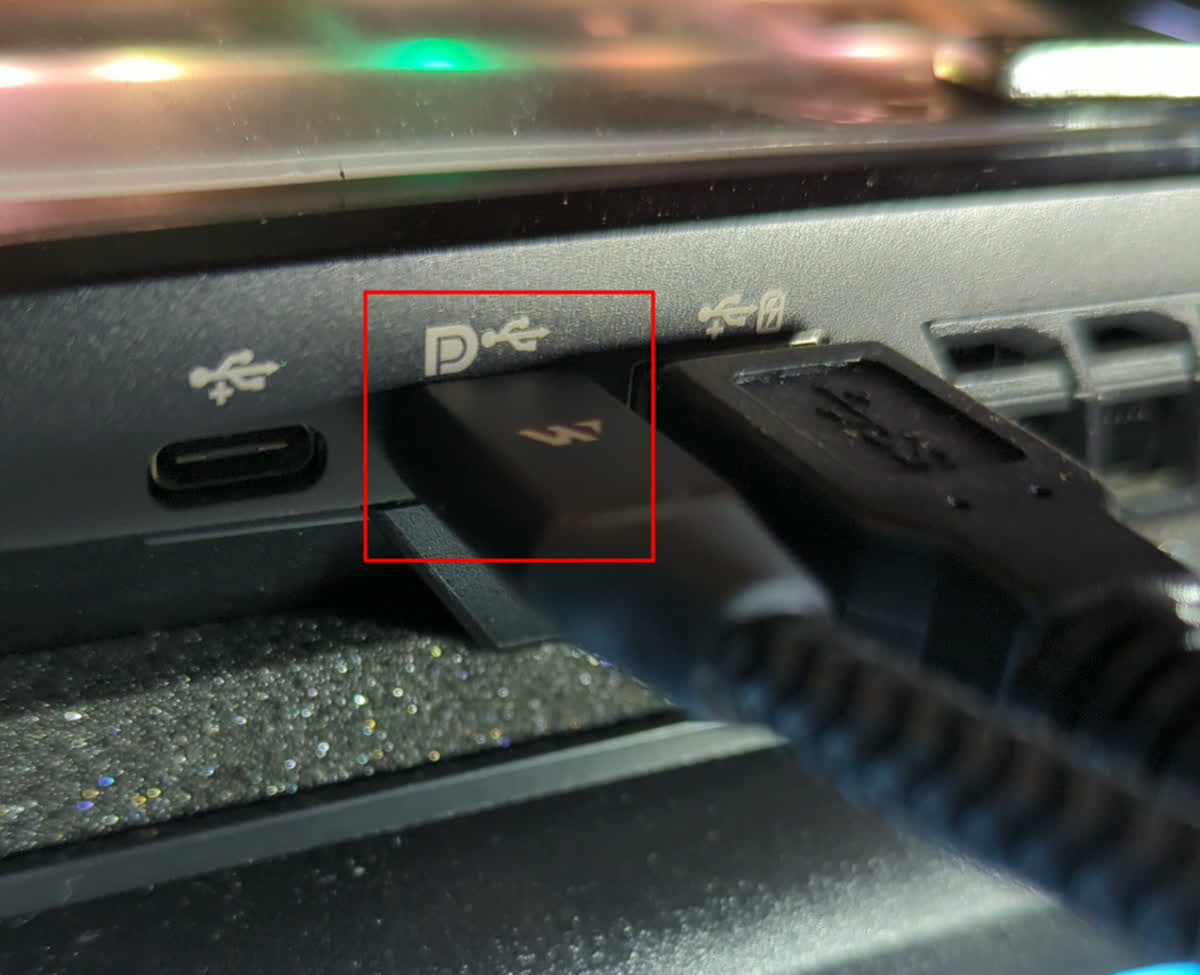
And, this is my monitor, connected to the DP in: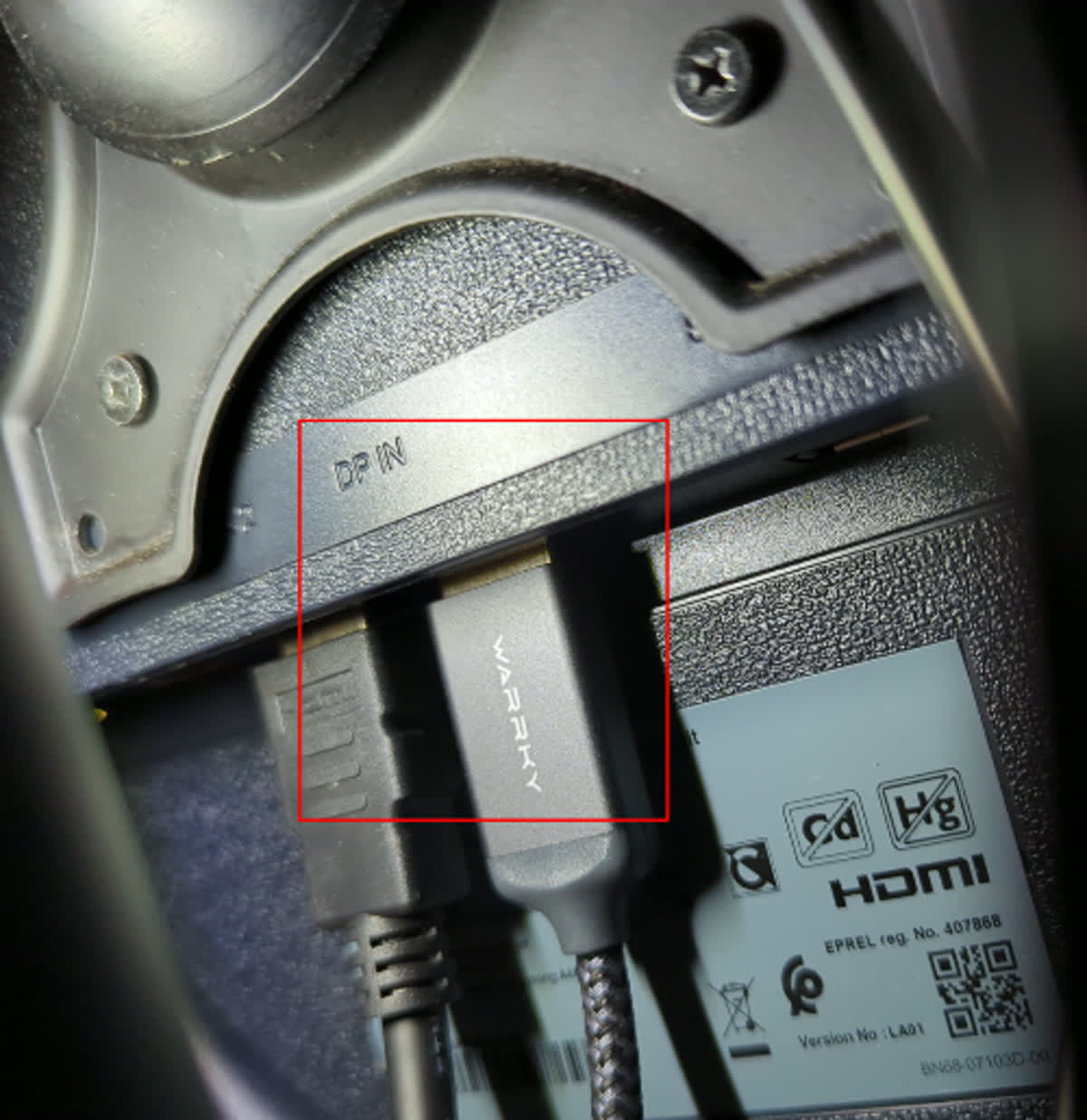
calyx — outer covering of a flower
Offline
#13 2026-02-01 22:46:51
- seth
- Member
- From: Won't reply 2 private help req
- Registered: 2012-09-03
- Posts: 77,706
Re: Problems attaching a fourth external screen using USB-C
Yeah, that's NOT displaylink.
https://en.wikipedia.org/wiki/USB-C#Alt … ifications
The subject speak of problems w/ a 4th monitor but there're 4 monitors - that's why I asked for details on the situation.
Offline
#14 2026-02-02 02:25:42
- calyx
- Member
- Registered: 2024-08-26
- Posts: 23
Re: Problems attaching a fourth external screen using USB-C
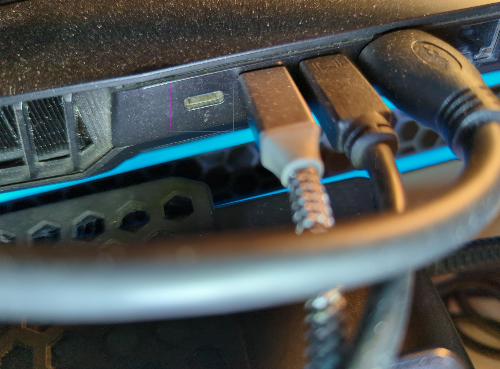
Well, that was slightly embarrassing. Thank you for pointing that out to me. And, when I located the correct port, and tried that instead, it worked.
Side note: I was unable to use HDMI at the same time as DisplayLink. But, that is another issue...
calyx — outer covering of a flower
Offline
#15 2026-02-02 09:18:54
- seth
- Member
- From: Won't reply 2 private help req
- Registered: 2012-09-03
- Posts: 77,706
Re: Problems attaching a fourth external screen using USB-C
That's the power supply - please post your Xorg log, https://wiki.archlinux.org/title/Xorg#General for the working setup to illustrate the working situation (explaining the problem)
Offline
#16 2026-02-02 09:39:32
- calyx
- Member
- Registered: 2024-08-26
- Posts: 23
Re: Problems attaching a fourth external screen using USB-C
Okay, thanks. As soon as I enable (in arandr) the Thunderbolt and the HDMI connection at the same time, the screens go black for a while. Then, my main screen comes on again, while the other screens are black, and the mouse pointer is gone.
I will post the Xorg log shortly.
calyx — outer covering of a flower
Offline
#17 2026-02-02 10:39:39
- calyx
- Member
- Registered: 2024-08-26
- Posts: 23
Re: Problems attaching a fourth external screen using USB-C
Upon rebooting all screens work (tty show up), except for my main screen.
Logging in, and running startx, I first tried to enable all five monitors. Like this: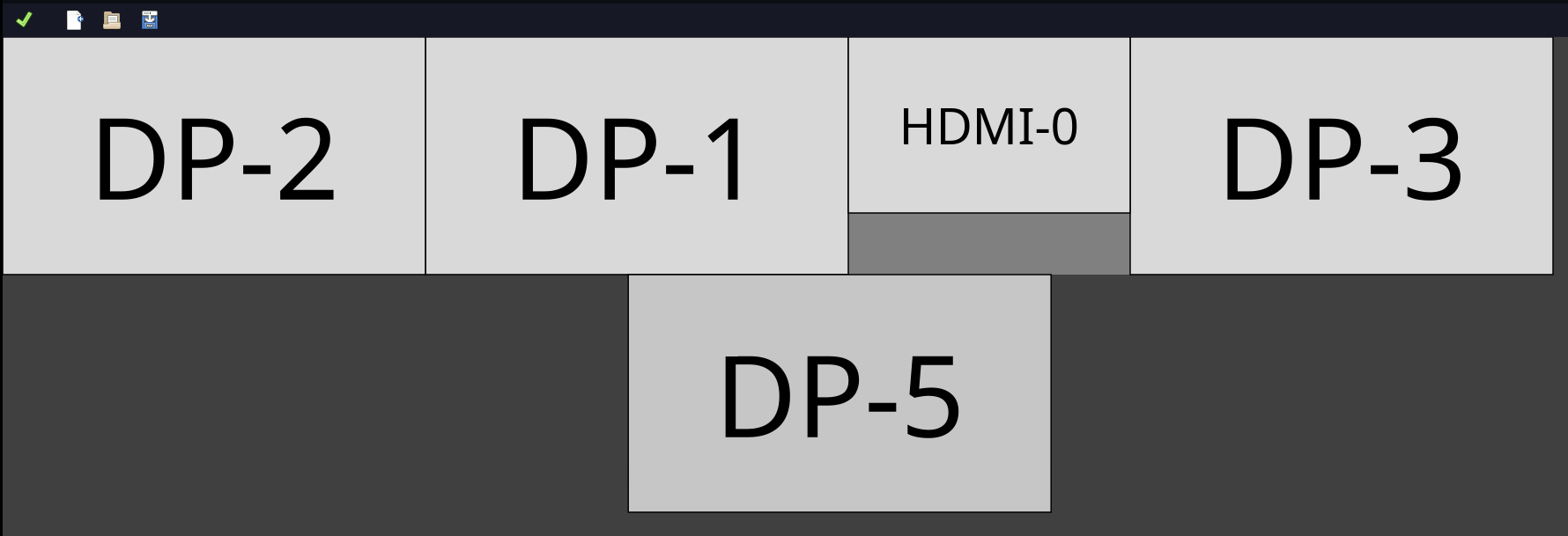
However, that resulted in error message: "XRandR returned error code 1: b'xrandr: cannot find crtc for output DP-5\n'":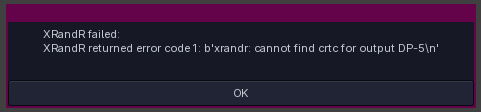
This error seems to be due to hardware limitations (system does not support that many screens). However, that is no problem, as I do not need my laptop monitor.
I tried a new setup, without my laptop monitor (DP-5 is the Thunderbolt-connected screen):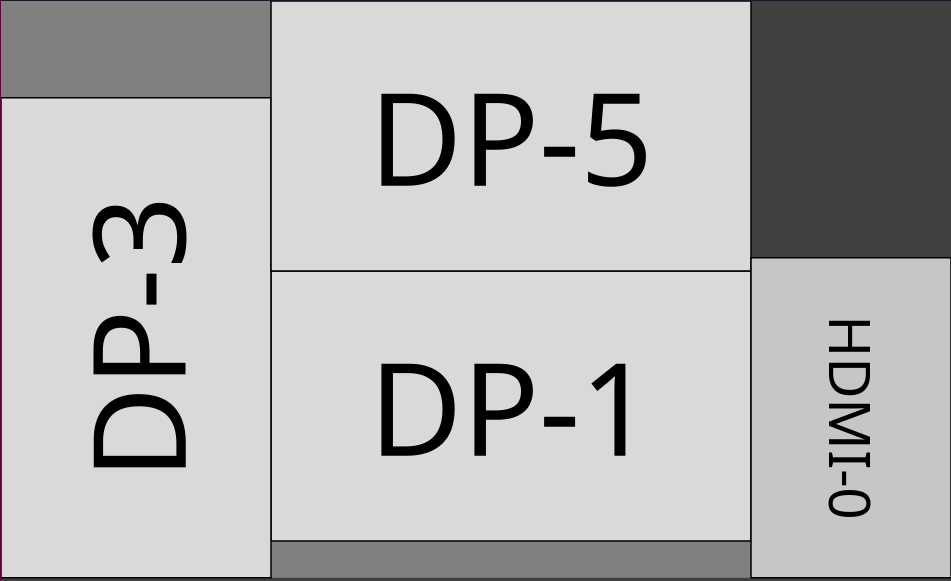
When I enabled this setup, all screens whent black, except for DP-1. The mouse pointer also disappeared.
This is the log file from that session:
4b_laptopPlus4IncThunderboltAndHDMINotWorking.Xorg.0.log.txt
From the log, I see the following errors, that might be related:
[   641.280] (EE) NVIDIA(GPU-0): Unable to add conservative default mode "nvidia-auto-select".
[   641.280] (EE) NVIDIA(GPU-0): Unable to add "nvidia-auto-select" mode to ModePool.
Last edited by calyx (2026-02-02 10:41:20)
calyx — outer covering of a flower
Offline
#18 2026-02-02 14:39:31
- seth
- Member
- From: Won't reply 2 private help req
- Registered: 2012-09-03
- Posts: 77,706
Re: Problems attaching a fourth external screen using USB-C
You're not using any displaylink device.
This error seems to be due to hardware limitations (system does not support that many screens).
Very likely.
I assume AU Optronics Corporation / DFP-3 is your eDP and that lists as DP2?
xrandr --output DP-2 --off
xrandr --output DP-5 --auto
And post the output of
xrandr -qw/ now all outputs properly attached.
Offline
#19 2026-02-02 15:10:22
- calyx
- Member
- Registered: 2024-08-26
- Posts: 23
Re: Problems attaching a fourth external screen using USB-C
Yes, you are correct, @seth! AU Optronics Corporation is listed as DP-2.
$ xrandr -q
Screen 0: minimum 8 x 8, current 6000 x 4989, maximum 32767 x 32767
DP-0 disconnected (normal left inverted right x axis y axis)
DP-1 connected primary 3840x2160+2160+2160 (normal left inverted right x axis y axis) 697mm x 392mm
   3840x2160     30.00*+  29.97    25.00    23.98
   2560x1440     59.95
   1920x1080     60.00    59.94    59.93    50.00    29.97    23.98
   1280x720      59.94
   1024x768      60.00
   800x600       60.32
   720x576       50.00
   720x480       59.94
   640x480       59.94    59.93
HDMI-0 connected (normal left inverted right x axis y axis)
   2560x1600     59.97 +
   1920x1200     59.88
   1920x1080     60.00    59.94    50.00    23.98
   1680x1050     59.95
   1600x1200     60.00
   1280x1024     75.02    60.02
   1280x800      59.81
   1280x720      60.00    59.94    50.00
   1152x864      75.00
   1024x768      75.03    60.00
   800x600       75.00    60.32
   720x576       50.00
   720x480       60.01    59.94
   640x480       75.00    59.94    59.93
DP-2 connected (normal left inverted right x axis y axis)
   3840x2160     60.02 +  48.01
DP-3 connected 2160x3840+0+1149 right (normal left inverted right x axis y axis) 700mm x 400mm
   3840x2160     60.00*+  30.00
   2560x1440     59.95
   1920x1080     60.00    59.94    59.93
   1280x720      59.94
   1024x768      60.00
   800x600       60.32
   720x480       59.94
   640x480       59.94    59.93
DP-4 disconnected (normal left inverted right x axis y axis)
DP-5 connected 3840x2160+2160+0 (normal left inverted right x axis y axis) 630mm x 360mm
   3840x2160     60.00*+  30.00    29.97
   2560x1440     59.95
   1920x1080     60.00    59.94    50.00
   1680x1050     59.95
   1600x900      60.00
   1440x900      59.89
   1280x1024     75.02    60.02
   1280x800      59.81
   1280x720      60.00    59.94    50.00
   1152x864      75.00
   1024x768      75.03    70.07    60.00
   800x600       75.00    72.19    60.32    56.25
   720x576       50.00
   720x480       59.94
   640x480       75.00    72.81    59.94
DP-6 disconnected (normal left inverted right x axis y axis)
calyx — outer covering of a flower
Offline
#20 2026-02-02 15:16:53
- calyx
- Member
- Registered: 2024-08-26
- Posts: 23
Re: Problems attaching a fourth external screen using USB-C
I reached out to Tuxedo Computers as well, and I just got a reply. It seems like I am trying to achieve something that is impossible:
This is not possible. No video output over UBS - C.
You can have the following configuration:The following resolutions are possible via all connections individually or in parallel:
1x Notebook-Display: 1920*1080@60Hz or 3840*2160@60Hz (Depending on display selection in the configurator)
2x DisplayPort: 2x 3840*2160@60Hz or 2560*1600@120Hz
1x HDMI 2.0: 3840*2160@60Hz or 2560*1600@120HzWith these maximum resolutions 4 displays can be controlled simultaneously, e. g. 1x notebook display and 3x external monitors.
I followed up asking if I could disable the Notebook display, and then attach four external monitors (one Thunderbolt, one HDMI and two DisplayPorts, as shown below). The answer was negative.
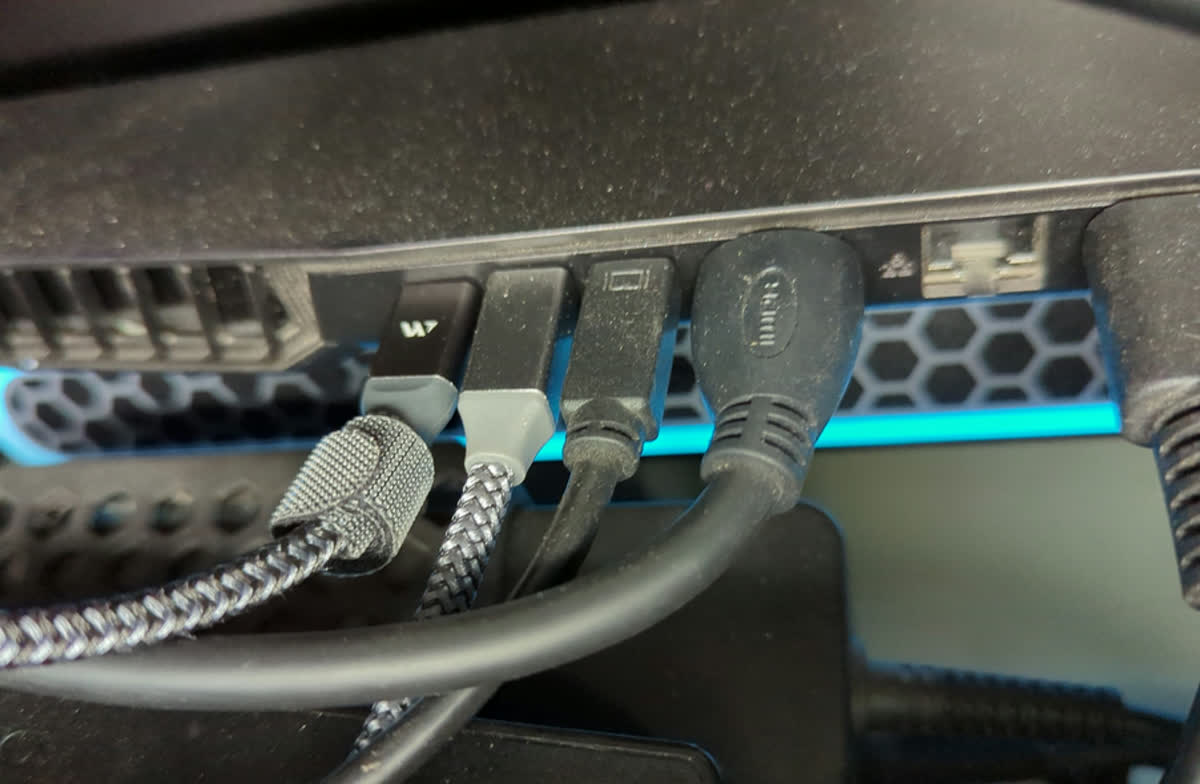
Last edited by calyx (2026-02-02 15:20:52)
calyx — outer covering of a flower
Offline
#21 2026-02-02 15:57:29
- seth
- Member
- From: Won't reply 2 private help req
- Registered: 2012-09-03
- Posts: 77,706
Re: Problems attaching a fourth external screen using USB-C
DP-1 connected primary 3840x2160+2160+2160 (normal left inverted right x axis y axis) 697mm x 392mm
HDMI-0 connected (normal left inverted right x axis y axis)
DP-2 connected (normal left inverted right x axis y axis)
DP-3 connected 2160x3840+0+1149 right (normal left inverted right x axis y axis) 700mm x 400mm
DP-5 connected 3840x2160+2160+0 (normal left inverted right x axis y axis) 630mm x 360mm
You have 3xDP 1xHDMI and the eDP connected - the latter two aren't enabled.
xrandr --output HDMI-0 --autofails or implicitly turns another monitor off?
Offline
#22 2026-02-02 18:35:01
- calyx
- Member
- Registered: 2024-08-26
- Posts: 23
Re: Problems attaching a fourth external screen using USB-C
fails or implicitly turns another monitor off?
All monitors goes black. After 20-30 second the main/primary display (DP-1) turns back on, but then the mouse pointer is gone. A hard reset/reboot is needed to get the displays working again (at least, I have found no other way around).
Last edited by calyx (2026-02-03 15:40:34)
calyx — outer covering of a flower
Offline