You are not logged in.
- Topics: Active | Unanswered
#1 2026-06-06 11:03:44
- Cooleech
- Member

- From: Solin, Croatia
- Registered: 2015-01-23
- Posts: 44
[SOLVED] Manual partitioning - no option to add esp flag
Hi all,
either I'm doing something wrong, or there simply doesn't exist an option to add esp flag to boot partition in archinstall.
When I edit partition options, there is an option to add or remove boot flag, but there is no option to add esp flag on which install script complains is missing when I try to install Arch.
I tried changing mountpoint from /boot to /boot/efi, I even tried setting /boot partition as first partition instead of the last one, but still no option to set esp.
I want to install Arch Linux on a USB stick with first partition being NTFS (for general data accessible on ANY OS (older Windows versions see only first partition on a USB sticks)), second one being root and last one boot partition.
I'm aware that I can set that using fdisk, but it is really strange that such a simple thing is missing in archinstall.
I tried searching this forum for a solution.. and found nothing. Am I really the only one that saw that? 
Thank you in advance for your answers. 
Last edited by Cooleech (2026-06-06 12:37:32)
Offline
#2 2026-06-06 11:57:29
- Cooleech
- Member
- From: Solin, Croatia
- Registered: 2015-01-23
- Posts: 44
Re: [SOLVED] Manual partitioning - no option to add esp flag
Here's how I'm running QEMU from which I'm doing installation as I've done multiple times before and it works just fine with any disto (even Arch with my install script which, unfortunately, lacks disk encription):
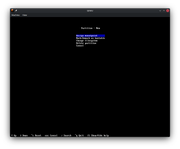
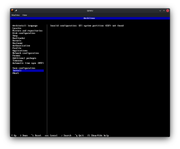
sudo qemu-system-x86_64 -enable-kvm -bios /usr/share/ovmf/x64/OVMF.4m.fd -cpu host -M pc -usbdevice tablet -drive file=/dev/sdb -drive file=/home/cooleech/Downloads/ISO/archlinux-2026.04.01-x86_64.iso,media=cdrom -smp cores=2,threads=1 -device AC97 -vga qxl -m 4096 -rtc base=localtimeSome screenshots: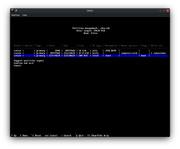
P.S. Before running archinstall I did pacman -Sy archinstall 
Last edited by Cooleech (2026-06-06 12:07:57)
Offline
#3 2026-06-06 12:09:38
- cryptearth
- Member
- Registered: 2024-02-03
- Posts: 2,331
Re: [SOLVED] Manual partitioning - no option to add esp flag
seems you overestimate archinstall
archinstall is NOT a replacement for the manual way - it's just some scripts of some dev reflecting thier opinions about how they like to install arch - and the arch maintainers at some point seem to made it "semi-official"
anyway - what you try to do is already something that shouldn't be done (if at all use exFAT instead of ntfs - will save you a lot of issues) - and although linux and very recent windows versions can handle multiple partitions on thumbdrives windows didn't so because for a long time removable media were seen and handled the same - for windows usb thumbsticks for a long time were just big floppies - for linux it's just another block device
also: although i know about gpt partition flags - last time i needed to manipulate them was from windows when some update had some issues - but from linux i never even bothered with set them at any point - so, what flag is it exactly you want to set - and for what reason exactly? i seem to miss the bigger picture why you even try to do what you ask archinstall to support
Offline
#4 2026-06-06 12:16:36
- Lone_Wolf
- Administrator

- From: Netherlands, Europe
- Registered: 2005-10-04
- Posts: 15,404
Re: [SOLVED] Manual partitioning - no option to add esp flag
The screenshots you posted suggest that you're trying to setup an MBR disk, not a GPT disk.
While an MBR disk can have an ESP that's only possible by setting the partition type ID for the esp partition to EF .
cfdisk and fdisk can set that , no idea what archinstall uses for partitioning and whether it supports setting partititon type IDs.
Switching to a GPT disk may be simpler.
Disliking systemd intensely, but not satisfied with alternatives so focusing on taming systemd.
clean chroot building not flexible enough ?
Try clean chroot manager by graysky
Offline
#5 2026-06-06 12:19:43
- Cooleech
- Member
- From: Solin, Croatia
- Registered: 2015-01-23
- Posts: 44
Re: [SOLVED] Manual partitioning - no option to add esp flag
I have to use NTFS because of some tools that do not recognize exFAT partitions (like Acronis True Image 202x, for example). Also, since there are many old machines I have to deal with (running WinXP and Win 7), first partition is what it is but even that doesn't fix the problem. Flags I need to set is something that is set from archinstall if you use recommended partiton layout option which doesn't suit my needs. I need manual partitioning for reasons I already stated.
Offline
#6 2026-06-06 12:28:09
- Cooleech
- Member
- From: Solin, Croatia
- Registered: 2015-01-23
- Posts: 44
Re: [SOLVED] Manual partitioning - no option to add esp flag
The screenshots you posted suggest that you're trying to setup an MBR disk, not a GPT disk.
While an MBR disk can have an ESP that's only possible by setting the partition type ID for the esp partition to EF .cfdisk and fdisk can set that , no idea what archinstall uses for partitioning and whether it supports setting partititon type IDs.
Switching to a GPT disk may be simpler.
Goddamn it, I am an idiot! You're right! USB thumbdrive is STILL MBR, not GPT! I was sure I converted it beforehand!
Thank you!!!
Offline