You are not logged in.
- Topics: Active | Unanswered
#1 2026-06-24 08:59:40
- Enrico1989
- Member
- Registered: 2018-07-05
- Posts: 425
ERR_NAME_NOT_RESOLVED when trying to navigate while on video call
Here's what I experience:
internet just works,
I enter a meeting,
the meeting is going smoothly, hence internet must be working, no?
during the meeting, I try to open some other web page (on different browsers)
I get a ERR_NAME_NOT_RESOLVED instead,
I close the meeting,
I still get ERR_NAME_NOT_RESOLVED if I try opening a page.
Last time (a few minutes ago while I was in a meeting on https://meet.google.com/), and most likely also the time before (a couple of days ago while I was in a meeting on https://meet.jit.si/), I've recovered internet by
$ connmanctl
connmanctl> disconnect ethernet_e0d55e2dee05_cable
connmanctl> connect ethernet_e0d55e2dee05_cable
And it has happened before, even though I don't have a huge record/recollection, because I haven't used the system I'm referring to for quite some time (at least not for videocalls) before coming back to it just a few weeks ago.
Furthermore, I don't know if the "breakage" happens right after I join the call, or it takes some time.
Incidentally, I haven't taken any action yet as regards my earlier question Guidance in migrating from Connman to iwd+impala for ethernet+wifi.
Last edited by Enrico1989 (2026-07-03 05:19:51)
Offline
#2 2026-06-24 10:39:32
- gerliczkowalczuk
- Member
- From: Warsaw, Poland
- Registered: 2026-06-22
- Posts: 10
Re: ERR_NAME_NOT_RESOLVED when trying to navigate while on video call
The fact that existing meetings continue to work while opening new pages fails with `ERR_NAME_NOT_RESOLVED` strongly suggests a DNS issue rather than a general connectivity issue.
When the problem occurs again, could you please post the output of:
resolvectl status
resolvectl query archlinux.org
cat /etc/resolv.conf
ping 1.1.1.1
ping google.com
If `ping 1.1.1.1` works while `ping google.com` fails, that would confirm that only DNS resolution is broken.
Since disconnecting and reconnecting the interface through ConnMan restores connectivity, I suspect ConnMan may be losing or misconfiguring DNS information during the call.
Offline
#3 2026-06-24 18:51:17
- Enrico1989
- Member
- Registered: 2018-07-05
- Posts: 425
Re: ERR_NAME_NOT_RESOLVED when trying to navigate while on video call
The problem hasn't occurred again, but I wanted to see what the output is supposed to be when things work, and I was surprised that the first two commands fail:
$ resolvectl status
Failed to connect to service /run/systemd/resolve/io.systemd.Resolve: No such file or directory
$ resolvectl query archlinux.org
archlinux.org: resolve call failed: Could not activate remote peer 'org.freedesktop.resolve1': activation request failed: unknown unit
Last edited by Enrico1989 (2026-06-24 18:51:57)
Offline
#4 2026-06-24 19:12:01
- gerliczkowalczuk
- Member
- From: Warsaw, Poland
- Registered: 2026-06-22
- Posts: 10
Re: ERR_NAME_NOT_RESOLVED when trying to navigate while on video call
Thanks, that explains it.
The error indicates that you are not using systemd-resolved, so the resolvectl commands can be ignored.
The next time the problem occurs, please post the output of:
cat /etc/resolv.conf
ping 1.1.1.1
ping google.com
connmanctl services
I am still leaning towards a DNS issue, since existing connections (the meeting) continue to work while new connections fail with
ERR_NAME_NOT_RESOLVED.
It would also be interesting to know whether
/etc/resolv.confchanges before and after reconnecting the interface through ConnMan.
Offline
#5 2026-06-24 19:22:10
- Enrico1989
- Member
- Registered: 2018-07-05
- Posts: 425
Re: ERR_NAME_NOT_RESOLVED when trying to navigate while on video call
For now, while everything seems to work, /etc/resolv.conf has this content
# Generated by Connection Manager
nameserver ::1
nameserver 127.0.0.1
and connmanctl services gives
*AO Wired                ethernet_e0d55e2dee05_cable
*AR DeAngelis            wifi_f83441daf73c_4465416e67656c6973_managed_psk
Offline
#6 2026-06-24 19:29:25
- seth
- Member

- From: Won't reply 2 private help req
- Registered: 2012-09-03
- Posts: 78,499
Re: ERR_NAME_NOT_RESOLVED when trying to navigate while on video call
If (re)starting the ethernet helps you either lost the lease or the resolver gets rewritten.
The former will show in the system journal, for the latter check the content development (and/or timestamps) of that file.
The /etc/resolv.conf content in #5 indicates a local resolver which is either resolved, dnsmasq or something weird.
sudo LC_ALL=C pacman -Qkk | grep -v ', 0 altered files'
stat /etc/resolv.confOnline
#7 2026-06-24 19:53:50
- Enrico1989
- Member
- Registered: 2018-07-05
- Posts: 425
Re: ERR_NAME_NOT_RESOLVED when trying to navigate while on video call
The output of pacman|grep: https://paste.c-net.org/FeaturedTurnover
And the output of stat:
  File: /etc/resolv.conf
  Size: 70        	Blocks: 8          IO Block: 4096   regular file
Device: 0,29	Inode: 11682714    Links: 1
Access: (0644/-rw-r--r--)  Uid: (    0/    root)   Gid: (    0/    root)
Access: 2026-06-24 07:34:11.935793900 +0200
Modify: 2025-04-01 17:16:16.211897902 +0200
Change: 2025-04-01 17:16:16.211897902 +0200
 Birth: 2023-10-11 17:34:33.055507949 +0200
Or did you mean to share this when the issue occurs?
Offline
#8 2026-06-24 20:02:50
- seth
- Member
- From: Won't reply 2 private help req
- Registered: 2012-09-03
- Posts: 78,499
Re: ERR_NAME_NOT_RESOLVED when trying to navigate while on video call
Wah, copypastedisaster…
Well, not "disaster"
Meant to post
find /etc/systemd -type l -exec test -f {} \; -print | awk -F'/' '{ printf ("%-40s | %s\n", $(NF-0), $(NF-1)) }' | sort -fSorry.
resolve.conf isn't a symlink, is acually anything listening on localhost?
ss -tulpn | grep ':53'Online
#9 2026-06-24 21:00:39
- Enrico1989
- Member
- Registered: 2018-07-05
- Posts: 425
Re: ERR_NAME_NOT_RESOLVED when trying to navigate while on video call
https://paste.c-net.org/SpyingCared
and
udp   UNCONN 0      0       127.0.0.1%lo:53         0.0.0.0:*
udp   UNCONN 0      0        224.0.0.251:5353       0.0.0.0:*    users:(("steamwebhelper",pid=34868,fd=195))
udp   UNCONN 0      0        224.0.0.251:5353       0.0.0.0:*    users:(("steamwebhelper",pid=34868,fd=194))
udp   UNCONN 0      0           [::1]%lo:53            [::]:*
tcp   LISTEN 0      10      127.0.0.1%lo:53         0.0.0.0:*
tcp   LISTEN 0      10          [::1]%lo:53            [::]:*
Offline
#10 2026-06-24 21:08:59
- seth
- Member
- From: Won't reply 2 private help req
- Registered: 2012-09-03
- Posts: 78,499
Re: ERR_NAME_NOT_RESOLVED when trying to navigate while on video call
Ah, nice - connman provides its own DNS server.
If there're no signs of losing the lease and notably if you've a caching DNS in your LAN (from your ISP router? "name -p 53 _gateway") you could disable that and fix the resolver to either your gateway IP (192.168.whatever.1) or some public DNS like 1.1.1.1, 8.8.8.8 or 9.9.9.9
Also look out for connman errors in the journal matching those incidents (in case you maintain the lease but it runs into problems w/ its dns sever)
Online
#11 2026-06-24 21:23:28
- Enrico1989
- Member
- Registered: 2018-07-05
- Posts: 425
Re: ERR_NAME_NOT_RESOLVED when trying to navigate while on video call
"name -p 53 _gateway"
What package does this "name" come from? Searching on the internet it's not very useful, given how ubiquitous the name name is.
Also look out for connman errors in the journal matching those incidents
There is something indeed here: https://paste.c-net.org/AtlanticRedial. I was in the call between 10:00 and 10:30, roughly, or maybe a bit more than that.
Last edited by Enrico1989 (2026-06-24 21:50:49)
Offline
#12 2026-06-24 21:48:40
- seth
- Member
- From: Won't reply 2 private help req
- Registered: 2012-09-03
- Posts: 78,499
Re: ERR_NAME_NOT_RESOLVED when trying to navigate while on video call
"nmap", sorry - obviously not using my regular setup atm 
Online
#13 2026-06-24 21:52:31
- Enrico1989
- Member
- Registered: 2018-07-05
- Posts: 425
Re: ERR_NAME_NOT_RESOLVED when trying to navigate while on video call
Starting Nmap 7.99 ( https://nmap.org ) at 2026-06-24 23:52 +0200
Nmap scan report for _gateway (127.0.0.1)
Host is up (0.000038s latency).
rDNS record for 127.0.0.1: localhost

PORT   STATE SERVICE
53/tcp open  domain

Nmap done: 1 IP address (1 host up) scanned in 0.53 seconds
Offline
#14 2026-06-24 22:19:52
- seth
- Member
- From: Won't reply 2 private help req
- Registered: 2012-09-03
- Posts: 78,499
Re: ERR_NAME_NOT_RESOLVED when trying to navigate while on video call
Why and how ist the localhost your gateway?
ip a; ip r (now)
and please post your complete system journal for the boot after such incident
sudo journalctl -b | curl -s -H "Accept: application/json, */*" --upload-file - 'https://paste.c-net.org/'Online
#15 2026-06-25 05:39:36
- Enrico1989
- Member
- Registered: 2018-07-05
- Posts: 425
Re: ERR_NAME_NOT_RESOLVED when trying to navigate while on video call
(now)
Eh, I'm sorry, this was not possible. Here in Italy summer takes its toll on eletctricity, and minutes after my last message there was a gust of powercuts that shut my system down over and over, and the router takes a few minutes to get back online. Eventually I went to sleep.
The output of `nmap -p 53 _gateway` looks still the same, if that's important.
ip a; ip r
1: lo: <LOOPBACK,UP,LOWER_UP> mtu 65536 qdisc noqueue state UNKNOWN group default qlen 1000
    link/loopback 00:00:00:00:00:00 brd 00:00:00:00:00:00
    inet 127.0.0.1/8 scope host lo
       valid_lft forever preferred_lft forever
    inet6 ::1/128 scope host noprefixroute
       valid_lft forever preferred_lft forever
2: enp5s0: <BROADCAST,MULTICAST,DYNAMIC,UP,LOWER_UP> mtu 1500 qdisc mq state UP group default qlen 1000
    link/ether e0:d5:5e:2d:ee:05 brd ff:ff:ff:ff:ff:ff
    altname enxe0d55e2dee05
    inet 192.168.1.12/24 brd 192.168.1.255 scope global enp5s0
       valid_lft forever preferred_lft forever
    inet6 fe80::e2d5:5eff:fe2d:ee05/64 scope link proto kernel_ll
       valid_lft forever preferred_lft forever
3: wlan0: <BROADCAST,MULTICAST,DYNAMIC,UP,LOWER_UP> mtu 1500 qdisc noqueue state UP group default qlen 1000
    link/ether f8:34:41:da:f7:3c brd ff:ff:ff:ff:ff:ff
    inet 192.168.1.10/24 brd 192.168.1.255 scope global wlan0
       valid_lft forever preferred_lft forever
    inet6 fe80::fa34:41ff:feda:f73c/64 scope link proto kernel_ll
       valid_lft forever preferred_lft forever
default via 192.168.1.1 dev enp5s0
default via 192.168.1.1 dev wlan0 metric 4294964223
192.168.1.0/24 dev enp5s0 proto kernel scope link src 192.168.1.12
192.168.1.0/24 dev wlan0 proto kernel scope link src 192.168.1.10
192.168.1.1 dev wlan0 scope link
192.168.1.1 dev enp5s0 scope link
after such incident
Being it the journal, I assume it's good I do it after I have fixed the incident too by disconnecting and reconnecting.
Last edited by Enrico1989 (2026-06-25 05:40:17)
Offline
#16 2026-06-25 06:34:30
- seth
- Member
- From: Won't reply 2 private help req
- Registered: 2012-09-03
- Posts: 78,499
Re: ERR_NAME_NOT_RESOLVED when trying to navigate while on video call
You've parallel connections via wifi and rj45 into the same network segment, the wlan just having a much higher metric.
See whether https://wiki.archlinux.org/title/ConnMa … connection stabilizes the situatation.
nmap -p53 192.168.1.1heat
Yup
Online
#17 2026-06-25 07:05:15
- Enrico1989
- Member
- Registered: 2018-07-05
- Posts: 425
Re: ERR_NAME_NOT_RESOLVED when trying to navigate while on video call
You've parallel connections via wifi and rj45 into the same network segment
I thought it was a good thing 
the wlan just having a much higher metric.
What does this mean?
See whether https://wiki.archlinux.org/title/ConnMa … connection stabilizes the situatation.
Ok, now /etc/connman/main.conf contains
[General]
PreferredTechnologies=ethernet,wifi
SingleConnectedTechnology=true
AllowHostnameUpdates=false
But am I supposed to restart some service/reboot the system or something else to see the effect? Given some earlier attempts (see next par) I think none of that is necessary, but I might be wrong.
I think I added the last line because I was experimenting with moving from/to WiFi to/from wired and noticed that I couldn't open terminals, or something like that.
nmap -p53 192.168.1.1
Starting Nmap 7.99 ( https://nmap.org ) at 2026-06-25 09:03 +0200
Nmap scan report for H388X.homenet.telecomitalia.it (192.168.1.1)
Host is up (0.00038s latency).

PORT   STATE SERVICE
53/tcp open  domain

Nmap done: 1 IP address (1 host up) scanned in 0.03 seconds
Offline
#18 2026-06-25 10:13:50
- seth
- Member
- From: Won't reply 2 private help req
- Registered: 2012-09-03
- Posts: 78,499
Re: ERR_NAME_NOT_RESOLVED when trying to navigate while on video call
But am I supposed to restart some service/reboot the system or something else to see the effect? Given some earlier attempts (see next par) I think none of that is necessary, but I might be wrong.
You'll need connman to re-read the config, in doubt by restarting it.
There's a DNS server at your router - if it's caching (you need to check w/ the router, a lot of them use dnsmasq but that doesn't guarantee a cache) you can completely forego the local resolver/cache.
Online
#19 2026-06-25 11:00:24
- Enrico1989
- Member
- Registered: 2018-07-05
- Posts: 425
Re: ERR_NAME_NOT_RESOLVED when trying to navigate while on video call
You'll need connman to re-read the config, in doubt by restarting it.
Done systemctl restart connman.service
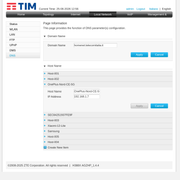
There's a DNS server at your router - if it's caching (you need to check w/ the router, a lot of them use dnsmasq but that doesn't guarantee a cache)
Does this answer the question?
you can completely forego the local resolver/cache.
Not sure if this is synonym of "you can forget fixing this issue" or not.
Last edited by Enrico1989 (2026-06-25 13:31:07)
Offline
#20 2026-06-25 11:24:05
- seth
- Member
- From: Won't reply 2 private help req
- Registered: 2012-09-03
- Posts: 78,499
Re: ERR_NAME_NOT_RESOLVED when trying to navigate while on video call
DDNS is unrelated, delete that image.
The other tabs shows that there's a DNS server config but we knew that - whether it maintains a cache is either in the documentation of you can ballpark that w/
dig @192.168.1.1 someobscuredomainyouvenevervisit.edand see whether subsequent resolutions are significantly faster than the initial one (because it's now in the routers cache)
If so, you don't need a local resolver (provided by connman or resolved) and can just disable that (which is what forego means)
It's however not that important if the single connection has fixed the original problem - has it?
Online
#21 2026-06-25 13:49:59
- Enrico1989
- Member
- Registered: 2018-07-05
- Posts: 425
Re: ERR_NAME_NOT_RESOLVED when trying to navigate while on video call
DDNS is unrelated, delete that image
Done.
dig @192.168.1.1 someobscuredomainyouvenevervisit.ed
Eh, I need to look for some URL wihtout looking first for some URL, ahah.
It's however not that important if the single connection has fixed the original problem - has it?
I don't know if the single connection has fixed the original problem. I'll know it next time I have a call.
But besides, even assuming it fixes that, I think I need to make sure about another detail. Let me explain: sometimes the modem decides it doesn't work. I think it's the ISP doing some works or something. If the smartphone data connection keeps working, though, I would like to be able to switch from the wired connection to the WiFi, using my smartphone as a router. That's the original reason why I had played around with both WiFi and wired connection.
Right now connmanctl services just prints
*AO Wired ethernet_e0d55e2dee05_cableand connmanctl scan wifi errors:
Error /net/connman/technology/wifi: Not supportedSo if the router were going to break, and I were going to use my smartphone to share WiFi, I wouldn't know how to connect to it.
Offline
#22 2026-06-25 17:42:54
- seth
- Member
- From: Won't reply 2 private help req
- Registered: 2012-09-03
- Posts: 78,499
Re: ERR_NAME_NOT_RESOLVED when trying to navigate while on video call
I would like to be able to switch from the wired connection to the WiFi, using my smartphone as a router.
Do you need to share that w/ other hosts? Otherwise consider https://wiki.archlinux.org/title/Tethering
Does the wifi scan also fail if you unplug the rj45 cable?
Online
#23 2026-06-25 21:41:32
- Enrico1989
- Member
- Registered: 2018-07-05
- Posts: 425
Re: ERR_NAME_NOT_RESOLVED when trying to navigate while on video call
Do you need to share that w/ other hosts? Otherwise consider https://wiki.archlinux.org/title/Tethering
If by "tethering" you mean via USB, I would like mostly to be able to connect via WiFi (the link you provided has sections for tethering via USB/WiFi/Bluetooth).
Does the wifi scan also fail if you unplug the rj45 cable?
Yes.
Offline
#24 2026-06-26 05:40:40
- seth
- Member
- From: Won't reply 2 private help req
- Registered: 2012-09-03
- Posts: 78,499
Re: ERR_NAME_NOT_RESOLVED when trying to navigate while on video call
You'll need to open a new thread for that to avoid turning this into a general "how to connman" thread but I could imagine that this is only implemented w/ wpa_supplicant and you can try whether you can still scan w/ iwctl.
How do you get the wifi lease itfp if connman cannot use it?
Online
#25 2026-06-26 07:11:47
- Enrico1989
- Member
- Registered: 2018-07-05
- Posts: 425
Re: ERR_NAME_NOT_RESOLVED when trying to navigate while on video call
to avoid turning this into a general "how to connman" thread
I'm not strongly interested in keeping using connman. I just want to switch freely between WiFi(s) and a wired connection.
How do you get the wifi lease itfp if connman cannot use it?
What do you mean? Now I can't, as I said even scanning for wifi errors out. But it was working earlier. Trying to make things work is precisely how I ended up with
[General]
PreferredTechnologies=ethernet,wifi
SingleConnectedTechnology=false # this is not changed to true
AllowHostnameUpdates=falsebut I could imagine that this is only implemented w/ wpa_supplicant and you can try whether you can still scan w/ iwctl
The wikipage says that I could make connman work with iwd instead of wpa_supplicant, but that's what you don't seem to really suggest.
You'll need to open a new thread for that
For what? The "I want to easily switch between WiFi and wired connection at will"?
Right now there's already 2 threads I've opened to sort out this internet thing, I would avoid opening a 3rd one that would be linked/overlapped to these existing two, if possible.
Offline