You are not logged in.
- Topics: Active | Unanswered
Pages: 1
#1 2026-07-09 09:04:56
- portasynthinca3
- Member
- Registered: 2026-07-09
- Posts: 5
mt7921e strange Wi-Fi behavior
Hello.
I have a Lenovo laptop (IdeaPad Slim 5 15ARP10) with a MediaTek mt7921e Wi-Fi modem. It's displaying very strange Wi-Fi behavior: it works fine for exactly 10 seconds, then acts up for exactly 20 seconds, in a loop. The symptoms for this "acting up" are:
- Packets get lost
- Ping is very high (400+ ms in local network)
- HTTP requests don't come through
- Connecting to Wi-Fi fails
- etc.
Initially I attributed it to congested RF space and my tiny home router. After replacing it with a more powerful one, the problem did improve, but not significantly. The real issue became clear when I took a look at the ping graph on this laptop and another one that never experienced this issue:
Ping over local network to gateway on working computer: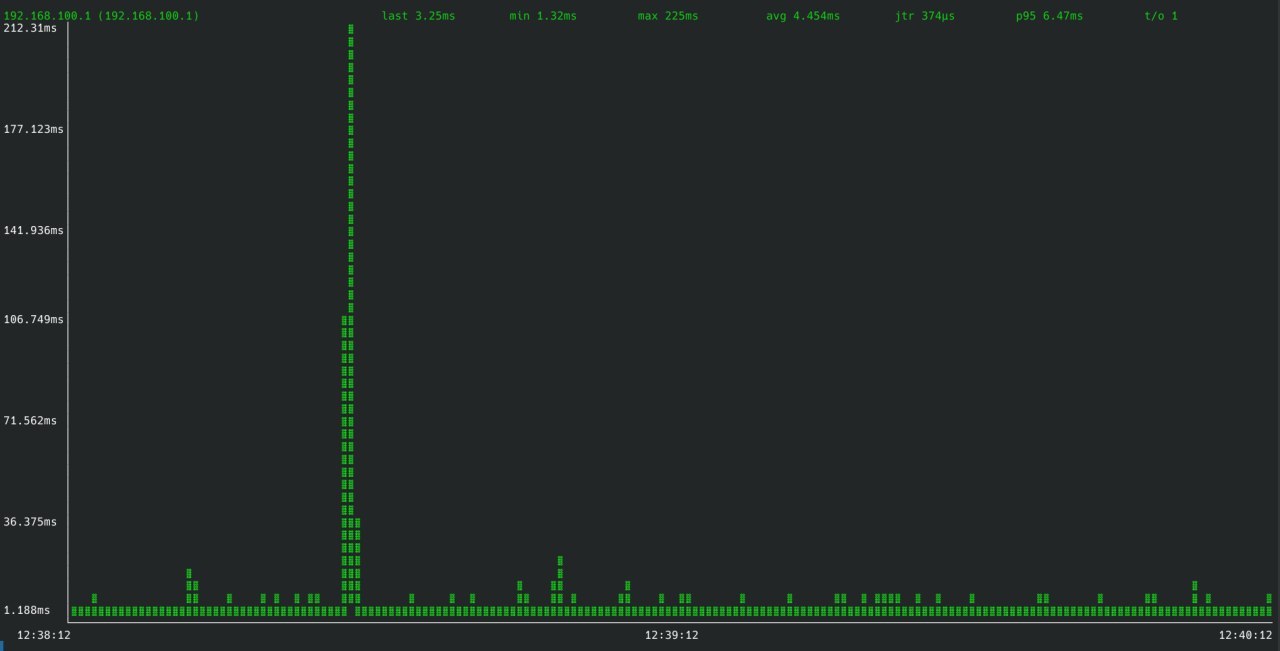
Ping over the same local network on faulty computer, in almost the exact same point in space, at the exact same time:
You can clearly see the periodicity of this event (10s working fine, 20s acting up in an almost sawtooth-like manner).
I've already tried these and none had an effect:
- Disabled power management 1:
sudo iwconfig wlp2s0 power off(was on previously)
- Disabled power management 2: Added
[connection]
wifi.powersave=2
to /etc/NetworkManager/conf.d/wifi-powersave.conf, after which restarted NetworkManager
- Disabled power management 3: Added
mt7921e.disable_aspm=Ykernel parameter (was set to N previously)
- Downgraded Wi-Fi firmware, as suggested in https://bbs.archlinux.org/viewtopic.php?id=308360
- Disconnected and reconnected the battery
Again, none of the above helped.
Related kernel logs:
[    0.045762] Kernel command line: <omitted disk configuration> mt7921e.disable_aspm=Y
[    0.305270] ACPI BIOS Error (bug): Failure creating named object [\_SB.PCI0.GPP6.WLAN._PRR], AE_ALREADY_EXISTS (20251212/dswload2-326)
[    0.305278] ACPI Error: AE_ALREADY_EXISTS, During name lookup/catalog (20251212/psobject-220)
[   16.951627] mt7921e 0000:02:00.0: enabling device (0000 -> 0002)
[   16.951999] mt7921e 0000:02:00.0: disabling ASPM  L1
[   16.957528] mt7921e 0000:02:00.0: ASIC revision: 79610010
[   17.031093] mt7921e 0000:02:00.0: sar cnt = 2
[   17.052949] mt7921e 0000:02:00.0: HW/SW Version: 0x8a108a10, Build Time: 20250625153620a
[   17.309990] mt7921e 0000:02:00.0: WM Firmware Version: ____010000, Build Time: 20250625153703
[   18.132028] mt7921e 0000:02:00.0 wlp2s0: renamed from wlan0
uname -a:
Linux psi3-pc2 7.1.2-arch3-1 #1 SMP PREEMPT_DYNAMIC Fri, 03 Jul 2026 23:25:36 +0000 x86_64 GNU/LinuxLast edited by portasynthinca3 (2026-07-09 10:08:22)
Offline
#2 2026-07-09 15:58:13
- seth
- Member

- From: Won't reply 2 private help req
- Registered: 2012-09-03
- Posts: 78,496
Re: mt7921e strange Wi-Fi behavior
Related kernel logs:
Please post your complete system journal for the boot:
sudo journalctl -b | curl -s -H "Accept: application/json, */*" --upload-file - 'https://paste.c-net.org/'though the symptom sounds like conflicting network services or maybe futile roaming.
Offline
#3 2026-07-09 17:02:18
- portasynthinca3
- Member
- Registered: 2026-07-09
- Posts: 5
Re: mt7921e strange Wi-Fi behavior
Please post your complete system journal for the boot
Offline
#4 2026-07-09 20:37:40
- seth
- Member
- From: Won't reply 2 private help req
- Registered: 2012-09-03
- Posts: 78,496
Re: mt7921e strange Wi-Fi behavior
Jul 09 21:00:06 archlinux kernel: Linux version 7.1.2-arch3-1 (linux@archlinux) (gcc (GCC) 16.1.1 20260625, GNU ld (GNU Binutils) 2.46.1) #1 SMP PREEMPT_DYNAMIC Fri, 03 Jul 2026 23:25:36 +0000
…
Jul 09 21:00:22 psi3-pc2 NetworkManager[916]: <info>  [1783616422.9880] dhcp4 (enp5s0f3u1): state changed new lease, address=10.0.4.21, acd pending
Jul 09 21:00:23 psi3-pc2 NetworkManager[916]: <info>  [1783616423.1249] dhcp4 (enp5s0f3u1): state changed new lease, address=10.0.4.21
Jul 09 21:00:35 psi3-pc2 NetworkManager[916]: <info>  [1783616435.1026] dhcp4 (wlp2s0): state changed new lease, address=192.168.100.7, acd pending
Jul 09 21:00:35 psi3-pc2 NetworkManager[916]: <info>  [1783616435.2378] dhcp4 (wlp2s0): state changed new lease, address=192.168.100.7
The journal is only 50s and you only have a lease for 30s of them(wifi for 20), but after 10s you're establishing a wifi lease into a different segment than the (remaining) wired lease.
=> what is that network setup, what does the routing table look like, where do you ping (enp5s0f3u1 or wlp2s0)?
ip a; ip rThere's otherwise no indication for problems but the journal is maybe too short and the hybrid connection certainly has problem-potential.
Offline
#5 2026-07-10 18:37:02
- portasynthinca3
- Member
- Registered: 2026-07-09
- Posts: 5
Re: mt7921e strange Wi-Fi behavior
The enp5s0f3u1 interface is an Ethernet-over-USB connection for local web UI interface for an embedded device. I disconnected it to avoid confusion. I also disabled Hamachi to remove another irrelevant interface (ham0)
This log is also quite short, but the problem manifests itself in this short timespan: https://paste.c-net.org/DesertedRoaming
~> ip a
1: lo: <LOOPBACK,UP,LOWER_UP> mtu 65536 qdisc noqueue state UNKNOWN group default qlen 1000
    link/loopback 00:00:00:00:00:00 brd 00:00:00:00:00:00
    inet 127.0.0.1/8 scope host lo
       valid_lft forever preferred_lft forever
    inet6 ::1/128 scope host noprefixroute
       valid_lft forever preferred_lft forever
2: wlp2s0: <BROADCAST,MULTICAST,UP,LOWER_UP> mtu 1500 qdisc noqueue state UP group default qlen 1000
    link/ether bc:09:b9:f3:e8:89 brd ff:ff:ff:ff:ff:ff
    altname wlxbc09b9f3e889
    inet 192.168.100.7/24 brd 192.168.100.255 scope global dynamic noprefixroute wlp2s0
       valid_lft 86182sec preferred_lft 86182sec
    inet6 fe80::50d7:96f1:1089:ae42/64 scope link noprefixroute
       valid_lft forever preferred_lft forever
~> ip r
default via 192.168.100.1 dev wlp2s0 proto dhcp src 192.168.100.7 metric 600
192.168.100.0/24 dev wlp2s0 proto kernel scope link src 192.168.100.7 metric 600
Offline
#6 2026-07-10 19:05:02
- seth
- Member
- From: Won't reply 2 private help req
- Registered: 2012-09-03
- Posts: 78,496
Re: mt7921e strange Wi-Fi behavior
A longer journal would help to separate pattern from noise but
Jul 10 22:31:32 psi3-pc2 NetworkManager[883]: <info>  [1783708292.2469] dhcp6 (wlp2s0): state changed new lease
Jul 10 22:31:40 psi3-pc2 systemd[1]: NetworkManager-dispatcher.service: Deactivated successfully.
Jul 10 22:31:43 psi3-pc2 NetworkManager[883]: <info>  [1783708303.7554] audit: op="statistics" interface="wlp2s0" ifindex=2 args="2000" pid=2496 uid=1000 result="success"
Jul 10 22:31:45 psi3-pc2 wpa_supplicant[1149]: wlp2s0: CTRL-EVENT-REGDOM-CHANGE init=BEACON_HINT type=UNKNOWN
Jul 10 22:31:45 psi3-pc2 wpa_supplicant[1149]: wlp2s0: CTRL-EVENT-REGDOM-BEACON-HINT before freq=5240 max_tx_power=2000 no_ir=1
Jul 10 22:31:45 psi3-pc2 wpa_supplicant[1149]: wlp2s0: CTRL-EVENT-REGDOM-BEACON-HINT after freq=5240 max_tx_power=2000
Jul 10 22:31:45 psi3-pc2 wpa_supplicant[1149]: wlp2s0: CTRL-EVENT-REGDOM-CHANGE init=BEACON_HINT type=UNKNOWN
Jul 10 22:31:45 psi3-pc2 wpa_supplicant[1149]: wlp2s0: CTRL-EVENT-REGDOM-BEACON-HINT before freq=5240 max_tx_power=2000 no_ir=1
Jul 10 22:31:45 psi3-pc2 wpa_supplicant[1149]: wlp2s0: CTRL-EVENT-REGDOM-BEACON-HINT after freq=5240 max_tx_power=2000
Jul 10 22:32:07 psi3-pc2 NetworkManager[883]: <info>  [1783708327.2179] audit: op="statistics" interface="wlp2s0" ifindex=2 args="0" pid=2496 uid=1000 result="success"
You get a lease, ~10s later there's a regdom hint (after you check the connection stats) and 20s lateryou check the stats again.
Jul 10 22:31:16 psi3-pc2 kernel: faux_driver regulatory: Direct firmware load for regulatory.db failed with error -2
Jul 10 22:31:16 psi3-pc2 kernel: cfg80211: failed to load regulatory.dbOffline
#7 2026-07-10 19:24:08
- portasynthinca3
- Member
- Registered: 2026-07-09
- Posts: 5
Re: mt7921e strange Wi-Fi behavior
Thanks for getting back to this so quick.
A longer journal would help to separate pattern from noise but
Sure: https://paste.c-net.org/RoutineDiamonds. The problem has been manifesting itself in cycles through the whole duration of this log.
I also set the region as per the article that you linked.
Offline
#8 2026-07-10 20:07:50
- seth
- Member
- From: Won't reply 2 private help req
- Registered: 2012-09-03
- Posts: 78,496
Re: mt7921e strange Wi-Fi behavior
"rien" - not even seemingly unrelated messages.
Can we rule out sideload/interference?
Do you have the same behavior on a 5GHz connection (a lot of stuff incl. bluetooth and dect are yelling around on 2.4GHz)?
Do you have the same behavior on the multi-user.target (2nd link below, no kde, kdeconnectd, akonadi, …)?
Offline
#9 2026-07-18 12:29:05
- portasynthinca3
- Member
- Registered: 2026-07-09
- Posts: 5
Re: mt7921e strange Wi-Fi behavior
Through random poking around I found out that if I disable Bluetooth, Wi-Fi works normally. The moment I enable it, this cyclic behavior starts again. The moment I disable it, it returns to normal.
This appears to be an issue with wireless coexistence in this specific wireless card, as no other devices on my network exhibit this behavior.
Unfortunately, I don't have a 5 GHz AP, so I can't test whether that behavior also persists with Bluetooth turned on while connected to 5GHz Wi-Fi. If I do end up being able to test this, I'll post to this thread.
Offline
Pages: 1