You are not logged in.
- Topics: Active | Unanswered
#1 2008-10-14 13:35:36
- daf666
- Member

- Registered: 2007-04-08
- Posts: 470
- Website
Archlinux.org Themes (Stylish FF Plugin)
Hi All;
For those of you who cant wait for this to be implemented: http://bugs.archlinux.org/task/10826 (please vote),
I have created a simple style to use with Stylish Firefox extension: https://addons.mozilla.org/en-US/firefox/addon/2108
The result is not bad..(for my taste at least):

How to use:
1. Install the Stylish FF extension (link above)
2. Install the Style from here: http://userstyles.org/styles/11276
Now you know where uv been 
Last edited by daf666 (2008-10-17 11:15:01)
Offline
#2 2008-10-17 11:18:04
- daf666
- Member
- Registered: 2007-04-08
- Posts: 470
- Website
Re: Archlinux.org Themes (Stylish FF Plugin)
New about:blank - ArchLinux Dark Grey theme (Based on the arch slim theme...):

Install: http://userstyles.org/styles/11356
Offline
#3 2008-10-17 11:35:40
- robmaloy
- Member
- From: Germany
- Registered: 2008-05-14
- Posts: 263
Re: Archlinux.org Themes (Stylish FF Plugin)
VERY cool 
☃ Snowman ☃
Offline
#4 2008-10-17 16:12:38
- mrunion
- Member

- From: Jonesborough, TN
- Registered: 2007-01-26
- Posts: 1,938
- Website
Re: Archlinux.org Themes (Stylish FF Plugin)
Awesome!
Matt
"It is very difficult to educate the educated."
Offline
#5 2008-10-17 16:18:31
- Army
- Member
- Registered: 2007-12-07
- Posts: 1,784
Re: Archlinux.org Themes (Stylish FF Plugin)
Oh man, that's pretty cool, I love it!!!
Offline
#6 2008-10-18 16:07:50
- bluewind
- Administrator

- From: Austria
- Registered: 2008-07-13
- Posts: 172
- Website
Re: Archlinux.org Themes (Stylish FF Plugin)
To make the navigation white again add the following to the style:
#main_nav ul li a:visited {
        color: #ffffff !important;
}
#brdmenu ul li a:visited {
        color: #ffffff !important;
}
(right click on the icon bottom right. edit the archlinux style and add the code)
Offline
#7 2008-10-18 17:40:16
- daf666
- Member
- Registered: 2007-04-08
- Posts: 470
- Website
Re: Archlinux.org Themes (Stylish FF Plugin)
To make the navigation white again add the following to the style
Cool! now its perfect, I will modify and add to the original on userstyles.
Offline
#8 2008-10-18 17:51:29
- bluewind
- Administrator
- From: Austria
- Registered: 2008-07-13
- Posts: 172
- Website
Re: Archlinux.org Themes (Stylish FF Plugin)
2 more fixes for the wiki:
a.new, #p-personal a.new {
        color:#BA0000 !important;
}
.pBody a:visited {
        color:#35526F !important;
}
Offline
#9 2008-10-18 18:59:44
- daf666
- Member
- Registered: 2007-04-08
- Posts: 470
- Website
Re: Archlinux.org Themes (Stylish FF Plugin)
2 more fixes for the wiki
Added
Offline
#10 2008-10-18 21:51:14
- whargoul
- Member
- From: Odense, Denmark
- Registered: 2005-04-04
- Posts: 546
Re: Archlinux.org Themes (Stylish FF Plugin)
Uhm, that blank page thing... I would LOVE having it as a standard plugin for Firefox. That would be so sweet.
Arch - It's something refreshing
Offline

#12 2008-10-19 13:41:06
- daf666
- Member
- Registered: 2007-04-08
- Posts: 470
- Website
Re: Archlinux.org Themes (Stylish FF Plugin)

Offline
#13 2008-10-19 14:48:20
- haxit
- Member

- From: /home/haxit
- Registered: 2008-03-04
- Posts: 1,247
- Website
Re: Archlinux.org Themes (Stylish FF Plugin)
Ye, I installed both of those, not the archtoo tho 
Archi686 User | Old Screenshots | Old .Configs
Vi veri universum vivus vici.
Offline
#14 2008-10-19 18:31:19
- Stythys
- Member

- From: SF Bay Area
- Registered: 2008-05-18
- Posts: 878
- Website
Re: Archlinux.org Themes (Stylish FF Plugin)
website is down 
[home page] -- [code / configs]
"Once you go Arch, you must remain there for life or else Allan will track you down and break you."
-- Bregol
Offline
#15 2008-10-20 08:48:07
- daf666
- Member
- Registered: 2007-04-08
- Posts: 470
- Website
Re: Archlinux.org Themes (Stylish FF Plugin)
website is down
rats... but I guess its back up now..
Offline
#16 2008-12-24 21:45:35
- Hrwa
- Member

- From: Croatia, Zagreb
- Registered: 2008-10-09
- Posts: 27
Re: Archlinux.org Themes (Stylish FF Plugin)
I've created dark grey themes for home page and forum.
Home: http://userstyles.org/styles/13262

Forum: http://userstyles.org/styles/13263
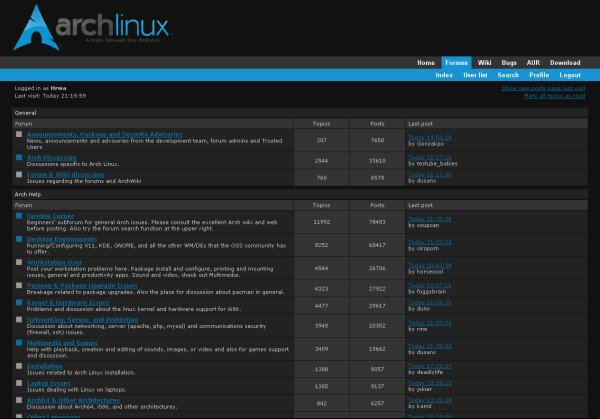
Please post suggestions or bugs you find. Especially if someone knows how to change background color in post reply text area.
Merry Christmas
Offline
#17 2008-12-25 02:33:15
- hk2717
- Member

- From: China
- Registered: 2007-09-13
- Posts: 217
Re: Archlinux.org Themes (Stylish FF Plugin)
@Hrwa: Thanks so much!
Offline
#18 2008-12-25 02:44:57
- interskh
- Member

- From: pittsburgh
- Registered: 2008-10-23
- Posts: 45
Re: Archlinux.org Themes (Stylish FF Plugin)
wow~ thats pretty!
love'it
I've created dark grey themes for home page and forum.
Home: http://userstyles.org/styles/13262
http://i264.photobucket.com/albums/ii19 … humb-1.png
Forum: http://userstyles.org/styles/13263
http://i264.photobucket.com/albums/ii19 … -thumb.png
Please post suggestions or bugs you find. Especially if someone knows how to change background color in post reply text area.
Merry Christmas
o.O
Offline
#19 2008-12-26 09:07:45
- Mr Green
- Forum Fellow

- From: U.K.
- Registered: 2003-12-21
- Posts: 5,932
- Website
Re: Archlinux.org Themes (Stylish FF Plugin)
Works for home page, aur, wiki but not forum ;-(
Mr Green
Offline
#20 2008-12-26 12:16:38
- seenxu
- Member
- Registered: 2008-08-25
- Posts: 111
Re: Archlinux.org Themes (Stylish FF Plugin)
the dark theme looks great!
Offline
#21 2008-12-26 17:07:37
- monstermudder78
- Member
- Registered: 2008-05-18
- Posts: 120
Re: Archlinux.org Themes (Stylish FF Plugin)
Hi All;
For those of you who cant wait for this to be implemented: http://bugs.archlinux.org/task/10826 (please vote),
I have created a simple style to use with Stylish Firefox extension: https://addons.mozilla.org/en-US/firefox/addon/2108
The result is not bad..(for my taste at least):How to use:
1. Install the Stylish FF extension (link above)
2. Install the Style from here: http://userstyles.org/styles/11276Now you know where uv been
Would it be possible to leave the links the same color but have the not-visited links be bold, and the visited links not bold? Before I take what you have done and hack it to pieces trying to figure it out I thought I might just ask 
Offline
#22 2008-12-26 17:16:22
- bluewind
- Administrator
- From: Austria
- Registered: 2008-07-13
- Posts: 172
- Website
Re: Archlinux.org Themes (Stylish FF Plugin)
@namespace url(http://www.w3.org/1999/xhtml);

@-moz-document domain("archlinux.org") {

a:visited {
  font-weight: normal !important;
}
a {
  font-weight: bold !important;
}

}
Should work.
That's just CSS btw 
Last edited by bluewind (2008-12-26 17:17:58)
Offline
#23 2008-12-27 18:16:40
- Arm-the-Homeless
- Member

- Registered: 2008-12-22
- Posts: 273
Re: Archlinux.org Themes (Stylish FF Plugin)
When I start up Firefox with the Arch about:blank Stylish thing, I need to re-enable it through the Stylish toolbar to get the logo to show, otherwise it is just black.
Offline
#24 2009-01-04 00:46:52
- FrozenFox
- Member

- From: College Station, TX
- Registered: 2008-03-23
- Posts: 422
- Website
Re: Archlinux.org Themes (Stylish FF Plugin)
To hrwa's theme, I had the issue that the homepage would only show up dark sometimes. I eventually figured out that it's because the theme is set to only work on the domain www.archlinux.org, which doesn't apply to the url http://archlinux.org because of the lack of www. If I added the domain archlinux.org to the homepage theme, it screwed the forums theme up. After looking around at some things and trying out, I seem to have found the solution.
To "arch linux home - dark grey" for stylish, changing the lines at the top to add the url-prefix line accordingly seems to make the right behavior on both home and the forums while using both stylish themes provided:
@-moz-document domain("www.archlinux.org"),
domain("wiki.archlinux.org"),
url-prefix("http://archlinux.org"),
domain("planet.archlinux.org"),
domain("bugs.archlinux.org"),
domain("repos.archlinux.org"),
domain("aur.archlinux.org"),
domain("projects.archlinux.org"){
Last edited by FrozenFox (2009-01-04 00:48:29)
Offline
#25 2009-01-05 20:37:46
- Hrwa
- Member
- From: Croatia, Zagreb
- Registered: 2008-10-09
- Posts: 27
Re: Archlinux.org Themes (Stylish FF Plugin)
@FrozenFox: Thanks for that tip, I've updated home theme on userstyles.org
Offline