You are not logged in.
- Topics: Active | Unanswered
#1 2011-07-24 14:32:29
- statc
- Member
- Registered: 2011-04-14
- Posts: 29
Safely remove USB 3G modem?
Hi. How do I safely remove an USB 3G modem? I use nautilus, but it does not show the modem in Side Panel > Devices. Or, is it safe to remove the modem "unsafely"? In case there are some wireless modem users here, how do you solve this problem?
Offline
#2 2011-07-24 15:11:01
- tinhtruong
- Member
- From: Australia
- Registered: 2008-12-18
- Posts: 117
Re: Safely remove USB 3G modem?
I just pull it out and plug it in without *asking* the OS to allow and I don't have any problem so far.
Offline
#3 2011-07-24 16:43:48
- Awebb
- Member

- Registered: 2010-05-06
- Posts: 6,688
Re: Safely remove USB 3G modem?
You could check the modules with lsmod and unload it before you unplug it. Doesn't make much sense, but it is, what you're looking for.
Offline
#4 2011-07-27 07:23:38
- statc
- Member
- Registered: 2011-04-14
- Posts: 29
Re: Safely remove USB 3G modem?
Hi. Sorry for the delay, I did not get a notification about your replies. Output of lsmod looks scary to me, so I'll stick to the "unsafe" way (will just pull the modem out). Thanks for your answers.
Offline
#5 2012-04-30 14:20:53
- praka123
- Member

- From: Kerala,India
- Registered: 2008-03-04
- Posts: 188
- Website
Re: Safely remove USB 3G modem?
I have a Huawei K4505 3G modem which works fine in Gnu/Linux. the issue is, I cannot safely remove usb modem as it fails with a error message which reads as below: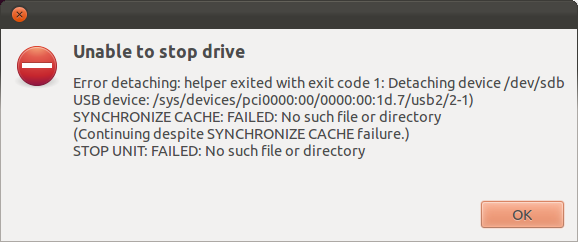
commands like pmount/pumount/umount/eject lazy unmount etc all failed. when I tried udisks --unmount /dev/sdb never worked showing same error as the pic I attached. Yet to try sdparm/hdparm as I don't know how to use these commands to unmount/unbind this device.
So, Safely remove a USB device needs the device to be "suspended" before removing. In Gnome, I face this issue with Amazon Kindle Touch(usb connection) and this USB modem where manually unbinding is what I do as of now.
I open "computer:" page on Nautilus file Manager and it shows Huawei device(K4505) displayed.
So, I find the usb port number from dmesg and issue below commands to remove the device as of now, because "Safely remove" fails.
I did type these commands after finding usb port used is "2-1":
as root :
sync&&sync&&sync echo "auto" > "/sys/bus/usb/devices/usb2/2-1/power/level"echo "2-1:1.1" > "/sys/bus/usb/devices/2-1\:1.1/driver/unbind"^^ I hope these 2 steps are enough? but, I try to remove the device attributes also before pulling usb modem out of the port.
echo "1" > "/sys/bus/usb/devices/usb2/2-1/remove" The End result is the "Huawei" icon disappears from Nautilus file manger "computer:" page. MY source for above commands are from Debian forum.
http://forums.debian.net/viewtopic.php?f=5&t=52627
Can someone guide Me whether I am doing is the correct way? Is there a way I can resolve this issue rather than manually unbinding/unmounting Modem/Kindle reader etc.
Some more info about this modem. I am using 3G modem for the first time and this modem when connected to Windows 7 mount a flash drive and pops out "mobile manager" software installer. In Gnu/Linux, it is detected as a modem only . is there a solution to see the flash drive and modem working together as in Windows?
Thanks in Advance,
DC
K4505 technical specifications:
http://pastebin.ca/2142207
Last edited by praka123 (2012-04-30 14:26:21)
Offline
#6 2012-04-30 15:45:13
- praka123
- Member
- From: Kerala,India
- Registered: 2008-03-04
- Posts: 188
- Website
Re: Safely remove USB 3G modem?
Here is the output when I inserted USB modem:
http://fpaste.org/QmyO/
to "safely remove" , I invoked the commands in My first post and here is the reaction:
Apr 30 21:03:11 lindesk kernel: [  842.517200] WARNING! power/level is deprecated; use power/control instead
Apr 30 21:05:18 lindesk NetworkManager[692]:    SCPlugin-Ifupdown: devices removed (path: /sys/devices/pci0000:00/0000:00:1d.7/usb1/1-4/1-4:1.1/net/wwan0, iface: wwan0)
Apr 30 21:05:18 lindesk kernel: [  969.297826] cdc_ether 1-4:1.1: wwan0: unregister 'cdc_ether' usb-0000:00:1d.7-4, Mobile Broadband Network Device
Apr 30 21:05:50 lindesk modem-manager[660]: <info>  (ttyUSB0) closing serial port...
Apr 30 21:05:50 lindesk modem-manager[660]: <info>  (ttyUSB0) serial port closed
Apr 30 21:05:50 lindesk kernel: [ 1001.878748] option: option_instat_callback: error -108
Apr 30 21:05:50 lindesk modem-manager[660]: <info>  (tty/ttyUSB0): released by modem /sys/devices/pci0000:00/0000:00:1d.7/usb1/1-4
Apr 30 21:05:50 lindesk kernel: [ 1001.880143] option1 ttyUSB0: GSM modem (1-port) converter now disconnected from ttyUSB0
Apr 30 21:05:50 lindesk kernel: [ 1001.880178] option 1-4:1.0: device disconnected
Apr 30 21:05:50 lindesk kernel: [ 1001.882779] option1 ttyUSB1: GSM modem (1-port) converter now disconnected from ttyUSB1
Apr 30 21:05:50 lindesk kernel: [ 1001.882820] option 1-4:1.3: device disconnected
Apr 30 21:05:50 lindesk kernel: [ 1001.884306] option1 ttyUSB2: GSM modem (1-port) converter now disconnected from ttyUSB2
Apr 30 21:05:50 lindesk kernel: [ 1001.884324] option 1-4:1.4: device disconnected
Apr 30 21:05:50 lindesk modem-manager[660]: <info>  Modem /org/freedesktop/ModemManager/Modems/0: state changed (registered -> disabled)
Apr 30 21:05:50 lindesk NetworkManager[692]: <info> (ttyUSB0): now unmanaged
Apr 30 21:05:50 lindesk NetworkManager[692]: <info> (ttyUSB0): device state change: disconnected -> unmanaged (reason 'removed') [30 10 36]
Apr 30 21:05:50 lindesk NetworkManager[692]: <info> (ttyUSB0): cleaning up...
Apr 30 21:05:50 lindesk NetworkManager[692]: <info> (ttyUSB0): taking down device.
Apr 30 21:05:50 lindesk modem-manager[660]: <info>  (ttyUSB2) closing serial port...
Apr 30 21:05:50 lindesk modem-manager[660]: <info>  (ttyUSB2) serial port closed
Apr 30 21:05:50 lindesk kernel: [ 1001.892265] usb 1-4: USB disconnect, device number 5
Offline
#7 2012-04-30 16:55:21
- Awebb
- Member
- Registered: 2010-05-06
- Posts: 6,688
Re: Safely remove USB 3G modem?
Why do you want that flashdrive to do anything at all? It's purpose is to feed a Windows machine with drivers.
Offline
#8 2012-05-02 08:43:48
- praka123
- Member
- From: Kerala,India
- Registered: 2008-03-04
- Posts: 188
- Website
Re: Safely remove USB 3G modem?
as of now, I want to "safely remove" this 3g modem without the "sync error" message. seems like, there is no fix with udisks so as to remove the device once it is suspended?
Offline