You are not logged in.
- Topics: Active | Unanswered
#1 2012-01-23 17:30:07
- sagottarius
- Member
- Registered: 2012-01-23
- Posts: 6
[solved then broken] Canon Pixma MP490 (CNIJFILTER v3.2) Arch x86_64
Having tried to compile the source code from Canon without success on x86_64...
So, having tried to modify various aur packages for lib32 with partial success: no printer tools from Canon working.
I have finally used the binary packages from Canon.
Had no success with the deb files but succeeded with the rpms.
On x86_64, here is how I've done:
- install lib32-popt, lib32-gtk2, lib32-libxml2, lib32-libpng12 and enventually lib32-oxygen-gtk2
- download the two RPM 32 bits v3.2 packages (for mp250, mp270, mp490, mp550, mp560, ip4700, mp640) on Canon Australia website. For MP490.
- extract them somewhere in your home
- rename /usr/lib folder to /usr/lib32
- now you should have:
/usr/local/share/printuimpXXX/ where XXX is your printer mp model
/usr/local/share/cngpijmonmpXXX/
/usr/local/share/cngpijmonmpXXX/pixmaps//usr/local/share/locale/ <- (languages definition files)
/usr/local/bin/printuimpXXX
/usr/local/bin/cngpijmonmpXXX
/usr/local/bin/cnijnetprn
/usr/local/bin/cifmpXXX
/usr/local/bin/cnijnpr
/usr/local/bin/cngpij
/usr/local/bin/lgmonmpXXX/usr/lib32/libcnbpessYYY.so* YYY corresponding to your model
/usr/lib32/cups/
/usr/lib32/cups/backend/
/usr/lib32/cups/backend/cnijusb
/usr/lib32/cups/backend/cnijnet/usr/lib32/cups/filter/
/usr/lib32/cups/filter/pstocanonij/usr/lib32/libcnbpoYYY.so*
/usr/lib32/libcnbpcnclbjcmdYYY.so*
/usr/lib32/libcnbpcnclapiYYY.so*
/usr/lib32/libcnbpcmcmYYY.so*
/usr/lib32/libcnbpcncluiYYY.so*/usr/lib32/bjlib/
/usr/lib32/bjlib/cifmpXXX.conf
/usr/lib32/bjlib/cnnet.ini
/usr/lib32/bjlib/cnb_YYY0.tbl
/usr/lib32/bjlib/cnbpnameYYY.tbl/usr/lib32/libcnnet.so.1.1.0
usr/share/cups/model/canonmpXXX.ppd
/usr/share/doc/*
chown root:root the files with 755 perms and copy everything to /
Then in your /usr/lib/cups/backend/ symlink:
/usr/lib/cups/backend/cnijusb -> /usr/lib32/cups/backend/cnijusb
/usr/lib/cups/backend/cnijnet -> /usr/lib32/cups/backend/cnijnet
Same thing symlink:
in /usr/lib/cups/filter/ :
/usr/lib/cups/filter/pstocanonij -> /usr/lib32/cups/filter/pstocanonij
in /usr/lib/bjlib/ :
/usr/lib/bjlib/cifmpXXX.conf -> /usr/lib32/bjlib/cifmpXXX.conf
/usr/lib/bjlib/cnnet.ini -> /usr/lib32/bjlib/cnnet.ini
/usr/lib/bjlib/cnb_YYY0.tbl -> /usr/lib32/bjlib/cnb_YYY0.tbl
/usr/lib/bjlib/cnbpnameYYY.tbl -> /usr/lib32/bjlib/cnbpnameYYY.tbl
And now after a /sbin/ldconfig everything works. here is a screenshot.
You can use the Canon printer tools with: /usr/local/bin/cngpij -P Canon_MPXXX_series <- must be the name your gave to your printer in Cups.
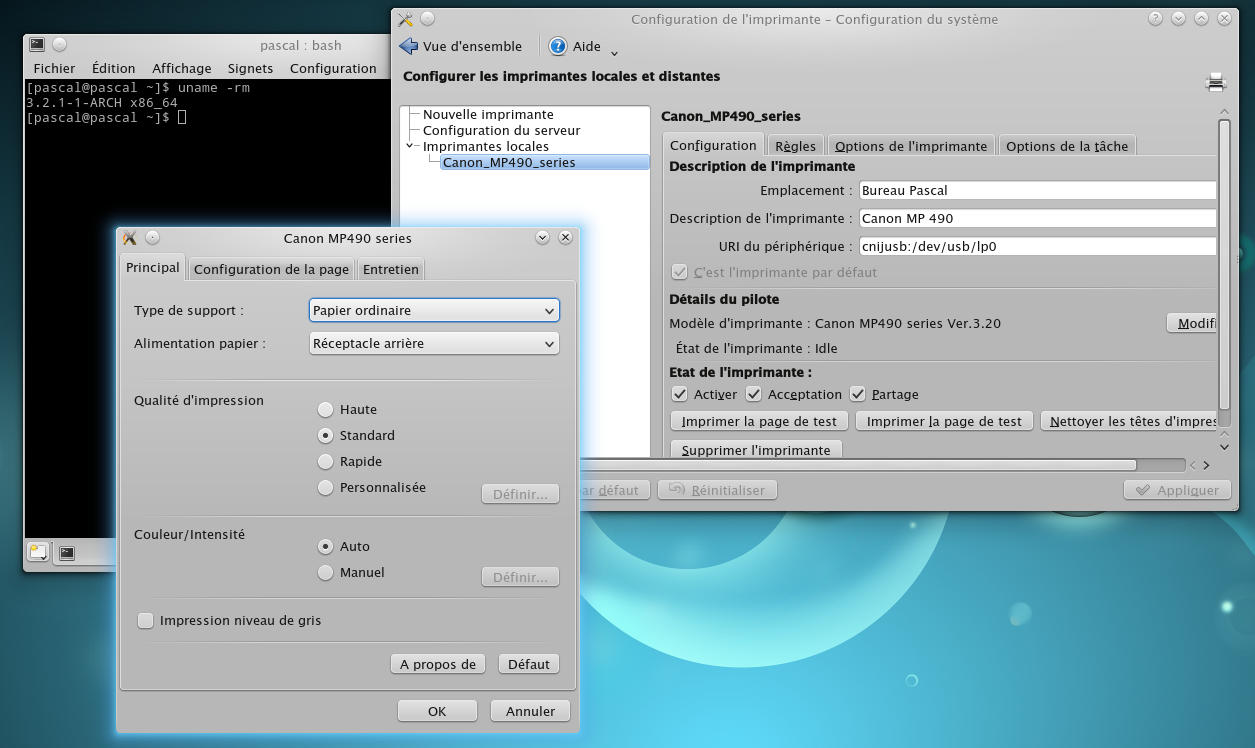
You can also change your ppd in some cases, for example on my MP490:
*OpenUI *Resolution/Output Resolution: PickOne
*DefaultResolution: 2400dpi
*Resolution 600dpi/600 dpi: "<</HWResolution[600 600]>>setpagedevice" <- The default resolution
*Resolution 1200dpi/1200 dpi: "<</HWResolution[1200 1200]>>setpagedevice"
*Resolution 2400dpi/2400 dpi: "<</HWResolution[2400 2400]>>setpagedevice"
*Resolution 2400dpi/4800 DPI: "<</HWResolution[2400 4800]>>setpagedevice"
*CloseUI: *Resolution*OpenUI *CNQuality/Quality: PickOne
*DefaultCNQuality: 3
*CNQuality 2/High: "2"
*CNQuality 3/Normal: "3"
*CNQuality 4/Standard: "4"
*CNQuality 5/Economy: "5"
*CloseUI: *CNQuality*OpenUI *CNGrayscale/Grayscale: PickOne <- For Grayscale printing
*DefaultCNGrayscale: true
*CNGrayscale false/Off: "false"
*CNGrayscale true/On: "true"
*CloseUI: *CNGrayscale
After adding my users to lp group with : gpasswd -a myuser lp
I've also added /lib/udev/rules.d/99-local.rules with: ATTRS{idVendor}=="04a9", ATTRS{idProduct}=="173c", MODE:="0666", GROUP:="lp"
I am new to Archlinux, so I will see if I have time to make a package.
Edit: needs now to ln -s /usr/lib32/libtiff.so.5 /usr/lib32/libtiff.so.3
Last edited by sagottarius (2012-07-18 11:47:29)
Offline
#2 2012-02-09 22:11:38
- SanskritFritz
- Member

- From: Budapest, Hungary
- Registered: 2009-01-08
- Posts: 1,954
- Website
Re: [solved then broken] Canon Pixma MP490 (CNIJFILTER v3.2) Arch x86_64
Thank you, that was great help!
zʇıɹɟʇıɹʞsuɐs AUR || Cycling in Budapest with a helmet camera || Revised log levels proposal: "FYI" "WTF" and "OMG" (John Barnette)
Offline
#3 2012-02-10 13:51:26
- SanskritFritz
- Member
- From: Budapest, Hungary
- Registered: 2009-01-08
- Posts: 1,954
- Website
Re: [solved then broken] Canon Pixma MP490 (CNIJFILTER v3.2) Arch x86_64
I am new to Archlinux, so I will see if I have time to make a package.
You may take the lib32-cnijfilter-mp560 package as reference.
zʇıɹɟʇıɹʞsuɐs AUR || Cycling in Budapest with a helmet camera || Revised log levels proposal: "FYI" "WTF" and "OMG" (John Barnette)
Offline
#4 2012-05-08 16:31:30
- valroy
- Member
- Registered: 2012-05-08
- Posts: 1
Re: [solved then broken] Canon Pixma MP490 (CNIJFILTER v3.2) Arch x86_64
Hi !
I'm trying your tuto but when :
You can use the Canon printer tools with: /usr/local/bin/cngpij -P Canon_MPXXX_series <- must be the name your gave to your printer in Cups.
[root@falcon final]# /usr/local/bin/cngpij -P Canon_MP550_series
ERROR: Illegal printer name.
Valroy
__________
Arch kernel : 3.3.4-2 64bits
OpenBox
Offline
#5 2012-05-23 12:53:49
- sagottarius
- Member
- Registered: 2012-01-23
- Posts: 6
Re: [solved then broken] Canon Pixma MP490 (CNIJFILTER v3.2) Arch x86_64
[root@falcon final]# /usr/local/bin/cngpij -P Canon_MP550_series
ERROR: Illegal printer name.
Is Canon_MP550_series your exact cups name for the printer ?
Offline
#6 2012-06-14 07:34:19
- sagottarius
- Member
- Registered: 2012-01-23
- Posts: 6
Re: [solved then broken] Canon Pixma MP490 (CNIJFILTER v3.2) Arch x86_64
Archlinux x86_64 june 2012
Because I could'nt any more use the xsane application with my MP490 (log said: usbfs: interface 1 claimed by usblp while 'scanimage' sets config #1 and because I had to chmod a+w /dev/bus/usb/00X/00Y for the scanner to work), I have finally blacklisted now the usblp in:
/etc/modprobe.d/rcconf_settings_blacklist.conf by inserting : blacklist usblp
Also in the cups web interface (http://localhost:631), I have changed the printer from cnijusb:/dev/usb/lp0 to proposed : usb://Canon/MP490%20series?serial=103BD5&interface=1
Last edited by sagottarius (2012-06-14 07:35:01)
Offline
#7 2012-06-15 21:48:34
- ratcheer
- Member

- Registered: 2011-10-09
- Posts: 924
Re: [solved then broken] Canon Pixma MP490 (CNIJFILTER v3.2) Arch x86_64
Unfortunately, even Canon's Australia site does not seem to have Linux drivers for my MP620. 
Tim
Offline
#8 2012-06-16 04:38:01
- David Batson
- Member
- Registered: 2011-10-13
- Posts: 640
Re: [solved then broken] Canon Pixma MP490 (CNIJFILTER v3.2) Arch x86_64
It seems the following user got the MP630 driver to work with the MP620.
http://mp610.blogspot.com/2007/11/setup … 7103500531
You might read through the blog for options.
http://mp610.blogspot.com/2007/11/setup … mp610.html
Offline
#9 2012-06-16 12:23:42
- ratcheer
- Member
- Registered: 2011-10-09
- Posts: 924
Re: [solved then broken] Canon Pixma MP490 (CNIJFILTER v3.2) Arch x86_64
Thanks, David. I had not ssen that site before.
Tim
Offline
#10 2012-06-18 00:03:59
- ratcheer
- Member
- Registered: 2011-10-09
- Posts: 924
Re: [solved then broken] Canon Pixma MP490 (CNIJFILTER v3.2) Arch x86_64
I am finally able to print to my Canon MP620 from Arch! I have been trying to get this to work for almost 9 months.
Here are the two things that I believe gave the solution: 1) Found cups-bjnp on Sourceforge.net, compiled and installed it. There is a package for it in the AUR, but it kept giving me md5sum errors when I ran makepkg -s. 2) Found and installed package gutenprint, which includes open source drivers for many printers, including mine.
YAY!
Tim
Offline
#11 2012-07-18 11:53:27
- sagottarius
- Member
- Registered: 2012-01-23
- Posts: 6
Re: [solved then broken] Canon Pixma MP490 (CNIJFILTER v3.2) Arch x86_64
Since yesterday, the CNIJFILTER v3.2 binaries do not work anymore.
And so, the original drivers from Canon are useless.
I guess the binaries were compiled with an old glibc version that is not supported anymore under Arch.
Do you observe same behavior ?
# ldd /usr/lib32/cups/filter/pstocanonij
n'est pas un exécutable dynamique
My next printer will be an HP.
EDIT: found the solution, my /lib/ folder had some old firmware folder and I was unable to install latest glibc without deleting it.
My Canon printer is back.
Just a simple check:
# ldd /usr/local/bin/cifmp490
        linux-gate.so.1 (0xf7724000)
        libcnbpcmcm358.so => /usr/lib32/libcnbpcmcm358.so (0xf76d5000)
        libcnbpess358.so => /usr/lib32/libcnbpess358.so (0xf7656000)
        libm.so.6 => /usr/lib32/libm.so.6 (0xf7617000)
        libdl.so.2 => /usr/lib32/libdl.so.2 (0xf7612000)
        libtiff.so.3 => /usr/lib32/libtiff.so.3 (0xf759f000)
        libpng12.so.0 => /usr/lib32/libpng12.so.0 (0xf7573000)
        libcnbpcnclapi358.so => /usr/lib32/libcnbpcnclapi358.so (0xf756b000)
        libcnbpcnclbjcmd358.so => /usr/lib32/libcnbpcnclbjcmd358.so (0xf7567000)
        libcnbpcnclui358.so => /usr/lib32/libcnbpcnclui358.so (0xf7561000)
        libpopt.so.0 => /usr/lib32/libpopt.so.0 (0xf7553000)
        libc.so.6 => /usr/lib32/libc.so.6 (0xf73ad000)
        libpthread.so.0 => /usr/lib32/libpthread.so.0 (0xf7392000)
        /lib/ld-linux.so.2 (0xf7725000)
        libjpeg.so.8 => /usr/lib32/libjpeg.so.8 (0xf734e000)
        libz.so.1 => /usr/lib32/libz.so.1 (0xf7337000)
Notice: I've also tried for a couple of days the Gutenprint solution, it's far from being perfect but it can really help.
Last edited by sagottarius (2012-07-21 20:45:32)
Offline