You are not logged in.
- Topics: Active | Unanswered
#1 2012-06-22 19:17:44
- praka123
- Member

- From: Kerala,India
- Registered: 2008-03-04
- Posts: 188
- Website
2.1 speaker surround on pulseaudio. help
I have a logitech LS21 2.1 speaker system and want to enable surround sound in pulseaudio.
I have onboard intel HD audio 7.1 surround based on ALC892 chipset . and below lines in /etc/asound.conf
pcm.hda-intel {
  type hw
  card 0
}

ctl.hda-intel {
  type hw
  card 0
}

pcm.pulse {
    type pulse
}

ctl.pulse {
    type pulse
}
I have sound working but no clue on enabling 2.1 support. please guide Me.
I understand that /etc/pulse/daemon.conf needs to be edited.
this is how it looks now:
default-sample-channels = 2
default-channel-map = front-left,front-right
I don't think LFE is the 3rd option to add? Can I add like this noting Subwoofer?
default-sample-channels = 8
default-channel-map = front-left,front-right,subwoofer
Below is how rear I/O port looks: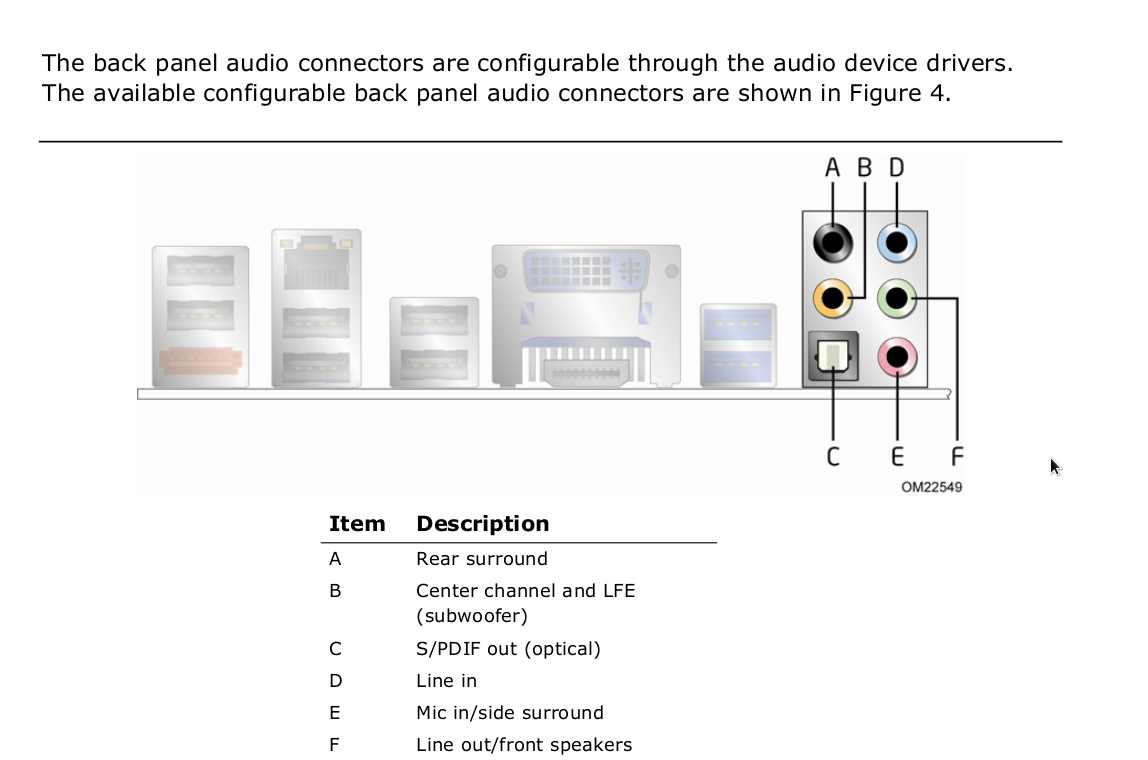
TIA+
Last edited by praka123 (2012-06-22 19:48:00)
Offline
#2 2012-06-23 21:49:01
- praka123
- Member
- From: Kerala,India
- Registered: 2008-03-04
- Posts: 188
- Website
Re: 2.1 speaker surround on pulseaudio. help
is it possible to downmix 8-channel o/p to 2.1 surround system?
Offline
#3 2012-06-23 22:28:13
- lssjbrolli
- Member
- Registered: 2007-12-16
- Posts: 26
Re: 2.1 speaker surround on pulseaudio. help
maybe you could use "speaker-test -c 8" to see which channels have sound on your setup, i get sound on:
 0 - Front Left
 4 - Center
 1 - Front Right
Offline
#4 2012-06-25 18:41:26
- praka123
- Member
- From: Kerala,India
- Registered: 2008-03-04
- Posts: 188
- Website
Re: 2.1 speaker surround on pulseaudio. help
maybe you could use "speaker-test -c 8" to see which channels have sound on your setup, i get sound on:
 0 - Front Left
 4 - Center
 1 - Front Right
I tried. I get proper sound on below options only. there is sound in low volume with other options(side rear etc).
0 - Front Left
4 - Center
1 - Front Right
So, What should I enter in /pulse/daemon.conf?
Thanks
Offline