You are not logged in.
- Topics: Active | Unanswered
#1 2013-08-08 12:15:04
- replabrobin
- Member
- Registered: 2010-05-06
- Posts: 240
[SOLVED] conky behaves differently after upgrade to xf86-video-intel
After latest upgrade to xf86-video-intel my conky setup seems to behave differently on my intel machines; can anyone tell me what's going on
before 2.21.13-1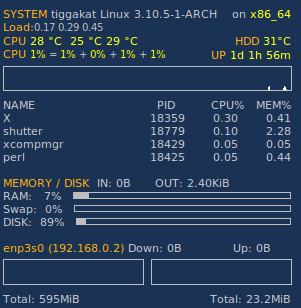
after 2.21.14-1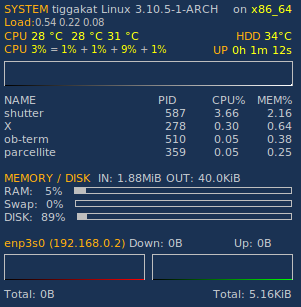
Last edited by replabrobin (2013-08-11 09:24:47)
Offline
#2 2013-08-08 12:33:45
- graysky
- Wiki Maintainer

- From: :wq
- Registered: 2008-12-01
- Posts: 10,734
- Website
Re: [SOLVED] conky behaves differently after upgrade to xf86-video-intel
What's the difference? Look the same to me.
Offline
#3 2013-08-08 12:42:19
- karol
- Archivist
- Registered: 2009-05-06
- Posts: 25,440
Re: [SOLVED] conky behaves differently after upgrade to xf86-video-intel
I see a red line and a green line instead of white ones near the bottom of these screenshots, I think they're part of the ethernet metering.
Offline
#4 2013-08-08 12:44:54
- replabrobin
- Member
- Registered: 2010-05-06
- Posts: 240
Re: [SOLVED] conky behaves differently after upgrade to xf86-video-intel
Sorry, should have let the charts go forward a bit more obviously. In the before case the chart colour doesn't obscure the border. In the after case the chart colour seems to obscure the border ie the rectangular grey borders are obscured by the chart plot colour (dark green/red/white). Some kind of rendering difference. Since I assume that conky just plots things in the same way I wouldn't expect any change at all.
Offline
#5 2013-08-08 21:58:05
- replabrobin
- Member
- Registered: 2010-05-06
- Posts: 240
Re: [SOLVED] conky behaves differently after upgrade to xf86-video-intel
Seems rhis is due to sna becoming a default for the intel video. If I follow the suggestion from
https://bugs.archlinux.org/task/36439
ie to add a config /etc/X11/xorg.conf.d/20-intel.conf containing
Section "Device"
Identifier "Intel Graphics"
Driver "intel"
Option "AccelMethod" "uxa"
EndSection
then conky renders the same way as before.
Offline
#6 2013-08-10 19:55:47
- kralyk
- Member
- Registered: 2009-04-27
- Posts: 73
Re: [SOLVED] conky behaves differently after upgrade to xf86-video-intel
Thanks replabrobin that worked for me.
Offline
#7 2013-08-10 20:02:05
- karol
- Archivist
- Registered: 2009-05-06
- Posts: 25,440
Re: [SOLVED] conky behaves differently after upgrade to xf86-video-intel
I think this thread can be marked solved, but probably there should be a bug report opened somewhere upstream.
Offline
#8 2013-08-11 09:28:19
- replabrobin
- Member
- Registered: 2010-05-06
- Posts: 240
Re: [SOLVED] conky behaves differently after upgrade to xf86-video-intel
Karol, I marked as solved, but I'm not sure this is a bug with conky or with the change to sna. I notice that the latest xf86-video-intel-2.21.14-2 gives a warning about the change to SNA and how to fix if problems occur. Perhaps that's suffficient.
Offline
#9 2013-08-11 14:25:24
- karol
- Archivist
- Registered: 2009-05-06
- Posts: 25,440
Re: [SOLVED] conky behaves differently after upgrade to xf86-video-intel
I'm not sure this is a bug with conky or with the change to sna.
That's why I wrote 'somewhere upstream' ;P
I'd start with https://bugs.freedesktop.org/enter_bug.cgi?product=xorg and blame it (i.e. pick from the 'Component' list) on Driver/Intel. The worst thing that can happen is they close the bug report.
I notice that the latest xf86-video-intel-2.21.14-2 gives a warning about the change to SNA and how to fix if problems occur. Perhaps that's suffficient.
Gusar has a point: https://bbs.archlinux.org/viewtopic.php … 5#p1310215 - this is not a fix, just a workaround.
Last edited by karol (2013-08-11 14:25:46)
Offline
#10 2013-08-12 08:21:19
- Strike0
- Member

- From: Germany
- Registered: 2011-09-05
- Posts: 1,491
Re: [SOLVED] conky behaves differently after upgrade to xf86-video-intel
I did not have the problem with xf86-video-intel-2.21.14-1 and sna enabled, but after xf86-video-intel-2.21.14-2 (with the default SNA) rolled in over the weekend this SNB behaved even more odd. The system was unresponsive and even the soundcard (intel chipset C200) got totally lost in controls, also over a reboot.
Downgrading to -1 resolved it immediately. I still have to try UXA with -2.
Anyone experienced such too?
edit: yes it appears to be normal with uxa in this case with -2 at first sight, sound is back as well.
Last edited by Strike0 (2013-08-12 08:33:21)
Offline
#11 2013-08-12 09:54:58
- mar04
- Member

- From: Poland
- Registered: 2010-02-08
- Posts: 117
Re: [SOLVED] conky behaves differently after upgrade to xf86-video-intel
I did not have the problem with xf86-video-intel-2.21.14-1 and sna enabled, but after xf86-video-intel-2.21.14-2 (with the default SNA) rolled in over the weekend this SNB behaved even more odd. The system was unresponsive and even the soundcard (intel chipset C200) got totally lost in controls, also over a reboot.
Downgrading to -1 resolved it immediately. I still have to try UXA with -2.Anyone experienced such too?
edit: yes it appears to be normal with uxa in this case with -2 at first sight, sound is back as well.
you realize that the only change from -1 to -2 was displaying a warning message in post_upgrade() :https://projects.archlinux.org/svntogit/packages.git/commit/trunk?h=packages/xf86-video-intel&id=0bae64607de97896482c5632a410c9b77ee6e24f ?
Offline
#12 2013-08-12 10:13:03
- Strike0
- Member
- From: Germany
- Registered: 2011-09-05
- Posts: 1,491
Re: [SOLVED] conky behaves differently after upgrade to xf86-video-intel
you realize that the only change from -1 to -2 was displaying a warning message in post_upgrade() :https://projects.archlinux.org/svntogit/packages.git/commit/trunk?h=packages/xf86-video-intel&id=0bae64607de97896482c5632a410c9b77ee6e24f ?
Sure I read and realized and it is discussed in above posts anyway, but this is the first ever time I had to switch that machine to UXA.
edit: But I do agree with you that it is odd. I re-checked when it was upgraded to -1:
[2013-08-06 23:07] [PACMAN] upgraded xf86-video-intel (2.21.13-1 -> 2.21.14-1)
[2013-08-11 00:13] [PACMAN] upgraded xf86-video-intel (2.21.14-1 -> 2.21.14-2)
[2013-08-12 01:53] [PACMAN] Running 'pacman -U xf86-video-intel-2.21.14-1-i686.pkg.tar.xz'
So it was running for nearly a week on -1 without a hitch.
Last edited by Strike0 (2013-08-12 10:31:59)
Offline