You are not logged in.
- Topics: Active | Unanswered
- Index
- » Pacman & Package Upgrade Issues
- » [solved] After a full-system upgrade (Linux 3.15.8) => Wifi undetected
Pages: 1
Topic closed
#1 2014-08-09 17:12:35
- nugetchar
- Member
- Registered: 2014-08-09
- Posts: 39
- Website
[solved] After a full-system upgrade (Linux 3.15.8) => Wifi undetected
Hi, following this post, I'm seeking help concerning a big problem with my wifi.
In fact, it has been a few months since my wifi interface isn't recognized anymore. Yesterday, after a few tests, I found it was due to the kernel version, so I tried to reinstall my first ArchLinux (Linux 3.13.5-1-ARCH) : it worked, my wifi was back. The problem was that I couldn't reinstall all my stuffs : so I did a full-system upgrade (knowing I will lose my wifi) and now I just want to fix it once and for all (I'm done dealing with it).
So now, your help would be very appreciated. Does anyone have an idead? Or need more details about my config, my laptop, or whatever?
Last edited by nugetchar (2014-08-09 20:30:44)
Offline
#2 2014-08-09 17:21:33
- ewaller
- Administrator

- From: Pasadena, CA
- Registered: 2009-07-13
- Posts: 20,701
Re: [solved] After a full-system upgrade (Linux 3.15.8) => Wifi undetected
When it is not working, post the output of uname -a and of pacman -Qi linux
Nothing is too wonderful to be true, if it be consistent with the laws of nature -- Michael Faraday
The shortest way to ruin a country is to give power to demagogues.— Dionysius of Halicarnassus
---
How to Ask Questions the Smart Way
Offline
#3 2014-08-09 17:38:44
- nugetchar
- Member
- Registered: 2014-08-09
- Posts: 39
- Website
Re: [solved] After a full-system upgrade (Linux 3.15.8) => Wifi undetected
Okay, so here is the output for uname -a :
[nugetchar@arch ~]$ uname -a
Linux arch 3.15.8-1-ARCH #1 SMP PREEMPT Fri Aug 1 08:51:42 CEST 2014 x86_64 GNU/Linux
And here is the ouput for pacman -Qi linux :
[nugetchar@arch ~]$ pacman -Qi linux
Name           : linux
Version        : 3.15.8-1
Description    : The Linux kernel and modules
Architecture   : x86_64
URL            : http://www.kernel.org/
Licenses       : GPL2
Groups         : base
Provides       : kernel26=3.15.8
Depends On     : coreutils  linux-firmware  kmod  mkinitcpio>=0.7
Optional Deps  : crda: to set the correct wireless channels of your country
Required By    : broadcom-wl  virtualbox-guest-modules  virtualbox-host-modules
Optional For   : None
Conflicts With : kernel26
Replaces       : kernel26
Installed Size : 72677.00 KiB
Packager       : Tobias Powalowski <tpowa@archlinux.org>
Build Date     : Fri 01 Aug 2014 02:55:32 AM EDT
Install Date   : Sat 09 Aug 2014 06:30:21 PM EDT
Install Reason : Explicitly installed
Install Script : Yes
Validated By   : Signature
May I ask in what manner those outputs will be usefull (just trying to understand what I'm doing) ? 
Offline
#4 2014-08-09 17:45:05
- mcloaked
- Member

- From: Yorkshire, UK
- Registered: 2012-02-02
- Posts: 1,360
Re: [solved] After a full-system upgrade (Linux 3.15.8) => Wifi undetected
It would be useful to list some details about which wireless card you have (output of lspci). Which driver are you using for it, and which application/method are you using to get it to connect (eg NetworkManager, wicd etc). Which desktop are you using, and are you using the networking facilities of the desktop (eg if you are using kde then there is a plasma network management tool) or are you connecting in the background without using the tools of your dekstop?
Post some more complete information about this and then people might have a chance to direct you to get particular diagnostic output to try to understand what is happening with your system.
By the way updating your system to include a kernel update may mean that the kernel is not the update that is involved. Usually when updating with pacman -Syu a number of other packages are updated as well - and a number of those could be relevant to changes in network connections.
Last edited by mcloaked (2014-08-09 17:46:58)
Mike C
Offline
#5 2014-08-09 17:56:01
- ewaller
- Administrator
- From: Pasadena, CA
- Registered: 2009-07-13
- Posts: 20,701
Re: [solved] After a full-system upgrade (Linux 3.15.8) => Wifi undetected
May I ask in what manner those outputs will be usefull (just trying to understand what I'm doing) ?
A very common failure mode is for the kernel to be unable to locate the modular drivers it needs. If one builds a kernel for a specific set of hardware, you can compile them into the kernel. It is not practical to compile in every single driver into a kernel, so if one does not know the specifics about the hardware on which a kernel will run, you provide modular drivers. These modules can be grafted onto the running kernel as needed when new hardware is discovered.
Kernels look for the modules that were compiled for them in specific version dependent locations. This way, one can install multiple kernels and you may choose one at start up. The modules for the different kernels are stored in different places. What can happen is that the kernel on the boot media does not get updated (There are several mechanisms where this can happen). When pacman updates a kernel, it removes the modules for the old kernel and creates a new location for the new modules. If an old kernel somehow is invoked, it won't be able to find its modules and won't be able to use any hardware that depends on those modules.
You are fine The kernel version is a stock Arch kernel (one of the things I was checking) and the modules/kernel installed are the same one that is running.
The next possibility is that a module you may have installed is from the AUR (or you installed it by hand) and is not updated by pacman -Syu. Let's see the output of ls /lib/modules If there are older directories, there may be an old driver lurking about.
Nothing is too wonderful to be true, if it be consistent with the laws of nature -- Michael Faraday
The shortest way to ruin a country is to give power to demagogues.— Dionysius of Halicarnassus
---
How to Ask Questions the Smart Way
Offline
#6 2014-08-09 18:01:41
- nugetchar
- Member
- Registered: 2014-08-09
- Posts: 39
- Website
Re: [solved] After a full-system upgrade (Linux 3.15.8) => Wifi undetected
Okay then, here we go :
When I do a
lspciI have the following output :
[nugetchar@arch ~]$ lspci
00:00.0 Host bridge: Intel Corporation 3rd Gen Core processor DRAM Controller (rev 09)
00:01.0 PCI bridge: Intel Corporation Xeon E3-1200 v2/3rd Gen Core processor PCI Express Root Port (rev 09)
00:14.0 USB controller: Intel Corporation 7 Series/C210 Series Chipset Family USB xHCI Host Controller (rev 04)
00:16.0 Communication controller: Intel Corporation 7 Series/C210 Series Chipset Family MEI Controller #1 (rev 04)
00:19.0 Ethernet controller: Intel Corporation 82579LM Gigabit Network Connection (rev 04)
00:1a.0 USB controller: Intel Corporation 7 Series/C210 Series Chipset Family USB Enhanced Host Controller #2 (rev 04)
00:1b.0 Audio device: Intel Corporation 7 Series/C210 Series Chipset Family High Definition Audio Controller (rev 04)
00:1c.0 PCI bridge: Intel Corporation 7 Series/C210 Series Chipset Family PCI Express Root Port 1 (rev c4)
00:1c.1 PCI bridge: Intel Corporation 7 Series/C210 Series Chipset Family PCI Express Root Port 2 (rev c4)
00:1c.2 PCI bridge: Intel Corporation 7 Series/C210 Series Chipset Family PCI Express Root Port 3 (rev c4)
00:1c.3 PCI bridge: Intel Corporation 7 Series/C210 Series Chipset Family PCI Express Root Port 4 (rev c4)
00:1c.5 PCI bridge: Intel Corporation 7 Series/C210 Series Chipset Family PCI Express Root Port 6 (rev c4)
00:1d.0 USB controller: Intel Corporation 7 Series/C210 Series Chipset Family USB Enhanced Host Controller #1 (rev 04)
00:1f.0 ISA bridge: Intel Corporation QM77 Express Chipset LPC Controller (rev 04)
00:1f.2 RAID bus controller: Intel Corporation 82801 Mobile SATA Controller [RAID mode] (rev 04)
00:1f.3 SMBus: Intel Corporation 7 Series/C210 Series Chipset Family SMBus Controller (rev 04)
01:00.0 VGA compatible controller: NVIDIA Corporation GF108GLM [NVS 5200M] (rev a1)
01:00.1 Audio device: NVIDIA Corporation GF108 High Definition Audio Controller (rev a1)
03:00.0 Network controller: Broadcom Corporation BCM4313 802.11bgn Wireless Network Adapter (rev 01)
0c:00.0 SD Host controller: O2 Micro, Inc. OZ600FJ0/OZ900FJ0/OZ600FJS SD/MMC Card Reader Controller (rev 05)
So, as you can see, the Network Controller is the following :
03:00.0 Network controller: Broadcom Corporation BCM4313 802.11bgn Wireless Network Adapter (rev 01)When I do a
ip linkthis is what I obtain :
[nugetchar@arch ~]$ ip link
1: lo: <LOOPBACK,UP,LOWER_UP> mtu 65536 qdisc noqueue state UNKNOWN mode DEFAULT group default
    link/loopback 00:00:00:00:00:00 brd 00:00:00:00:00:00
2: eno1: <NO-CARRIER,BROADCAST,MULTICAST,UP> mtu 1500 qdisc pfifo_fast state DOWN mode DEFAULT group default qlen 1000
    link/ether f0:1f:af:25:3b:13 brd ff:ff:ff:ff:ff:ff
6: enp0s20u2: <BROADCAST,MULTICAST,UP,LOWER_UP> mtu 1500 qdisc pfifo_fast state UNKNOWN mode DEFAULT group default qlen 1000
    link/ether 6e:d6:2d:5c:29:bd brd ff:ff:ff:ff:ff:ff
I started reading this page but am not sure if it is relevant due to the fact it concerns the 3.8.2B version.
Finally, a
more /etc/modprobe.d/modprobe.confgives me the following output :
^C[nugetchar@arch ~]$ more /etc/modprobe.d/modprobe.conf
alias floppy off
blacklist fd0
blacklist floppy
blacklist ipv6
blacklist bcma
blacklist pcspkr
blacklist snd_pcsp
I think I need to unblacklist bcma ?
@ewaller : I just saw you reply, here is the output for ls /lib/modules
[nugetchar@arch ~]$  ls /lib/modules
3.15.8-1-ARCH  extramodules-3.13-ARCH  extramodules-3.15-ARCH
Thank you for your answers, I really appreciate it
Offline
#7 2014-08-09 18:11:54
- Trilby
- Inspector Parrot

- Registered: 2011-11-29
- Posts: 30,518
- Website
Re: [solved] After a full-system upgrade (Linux 3.15.8) => Wifi undetected
First you need to start at the top of the broadcom page on our wiki. The 4313 card is not particularly well supported and often requires the wl driver. But before we jump to that conclusion can you post the output of the following command which will provide a little more detail about the actual chipset of your wireless card (the hex numbers in square brackets):
lspci -vnn | grep -i net"UNIX is simple and coherent" - Dennis Ritchie; "GNU's Not Unix" - Richard Stallman
Offline
#8 2014-08-09 18:17:51
- nugetchar
- Member
- Registered: 2014-08-09
- Posts: 39
- Website
Re: [solved] After a full-system upgrade (Linux 3.15.8) => Wifi undetected
Okay, so here it is :
 [nugetchar@arch ~]$ lspci -vnn | grep -i net
00:19.0 Ethernet controller [0200]: Intel Corporation 82579LM Gigabit Network Connection [8086:1502] (rev 04)
03:00.0 Network controller [0280]: Broadcom Corporation BCM4313 802.11bgn Wireless Network Adapter [14e4:4727] (rev 01)
Offline
#9 2014-08-09 18:26:45
- Trilby
- Inspector Parrot
- Registered: 2011-11-29
- Posts: 30,518
- Website
Re: [solved] After a full-system upgrade (Linux 3.15.8) => Wifi undetected
Ah, you're in luck! B43 will not work with that chip, but brcmsmac will. This driver tends to be much better than wl. Wl really seems to be a last resort in my book.
And yes, the section for setting up brcmsmac says it depends on bcma. Blacklisting bcma is preventing the needed module from loading. Unblacklist bcma.
And this makes sense as failing after a recent update as brcmsmac used to conflict with bcma, so for a while users of your wireless card needed to blacklist bcma for it to work. Now brcmsmac depends on bcma.
"UNIX is simple and coherent" - Dennis Ritchie; "GNU's Not Unix" - Richard Stallman
Offline
#10 2014-08-09 18:49:33
- nugetchar
- Member
- Registered: 2014-08-09
- Posts: 39
- Website
Re: [solved] After a full-system upgrade (Linux 3.15.8) => Wifi undetected
I removed the line in the /etc/modprobe.d/modprobe.conf file concerning bcma but even after a reboot, the wifi does not work. This is what I've got : http://zupimages.net/up/14/32/fkvv.png
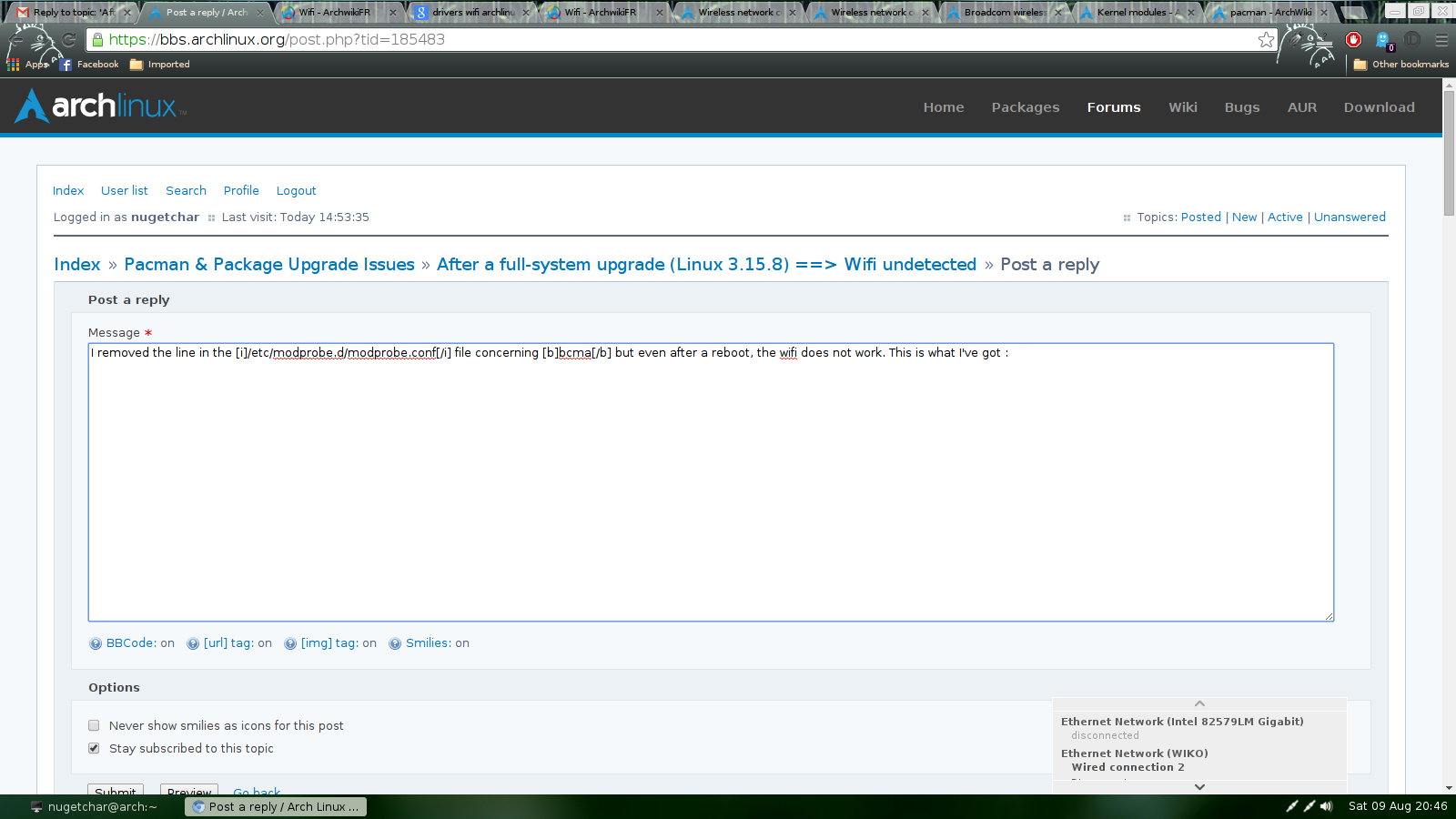
As you can see, the wi-fi isn't even showed as an available interface 
I tried
mkinitcpio but still, nothing is happening.
Last edited by Trilby (2014-08-09 20:11:43)
Offline
#11 2014-08-09 20:11:30
- Trilby
- Inspector Parrot
- Registered: 2011-11-29
- Posts: 30,518
- Website
Re: [solved] After a full-system upgrade (Linux 3.15.8) => Wifi undetected
nutgetchar, I just changed your image to a url - it was too big for the forums (see the etiquette guide on the wiki for more information).
Also, a full screen image really isn't needed and is a bit distracting from the small corner of the screen where some networking tool doesn't list the wireless connection.
Does brcmsmac show up in the lsmod output?
lsmod | grep brcmsmacIf not, can you load it?
modprobe brcmsmac"UNIX is simple and coherent" - Dennis Ritchie; "GNU's Not Unix" - Richard Stallman
Offline
#12 2014-08-09 20:29:56
- nugetchar
- Member
- Registered: 2014-08-09
- Posts: 39
- Website
Re: [solved] After a full-system upgrade (Linux 3.15.8) => Wifi undetected
Ho my... I tried to load bcma, not brcmsmac... Well it works ! It works perfectly, thank you very much ! Now this is a solved issue 
Offline
#13 2014-08-09 20:31:47
- Trilby
- Inspector Parrot
- Registered: 2011-11-29
- Posts: 30,518
- Website
Re: [solved] After a full-system upgrade (Linux 3.15.8) => Wifi undetected
Glad that worked - if you find you have to manually load brcmsmac manually after rebooting, look into modprobe to automate that. However, provided bcma is not blacklisted, brcmsmac should be loaded automatically.
"UNIX is simple and coherent" - Dennis Ritchie; "GNU's Not Unix" - Richard Stallman
Offline
#14 2014-08-09 20:41:01
- nugetchar
- Member
- Registered: 2014-08-09
- Posts: 39
- Website
Re: [solved] After a full-system upgrade (Linux 3.15.8) => Wifi undetected
It's not loaded automatically but it's not a problem, the Arch Wiki is pretty clear I think. Thanks again.
Offline
#15 2014-08-11 20:54:27
- Wilco
- Member
- Registered: 2008-11-09
- Posts: 440
Re: [solved] After a full-system upgrade (Linux 3.15.8) => Wifi undetected
Strange, I have the exact same chipset, every single number is the same, but my Wifi does not work with the brcmsmac driver. Only (partially) with the wl driver from aur.
Offline
#16 2014-08-11 20:58:23
- nugetchar
- Member
- Registered: 2014-08-09
- Posts: 39
- Website
Re: [solved] After a full-system upgrade (Linux 3.15.8) => Wifi undetected
Can you give us the outputs that I had to give previously?
Offline
#17 2014-08-12 08:15:38
- Wilco
- Member
- Registered: 2008-11-09
- Posts: 440
Re: [solved] After a full-system upgrade (Linux 3.15.8) => Wifi undetected
It's exactly the same as you posted at #8.
I think it's related to this:
http://wireless.kernel.org/en/users/Dri … rted_Chips
Offline
#18 2014-08-12 09:57:50
- nugetchar
- Member
- Registered: 2014-08-09
- Posts: 39
- Website
Re: [solved] After a full-system upgrade (Linux 3.15.8) => Wifi undetected
Okay, and have you checked if it is not blacklisted in the /lib/modprobe/broadcom-wl.conf file?
Offline
#19 2014-08-12 11:13:10
- Trilby
- Inspector Parrot
- Registered: 2011-11-29
- Posts: 30,518
- Website
Re: [solved] After a full-system upgrade (Linux 3.15.8) => Wifi undetected
Wilco, if you - as you claim - have the exact same output (which I highly doubt) than what you link to would not be a problem. Most 4313 chips are not supported by either b43 or brcmsmac, this is what I was getting at in post 7 and why I was pleasantly surprised in post 9 (based on the result in post 8): most 4313 cards require wl if they are to work at all, but 4313:4727 works very well with brcmsmac - and it is the only one in the 4313 series that I know of that will.
So if you actually have a 4313:4727 then brcmsmac should work. If you have some other 4313 you might be able to use wl, or you may need ndiswrapper with the windows driver files.
In any case, please do not hijack aa solved thread. If you want to diagnose and fix your wireless card issue, please start a thread of your own. You can certainly refer/link back to this thread if relevant.
"UNIX is simple and coherent" - Dennis Ritchie; "GNU's Not Unix" - Richard Stallman
Offline
#20 2014-08-12 17:40:15
- Wilco
- Member
- Registered: 2008-11-09
- Posts: 440
Re: [solved] After a full-system upgrade (Linux 3.15.8) => Wifi undetected
Sorry, didn't mean to hijack this thread. My card is listed as follows:
Broadcom Corporation BCM4313 802.11bgn Wireless Network Adapter [14e4:4727] (rev 01)My problem is I get constant stalling, e.g. downloading works for 30 seconds then it stalls and the card reconnects. But since it works for nugetchar I'm guessing my old Linksys router might be causing these problems.
Offline
#21 2014-08-12 17:43:10
- Trilby
- Inspector Parrot
- Registered: 2011-11-29
- Posts: 30,518
- Website
Re: [solved] After a full-system upgrade (Linux 3.15.8) => Wifi undetected
Sorry, didn't mean to hijack this thread.
Then follow my suggestion and open your own thread rather than continuing here.
The issue in this thread has been solved. Closing.
EDIT: as a hint, this is a very different problem than the one described in this thread. This thread was about the missing driver leading to a lack of an wireless interface. Your problem has nothing to do with the driver or the specific interface, but it is a very common problem with connectivity almost always due to having more than one networking service running at the same time.
Last edited by Trilby (2014-08-12 17:45:41)
"UNIX is simple and coherent" - Dennis Ritchie; "GNU's Not Unix" - Richard Stallman
Offline
Pages: 1
Topic closed