You are not logged in.
- Topics: Active | Unanswered
#1 2014-09-29 01:11:59
- theflameemperor
- Member
- Registered: 2014-09-26
- Posts: 10
Gnome 3.14 strange spaces between UI elements
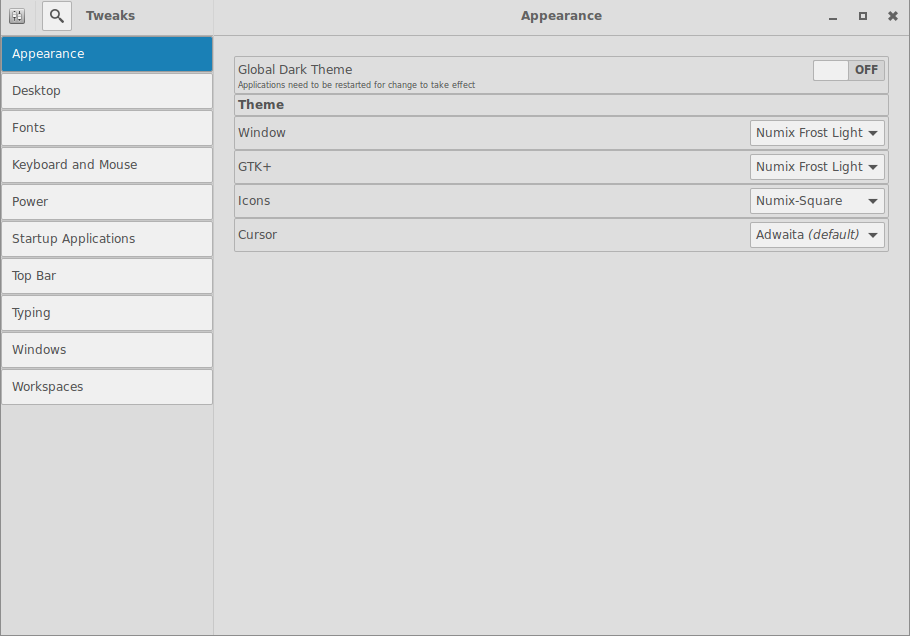
After updating gnome to 3.14 some gtk applications seem to add spaces to UI elements among other things for instance here is picture of gnome tweak
http://i1207.photobucket.com/albums/bb4 … 210503.png
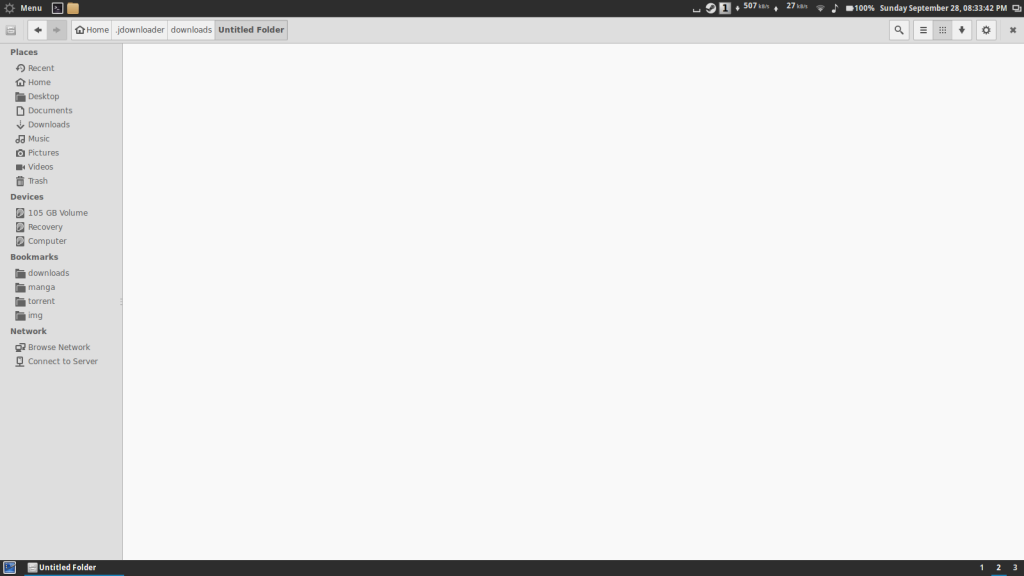
but the main reason it the changes to nautilus
3.12
http://i1207.photobucket.com/albums/bb4 … 203343.png
3.14
http://i1207.photobucket.com/albums/bb4 … 204459.png
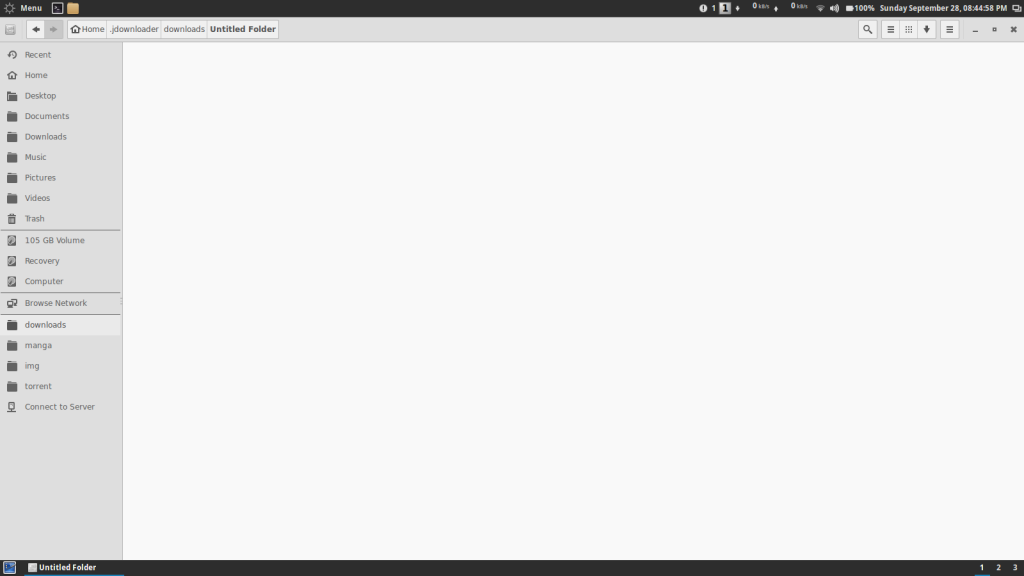
it it that im missing something because i dont remember reading any where about theses changes
moderator edit [ewaller] redacted over sized images
Last edited by ewaller (2014-09-29 01:15:50)
Offline
#2 2014-09-29 01:16:50
- ewaller
- Administrator

- From: Pasadena, CA
- Registered: 2009-07-13
- Posts: 20,611
Re: Gnome 3.14 strange spaces between UI elements
Welcome to Arch Linux. Please see our policy on the posting of large images. Thanks.
Nothing is too wonderful to be true, if it be consistent with the laws of nature -- Michael Faraday
The shortest way to ruin a country is to give power to demagogues.— Dionysius of Halicarnassus
---
How to Ask Questions the Smart Way
Offline
#3 2014-09-29 01:21:04
- theflameemperor
- Member
- Registered: 2014-09-26
- Posts: 10
Re: Gnome 3.14 strange spaces between UI elements
Welcome to Arch Linux. Please see our policy on the posting of large images. Thanks.
could you post the link i dont see it on any of the in the index nor the in Applications & Desktop Environments
edit: so i just dont use the img tags and just post the link? and out of curiosity why is the policy of the forums in the wiki and not as a sticky in the forums
Last edited by theflameemperor (2014-09-29 01:27:08)
Offline
#4 2014-09-29 01:34:16
- ewaller
- Administrator
- From: Pasadena, CA
- Registered: 2009-07-13
- Posts: 20,611
Re: Gnome 3.14 strange spaces between UI elements
https://wiki.archlinux.org/index.php/Fo … s_and_Code
Some of our members are on slow or metered connections. If one is in an image thread, you can expect to have large in line pictures. On a support forum, not everyone expects to encounter large in line downloads without warning. The best way to do it is to use url tags surrounding img tags that point to a smaller thumbnail. In that way, the reader can click through the thumbnail if they choose. It is done like this [ url=/path/to/big.jpg][ img]/path/to/thumbnail.jpg[ /img][ /url]
Nothing is too wonderful to be true, if it be consistent with the laws of nature -- Michael Faraday
The shortest way to ruin a country is to give power to demagogues.— Dionysius of Halicarnassus
---
How to Ask Questions the Smart Way
Offline
#5 2014-09-29 01:38:25
- theflameemperor
- Member
- Registered: 2014-09-26
- Posts: 10
Re: Gnome 3.14 strange spaces between UI elements
https://wiki.archlinux.org/index.php/Fo … s_and_Code
Some of our members are on slow or metered connections. If one is in an image thread, you can expect to have large in line pictures. On a support forum, not everyone expects to encounter large in line downloads without warning. The best way to do it is to use url tags surrounding img tags that point to a smaller thumbnail. In that way, the reader can click through the thumbnail if they choose. It is done like this [ url=/path/to/big.jpg][ img]/path/to/thumbnail.jpg[ /img][ /url]
i understand ill just post the link to the images from now on sorry for now reading about forum policy
Offline
#6 2014-09-29 01:48:01
- ewaller
- Administrator
- From: Pasadena, CA
- Registered: 2009-07-13
- Posts: 20,611
Re: Gnome 3.14 strange spaces between UI elements
No worries  And, as I said, welcome to Arch Linux.
Nothing is too wonderful to be true, if it be consistent with the laws of nature -- Michael Faraday
The shortest way to ruin a country is to give power to demagogues.— Dionysius of Halicarnassus
---
How to Ask Questions the Smart Way
Offline
#7 2014-09-29 01:52:02
- theflameemperor
- Member
- Registered: 2014-09-26
- Posts: 10
Re: Gnome 3.14 strange spaces between UI elements
No worries
thank you i have been using arch for some time an have rarely run into something i cant fix finding most of the time the answers in the wiki which i find very complete at least on what i have ever searched on it . i mainy created an acount on the forums because these change are anoying me a bit and now im hoping to contribute to the forums as well
Offline
#8 2014-09-29 02:21:30
- cris9288
- Member
- Registered: 2013-01-07
- Posts: 348
Re: Gnome 3.14 strange spaces between UI elements
Same problem. The ridiculous spacing is still present in Adwaita, but other themes are worse. Everything looking only happens with other themes as well - the default Adwaita theme looks fine. I figured that this was just due to some change in gtk3 that is only implemented by the Adwaita theme and that other themes would catch up at some point.
Offline
#9 2014-09-29 02:23:02
- ooo
- Member
- Registered: 2013-04-10
- Posts: 1,638
Re: Gnome 3.14 strange spaces between UI elements
your gtk theme simply haven't been updated to gtk 3.14, and there are some glitches.
if you're talking about the horizontal lines in nautilus side bar, they are actually present with adwaita theme as well, but are more subtle.
I'm quite sure they could be made invisible from the theme.
Offline
#10 2014-09-29 02:37:45
- theflameemperor
- Member
- Registered: 2014-09-26
- Posts: 10
Re: Gnome 3.14 strange spaces between UI elements
it switched the theme to adwaita and nautilus still looks weird although less notable are the changes in gnome-tweak these are the ones where this is most notable in some other gtk apps like transmission and rhythmbox there is a slight spacing to the side but nothing big.
if its just that the themes haven't been updated (updated correctly in the case of adwaita) then i guess ill have wait or maybe try to update them i have never made themes for gtk guess ill give it a shot
Last edited by theflameemperor (2014-09-29 02:38:49)
Offline
#11 2014-09-29 11:21:00
- blackout23
- Member

- Registered: 2011-11-16
- Posts: 781
Re: Gnome 3.14 strange spaces between UI elements
Can you post a screenshot of nautilus looking weird with the GTK 3.14 Adwaita theme? Looks fine to me.
Offline
#12 2014-09-29 11:41:45
- theflameemperor
- Member
- Registered: 2014-09-26
- Posts: 10
Re: Gnome 3.14 strange spaces between UI elements
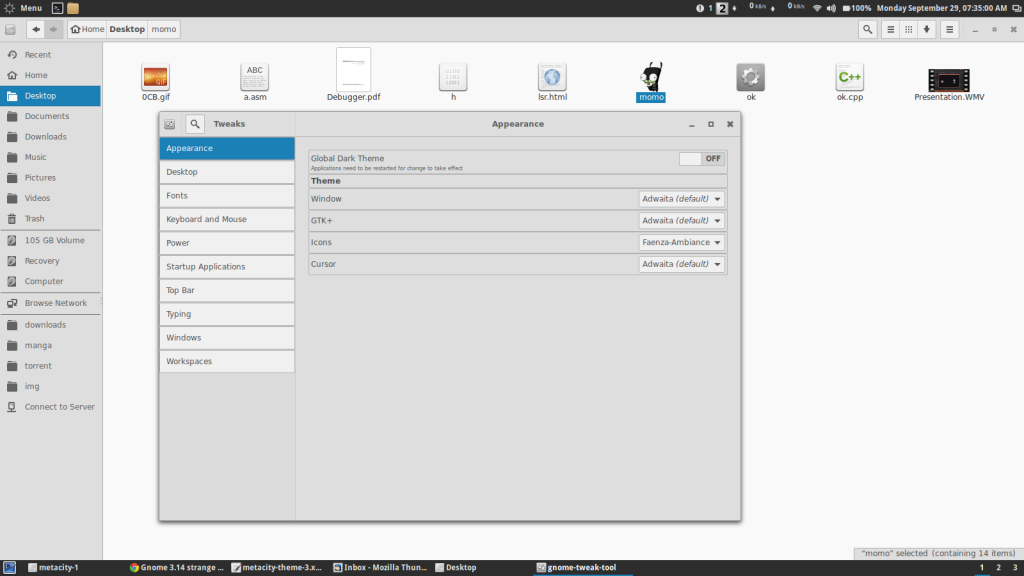
http://i1207.photobucket.com/albums/bb4 … 073500.png
still has that strange spacing checking the .css files for the other themes i dont see any mention of padding or margin that could cause the spacing just color definition an such as for the adwaita there is no .css with any info beside : /* Adwaita is the default theme of GTK+ 3, this file is not used */
Last edited by theflameemperor (2014-09-29 11:43:22)
Offline
#13 2014-09-29 12:45:26
- blackout23
- Member
- Registered: 2011-11-16
- Posts: 781
Re: Gnome 3.14 strange spaces between UI elements
Is this Gnome 3.14? Also that's not what Adwaita looks like. It's way to grey. Did you do a vanilla Gnome 3.14 install?
http://i.imgur.com/fiQp2FO.png

Why do you have metacity files open? Gnome doesn't use metacity as window manager anymore since Gnome 3.0.
Last edited by blackout23 (2014-09-29 12:46:57)
Offline
#14 2014-09-29 14:14:35
- theflameemperor
- Member
- Registered: 2014-09-26
- Posts: 10
Re: Gnome 3.14 strange spaces between UI elements
i had metacity files open just to view as i said i have never made themes and was curous to see what was inside i checked the gtk.css to see the layout ill try reinstalling adwaita
Offline
#15 2014-09-29 18:19:16
- technolog
- Member
- From: Europe / Slovenia / Grosuplje
- Registered: 2012-01-28
- Posts: 117
Re: Gnome 3.14 strange spaces between UI elements
I had the same problem while the Zukitwo theme was on. It's the theme, for sure.
Offline
#16 2014-09-29 20:16:15
- theflameemperor
- Member
- Registered: 2014-09-26
- Posts: 10
Re: Gnome 3.14 strange spaces between UI elements
ok i switch to gnome shell and here is the result
http://i1207.photobucket.com/albums/bb4 … 160306.png
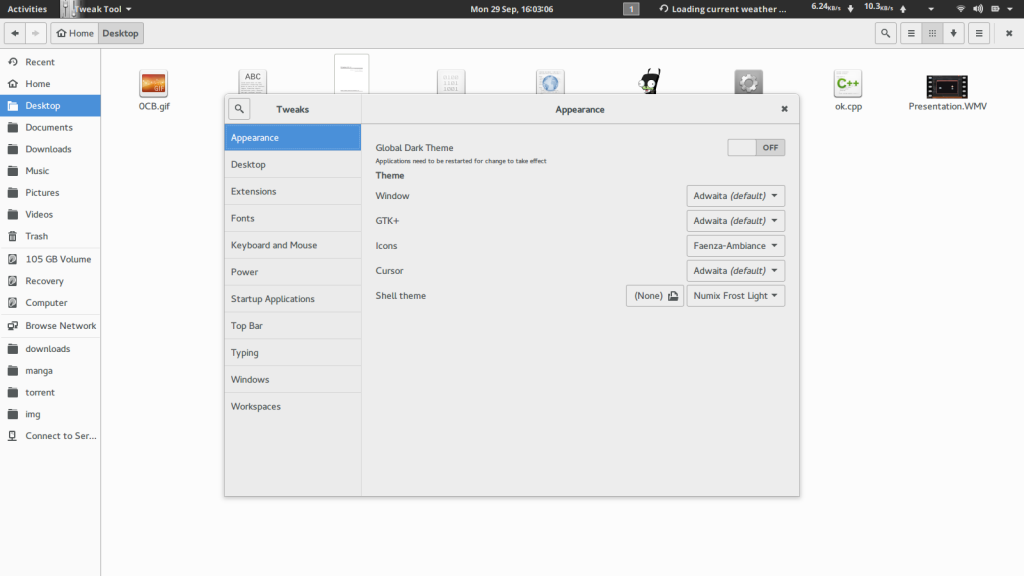
i forgot that the theme in cinnamon is set at cinnamon settings  .but yeah here is a screen shot of the change :
http://i1207.photobucket.com/albums/bb4 … 161057.png
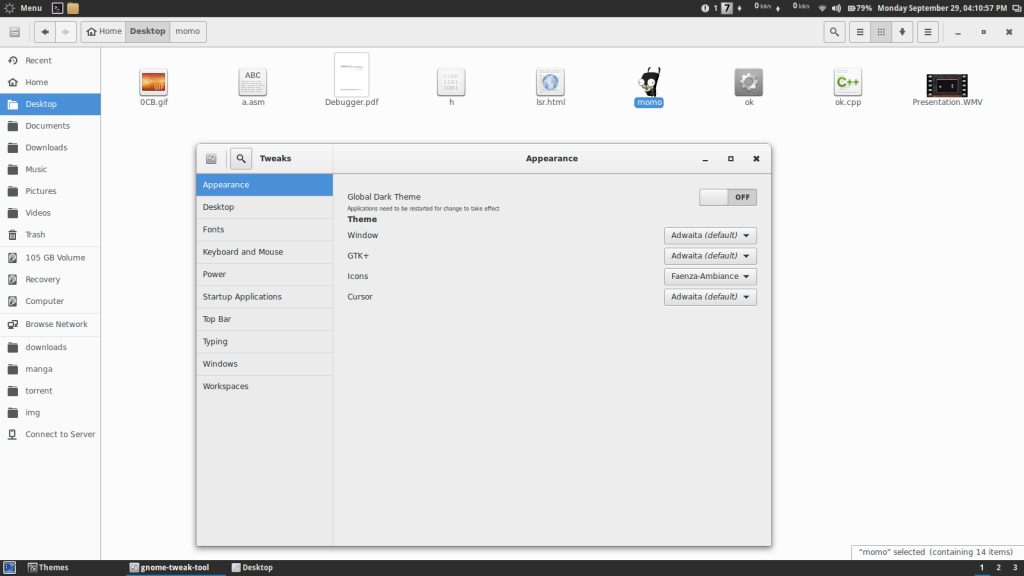
looks like it is just a theme issue
Offline
#17 2014-09-30 19:23:20
- markzz
- Member
- From: Michigan, United States
- Registered: 2013-06-08
- Posts: 89
- Website
Re: Gnome 3.14 strange spaces between UI elements
GTK+ 3.12 and 3.14 are different. You just have to wait until the theme developers update to GTK 3.14, or you can try and update it yourself.
Remember, GTK/Gnome 3.14 is in testing and things may not work properly or as expected.
Last edited by markzz (2014-09-30 19:23:47)
I don't want to work. I want to bang on the drum all day.
Offline
#18 2014-09-30 21:10:24
- theflameemperor
- Member
- Registered: 2014-09-26
- Posts: 10
Re: Gnome 3.14 strange spaces between UI elements
im aware its in testing i started the tread thinking it was a possible bug or i was missing/messed up something since i did read about changes to gedit and a few others but not nautilus (even with adwaita theme it is ugly ) which i use alot in cinnamon
Offline
#19 2014-10-01 08:27:39
- lassekongo83
- Member
- From: Sweden
- Registered: 2011-12-10
- Posts: 20
- Website
Re: Gnome 3.14 strange spaces between UI elements
As the theme developer of Zukitwo it may take a while before an update. The Adwaita theme is now located in gtk+: https://git.gnome.org/browse/gtk+/tree/ … me/Adwaita
Looking at the CSS and the new SCSS makes my head hurt. The 4 space indent just makes everything look like a complete mess.
I also have to wait until Gnome 3.14 works in virtualbox with guest additions enabled. Because that's where I do my themes. 
Offline
#20 2014-10-01 11:54:14
- theflameemperor
- Member
- Registered: 2014-09-26
- Posts: 10
Re: Gnome 3.14 strange spaces between UI elements
As the theme developer of Zukitwo it may take a while before an update. The Adwaita theme is now located in gtk+: https://git.gnome.org/browse/gtk+/tree/ … me/Adwaita
Looking at the CSS and the new SCSS makes my head hurt. The 4 space indent just makes everything look like a complete mess.
I also have to wait until Gnome 3.14 works in virtualbox with guest additions enabled. Because that's where I do my themes.
i sometimes use your theme(currently with numix) great job !!!!!
Offline