You are not logged in.
- Topics: Active | Unanswered
Pages: 1
#1 2014-11-19 01:31:26
- Linuxgeek121
- Member
- Registered: 2014-11-19
- Posts: 5
Need help in getting printer to work
Hi,
This is my first post on this forum. I have an old sharp FO-2950M laser multifunction printer that I would like to use with Linux. The problem is the printer does not have any Linux drivers available. It's not a postscript printer and uses a parallel port. I had a hard time just making cups see the printer. It detected the printer and also its name and other details once but now only a "LPT 1" option is seen when trying to add a printer through the cups web interface.
What should I do? Is cups the right way to go?
I'll be happy to give any other info you may need.
Thanks in advance.
Last edited by Linuxgeek121 (2014-11-19 01:32:22)
Offline
#2 2014-11-19 09:23:27
- TheSaint
- Member

- From: my computer
- Registered: 2007-08-19
- Posts: 1,536
Offline
#3 2014-11-19 13:22:30
- Linuxgeek121
- Member
- Registered: 2014-11-19
- Posts: 5
Re: Need help in getting printer to work
I have already read the wiki, but thanks for the link anyway.
Here's the output of lpinfo -v :
network ipps
network ipp
network https
network http
network lpd
network socket
network smb
direct parallel:/dev/lp0
If you want me to run any other commands, please ask.
UPDATE: For some reason the printer is being detected again, but the drivers for the printer are not available in cups.
I just set it up as a Generic PCL Laser Printer, and I'm still not able to print. When I try to print, the printer is reported to be busy.
Last edited by Linuxgeek121 (2014-11-19 13:49:50)
Offline
#4 2014-11-19 16:44:19
- TheSaint
- Member
- From: my computer
- Registered: 2007-08-19
- Posts: 1,536
Re: Need help in getting printer to work
You may try out gutenprint.
It seems that is using PCL5e commands.
I found a file for windows, but I'm not able to unpack it. Doing that maybe we find the proper PPD file.
do it good first, it will be faster than do it twice the saint 
Offline
#5 2014-11-20 14:06:30
- Linuxgeek121
- Member
- Registered: 2014-11-19
- Posts: 5
Re: Need help in getting printer to work
It seems I already have gutenprint installed but it does not support my printer. Also I got the windows driver too. It doesn't install with wine due to some missing dll files (Can installing the driver through wine even work?). I don't think I can get a PPD from it since the printer does not seem to support postscript. But I'll try it anyway. Do you think any other printer would have compatible drivers?
Last edited by Linuxgeek121 (2014-11-20 14:07:42)
Offline
#6 2014-11-20 22:13:24
- TheSaint
- Member
- From: my computer
- Registered: 2007-08-19
- Posts: 1,536
Re: Need help in getting printer to work
I tried to unpack by wine, me too. Maybe I should try within virtualbox.
Maybe the printer itself contains a folder with the drivers. It's some kind of tricky idea that mid class printers having a folder for that.
Other solution might be to remember the time that cups found the printer and which condition was the system, about cups version and surrounding software.
do it good first, it will be faster than do it twice the saint
Offline
#7 2014-11-22 01:48:06
- Linuxgeek121
- Member
- Registered: 2014-11-19
- Posts: 5
Re: Need help in getting printer to work
I had installed the driver in virtualbox long ago, but I found no way to actually have virtualbox connect to the parallel port. All the available guides tell about setting up a network connection to the printer, which I presume requires the printer to work with cups anyway.
To remember the condition my computer was in when the printer was detected, what kinds of information should I have to save?
And when the printer was detected, cups was not even able to print a test page, with the generic drivers. Do you know of any supported printer whose drivers may work for mine?
I already tried the drivers for Sharp AR-161, AR-M257, HP LaserJet 2 and some other sharp drivers. I also used the Generic PCL laser printer drivers (because it was the only option that had the word 'laser').
But none of them worked.
Offline
#8 2014-11-22 09:36:42
- TheSaint
- Member
- From: my computer
- Registered: 2007-08-19
- Posts: 1,536
Re: Need help in getting printer to work
I don't like it, but I say sorry there no much to do.
At Sharp's site they may have the driver for the successor fo-3150, it may be compatible.
I found the driver for windows, here (if the link works not, please go here and choose the win98 package)
Then I unzipped and extracted data.cab by unshield. The *.inf or *-sdd files report something about Xerox DocuPrint P8.
So, at this point you may either try if there's compatibility with that printer or use the printer within virtualbox(PUEL), but not guarantee that will use the parallel port as natively programmed. (probably USB-1824P adaptors like this doesn't work, even in win).
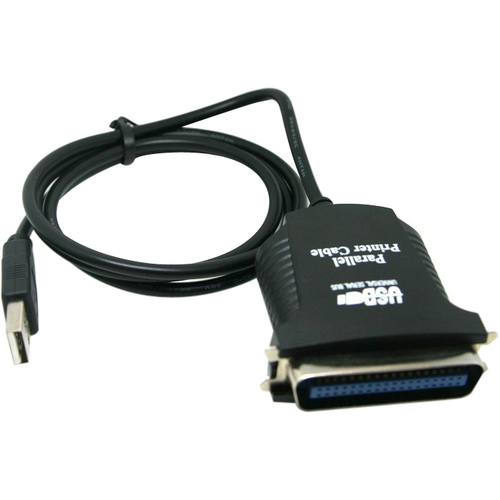
More that this I still to have to learn how to rev-engineering
do it good first, it will be faster than do it twice the saint
Offline
#9 2014-11-23 07:18:12
- Linuxgeek121
- Member
- Registered: 2014-11-19
- Posts: 5
Re: Need help in getting printer to work
Thanks for the links. I'll definitely give VirtualBox another go. I'll try unshield as well. I guess the last resort is to write my own drivers. Any pointers on that?
Open Printing reports Xerox DocuPrint P8 to be paperweight. Seems like a dead end there. But Xerox DocuPrint P8e does work but it seems to be a completely different printer with hardly any similarities.
Thanks again.
Offline
Pages: 1